


Adobe Sign vs DocuSign (2026): Pricing, Limits, QES and a Third Option
Adobe Acrobat Sign and DocuSign compared on pricing, usage limits, QES, data residency, HIPAA, mobile apps, the API, SSO and contract terms, with a hands-on test of each and Sign.Plus as the third option.


- Adobe bundles signing into Acrobat PDF plans from $14.99 per month; Acrobat Sign Solutions is quote-only.
- DocuSign Standard costs $25 per user per month paid upfront and includes 100 envelopes per user per year.
- On both, signer authentication, HIPAA support and QES lead to add-ons or a sales quote.
- Adobe suits existing Acrobat users; DocuSign suits low, predictable volume.
- Sign.Plus is our pick: unlimited requests from $19.99, QES on every plan at $5 per recipient, published prices, Swiss-based.
Adobe Acrobat Sign and DocuSign are two US-based e-signature services with different pricing models: Adobe builds signing into its Acrobat PDF plans, while DocuSign sells signing on its own and meters usage by envelopes.
Adobe Sign vs DocuSign at a Glance
| Adobe Acrobat Sign | DocuSign | Sign.Plus | |
|---|---|---|---|
| Team plan (annual) | Acrobat Pro for teams: $23.99 per license per month, billed monthly | Standard: $25 per user per month, paid upfront | Professional: $19.99 per user per month |
| Sending limit | No usage caps in Acrobat teams plans; 150 transactions per user per year on Sign Solutions | 100 envelopes per user per year | Unlimited signature requests |
| SMS delivery and ID checks | Phone and ID authentication not on Acrobat plans; per-use charge through sales | From $0.36 per SMS and $2.40 per ID attempt | Monthly SMS or WhatsApp allowance per seat; ID Check $2 |
| QES | Through third-party trust service providers, separate contract | US: Enhanced (contact sales); Europe: paid add-on | Every plan, including Free: $5 per recipient |
| Choice of storage region | Depends on the solution; plan rules not published | Enhanced only; fixed at account setup | Enterprise: 43 locations, documents can move later |
| HIPAA | Sign business or enterprise plan with a BAA, by quote | Listed on Enhanced (contact sales) | Enterprise with Advanced Security Controls and a signed BAA, at a published price |
| Company based in | San Jose, United States | San Francisco, United States | Geneva, Switzerland |
Prices are US list prices, checked on each vendor's own pricing page in November 2026.
Adobe Sign or DocuSign: Which Should You Choose?
Adobe Acrobat Sign fits teams that already pay for Acrobat to edit PDFs. Signing is included in Acrobat Standard, Pro and Studio; phone and ID authentication, the production API and HIPAA support are not, and lead to a quote.
DocuSign fits teams that send a small, predictable number of agreements. Standard includes 100 envelopes per user per year, SMS delivery and ID checks cost extra per use, and QES, storage choice and HIPAA support sit on the quote-based Enhanced plan.
What if you did not have to accept either set of limits? Sign.Plus is built only for signing: unlimited signature requests from $19.99 per user per month, qualified signatures on every plan, and storage choice on Enterprise, all at published prices, from a Swiss provider. Each section below shows where it comes out ahead.
What Are Adobe Acrobat Sign and DocuSign?
Adobe Acrobat Sign (formerly Adobe Sign and EchoSign)
Adobe Acrobat Sign is the e-signature service from Adobe Inc., headquartered in San Jose, California. It used to be called Adobe Sign, and some older accounts still run on the legacy EchoSign domain. Adobe sells it two ways: Acrobat Standard, Pro and Studio are PDF plans with public prices and signing built in, and Acrobat Sign Solutions is the standalone e-signature product, sold by quote. Almost every answer about Adobe Sign pricing, limits and features depends on which of the two you buy. See our Adobe Acrobat Sign review for the full breakdown.
DocuSign
DocuSign is a US company headquartered in San Francisco. It sells e-signature in four families: eSignature (Personal, Standard, Business Pro and Enhanced), IAM (Intelligent Agreement Management), Real Estate and Developer plans. DocuSign counts usage in envelopes: one package of documents sent to one or more recipients. See our DocuSign review for every plan.
Is Adobe Sign the Same as DocuSign?
No. They are separate products from separate companies, and they are priced differently: Adobe bundles signing with PDF editing, while DocuSign sells signing on its own with an envelope allowance.
How We Compared Adobe Sign and DocuSign
E-signature is what we work on every day. We build and run Sign.Plus, and we follow the other platforms closely. For this comparison we read Adobe's Acrobat plans page, its Acrobat Sign Solutions page, its subscription terms and help center, and DocuSign's US price lists, plan comparisons, pricing FAQs, data residency page and eSignature terms. We tested both services hands-on by sending a test agreement through each, and rechecked every price on the vendors' own pages in November 2026. Where something is marked as not published, the vendor does not state it on its own pages, which makes it a question for their sales team, not proof that it is missing.
1. Adobe Sign vs DocuSign Pricing
Adobe Acrobat Sign Pricing
Adobe publishes prices for its Acrobat plans. Acrobat Sign Solutions, the standalone product for businesses, shows only "Contact sales" and a 30-day free trial.
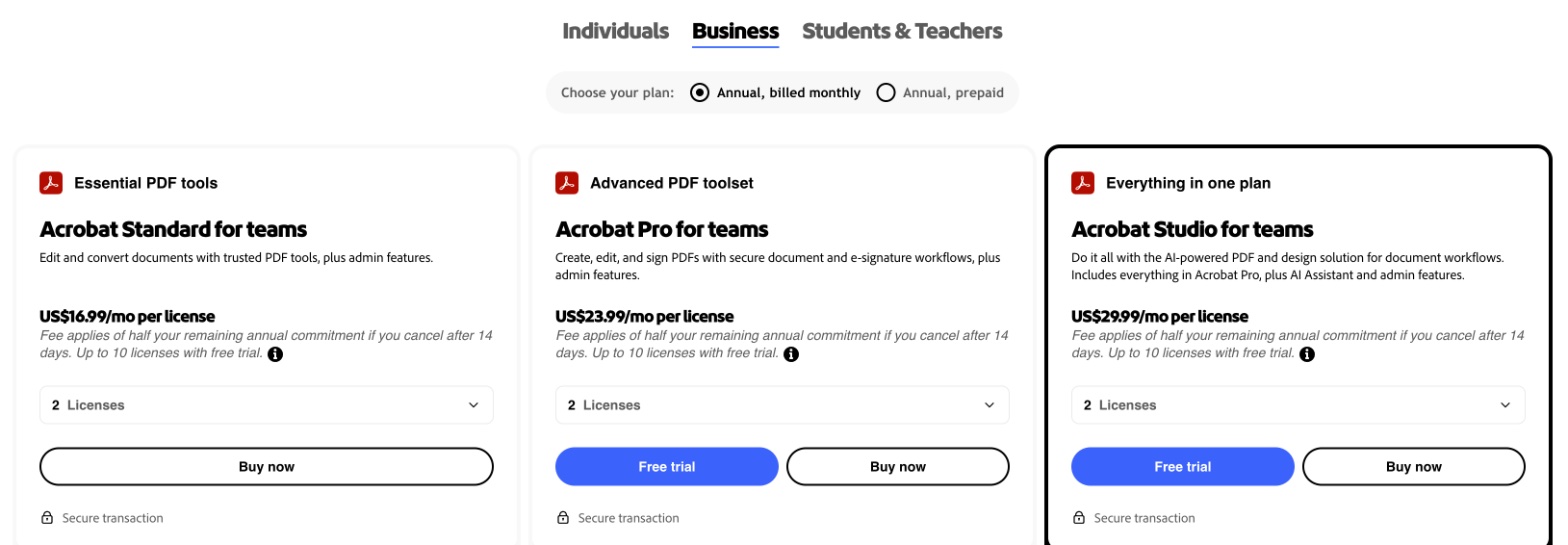
| Adobe plan | Annual, billed monthly | Annual, prepaid | Monthly |
|---|---|---|---|
| Acrobat Standard | $14.99/mo | $179.88/yr | $24.99/mo |
| Acrobat Pro | $19.99/mo | $239.88/yr | $29.99/mo |
| Acrobat Studio | $24.99/mo | $299.88/yr | $34.99/mo |
| Acrobat Standard for teams | $16.99/license/mo | $203.88/license/yr | Not offered |
| Acrobat Pro for teams | $23.99/license/mo | $287.88/license/yr | Not offered |
| Acrobat Studio for teams | $29.99/license/mo | $359.88/license/yr | Not offered |
| Acrobat Sign Solutions | Quote | Quote | Quote |
DocuSign Pricing
DocuSign's US page opens on annual billing paid monthly. Paying the year upfront is the cheapest option, and month-to-month costs the most.
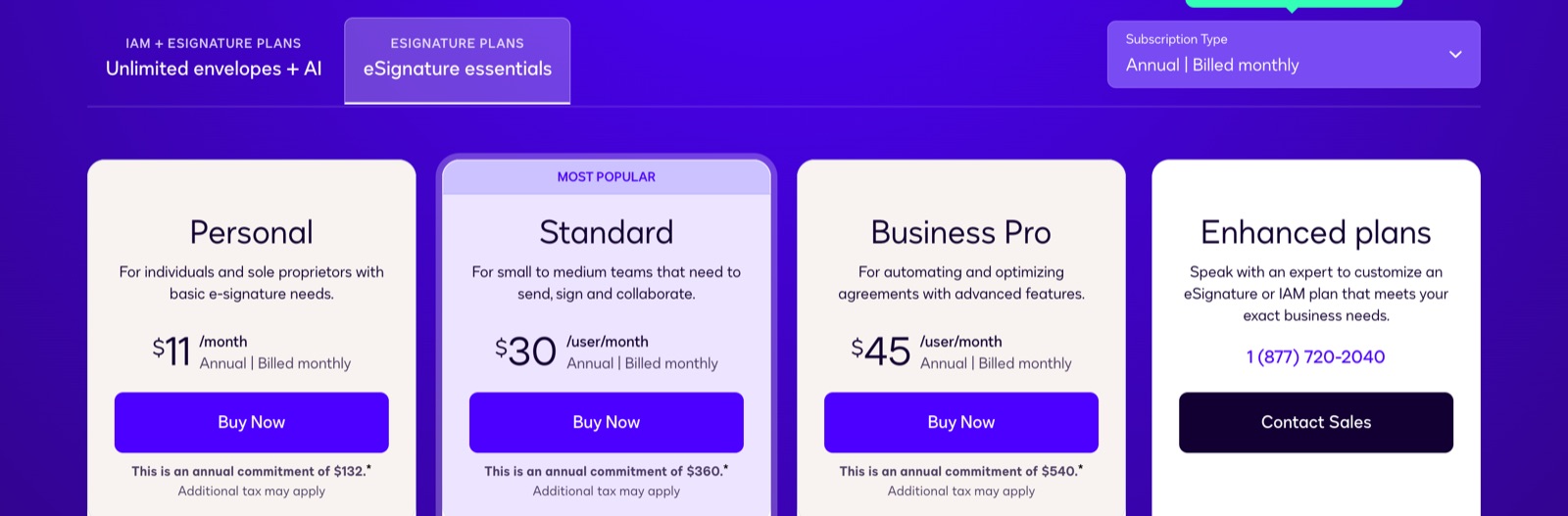
| DocuSign plan | Annual, upfront | Annual, billed monthly | Monthly | Envelopes |
|---|---|---|---|---|
| Personal (1 user) | $10/mo | $11/mo | $15/mo | 5 per month |
| Standard | $25/user/mo | $30/user/mo | $45/user/mo | 100 per user per year |
| Business Pro | $40/user/mo | $45/user/mo | $65/user/mo | 100 per user per year |
| Enhanced | Contact sales | Contact sales | Contact sales | Custom |
Sending without an envelope counter starts on DocuSign's IAM Standard plan at $45 per user per month on annual upfront billing, with a three-user minimum.
Which Is Cheaper, Adobe Sign or DocuSign?
On annual plans billed monthly, Acrobat Standard costs $14.99 per month and DocuSign Personal $11, but DocuSign Personal stops at five envelopes a month. For teams, Acrobat Pro for teams costs $23.99 per license and DocuSign Standard $30 per user; DocuSign Standard drops to $25 when the year is paid upfront. The real difference is what you get for it: Adobe includes PDF editing and lists no usage caps on its Acrobat teams plans, while DocuSign Standard includes 100 envelopes per user for the whole year. Adobe moves phone and ID authentication, production API access and HIPAA support to sales-led Sign Solutions. DocuSign publishes API prices and sells SMS delivery and ID verification as add-ons, while HIPAA support sits on the quote-based Enhanced plan.
How Adobe and DocuSign Pricing Compare With Sign.Plus
Now imagine a plan that costs less than either and never asks you to count.
| Platform | Team plan, annual billing | Sending model |
|---|---|---|
| Adobe Acrobat Sign | Acrobat Pro for teams: $23.99 per license per month, billed monthly | No usage caps in Acrobat; 150 transactions per user per year on Sign Solutions |
| DocuSign | Standard: $25 per user per month | 100 envelopes per user per year |
| Sign.Plus | Professional: $19.99 per user per month | Unlimited signature requests |
Sign.Plus Professional costs $19.99 per user per month on annual billing, less than both, and includes unlimited signature requests for up to five users, 10 templates, passcode verification and a monthly allowance of signature requests by SMS or WhatsApp. At $239.99 per seat per year, five Professional seats cost $1,199.95, against $1,439.40 a year for five Acrobat Pro for teams licenses and $1,500 for five DocuSign Standard seats paid upfront ($1,800 billed monthly), before DocuSign's envelope limit even comes into play. Business adds bulk send, custom branding and Zapier at $29.99, and Enterprise adds storage choice and SSO at $49.99, plus HIPAA support with Advanced Security Controls enabled and a signed BAA, all at published prices.
2. Usage Limits and Add-Ons
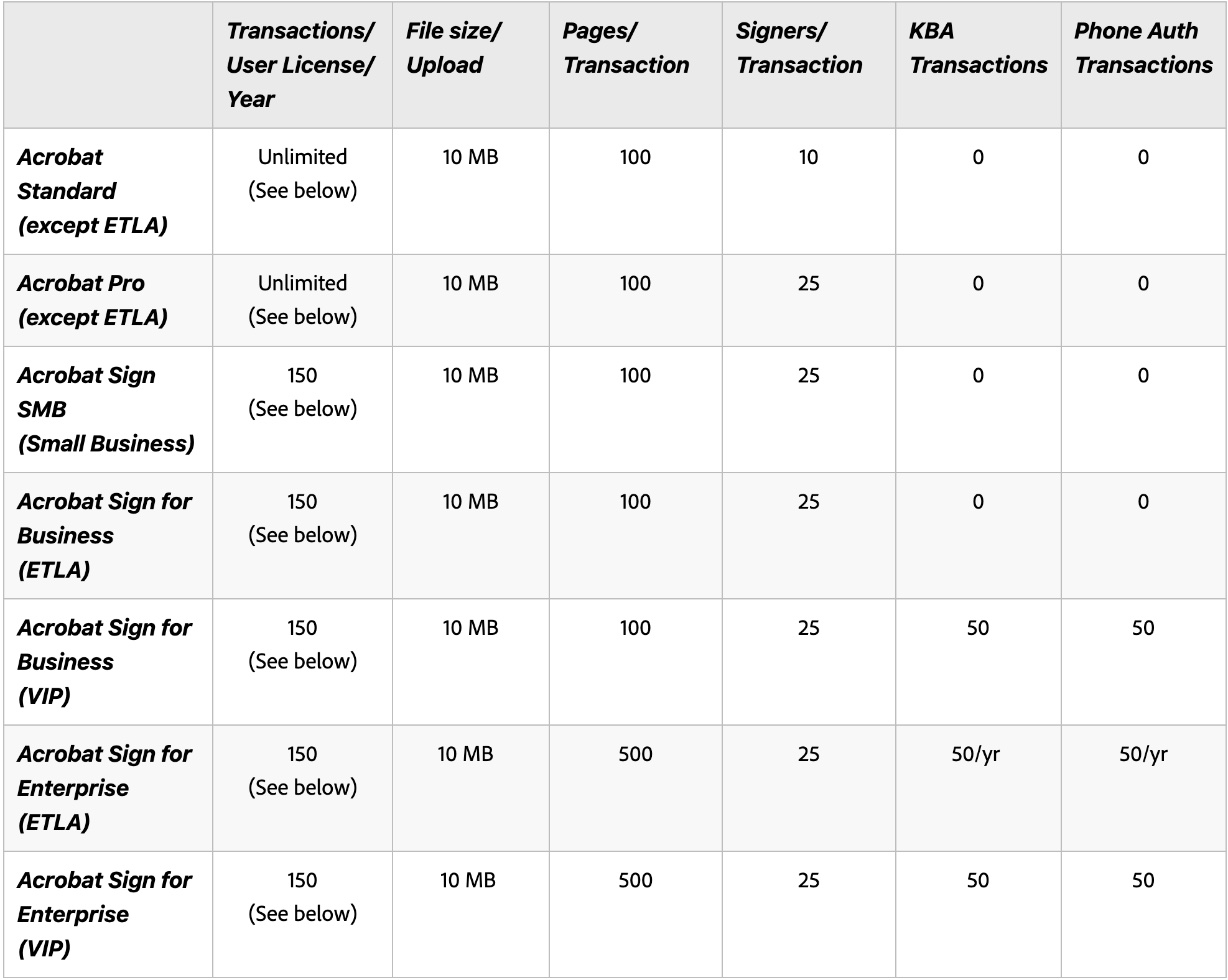
How Adobe Counts Transactions
On Acrobat plans, Adobe's help center lists unlimited transactions, with no usage caps on the teams plans. Acrobat Sign Solutions works differently: user licenses "include 150 transactions per user per year unless otherwise stipulated in your contract." Each send, each bulk-send agreement, each web form submission and every API send counts. Adobe does not publish an overage price, and phone, knowledge-based and government ID checks have a per-use charge bought through sales.
How DocuSign Counts Envelopes
DocuSign's eSignature terms say an envelope is used when it is sent, whether or not anyone signs it, and voiding it does not give it back. Bulk sends and API sends count against the same allowance, and envelopes above it are billed per envelope. SMS delivery starts at $0.36 per delivery and ID verification at $2.40 per attempt; Standard includes five of each as a one-time bonus.
How Their Usage Costs Compare With Sign.Plus
What if sending one more standard signature request never created an overage charge? On Sign.Plus team plans, it does not: Professional and higher plans include unlimited signature requests, so a hiring wave or a year-end renewal round does not push you into overage or another seat.
| Signing requests per year | DocuSign Standard (1 user, upfront) | Sign.Plus Professional (1 user) |
|---|---|---|
| 100 | $300, about $3.00 per request | $239.99, about $2.40 per request |
| 200 | $300 plus 100 overage envelopes, or a second seat | $239.99, about $1.20 per request |
| 1,000 | $300 plus 900 overage envelopes, or more seats | $239.99, about $0.24 per request |
Reaching and checking signers is priced in the open too. Each Sign.Plus seat includes signature requests by SMS or WhatsApp: 10 a month on Professional, 30 on Business and 150 on Enterprise. From Professional up, passcode verification is included, SMS code verification is available with SMS credits, and ID Check costs $2 per check. See how signing by SMS or WhatsApp works.
3. QES and eIDAS: Adobe Sign vs DocuSign
Which Signature Level Do You Need?
Not every electronic signature carries the same legal weight. In the European Union, the eIDAS regulation defines three levels:
- SES (simple electronic signature): a typed name, drawn signature or click to sign. Fine for most everyday agreements, such as sales contracts, NDAs and offer letters.
- AES (advanced electronic signature): uniquely linked to the signer, capable of identifying them, created with data the signer alone controls, and linked to the document so any later change is detectable.
- QES (qualified electronic signature): an advanced signature based on a qualified certificate and created with a qualified signature creation device, issued by a qualified trust service provider after the signer's identity is verified. Under eIDAS it has the same legal effect as a handwritten signature in every EU country.
Switzerland has its own law, ZertES, with its own qualified level. In the United States, the ESIGN Act and UETA make electronic signatures legally valid for most transactions, without separate levels.
How Adobe Acrobat Sign Handles QES
Adobe offers qualified signatures through third-party trust service providers from the EU Trusted Lists and the Adobe Approved Trust List. Its Digital Identity Gateway page says identity providers "are not included in the Acrobat Sign licensing," and each needs a commercial contract with the provider. The cost per qualified signature is not published. Accounts on Adobe's EU1 instance get eIDAS-compliant qualified timestamps by default.
How DocuSign Handles QES
On DocuSign's US price list, AES and QES appear only on Enhanced, sold through sales. Its European price lists offer QES as a paid add-on on Personal, Standard and Business Pro. Through the API, DocuSign lists QES on its Enhanced developer plan and says production use needs sales.
How Adobe and DocuSign QES Compare With Sign.Plus
If a client in Europe asks for a qualified signature tomorrow, how fast can you say yes?
| Platform | Where QES is available | Price |
|---|---|---|
| Adobe Acrobat Sign | Through third-party trust service providers, under a separate contract with the provider | Not published |
| Sign.Plus | Every plan, including Free; eIDAS and ZertES through Swisscom Trust Services | $5 per recipient, identity verification included; purchased credits do not expire |
| DocuSign | US: Enhanced (contact sales); Europe: paid add-on | Priced by sales on Enhanced |
With Sign.Plus, you can say yes on any plan, without moving to a sales-quoted tier: QES credits cost $5 per recipient and do not expire, so occasional qualified signatures do not need a separate contract. A team can send everyday contracts with a simple signature and switch to a qualified one for the agreement that needs it. Read more about eIDAS signatures and ZertES signatures.
4. Where Your Documents Live
Signed contracts often hold salaries, health details and ID numbers, so legal and IT teams ask two questions: in which country are the documents stored, and which company, under which country's law, holds them?
Adobe Data Residency
Adobe runs Document Cloud on AWS and Microsoft Azure across North America, Europe and Asia Pacific, with NA, EU, AU, JP1 and IN1 environments. Its hosting page says the location depends on the solution, services and customer settings, but does not say which plans can choose a region or whether data can move later. Adobe stores licensing and identity data in the United States even when documents sit elsewhere.
DocuSign Data Residency
DocuSign offers five regions: the US, Canada, Europe, Australia and Japan. On its US eSignature price list, data residency appears on Enhanced, and the region is set when the account is created. DocuSign's standard web terms name California law and San Francisco courts.
How Their Storage Options Compare With Sign.Plus
| Platform | Company based in | Storage choice | Can documents move later? |
|---|---|---|---|
| Adobe Acrobat Sign | San Jose, United States | North America, Europe or Asia Pacific, depending on the solution | Not published |
| DocuSign | San Francisco, United States | Five regions (Enhanced) | No, set at account creation |
| Sign.Plus | Geneva, Switzerland | Switzerland by default; 43 locations on Enterprise | Yes |
Want a provider that is not based in the US, without giving up a US region? Sign.Plus is built by Alohi, a Swiss company headquartered in Geneva. Documents are stored in Switzerland by default, under the Swiss Federal Data Protection Act (FADP), and the EU recognizes Switzerland as offering an adequate level of data protection. On Enterprise, US teams can keep documents in nine US locations, Canadian teams can choose Montreal or Toronto, and European teams can pick locations such as Frankfurt, Paris, Madrid, Milan, Warsaw, Geneva and Zurich, out of 43 worldwide. And if your needs change, documents can move later. See Alohi's data residency options and our guide to what data residency means for e-signatures.
5. HIPAA, PHIPA and Security Certifications
HIPAA is the US law that protects patient health information; a provider that handles it signs a BAA (Business Associate Agreement). PHIPA plays a similar role in Ontario, Canada. ISO/IEC 27001 is an international certification for information security management, and a SOC 2 Type 2 report is an auditor's review of how security controls worked over time.
Adobe Compliance
Adobe says HIPAA readiness "is only available through an Adobe Acrobat Sign for enterprise or business subscription plan. Not all accounts will qualify for enablement." A BAA is required. For Sign Solutions, Adobe lists SOC 2 Type 2, ISO 27001:2022 and CSA STAR Level 2. PHIPA is not published.
DocuSign Compliance
DocuSign lists SOC 2 Type 2 reports and ISO 27001 certification. A BAA is available, and on its US eSignature price list HIPAA support is listed on Enhanced, sold through sales. PHIPA is not published.
How Their Compliance Compares With Sign.Plus
| Platform | ISO 27001 | SOC 2 Type 2 | HIPAA and BAA | PHIPA |
|---|---|---|---|---|
| Adobe Acrobat Sign | Yes (Sign Solutions) | Yes (Sign Solutions) | Sign business or enterprise plan with a BAA; not all accounts qualify | Not published |
| DocuSign | Yes | Yes | BAA available; listed on Enhanced (contact sales) | Not published |
| Sign.Plus | Certified to ISO/IEC 27001:2022 by EY CertifyPoint | Report from EY | Enterprise with Advanced Security Controls and a signed BAA | Enterprise with Advanced Security Controls and a signed PHIPA Service Provider Agreement |
On certifications, all three are comparable. The difference is how healthcare support is sold: with Adobe and DocuSign it starts with a sales conversation, while Sign.Plus offers HIPAA on Enterprise at a published $49.99 per user per month on annual billing, with Advanced Security Controls enabled and a signed BAA, and supports PHIPA on Enterprise with Advanced Security Controls and a signed PHIPA Service Provider Agreement. Sign.Plus is also listed on the CSA STAR Registry and upholds the standards set by the GDPR.
6. Mobile Apps
Does Adobe Acrobat Sign Have a Mobile App?
Yes. Adobe has a dedicated Adobe Acrobat Sign app for iOS and Android to send, sign and track documents, and it requires a paid Adobe subscription. Acrobat Reader can also sign PDFs.
Does DocuSign Have a Mobile App?
Yes. DocuSign has iOS and Android apps for sending and signing documents.
How Their Mobile Access Compares With Sign.Plus
| Platform | Mobile apps | What they do |
|---|---|---|
| Adobe Acrobat Sign | iOS and Android | Send, sign and track; needs a paid Adobe subscription |
| DocuSign | iOS and Android | Send and sign |
| Sign.Plus | iOS and Android | Send and sign, plus Microsoft Word and Google Workspace add-ins |
All three cover phones. Sign.Plus also meets you where the document is written: its Microsoft Word and Google Workspace add-ins let you prepare and send a contract without leaving the editor.
7. Signing Experience: What We Saw Hands-On
To see the everyday workflow and not just the feature list, we sent a one-page test agreement through each service in November 2026.
Sending With Adobe Acrobat Sign
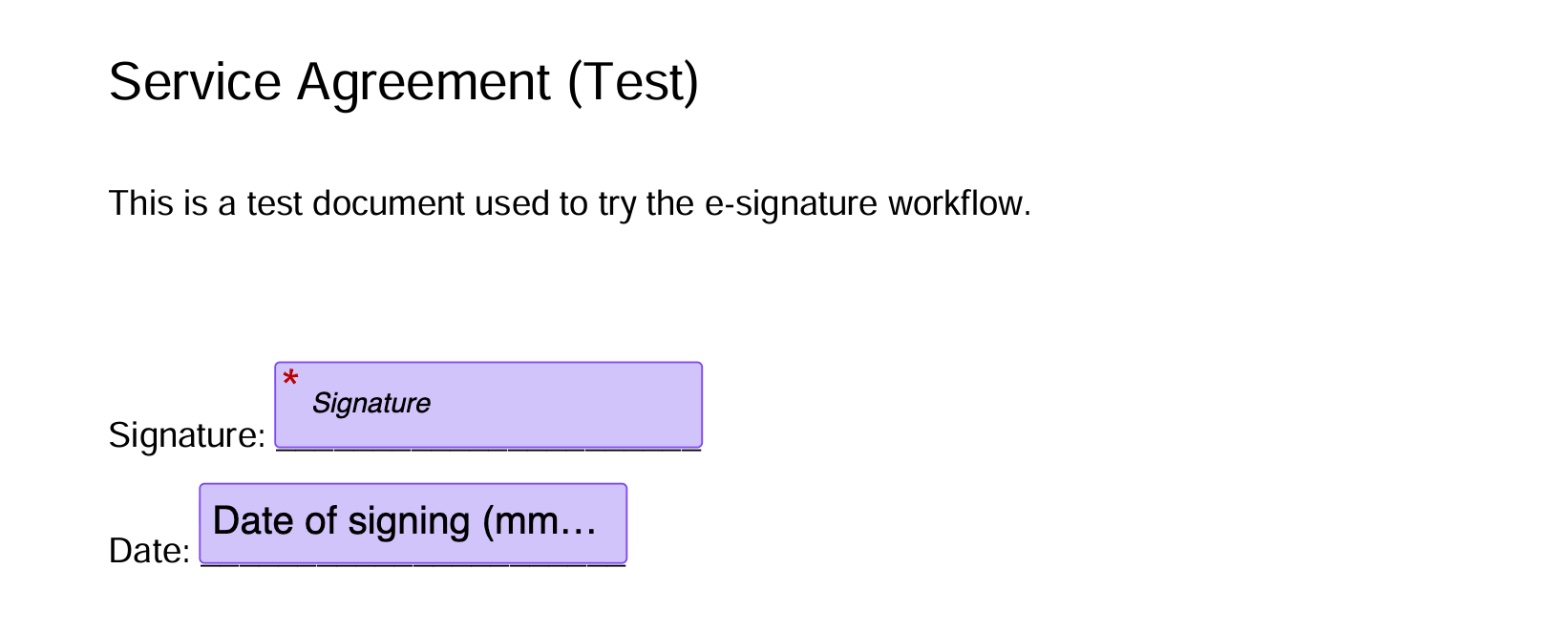
Adobe detected fields on our simple PDF: its Auto-place fields button added a signature field and a date-of-signing field with one click. The PDF can be edited in Acrobat before sending. Two limits showed up: our account was hosted on Adobe's EU instance, yet the date of signing was stamped in US format (11/04/2026), and new agreements started with no completion deadline, no reminders and no password. For signer verification we saw a password or knowledge-based authentication.
Sending With DocuSign
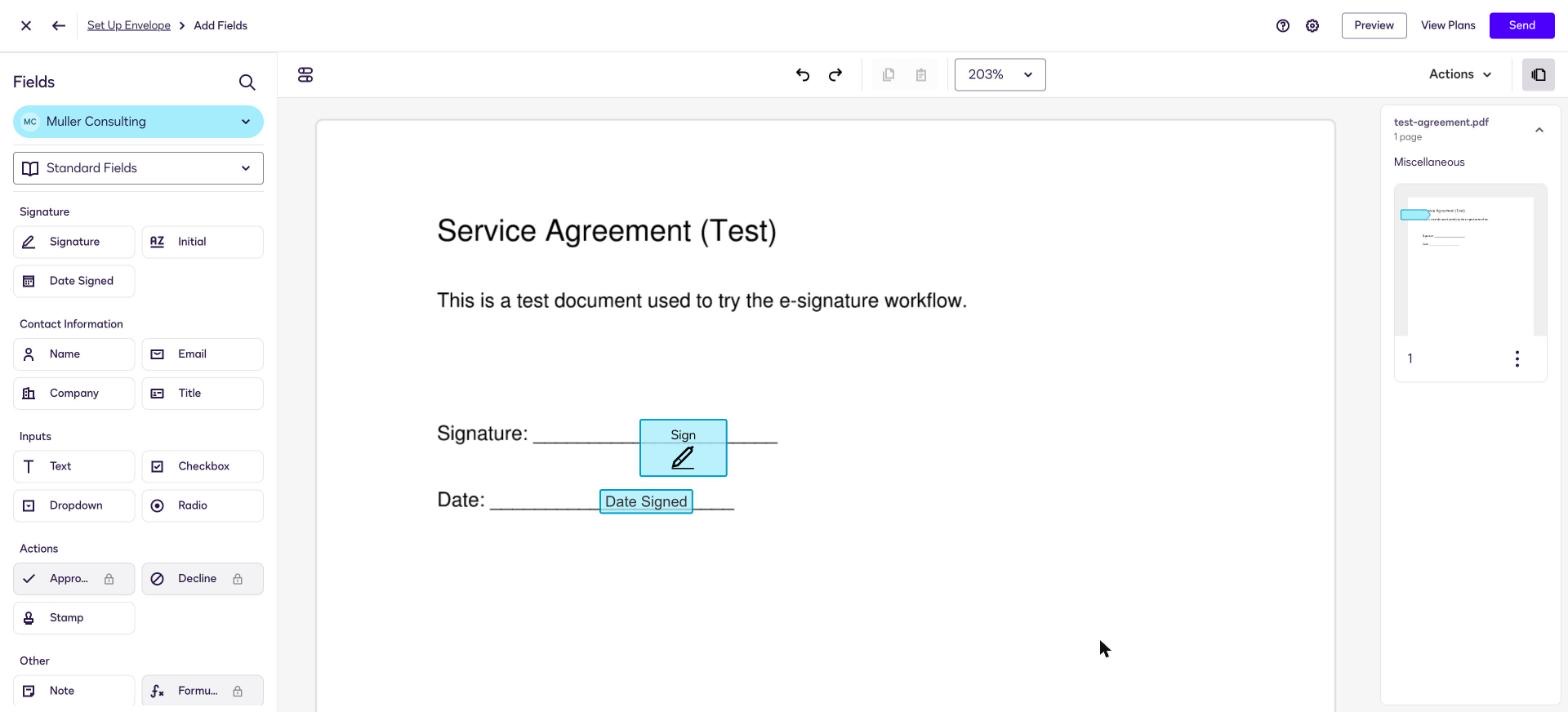
In DocuSign we placed the signature and date fields by hand. DocuSign offers AutoPlace, which places fields from anchor text you add to the document yourself, but nothing placed fields for us automatically. The envelope was named "Complete with Docusign: test-agreement.pdf" by default, our EU-hosted account showed the date as 11/3/2026, month first, and the request was set to expire four months after sending without the send flow asking.
How the Signing Experience Compares With Sign.Plus
What if field placement worked on every document, not just clean PDFs? Sign.Plus Auto-Place places the fields as soon as you upload, ready for you to review and assign, on fillable PDFs and on flat documents such as scans and received faxes, where there is no form data to read.
Within one request, you can also set a different check for each recipient: a passcode, an SMS code or an ID Check with a government ID, so a colleague signs with a simple link while an outside party confirms their identity. Requests can go out by SMS or WhatsApp from the seat allowance, and every signed document comes with a separate Certificate of Completion alongside the audit trail.
8. Adobe Sign API vs DocuSign API
Adobe Acrobat Sign API
Adobe offers a free Developer Edition for testing. For production, its API page says "API access is reserved exclusively for enterprise and developer tier accounts." No API price is published, and API sends count as normal billable transactions.
DocuSign API
DocuSign publishes developer plans priced per account: Starter at $50 per month on annual billing (from 40 envelopes a month), Intermediate at $300 and Advanced at $480 (from 100 envelopes a month), plus a free developer account for testing. QES through the API is listed on the Enhanced developer plan, sold through sales.
How Their APIs Compare With Sign.Plus
| Plan level | Adobe Acrobat Sign API | DocuSign Developer (annual) | Sign.Plus API (annual) |
|---|---|---|---|
| Testing | Free Developer Edition | Free developer account | Sandbox |
| Entry | Enterprise and developer tier only; price not published | Starter: $50/mo, from 40 envelopes a month | Essential: $75.99/mo, 50 requests a month |
| Higher volume | Through sales | Intermediate: $300/mo; Advanced: $480/mo, from 100 envelopes a month | Grow: $279.99/mo, 200 requests; Scale: $659.99/mo, 600 requests a month |
| AES and QES through the API | Not published | Listed on Enhanced (contact sales) | Supported on every API plan; QES credits cost extra |
Building signing into your own product? Sign.Plus publishes every API plan price, and at the middle tier Grow works out to about $1.40 per request, against about $3.00 per envelope for DocuSign Intermediate at its base allowance. Every Sign.Plus API plan supports SES, AES and QES, so your app can send a qualified signature without a separate contract. See Sign.Plus API plans and the API documentation.
9. Single Sign-On (SSO)
Adobe SSO
Adobe supports SAML single sign-on for Acrobat Sign accounts but does not publish which plans include it.
DocuSign SSO
DocuSign lists SSO on Enhanced among its US eSignature plans, priced by sales, and on some IAM plans.
How Their SSO Options Compare With Sign.Plus
| Platform | Where SSO is available | Price |
|---|---|---|
| DocuSign | Enhanced (US eSignature) and some IAM plans | Enhanced priced by sales |
| Adobe Acrobat Sign | Acrobat Sign accounts; plans not published | Not published |
| Sign.Plus | Enterprise | $49.99 per user per month, annual billing |
Need SSO without a quote? Sign.Plus includes it on Enterprise at a published price, on the same plan as storage choice and HIPAA support with Advanced Security Controls and a signed BAA.
10. Contract Terms and Canceling
Adobe Terms
On Acrobat annual plans billed monthly, canceling within 14 days gets a full refund; after that, Adobe charges 50% of your remaining commitment. Annual prepaid plans are not refunded after 14 days, renew every year, and Adobe may change the rate at renewal. Only the monthly plan for individuals can be canceled anytime with no fee. Sign Solutions terms are set in your order.
DocuSign Terms
DocuSign annual plans can be canceled within 30 days without penalty, an option that can be used once per customer. After that, the remaining balance of the year is owed. Envelopes are used on sending, and overage is billed per envelope.
Either way, find your renewal date before you test an alternative, so you do not pay for a year you will not use.
Check Recent Adobe Sign and DocuSign Reviews
Pricing pages and terms show what a provider promises; users show how it feels a year in. Before renewing or committing, search for:
- "Adobe Acrobat cancellation fee" and "Adobe Sign transaction limit"
- "DocuSign envelope limit" and "DocuSign auto renewal"
- "Adobe Sign price increase" and "DocuSign price increase"
- The same searches for any alternative you shortlist
Sort by most recent, and look for patterns rather than single complaints.
Other Adobe Sign and DocuSign Alternatives
| Platform | Team plan (annual) | Sending limit | Best for |
|---|---|---|---|
| Sign.Plus | $19.99 | Unlimited | QES on every plan; verification from Professional; storage choice on Enterprise |
| Dropbox Sign | $25 (2+ users) | Unlimited | Teams on Dropbox |
| Skribble | €23 or CHF 23 (Team) | Unlimited SES; 72 pooled AES/QES per user per year on annual Team | DACH teams that need SES, AES and QES |
Final Verdict: Adobe Sign vs DocuSign
Adobe Acrobat Sign suits teams that already use Acrobat for PDF editing and sign occasionally. Authentication, the production API and HIPAA support mean a Sign Solutions quote, and annual plans billed monthly carry a 50% early cancellation fee.
DocuSign suits low, predictable volume. Every envelope counts against 100 per user per year, add-ons are billed per use, and QES, storage choice and HIPAA support require a sales quote.
Sign.Plus is our pick for everyone whose main job is getting documents signed, without counting envelopes or waiting on a quote. Professional costs $19.99 per user per month with unlimited signature requests, QES is on every plan at $5 per recipient, and Enterprise adds storage choice and SSO at a published price, plus HIPAA support with Advanced Security Controls and a signed BAA, from a Swiss provider. Start a Sign.Plus free trial and send your next contract with it.
FAQs
Is Adobe Sign the same as DocuSign?

How much does Adobe Sign cost?
Is Adobe Sign cheaper than DocuSign?
Is Adobe Sign legally binding?
Do Adobe Sign and DocuSign support QES?
What is the best alternative to Adobe Sign and DocuSign?


Confédération Suisse
Confederazione Svizzera
Confederaziun Svizra
Zwitserse Bondsstaat
Innosuisse - Zwitsers innovatieagentschap


