


Electronic Signature Fields: Meaning and Types
Assigned areas in a signing document that collect signatures, initials, dates or other requested information.


- Fields collect particular signing actions or information.
- The field type and recipient assignment determine what is requested.
- Required does not mean factually verified or legally sufficient.
What are electronic signature fields?
Electronic signature fields are interactive areas placed in a document to collect information or signing actions. Their type, assigned recipient and completion rules determine what the person is asked to enter.
What can a field collect?
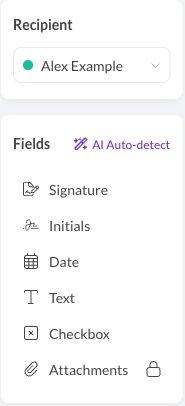
Sign.Plus’s standard field types include:
- Signature: collects the assigned signing mark or action.
- Initials: collects a shorter name mark for its stated purpose.
- Date: records a date in the document; it should not be confused with every event timestamp in the audit trail.
- Text: collects entered information, such as a name or address.
- Checkbox: records the requested selection or acknowledgment.
A text field and a signing field serve different purposes; entering a name as contact information does not automatically express an intention to sign.
Required fields concern completion of the configured process. They do not establish that an answer is accurate or that a person has signing authority. A conditional field, in general terminology, appears or changes based on another answer; its availability must be checked rather than assumed.
How do fields fit the workflow?
Match fields to the correct recipient role. A reusable signing template can preserve placement, while attachment requests collect supporting files rather than ordinary text answers. Review the completed document as well as whether its configured fields are filled.
A Common Case: Preparing an onboarding acknowledgment
An Illinois clinic’s HR team could place a signature field and acknowledgment checkbox in an administrative onboarding document. Before sending, it would check that each field belongs to the employee and that the wording explains what the acknowledgment means.
FAQs
Is a filled text field the same as a signature?

No. A field can collect information without recording an intention to sign; its purpose and surrounding instructions matter.
Do required fields verify the answers?
No. A required field controls workflow completion, not the truth of an answer or the signer’s legal authority.

Featured Articles
See All



Confédération Suisse
Confederazione Svizzera
Confederaziun Svizra
Zwitserse Bondsstaat
Innosuisse - Zwitsers innovatieagentschap


