


Signing for a Company: Authority and Signature Block Examples
See contract signature block examples and an authority checklist for signing on behalf of a company. Separate representative capacity from identity checks.


- Confirm authority for the specific contract, including the entity, transaction limits and required approvals.
- Name the company, individual and approved representative capacity clearly in the contract signature block.
- Signing roles, job titles and identity checks do not independently establish authority or remove personal liability.
- Assign fields to the correct signers and retain the completed agreement, signing evidence and authorization reference.
How do you sign a contract on behalf of a company?
When signing contracts on behalf of a company, identify the company as the contracting party, confirm your authority for that transaction, and sign in the representative capacity the agreement requires. The signature block should connect your signature to the entity and your role. A title typed below your name does not create authority.
This guide covers ordinary US business-contract preparation. Deeds, guarantees, powers of attorney and other instruments may require different wording or formalities. Have the responsible legal or contract owner approve the execution requirements before sending.
Check authority before preparing the signing request
An authorized signatory may have limits by contract type, value, entity or time period. Work through these checks for the particular agreement:
- Match the legal entity. Compare the party named in the contract with the company that will undertake the obligation. A parent, subsidiary and trading name are not interchangeable.
- Identify the source of authority. Check the relevant governing documents, delegation, resolution or other authorization. Ask the company’s designated approver to resolve uncertainty.
- Check scope and conditions. Confirm any spending ceiling, required second signature, prior approval or restriction for this transaction. An internal approval and a contract signature are different actions.
- Check execution capacity. Decide whether the person signs only for the company, also personally, or under another authority. Do not infer this from the position of a signature field.
- Retain the decision. Record the approved signer, capacity and supporting approval reference in the contract file. Keep sensitive internal authorization material in the appropriate controlled system.
State rules illustrate why checking only a title is insufficient. Texas Business Organizations Code § 101.254 addresses LLC agents and distinguishes apparently ordinary-course acts from other acts. Delaware General Corporation Law § 142 places officer titles and duties in the bylaws or a consistent board resolution. Neither provision makes every employee an unrestricted company signer. These examples do not resolve authority under every entity’s documents or applicable law.
Contract signature block examples
A contract signature block normally identifies the entity, the individual signer and the capacity in which that person signs. The layouts below are illustrative formatting examples, not execution forms prescribed by either state. The entity names are fictional.
| Signing situation | Illustrative contract signature block | Check before use |
|---|---|---|
| Manager signing for a Texas LLC | Example Property Services, LLC, a Texas limited liability company By: [Manager's signature] Name: [Manager's full name] Title: Manager Date: [Signing date] | Confirm this is the contracting entity, the manager is authorized for this agreement, and any approval conditions are met. |
| Officer signing for a Delaware corporation | Example Business Services, Inc., a Delaware corporation By: [Officer's signature] Name: [Officer's full name] Title: [Actual authorized office] Date: [Signing date] | Confirm the officer's duties and authority under the applicable corporate documents and transaction approvals. |
Use the person’s actual approved capacity. Do not choose “Manager” because someone supervises a team, or “President” because it sounds senior. The role in the block must fit the authorization and the agreement.
If one person signs for two group companies, identify each contracting entity and its capacity clearly in the approved document. If a person also gives a personal guarantee, have the contract owner specify the separate personal obligation and signing requirements. A company title or this layout does not guarantee protection from personal liability.
Apply the approved block in Sign.Plus
- Finalize the document. Put the correct entity name and approved representative wording in the contract before uploading. Resolve terms and authority checks outside the signing request.
- Add the actual signers. Enter the authorized individual’s name and email for each required signer. Use a copy recipient only for someone who needs the document without signing. Configure signing steps for the required sequence; a copy role is not an internal approval step.
- Assign fields to the right person. Place that signer’s signature, date and any required text fields within the approved block. Check every assignment, especially when the same person represents more than one entity.
- Choose appropriate recipient verification. Match available checks to your organization’s risk policy. Checking the signer’s identity and checking their authority answer different questions. Sign.Plus does not decide whether a person may bind the company.
- Review, send and retain. Recheck the final contract, recipients, fields and sequence before sending. After all required signers finish, save the completed agreement and signing evidence alongside the relevant authorization reference.
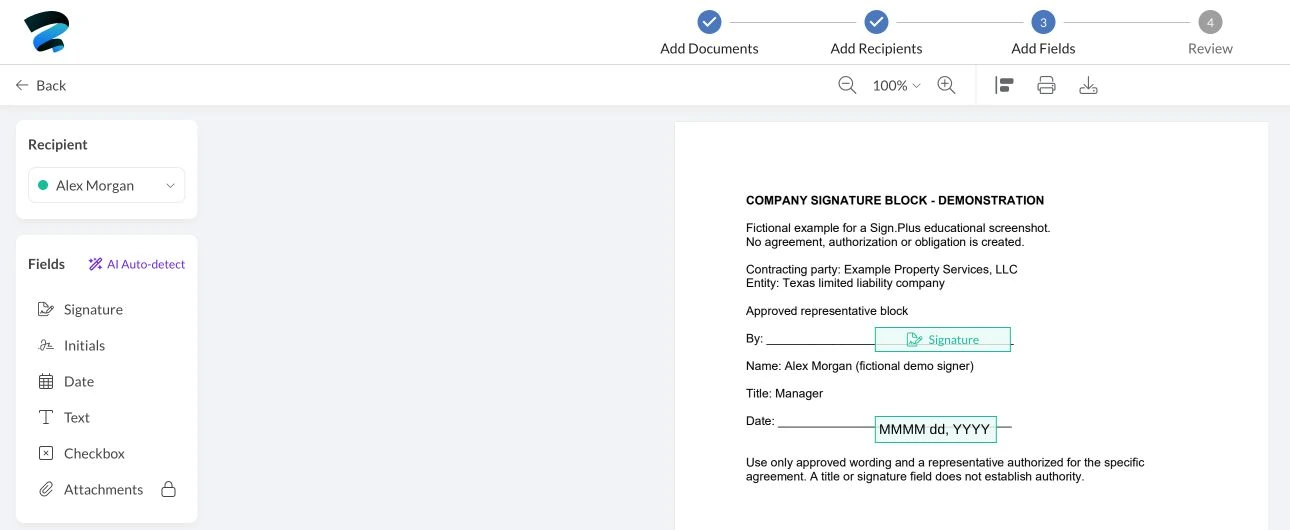
Example: a property-services company has approved its manager to sign a vendor agreement within a specified limit. Its contract owner confirms the entity and approval, prepares the manager’s block and assigns the signature field in Sign.Plus. Completing that field records the signing action; it does not expand the manager’s approved limit.
For agreements involving US, EU or Swiss parties, use the cross-border signing checklist to review the document requirements alongside each representative’s authority.
Pause when the signer or capacity changes
If the named representative is unavailable, confirm the replacement’s authority before changing the workflow. Forwarding a link, reassigning a request or using another person’s saved signature does not grant authority. If contract wording must change, obtain an approved version and follow the appropriate replacement process rather than altering a completed agreement.
Where someone acts under a power of attorney, check that instrument’s scope, effectiveness and execution formalities separately. Permission to sign the contract does not establish that the power itself can be created or executed through the same process.
FAQs
Can an employee sign a contract on behalf of a company?

An employee may sign when they have the required authority for that transaction and its execution requirements are met. Confirm the relevant delegation, limits and approvals; employment, a job title or access to a signing request alone does not establish authority.
What should a company contract signature block include?
Identify the contracting company, the individual signing, their approved representative capacity and the signing date where required. Match the agreement’s execution requirements: a clear layout describes capacity but does not create authority.
Does verifying a signer prove they can bind the company?
No: recipient verification checks access or identity according to the method used, while authority concerns whether the person may enter that agreement for the entity. Retain the relevant authorization reference with the contract record.

Related guides



Confédération Suisse
Confederazione Svizzera
Confederaziun Svizra
Konfederacja Szwajcarska
Innosuisse – Szwajcarska Agencja Innowacji


