


Independent Contractor Onboarding Checklist: What to Collect and Sign
A designer is due to start Monday, but the agreement is unsigned and Finance still needs the W-9. This independent contractor onboarding checklist shows what to prepare, sign, collect, and file before granting access.


- Complete classification review before preparing contractor documents.
- Sign the approved agreement, SOW, and NDA as applicable, while Finance handles Form W-9 and payment setup separately.
- Verify signatures, file completed records, and grant only approved access.
What should an independent contractor onboarding checklist include?
An independent contractor onboarding checklist should cover classification review, approved documents, required signatures, tax and payment routing, record filing, and access handoff. Assign an owner and timing to each item so the project owner can confirm day-one readiness without searching across inboxes.
What should you check before sending documents?
Confirm that the engagement belongs in this contractor process. For U.S. federal tax purposes, the IRS considers behavioral control, financial control, and the type of relationship based on the facts. A contractor label or signed agreement alone does not determine status. Review the IRS guidance on independent contractor, self-employed, or employee status. If the answer is uncertain, route the question to the appropriate HR, tax, or legal reviewer.
Documentation records the engagement. Classification review addresses whether this process fits. Once that review is complete, prepare the following:
- The organization-approved agreement and any required statement of work.
- The correct contractor and client representative, based on the parties and signature blocks.
- A separate NDA when required, ready before confidential materials are shared.
- A Finance request for tax and vendor payment information through approved channels.
- A list of systems or folders the contractor is specifically approved to receive.
Day-one file readiness checklist
Use this checklist for the final handoff. Each item has a clear owner and completion point.
- Classification review completed. The appropriate reviewer handles this before the contractor checklist is used.
- Agreement package approved. The project owner prepares the agreement and scope before sending, using the approved documents.
- Required signatures complete. The project owner checks the agreement, SOW, and NDA where applicable before work or access begins.
- Conditional evidence received. The designated owner requests insurance evidence only when the agreement or policy calls for it and uses the appropriate channel.
- Tax and payment setup confirmed. Finance confirms its separate process is complete. The project file does not need to contain the contractor's tax ID.
- Completed records filed. The project owner places signed documents and signing evidence in the approved folder.
- Access handoff approved. The project owner shares only the approved project resources after the required documents are complete.
What documents should you collect and sign?
Agreement and statement of work
Use the organization-approved agreement, such as an approved version based on this independent contractor agreement template. State the scope in the agreement or attach an SOW. Useful example fields include deliverables, dates, fees, revision or change handling, and acceptance. These are practical fields to consider, not universal legal requirements.
The contractor and client representative sign where the document calls for it. Check whether a separate SOW also needs signatures under the approved document. Confirm the parties as written before sending.
NDA and insurance evidence
Use a separate NDA when required, and complete it before granting access to confidential materials. Confirm that the named parties and required signers match the document. Teams that need the signing steps can review how to sign an NDA online.
Request insurance evidence only when the agreement or organizational policy calls for it. Route it through the appropriate channel and record who verifies it.
Form W-9 and vendor payment details
For the U.S. contractor covered by this checklist, the IRS advises asking the contractor to complete Form W-9 with their name and taxpayer ID and return it to the requester. Finance should collect it through a restricted, Finance-approved channel, especially because it contains a tax ID. Do not place the W-9 in a shared signing packet.
Finance also handles vendor payment details through its approved process. Payment setup is separate from document signing. Form 1099-NEC is a separate payer reporting step when applicable, not a form the contractor signs during onboarding. See the IRS overview of forms and associated taxes for independent contractors.
What is the compact prepare, sign, file, and handoff sequence?
- Prepare. The project owner assembles the approved agreement and SOW, confirms the scope and recipients, and keeps any required NDA separate. Finance starts its W-9 and vendor setup process through its own channels.
- Send for signature. In Sign.Plus, upload the approved agreement, choose Request Signature, add recipients, assign signature and date fields where appropriate, review the request, and select Send. The signature request steps show this web sender flow.
- Track and verify. Check progress in Documents using the signature request progress steps. Field assignment and progress tracking help the project owner see outstanding signing work. Confirm every required party has signed, including a separate SOW or NDA when applicable.
- File. Finalize only what each party is meant to receive. Store the signed record and signing evidence in the approved folder. Keep Finance tax records in their restricted channel. This guide to saving a signed agreement and evidence provides a useful filing reference.
- Hand off. The project owner checks the readiness list, confirms Finance has its required information, and shares only the approved project folder or system access.
How does this work for a freelance designer?
Consider a fictional small U.S. agency engaging a freelance designer for a landing-page design. After classification review, the project owner prepares an agreement and SOW describing desktop and mobile mockups, two revision rounds, the delivery date, and payment terms. A mutual NDA applies because the designer will receive unreleased brand material.

The authorized company representative and designer sign the NDA before any brand files are shared. They also sign the agreement and SOW where applicable. In parallel, Finance collects the completed W-9 through its restricted, approved channel and handles vendor payment details separately.
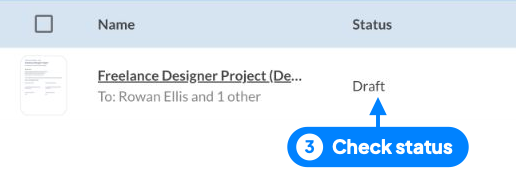
The project owner then checks the required signatures, files the completed agreement package and signing evidence, and confirms that any conditional items are resolved. Only after those checks does the owner share the specifically approved project folder. This sequence keeps signing, tax collection, filing, and access visible without mixing sensitive tax information into the project packet.
Legal notice. This guide is for general informational purposes only and does not constitute legal advice. For advice about a specific contract or signing requirement, consult a qualified legal professional.
FAQs
What documents should I collect from an independent contractor?

Collect the signed approved agreement, an SOW when used, and an NDA when required. Request insurance evidence only when the agreement or policy calls for it. Finance should separately confirm receipt of Form W-9 and vendor payment details through its approved channels.
Who signs the independent contractor agreement?
The contractor and the client representative sign where the agreement calls for it. Confirm the parties and signature blocks as written, and check whether the approved documents require separate signatures on an attached or separate SOW.
How does Form W-9 differ from Form 1099-NEC?
The contractor completes Form W-9 with their name and taxpayer ID and returns it to the requester. Form 1099-NEC is a separate payer reporting step when applicable. It is not a form the contractor signs during onboarding.
Is a separate NDA or SOW always needed?
No. Use a separate NDA when required, before confidential access. State the scope in the agreement or use an SOW for details such as deliverables, dates, fees, changes, and acceptance. Check the approved documents for any separate signature requirements.

Related guides







Confédération Suisse
Confederazione Svizzera
Confederaziun Svizra
Швейцарская Конфедерация
Innosuisse — Швейцарское агентство по содействию инновациям



