


Enterprise E-Signature Evaluation Checklist
Evaluate team signing requirements, commercial assumptions, administration, integrations and records with a practical pilot scorecard.


- Start with actual signing workflows and separate mandatory conditions from preferences.
- Ask for evidence and a named owner for legal, security, administration, integration and record requirements.
- Model realistic usage and written commercial scope rather than comparing headline prices alone.
- Run a representative pilot, record exceptions and approve the decision with unresolved conditions visible.
Start an e-signature evaluation with the work your team must complete
Evaluate an e-signature platform against documented requirements and a realistic pilot, not the length of its feature list. Start with the agreements your team sends, who must act, what evidence you need and the systems that hold the completed record. Then ask each shortlisted platform to demonstrate those tasks.
The result should be a decision record: mandatory requirements, evidence gathered, pilot results, unresolved conditions, total cost assumptions and the people approving the choice. Security, legal, operations and procurement can review the same record without each inventing a separate checklist.
Build a requirements scorecard
Separate must-have conditions from preferences before seeing a demonstration. A failed mandatory condition should trigger an explicit resolution or rejection, rather than disappear inside an average score. Assign one owner to each requirement and record how it will be verified.
| Requirement | Evidence to collect | Pilot pass condition |
|---|---|---|
| Priority workflows | Actual approved document types, signer groups, sequence and exception paths. | The team can complete its representative workflow without a workaround that violates a requirement. |
| Signature requirements | Required signature level, identity checks and any document-specific formalities. | The required method is available to the intended signers and accepted for the transaction. |
| Administration | Needed user roles, account access, ownership and offboarding process. | An administrator can operate the approved team model and remove access as required. |
| Commercial model | Relevant seats, request volumes, API usage, verification needs, support and renewal terms. | The written quote covers the realistic baseline and growth scenarios. |
| Integration | Required systems, supported interfaces, ownership and failure-handling requirements. | A representative integration handles success, failure and reconciliation correctly. |
| Records and rollout | Completed-document exports, evidence, access, retention and training ownership. | The record owner can retrieve a complete test record and the pilot team can repeat the process. |
For preferences, define the scoring scale in advance: for example, “not demonstrated,” “meets the requirement in the pilot” and “meets it with a documented operational benefit.” Apply the same criteria to every option. Do not award points simply because a feature exists when it has no use in your workflow.
Use representative documents and exception cases
Choose a small set that exposes the real decisions: an agreement with an authorized company countersigner, a repeated request built from an approved template, and an exception such as an unavailable signer or corrected terms. Use synthetic documents and designated test recipients; do not upload confidential production contracts merely to make a demonstration feel realistic.
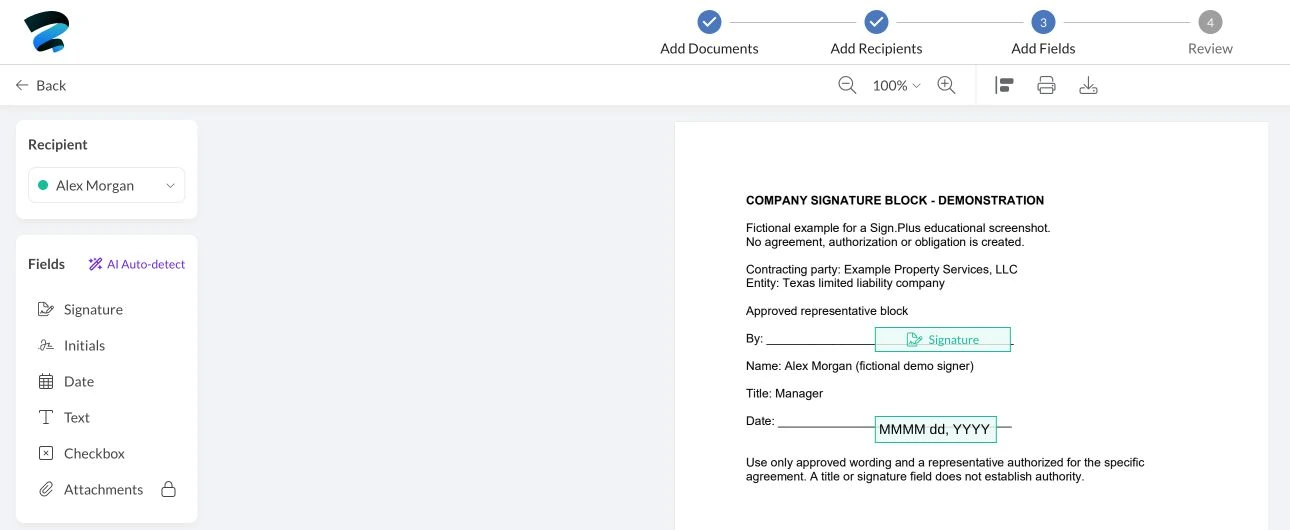
List the expected result before each test. For a two-party agreement, that may mean the right person receives each field, the required sequence is respected, completion is distinguishable from a single signature, and the record owner can export the finished agreement and evidence. The multi-signer routing guide provides a practical sequence to adapt.
Evaluate requirements beyond the demo
Legal and security owners
Ask the document owner to identify applicable signature levels and formalities, including any cross-border requirement. “Electronic signature supported” is not enough to answer every document-specific question. Use the cross-border signing checklist where relevant, and keep the provider security and privacy review as the detailed security workstream instead of repeating its questionnaire in the scorecard.
Commercial owner
Model a normal month, a peak month and expected growth. Distinguish people who send from external people who sign, and confirm how the proposed plan counts each relevant unit. Include the required administration, verification, API, support and rollout requirements in the written scope; do not assume a headline subscription price covers every part of your intended deployment.
For Sign.Plus, confirm the current web-app plan or API plan against the proposed workflow and obtain answers for any enterprise requirements. Record the quote date, billing period, inclusions and conditions. This checklist does not fix current prices or promise that a particular feature is included in every plan.
Integration owner: configure, integrate or build?
First decide whether the workflow needs an API at all. A team that can prepare and send approved documents in the web app may have different requirements from a service that must generate requests from another application.
If an integration is needed, assess authentication, supported operations, status handling, retries, duplicate prevention and responsibility for storing the final record. For a build-versus-buy decision, compare implementation and ongoing maintenance, not just initial development. The electronic-signature API overview explains the interface; the technical owner should validate the actual implementation in a test environment.
If your evaluation includes an AI-assisted signing workflow, use this practical AI-assisted signing workflow to define the preparation brief, review the stored request and separate approval to send from the recipient’s act of signing.
Run the pilot and record the decision
- Agree acceptance criteria. Give every mandatory requirement an owner, a test and a pass condition. Record any requirement that needs contractual evidence rather than an interface demonstration.
- Run the end-to-end workflow. Have representative senders, signers and record owners participate, including mobile access where it matters.
- Test exceptions. Check the approved response to corrected documents, missing signatures, staff changes and integration failures. Capture the outcome, not a sales assurance.
- Review the record. Confirm that an authorized record owner can retrieve the completed document and evidence in usable form. Check destination access and retention responsibilities.
- Approve with conditions visible. Name the decision maker, unresolved items, owners and due dates. A pilot pass should not silently waive a legal or security requirement.
Example: a US professional-services firm evaluates signing for client statements of work. Its account team tests preparation, an authorized representative tests countersigning, and operations tests the final-record handoff. The team scores those outcomes separately from a future API project, so an unneeded integration does not outweigh a failed everyday workflow.
Once a platform is selected, use an e-signature migration and cutover plan for any existing service. Selection establishes suitability; the cutover still needs its own record inventory, unfinished-request decisions and rollout checks.
FAQs
What should an e-signature software evaluation include?

Assess actual workflows, signature requirements, administration, commercial units, integrations and record ownership. Give mandatory requirements an owner, evidence and a practical pass condition.
How do I compare e-signature platform costs?
Model normal usage, peak usage and growth against the written quote, including the capabilities your workflow needs. Confirm how relevant seats, requests, verification, API access and support are included or charged.
Should I build an e-signature integration or use the web app?
Start with the workflow: use the web app when it satisfies the task, and evaluate an integration when another system must initiate or reconcile signing activity. Include authentication, exception handling and ongoing maintenance in the decision.

Related guides



Confédération Suisse
Confederazione Svizzera
Confederaziun Svizra
Swiss Confederation
Innosuisse - 瑞士创新署


