


Plan an E-Signature Migration Before Renewal
Plan an e-signature switch before renewal. Inventory signed records, evidence, templates, users and integrations, then verify an orderly cutover.


- Start before renewal and any notice deadline. Plan archive access, open requests and new workflows before authorizing cancellation.
- Preserve completed signed originals with their associated evidence, then reconcile the export and test retrieval.
- Give each unfinished request one owner and a clear finish, cancel or replace decision.
- Run an end-to-end pilot. Verify templates, roles, access, connected systems and completion records before moving new work.
Set a cutover plan before ending the old service
An e-signature migration moves more than future signature requests. Your team also needs access to completed agreements, their evidence, unfinished requests and the preparation behind recurring documents. Start with an inventory and measurable handover checks, then set the date for new work to move.
Work backward from your contract's renewal date, any notice deadline and the access terms after cancellation. These may be different dates. Leave enough time to export records, prepare the destination and run a controlled pilot before deciding the old account can close.
Inventory what must remain usable
Assign a named owner to each part of the move. Count what exists, record where it will go and define how the owner will check it. “Export complete” is less useful than “the records owner can retrieve the signed file and its associated evidence from the archive.”
| Inventory | What to capture | Handover check |
|---|---|---|
| Completed agreements | Signed originals, associated certificates or audit records, attachments and transaction references | The intended team can locate and open the correct files together |
| Open requests | Owner, current status, required signers and any deadline | Each request has an explicit finish, cancel or replace decision |
| Reusable templates | Current source file, recipient roles, field assignments and signing steps | A test request reaches the right people with the right fields |
| Users and access | Senders, administrators, archive readers and account ownership | Authorized people can do their jobs and former users have the intended access |
| Connected systems | Applications, authentication method, permission scopes, credential owner, status callbacks and file delivery | A test transaction reaches the correct final status and destination |
| Commercial and retention terms | Notice dates, post-cancellation access, export availability and document retention requirements | The account owner has a documented closure decision |
Separate records you must retain from obsolete preparation files. Keep any preservation requirement or unresolved matter with its owner; moving software does not establish a new retention period.
Export and verify completed agreements first
Keep the downloaded signed original and its associated signing evidence. Preserve the relationship between them rather than treating the PDF as an isolated attachment. An email notification, a screenshot of a signature or a printed-and-scanned copy is not a substitute for the original electronic record.
Follow a consistent signed-agreement filing process: identify the transaction, keep related files together, assign access and test retrieval. Use counts or a manifest to reconcile the export against your inventory, then open representative records from each document type and age range. Investigate missing or unreadable files before closing access.
In Sign.Plus, download the completed document and retrieve its associated Certificate of Completion. Check the export you actually receive, including whether a certificate has been merged with the document. Use the equivalent documented export process in the source service.
For covered US transactions, ESIGN's retention provisions address accurate retention, accessibility and later reproduction where a record must be kept. They do not prescribe one period for every agreement. Retain the archive according to the requirements for its records, even after the subscription changes.
Give each unfinished request one clear path
Do not move every open request by default. A nearly completed agreement may be better finished in the current workflow. An incorrect or abandoned request may need its sender's cancellation action. A replacement may need to be prepared and explained to the parties.
Keep an open-request register with the decision, owner and follow-up date. Avoid two active requests for the same agreement unless the parties have a clear reason and know which one to use. If a request is waiting because of its signing order, resolve the routing question before sending another invitation.
Account cancellation, a request's cancellation action and the legal effect of an agreement are separate questions. Confirm what happens to access and unfinished requests under the source service's actual terms. Do not assume that ending billing cancels a signature request or undoes an agreement.
Rebuild recurring workflows and test them end to end
Use approved source documents to prepare recurring requests in Sign.Plus. Map the required roles and fields, then recreate the route the business actually needs. Treat a template as a configuration to check, not just a PDF to upload. The signer and signing-step checks help verify who acts together and who waits for an earlier step.
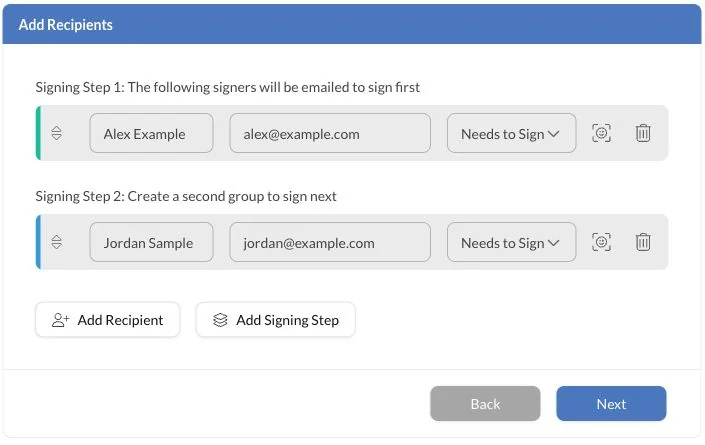
File export is not proof that a template, workflow or integration transfers. Confirm any supported import path for the specific source and destination. Otherwise, plan the preparation and testing explicitly rather than assuming an automatic conversion.
For a connected workflow, have the technical owner check destination identifiers, credentials, recipient mapping, status updates, failure handling and delivery of completed files. Update any old request links in forms, internal instructions or customer messages when the corresponding workflow moves.
An Illinois accounting firm plans to switch before its annual renewal. It pilots one engagement-letter workflow using authorized test recipients, checks the partner's countersignature and retrieves the completed file and evidence. The archive owner separately verifies prior client agreements. Passing the new signing flow does not, by itself, finish the archive handover.
Approve the move with a short acceptance checklist
Choose a cutover date for new requests and tell senders which service to use from that point. Keep ownership of older requests clear during any overlap. Before retiring the old service, confirm that:
- The archive reconciles. Required records are accounted for and retrievable; unresolved gaps keep source access open until resolved or an authorized retention decision is documented.
- Open requests are accounted for. Every unfinished agreement has an owner and a recorded next action.
- The pilot passed. The selected workflows produced the intended signatures, final status and retrievable completion records.
- Access and connections are ready. The right people and systems can operate the new workflow.
- Closure terms are understood. The account owner has checked notice, billing and continued access before authorizing cancellation.
FAQs
Which records should I preserve when switching e-signature services?

Keep completed signed originals with their associated certificates or audit records, attachments and transaction references. Reconcile the archive against your inventory and test access before ending the old service.
Should I cancel unfinished signature requests during a migration?
Decide individually whether each request should finish in the current service, be canceled or be replaced, and record its owner. Subscription cancellation and request cancellation are separate, so confirm the source service’s rules and tell recipients which request to use.
What should I test before using a rebuilt signing template?
Check the approved document, recipient roles, field assignments and signing steps, then complete a request with authorized test recipients. Verify the final status, completed document and associated evidence, including any connected application in the test.

Related guides



Confédération Suisse
Confederazione Svizzera
Confederaziun Svizra
Confederación Suiza
Innosuisse - Agencia Suiza de Innovación


