


Signeasy Review 2026: Pricing, Limits, and the Best Signeasy Alternatives
Signeasy looks simple, but Personal caps sending at five documents a month, key features are unpriced add-ons and no QES or storage choice is published. We compared every plan, the add-ons, compliance, data location, the API and refund terms, sent a test agreement, and ranked the best Signeasy alternatives for 2026.


- Signeasy Personal costs $10, Business $20 and Business Pro $30 per seat per month on annual billing ($15, $30 and $40 monthly); Personal sends only 5 documents a month.
- SMS sending, bulk send, SSO and HIPAA are add-ons priced only through sales, and API access is sold as separate annual credit plans.
- No QES offering is published, and personal data is mainly processed in the US with no storage choice published.
- Refund terms differ across the pricing page, help center and terms, and our test showed a Signeasy stamp on every signature and US-format dates.
- Sign.Plus is our winner: unlimited signature requests, 10 templates, in-person signing and public forms on Professional at $19.99, QES on every plan and up to 43 storage locations.
Signeasy is a US-based e-signature app sold in three self-serve plans and a custom "Build Your Plan" tier. This review covers its pricing and plan limits, the features sold through sales, security and compliance, data location, the API and refund terms, and compares it with eight alternatives.
Is Signeasy Worth It in 2026?
For a single user who signs more than they send, possibly. For a team that sends contracts every week, the price on the plan card rarely tells the full story.
Personal is capped at five sent documents a month, and the plans marked unlimited carry a fair-usage note. SMS delivery, bulk send, SSO and HIPAA support are add-ons with no published price, and on the regular plans, API access sits only in the custom tier. Signeasy also does not publish a qualified electronic signature (QES) offering or a choice of storage location.
Sign.Plus Professional costs $19.99 per user per month on annual billing, compared with $20 for Signeasy Business, and includes unlimited signature requests, 10 templates, in-person signing, public forms and a monthly SMS or WhatsApp allowance. QES is available on every Sign.Plus plan for $5 per recipient.
Signeasy Pros and Cons
Pros
- Signers do not pay and do not need a Signeasy account.
- Business and higher plans include in-person signing, shareable signing links and sequential signing.
- Mobile apps and offline signing are listed on every plan.
Cons
- Personal allows only five sent documents a month, and "unlimited" plans carry a fair-usage restriction.
- SMS sending, bulk send, SSO and HIPAA support are add-ons with no published price.
- On the eSignature plans, API access is listed only in the custom Build Your Plan tier.
- No QES offering is published, and personal data is mainly processed in the US with no storage choice published.
- Signeasy's refund terms differ between its pricing page, help center and terms of service.
- In our test, every signature carried a "Signed with Signeasy" stamp and the date filled in a US format.
What Is Signeasy?
Signeasy is an electronic signature service for individuals and teams, available on the web, on mobile devices and inside tools such as Google Workspace, Microsoft apps, SharePoint and HubSpot. Its sending flow supports approvers, signing order, observers, signer attachments and optional two-step verification for signers.
Signeasy sells three self-serve plans, Personal, Business and Business Pro, plus Build Your Plan for five or more seats or high volume, priced by sales. A separate API plan family is priced on its own page.
Which Signeasy Plan Is Which?
| Name you see | What it is | Published price |
|---|---|---|
| Personal | One user who mostly signs, with limited sending | $10 per seat per month, billed annually |
| Business | Team plan with unlimited sending* and shared templates | $20 per seat per month, billed annually |
| Business Pro | Adds roles, branding, signer authentication and approval workflows | $30 per seat per month, billed annually |
| Build Your Plan | Custom plan for 5+ seats or high volume, with API and compliance add-ons | Contact sales |
*Signeasy marks unlimited sending with "fair usage restrictions applicable".
How We Compared These Services
E-signature is what we work on every day. We build and run Sign.Plus for everyone from freelancers and small offices to healthcare providers, law firms and international companies, and we follow the questions teams ask when they compare tools or move away from one.
For this guide we read Signeasy's pricing page and plan comparison, API pricing, security page, privacy policy, terms of service and help center articles on plans, refunds and compliance. We rechecked every price on the vendors' own pages in November 2026. Where a capability is marked as not published or not listed, Signeasy does not state it in the public materials reviewed. That makes it a question to confirm with Signeasy, not proof that the capability is unavailable.
We also tested Signeasy hands-on. We sent a test agreement, signed it as an external recipient and voided a second request.
1. Signeasy Pricing: Every Plan
Signeasy publishes prices in US dollars per seat. On annual billing, Personal costs $10 per month ($120 a year), Business $20 ($240 a year) and Business Pro $30 ($360 a year). Monthly billing costs $15, $30 and $40 per seat, so annual billing saves up to 33%.
How to Read Signeasy's Plans
Four details determine the actual cost:
- Personal limits sending. Signing your own documents is unlimited, but you can send only five contracts a month for others to sign.
- Unlimited carries a condition. Business and Business Pro list unlimited sending with a fair-usage note, and the terms say exceeding a plan limit can move you to a higher plan.
- Key features are unpriced add-ons. SMS sending, bulk send, HIPAA and SSO are priced only through sales. The plan comparison lists them as Business Pro add-ons or Build Your Plan items, while the same page says optional upgrades can be added to any plan, so confirm which base plan qualifies.
- Templates are capped on Business. Signeasy's help center lists up to five templates on Business, with unlimited templates on Business Pro.
Signeasy Plans
| Plan | Annual, per seat per month | Sending | Highlights |
|---|---|---|---|
| Personal | $10 | 5 documents per month | Unlimited self-signing, mobile apps, Google and Microsoft apps |
| Business | $20 | Unlimited* | In-person signing, shared templates (up to 5), shareable signing links, reminders, AI assistant |
| Business Pro | $30 | Unlimited* | Roles and permissions, branding, signer authentication, approvals, SharePoint and HubSpot |
| Build Your Plan | Contact sales | Unlimited | API, SSO, HIPAA, bulk send, SMS and a dedicated success manager |
Is Signeasy Free?
Signeasy advertises a 14-day free trial and does not list a free plan on its pricing page. Its help center, however, also describes a Free plan limited to three documents. Check which option is offered when you sign up.
How Signeasy Pricing Compares
| Platform | Team plan, annual billing | Sending model |
|---|---|---|
| Sign.Plus | Professional: $19.99 per user per month | Unlimited signature requests |
| Signeasy | Business: $20 per seat per month | Unlimited, with a fair-usage restriction |
| DocuSign | Standard: $25 per user per month | 100 envelopes per user per year |
| PandaDoc | Starter: $19 per seat per month | Unlimited e-signatures in the app |
| Dropbox Sign | Standard: $25 per user per month, 2-user minimum | Unlimited on paid plans |
| SignNow | Starter: $8 per account per month | 100 invites per account per year |
2. What Signeasy Sells Through Sales
Signeasy's plan comparison lists several features that most growing teams eventually need as add-ons or Build Your Plan items, without a public price. The pricing page also says optional upgrades can be added to any plan, so the eligible base plan is worth confirming:
- SMS sending: add-on on Business Pro, included in Build Your Plan.
- Bulk send: add-on on Business Pro, included in Build Your Plan.
- SSO: add-on on Business Pro, included in Build Your Plan.
- HIPAA: add-on on Business Pro, included in Build Your Plan.
- API: Build Your Plan only, under a separate eSignature API plan.
Signer authentication, custom branding, signer attachments and the audit log start on Business Pro at $30 per seat per month.
How Signeasy's Plans Compare
Sign.Plus Professional, at $19.99 per user per month on annual billing, includes unlimited signature requests, 10 templates, in-person signing, public forms and attachment requests. Passcode verification is included, while SMS code verification is available and ID Check costs $2 per check. Each Professional seat also includes a monthly allowance of 10 requests delivered by SMS or WhatsApp.
Bulk send, custom branding and Zapier start on Sign.Plus Business at $29.99 per user per month on annual billing, and SSO is included on Enterprise at $49.99. Each of these has a published price.
3. Signeasy QES and eIDAS
Signeasy states that its signatures adhere to eIDAS and the ESIGN Act. No QES offering or qualified trust service provider was found on the pricing, security or legality pages we reviewed. For agreements that legally require a qualified signature in the EU or Switzerland, confirm with Signeasy before relying on it.
How Signeasy QES Access Compares
| Platform | Qualified signature (QES) | Cost |
|---|---|---|
| Sign.Plus | Available on every plan, including Free | $5 per recipient, identity verification included |
| Signeasy | Not published | Not published |
Sign.Plus supports QES under eIDAS and Swiss ZertES through Swisscom Trust Services on every plan, including Free. QES uses separately purchased credits, and purchased credits do not expire. Read more about eIDAS signatures and ZertES signatures.
4. Where Your Documents Live
Signeasy's privacy policy says it mainly processes personal data in the US, with transfers outside the US possible. No storage-location choice is published on the pages we reviewed.
How Signeasy Data Residency Compares
| Platform | Company based in | Storage choice | Can documents move later? |
|---|---|---|---|
| Sign.Plus | Geneva, Switzerland | Switzerland by default; 43 locations on Enterprise | Yes |
| Signeasy | United States | Not published; personal data mainly processed in the US | Not published |
| DocuSign | United States | Five regions on Enhanced | No, the region is set when the account is created |
| PandaDoc | United States | US or EU on Enterprise | No |
| Dropbox Sign | United States | US, Australia, EU, Japan, Canada or UK on Premium | Not published |
| SignNow | United States | US or EU on Professional and higher plans | Not published |
Sign.Plus stores documents in Switzerland by default. Enterprise customers can select from 43 locations across the Americas, Europe, Asia Pacific, the Middle East and Africa, and documents can move later if business or regulatory requirements change. See the Sign.Plus guide to what data residency means for e-signatures.
Sign.Plus is built by Alohi, headquartered in Geneva. Alohi is dedicated to protecting personal data and upholds the standards set by the GDPR.
5. Signeasy Security and Compliance
Signeasy's help center says it undergoes SOC 2 Type II audits and makes the report available to customers on request. ISO 27001 is not listed on its security page.
On HIPAA, Signeasy's security page and help center say it complies with HIPAA, and its pricing sells HIPAA as an add-on through sales. Its terms of service, however, list storing or transmitting sensitive personal information, which includes health data, among prohibited uses, and the public materials do not explain how the HIPAA add-on changes that. No public BAA terms or price were found. Signeasy's compliance materials do not mention PHIPA.
How Signeasy Compliance Compares
| Platform | HIPAA and BAA | PHIPA | ISO 27001 | SOC 2 Type 2 |
|---|---|---|---|---|
| Sign.Plus | Enterprise with Advanced Security Controls and a signed BAA | Enterprise with Advanced Security Controls and a signed PHIPA Service Provider Agreement | Certified to ISO/IEC 27001:2022 by EY CertifyPoint | Report from EY |
| Signeasy | Add-on through sales; price and BAA terms not published | Not published | Not listed on its security page | Type II per its help center |
| DocuSign | BAA available; listed on Enhanced | Not compared | Yes | Yes |
| Dropbox Sign | Annual Standard or Premium with a BAA and unpublished minimum contract value | Not compared | Yes | Yes |
| SignNow | Enterprise paid add-on; price not published | Not compared | Yes | Yes |
Sign.Plus has ISO/IEC 27001:2022 certification from EY CertifyPoint, a SOC 2 Type 2 report from EY and a listing on the CSA STAR Registry. HIPAA support requires Sign.Plus Enterprise with Advanced Security Controls and a signed BAA, at a published $49.99 per user per month on annual billing. For Canadian health data, Sign.Plus supports PHIPA on Enterprise with Advanced Security Controls and a signed PHIPA Service Provider Agreement.
6. Signing Experience and Where Sign.Plus Does More
Signeasy lets external recipients sign without an account, and Business adds in-person signing, shareable signing links and sequential signing. Signer authentication starts on Business Pro, and SMS delivery is a paid add-on.
What We Saw When Sending a Test Document
Setting Up the Request
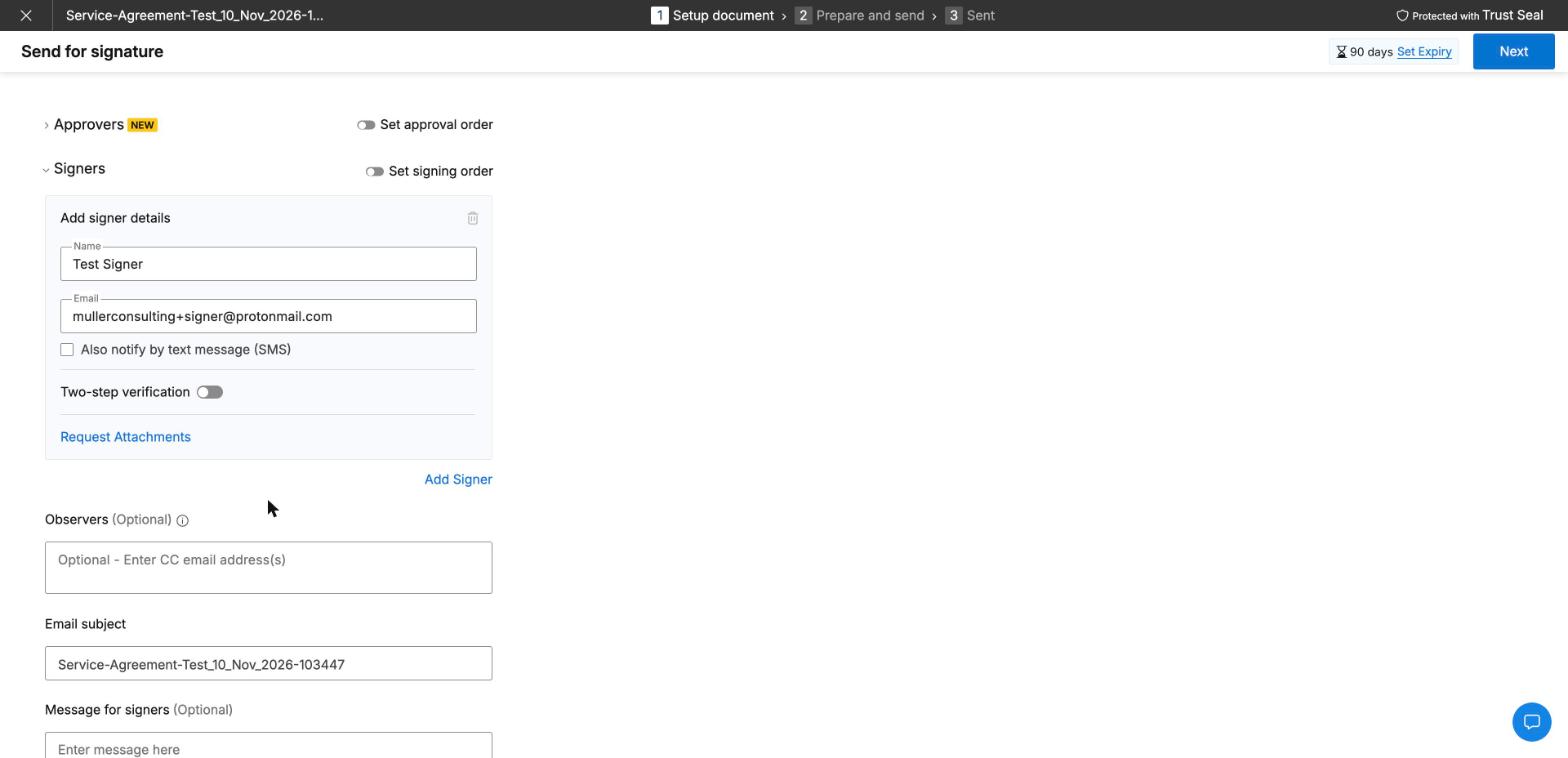
A new request starts with the upload, then signer details: name, email, an optional SMS notification, a two-step verification toggle and attachment requests. Observers, a subject and a message follow. In our test, the subject was prefilled with the file name plus a timestamp, and the request was set to expire after 90 days.
Placing Fields
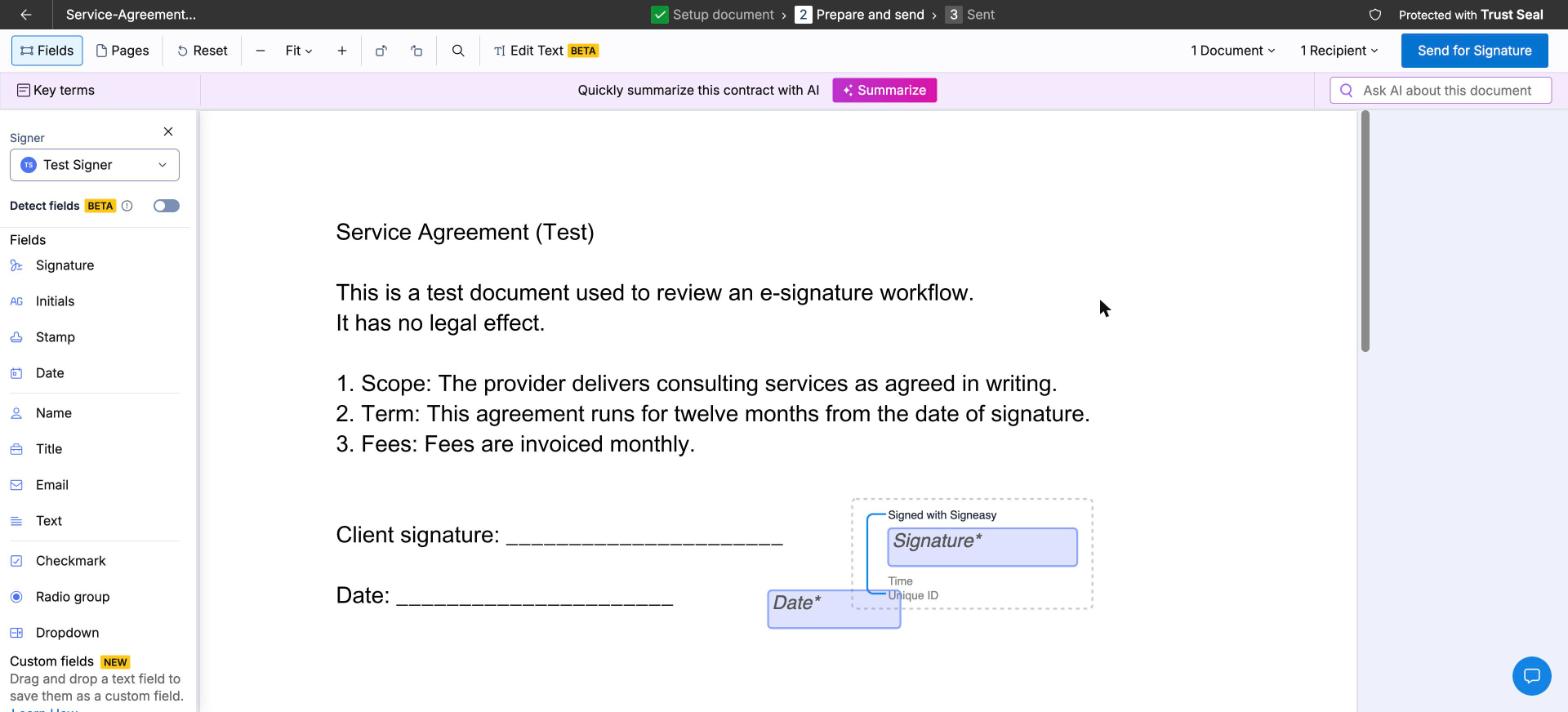
The editor offers signature, initials, stamp, date, name, title, email, text, checkbox, radio group and dropdown fields, plus a beta field detection option. Every signature field we placed was wrapped in a "Signed with Signeasy" frame with space for a time and unique ID. An AI summary bar and an "Ask AI about this document" box sit above the document.
The Signer's Side
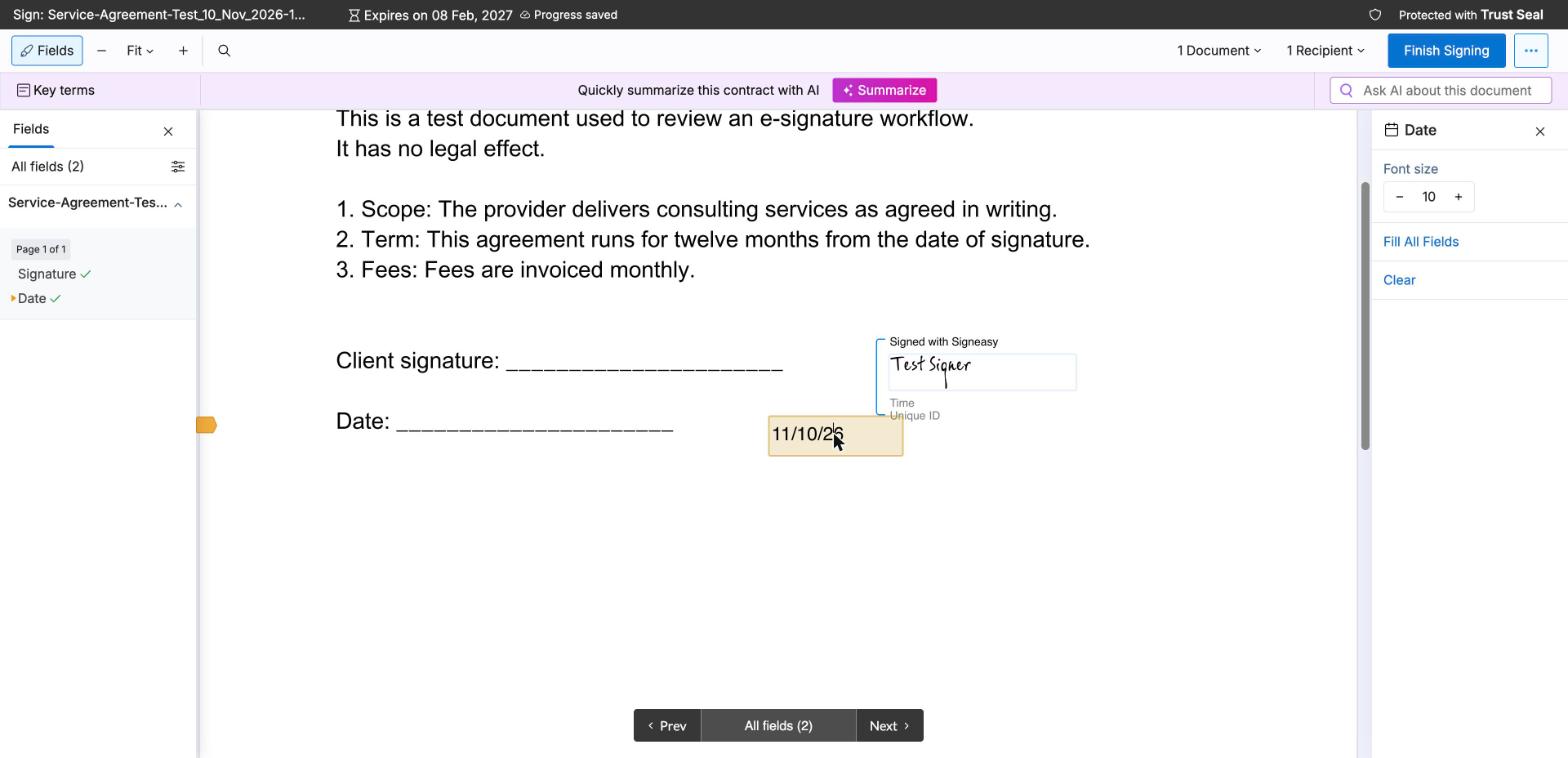
The invitation arrived with a "Review and Sign" button, and the link opened the document directly without an account. The signature window offers typed, drawn, uploaded and saved signatures in four colors. The date field filled with one click in a US format (11/10/26), which European recipients can easily misread. Consent to Signeasy's terms and privacy policy appears only when the signer clicks Finish Signing.

The signed PDF carries the "Signed with Signeasy" stamp with a UTC timestamp and a hash. One more detail stood out: in our test, the signing link would not open in a browser where a Signeasy account was logged in, and Signeasy asked the recipient to log out or use a private window. Voiding a request requires a reason of up to 255 characters, and the recipient is notified.
How the Signeasy Signing Experience Compares
Sign.Plus focuses on providing several signing workflows at one published subscription price:
- Preparing the document. Sign.Plus Auto-Place places fields automatically on uploaded documents for the sender to review and assign.
- Choosing recipient verification. A sender can assign a different check to each recipient on Professional, including a passcode, an SMS code or an ID Check with a government ID at $2 per check. Signeasy lists passcode on every plan, but broader signer authentication starts on Business Pro and SMS is an add-on. The video below shows a sales contract sent with signing order, buyer verification, reminders and an expiration date.
- Reaching signers by phone. Sign.Plus requests can be delivered by SMS or WhatsApp, with an allowance included in every paid seat. Signeasy sells SMS sending as an add-on.
- Using reusable templates. Sign.Plus Professional includes 10 templates at $19.99, while Signeasy Business lists up to five at $20.
7. Signeasy API and Developer Access
Signeasy prices its API separately. Starter is a free sandbox with 100 requests for evaluation. Intermediate costs $1,499 billed annually for 1,000 requests, and Advanced costs $2,999 billed annually for 2,000 requests. Credits are valid for the one-year subscription period, and one envelope counts as one request regardless of documents and signers. On the eSignature plans, API access is listed only in Build Your Plan.
How Signeasy's API Compares
| Plan level | Signeasy API | Sign.Plus API, annual billing |
|---|---|---|
| Testing | Starter: free sandbox, 100 requests | Sandbox for testing |
| Entry | Intermediate: $1,499 a year for 1,000 requests | Essential: $75.99 per month, 50 requests |
| Higher volume | Advanced: $2,999 a year for 2,000 requests | Grow: $279.99 per month, 200 requests; Scale: $659.99 per month, 600 requests |
| AES and QES | QES not published | Supported on every API plan; QES credits cost extra |
What this means for you. Signeasy counts API requests per year, while Sign.Plus counts them per month, so compare your expected monthly volume carefully. Every Sign.Plus API plan supports SES, AES and QES. See Sign.Plus API plans.
Single Sign-On (SSO)
Signeasy lists SSO as a Business Pro add-on or a Build Your Plan item, with no published price. Sign.Plus includes SSO on Enterprise at $49.99 per user per month on annual billing.
8. Check Recent Signeasy Reviews
Pricing pages and terms explain what a provider promises. Recent users can show how the product works in practice. We do not summarize changing review scores here. Instead, search for current experiences and look for patterns across several sources.
- "Signeasy fair usage", to see how unlimited sending works for high-volume accounts.
- "Signeasy refund", to check how the money-back guarantee is applied in practice.
- "Signeasy HIPAA BAA", if your team handles health data.
- "Signeasy API pricing", if developers need more than the published request credits.
- "Is Signeasy legit?", followed by the certification or compliance framework your procurement team requires.
Sort independent review sites and community forums by the most recent date. Treat individual complaints as personal experiences and look for recurring themes rather than drawing a conclusion from one review.
Should You Switch?
Signeasy remains a reasonable choice for individuals and small teams that want simple mobile signing and stay within Business features. Switching becomes more attractive when you need SMS delivery, bulk send, SSO, HIPAA support or API access at published prices, qualified signatures, or a choice of where documents are stored.
Sign.Plus is the stronger overall choice for teams that want unlimited signature requests and common signing workflows on Professional, QES on every plan, published API tiers and Enterprise options for SSO, 43 storage locations and HIPAA support with Advanced Security Controls and a signed BAA.
Contract Terms to Read Before You Sign
- Automatic renewal. Plans renew automatically, and canceling keeps the plan active until the end of the paid period.
- Refunds. The pricing page offers a 100-day money-back guarantee on yearly Personal, Business and Business Pro plans. The help center says refunds are available up to 30 days after purchase and that renewals are not refundable, while the terms say subscription charges are non-refundable unless otherwise specified. Confirm the policy in writing before you buy.
- Upgrades. The terms say exceeding a plan limit can move you to a higher plan, and upgrade fees are non-refundable.
- Fair usage. Unlimited sending on Business and Business Pro is subject to fair-usage restrictions.
How to Switch From Signeasy
- Check the renewal date. Cancel before the next billing date, since renewals are not refundable.
- Export signed documents and audit trails. Download the files your retention policy requires.
- List add-ons in use. Note SMS, bulk send, SSO, HIPAA and API dependencies so you can compare like for like.
- Rebuild recurring documents. Create your most-used templates and signing links in the new platform first.
- Run an end-to-end test. Test one agreement on a computer and phone, including recipient verification and completion evidence.
- Cancel before renewal. Keep both systems available long enough to finish requests already in progress.
Best Signeasy E-Signature Alternatives
Signeasy Alternatives at a Glance
| Platform | Team plan, annual billing | Sending limit | Best for |
|---|---|---|---|
| Sign.Plus | $19.99 | Unlimited | In-person signing and forms on Professional, QES on every plan and flexible Swiss-led storage |
| Signeasy | $20 for Business | Unlimited with fair usage; 5 per month on Personal | Individuals who mostly sign on mobile |
| DocuSign | $25 | 100 envelopes per user per year | Low-volume standard signing |
| PandaDoc | $19 | Unlimited in the app | Proposals and quotes |
| Dropbox Sign | $25, 2-user minimum | Unlimited on paid plans | Teams whose files live in Dropbox |
| SignNow | $8 per account | 100 invites per account per year | A few simple agreements each year |
| Adobe Acrobat Sign | $23.99 for Acrobat Pro for teams, billed monthly | No caps in Acrobat; 150 per user per year on Sign Solutions | Teams that edit PDFs in Acrobat |
| Zoho Sign | $16 for Professional | Unlimited from Professional | Teams already using Zoho CRM or Zoho One |
| Skribble | €23 or CHF 23 | Unlimited SES; pooled AES/QES allowance | DACH teams using several European signature standards |
Sign.Plus: Best Overall Signeasy Alternative
Sign.Plus is our pick for teams that send contracts every week and want common signing workflows at published prices. Professional includes unlimited signature requests, up to five users, 10 templates, in-person signing, public forms and attachment requests for $19.99 per user per month on annual billing. Passcode verification is included, SMS code verification is available and ID Check costs $2 per check.
Every Sign.Plus plan, including Free, supports QES at $5 per recipient, with identity verification included in that price. Purchased QES credits do not expire. Enterprise adds SSO and 43 storage-location choices. HIPAA support requires Enterprise with Advanced Security Controls and a signed BAA, and PHIPA support requires Enterprise with Advanced Security Controls and a signed PHIPA Service Provider Agreement. Sign.Plus is built by Alohi in Geneva, Switzerland, is certified to ISO/IEC 27001:2022 and has a SOC 2 Type 2 report. Compare Sign.Plus plans and start a free trial.
Best for: teams that need unlimited signing, reusable templates, in-person signing, public forms, optional recipient verification, qualified signatures and flexible storage choices.
DocuSign: Standard Signing With an Annual Envelope Allowance
DocuSign Standard costs $25 per user per month on annual billing and includes 100 envelopes per user per year. Qualified signatures, data residency, SSO and HIPAA support are listed on Enhanced, which is priced by sales. See our DocuSign review for the full breakdown.
Best for: teams that send a modest number of standard agreements and stay under the annual envelope allowance.
PandaDoc: Proposals and Quotes
PandaDoc Starter costs $19 per seat per month on annual billing, with unlimited uploads and e-signatures. Business costs $49 and adds CRM integrations, approval workflows and branding. Documents created through the API, forms or bulk send use paid usage credits. See our PandaDoc review for the full breakdown.
Best for: sales teams that build proposals and quotes every week.
Dropbox Sign: Signing Alongside Dropbox Files
Dropbox Sign costs $15 per month on Essentials for one user and $25 per user per month on Standard, with a two-user minimum, on annual billing. Paid plans include unlimited signature requests. SSO and data residency sit on Premium, priced by custom quote. See our Dropbox Sign review for the full breakdown.
Best for: teams whose files already live in Dropbox.
SignNow: Low Per-Account Subscription
SignNow prices its plans per account with unlimited users. Starter costs $8 per month and Business costs $30 per month on annual billing. Every self-serve annual plan shares 100 signature invites per account per year, and declined or canceled invites still count. See our SignNow review for the full breakdown.
Best for: small teams that send only a few simple agreements each year.
Adobe Acrobat Sign: Signing Inside a PDF Editor
Adobe builds e-signing into Acrobat Standard, Pro and Studio, from $14.99 per month for individuals and $23.99 per license per month for Acrobat Pro for teams on annual billing. Acrobat Sign Solutions is priced by quote and includes 150 transactions per user per year unless the contract states otherwise. See our Adobe Acrobat Sign review for the full breakdown.
Best for: teams that edit PDFs in Acrobat every day.
Zoho Sign: Signing Within the Zoho Ecosystem
Zoho Sign Standard costs $10 per user per month on annual billing, while Professional costs $16 and includes unlimited envelopes. In-person signing, bulk send, SignForms and API access are listed on Enterprise, and several actions use prepaid Zoho Sign credits. See our Zoho Sign review for the full breakdown.
Best for: teams already working in Zoho CRM, Zoho Books or Zoho One.
Skribble: Swiss QES With Expiring Quotas
Skribble Team costs €23 or CHF 23 per user per month and Pro €36 or CHF 36 on annual billing, excluding VAT, with unlimited simple signatures and a pooled 72 or 120 advanced and qualified signatures per user per year. Every signer counts separately, unused signatures expire, QES signers pay a one-time identification fee of €22.50 or CHF 22.50, and the Swiss or German data center is fixed for the whole contract. See our Skribble review for the full breakdown.
Best for: DACH teams that need SES, AES and QES in one platform.
Final Verdict
Signeasy is a simple option for individuals and small teams that sign on mobile and stay within its Business features. External signers need no account, and Business includes in-person signing and shareable signing links.
Sign.Plus is our winner overall. Professional costs $19.99 per user per month on annual billing and includes unlimited signature requests, 10 templates, in-person signing, public forms, passcode verification and a monthly SMS or WhatsApp allowance. SMS codes and ID Check are available at separate published prices, and QES is available on every plan for $5 per recipient, including identity verification.
For organizations that need more control, Sign.Plus publishes the price of Business bulk send and branding, Enterprise SSO, HIPAA support (Enterprise with Advanced Security Controls and a signed BAA), PHIPA support (Enterprise with Advanced Security Controls and a signed PHIPA Service Provider Agreement) and each API tier, while Signeasy sells those through sales. Enterprise customers can choose among 43 storage locations and move documents later. Start a Sign.Plus free trial and test it with your own documents and signing requirements.
FAQs
How much is Signeasy per month?

Is Signeasy free?
Is Signeasy legit?
Does Signeasy support HIPAA?
Signeasy vs DocuSign: which is cheaper?
What is the best Signeasy alternative?

추천 문서



Confédération Suisse
Confederazione Svizzera
Confederaziun Svizra
스위스 연방
Innosuisse - 스위스 혁신청


