


New Hire Paperwork: What to Collect and How to Send It Online

A new hire's first week comes with a stack of forms: tax withholding, work eligibility, policies, agreements. This guide lists the paperwork to collect, when each piece is due, and how to send the signable part as one online packet before day one.


- Collect Form I-9, Form W-4, any state withholding form, and your own agreements and policy acknowledgments.
- Section 1 of Form I-9 is due by the first day of work.
- Send everything else for signature as one packet, so the hire arrives with paperwork done.
What is new hire paperwork?
New hire paperwork is the set of forms and documents a new employee completes when they join: government forms that let you pay them legally, plus your company's own agreements and acknowledgments. Some of it is required by federal or state law. The rest protects the company and gives the employee what they need to start.
This guide follows US federal rules; other countries require different forms, but the signing workflow below works the same anywhere.
The fastest teams split the stack in two. Government forms follow their own rules and often run through payroll. Company documents, such as the employment agreement, handbook acknowledgment, and confidentiality agreement, go out for electronic signature before the first day, so day one is for people, not paper.
Which documents belong in a new hire packet?
| Document | Required by | Who completes it | When |
|---|---|---|---|
| Form I-9, Employment Eligibility Verification | Federal law | Employee (Section 1), employer (Section 2) | Section 1 by the first day of work; Section 2 within three business days of the hire |
| Form W-4, Employee's Withholding Certificate | Federal tax law | Employee | Before the first payroll, so withholding is right |
| State withholding form | State law, where the state taxes income | Employee | With the W-4 |
| Offer letter or employment agreement | Bedrijf | Employee and an authorized company signer | Before the start date |
| Handbook and policy acknowledgments | Bedrijf | Employee | Before or on day one |
| Confidentiality agreement (NDA) and similar agreements | Bedrijf | Employee, sometimes a company signer | Before access to confidential information |
| Direct deposit authorization | Company or payroll provider | Employee | Before the first payroll |
| Benefits enrollment | Plan or benefits provider | Employee | Within the plan's enrollment window |
| Emergency contact form | Bedrijf | Employee | Before or on day one |
Your state, industry, and size can add more: a state new hire notice, background check authorizations, or role-specific certifications. Check your state labor department's list before you finalize the packet.
What is the new hire paperwork timeline?
Three federal deadlines shape the first weeks. Build your packet around them.
- When the offer is accepted. Send the offer letter or employment agreement. Our guide to electronic signatures for HR walks through that step.
- Before day one. Send the company documents as one signing request: agreements, policy acknowledgments, the emergency contact form. Ask for Form W-4 and the state form through your payroll process.
- Day one. The employee completes Section 1 of Form I-9 no later than their first day of employment.
- Within three business days of the hire. The employer examines the employee's documents and completes Section 2 of Form I-9.
- Within 20 days of the hire. Report the new employee to the State Directory of New Hires. Federal law sets 20 days as the outer limit; some states set a shorter deadline.
Which onboarding forms can you sign electronically?
Most of the packet can be signed electronically. Under the federal ESIGN Act, a contract or signature can't be denied legal effect only because it is electronic, which covers the employment agreement, NDA, and policy acknowledgments (15 U.S.C. § 7001). For more on the US rules, see our overview of electronic signature laws in the United States.
Two federal forms come with their own conditions:
- Form I-9. Electronic signatures are allowed, but the system that captures them must meet specific requirements, including identity checks, a printed confirmation on request, and an acknowledgment that the signer read the attestation (8 CFR § 274a.2). The employer also has to examine the employee's original documents. Keep I-9s in a process built for those rules.
- Form W-4. The IRS lets employers accept W-4s electronically, as long as the system confirms who is submitting the form, shows the same content as the current IRS form, and has the employee sign under penalties of perjury, with the signature as the final entry (26 CFR § 31.3402(f)(5)-1(c)). Most employers collect it through their payroll system.
This guide explains general US rules and is not legal advice.
How do you send new hire paperwork online?
Here is the company side of the packet in Sign.Plus, from files to a completed record.
1. Put the packet together
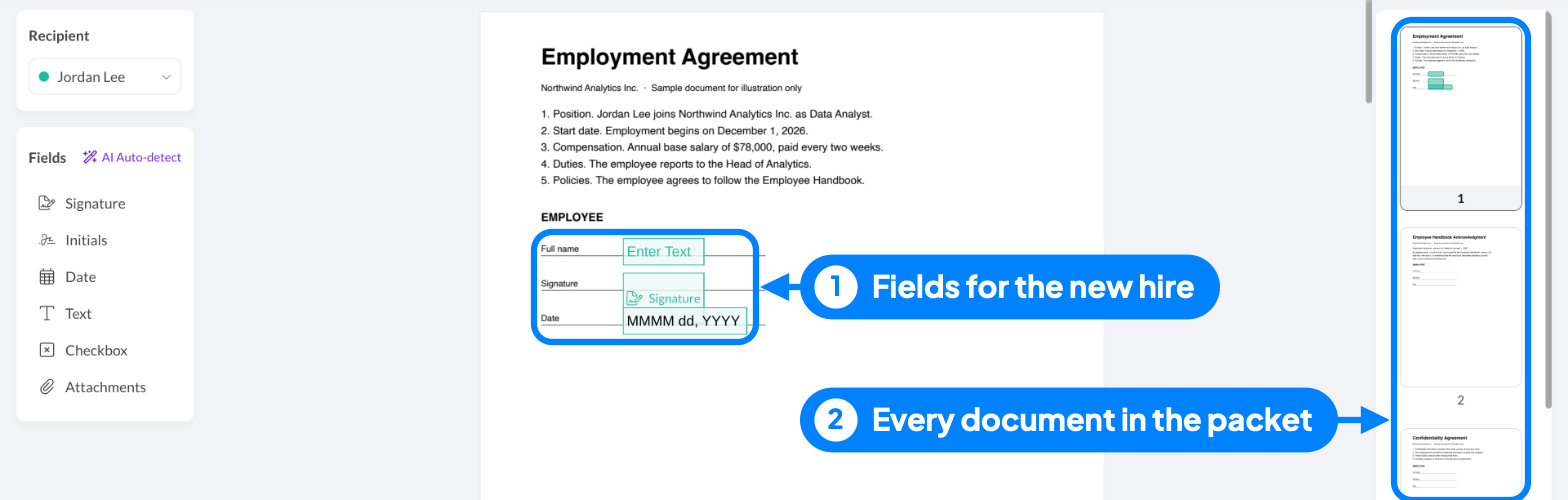
Collect the final version of each company document: the employment agreement, handbook acknowledgment, NDA, and emergency contact form. Open Sign and upload all of them at once. They go out together in one signing request, so the new hire gets one email instead of five.

2. Add the new hire and any company signer
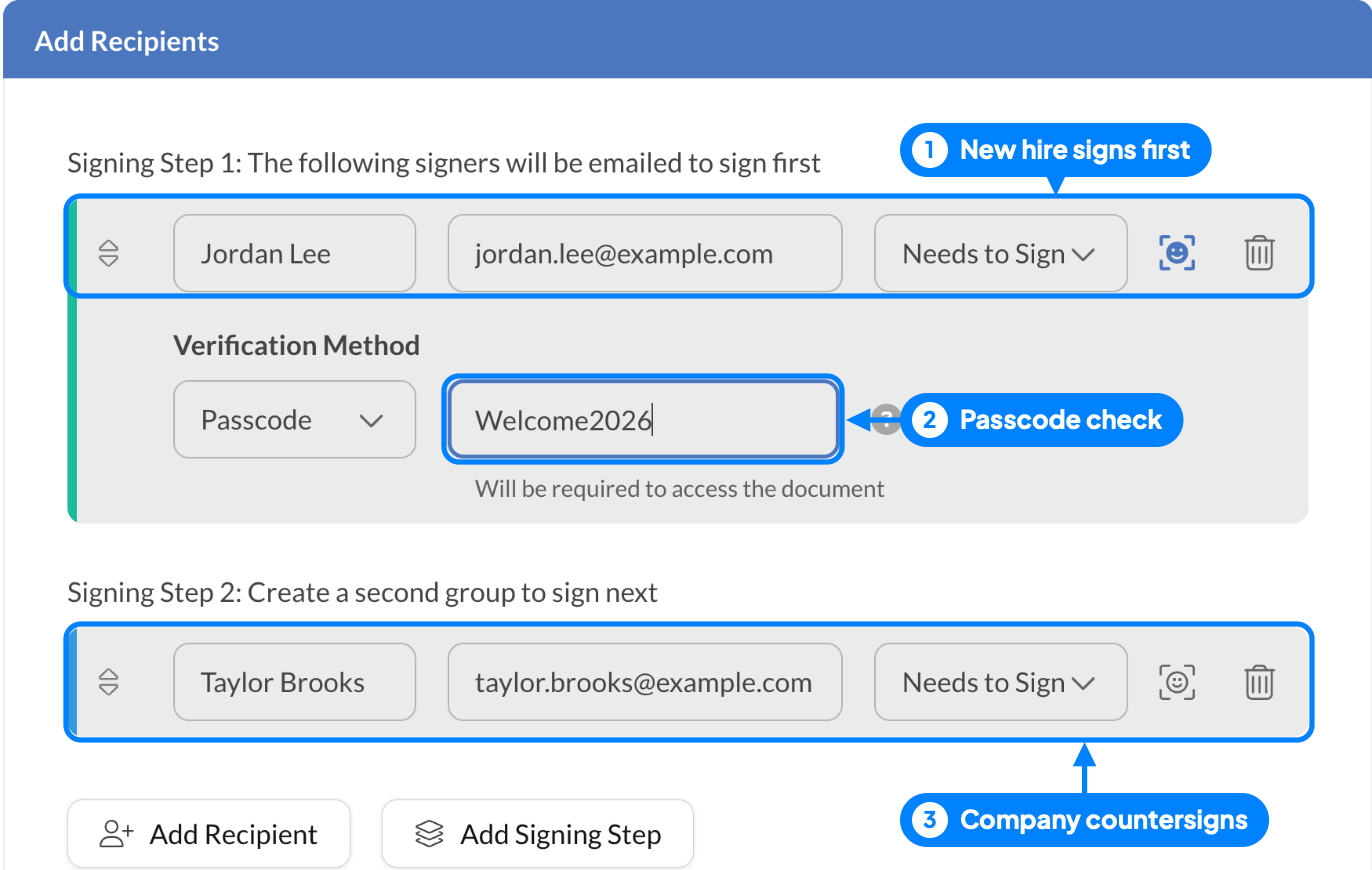
Under Add Recipients, enter the new hire's name and personal email address. If a document needs a company signature, such as the employment agreement, add an authorized signer as a second signing step, so they countersign after the new hire. A manager who only needs the final copy can be set to receive a copy.
3. Check who is signing
New hires often sign before anyone at the company has met them in person. With recipient verification, you can require a passcode you share separately, a one-time code by text message, or an ID check before the packet opens.
4. Place the fields in each document
Add signature, date, and text fields where the new hire needs to act, and initials next to the policies that matter most. Use an Attachments field to ask for a file as part of signing, such as a signed copy of a certification. Keep bank details, identity documents, and medical information in the systems your organization designates for them.
5. Set reminders and a deadline
Turn on reminders and set the request to expire before the start date. If the packet isn't signed in time, you will know before day one, not on it.

6. File the completed packet
When every signer has finished, download the signed documents and their Certificate of Completion, which records who signed, when, and which verification step they passed. File them in the employee's record under your retention rules.
How do you handle day one and repeat hires?
Day one at the office. For a new hire who signs on site, in-person signing lets them sign on your tablet or computer without waiting for an email.
The same packet every time. Save the packet as a template with its fields, roles, reminders, and expiry in place. The next hire takes minutes: pick the template, add the name and email, send. Update the template when a policy changes, and keep person-specific terms, such as salary, in the employment agreement you check before each send.
Policy updates for everyone. When the handbook changes, Bulk Send on Business and Enterprise plans sends one template to up to 100 recipients from a CSV file, and each employee gets their own request and signing record.
How long should you keep onboarding documents?
Retention depends on the document, and the clock usually starts at hire or at termination.
- Form I-9: keep it for three years after the date of hire or one year after employment ends, whichever is later (8 CFR § 274a.2(b)(2)). Many employers store I-9s apart from personnel files, so an inspection doesn't expose unrelated records.
- Form W-4 and other payroll records: follow the IRS and your state's employment tax record rules.
- Signed agreements and acknowledgments: keep them for as long as they govern the employment, plus your legal team's retention period.
Keep each signed document with its Certificate of Completion. Sign.Plus keeps the audit trail and certificate indefinitely, so the signing evidence is there if a question comes up years later.
What slows down new hire paperwork?
- Sending forms one at a time. Five emails mean five chances to miss one. Send one packet.
- Waiting until day one. Everything that isn't Section 2 of the I-9 can be done before the start date.
- A work email that doesn't exist yet. Send the packet to the new hire's personal address.
- No deadline on the request. Without an expiry and reminders, an unsigned packet surfaces on the first morning.
- Mixing the I-9 into a general signing flow. It has its own rules; keep it separate.
- Signed files left in inboxes. File the documents and their certificate in the employee record right away.
Why HR teams use Sign.Plus for onboarding
- One request for the whole packet. Upload several documents and send them as one signing request.
- Signer checks before the packet opens. Passcode, text message code, or ID Check per recipient; with ID Check, you see a confirmation and the legal name from the ID, while the ID images stay private.
- No account for the new hire. They sign from the email link on a laptop or a phone, on the web or with the iOS and Android apps.
- Evidence kept for the long run. The audit trail and Certificate of Completion are kept indefinitely.
Ready to build your packet? Set up a new hire packet template once and reuse it for every hire.
FAQs
What paperwork is required for a new employee?

Federal law requires Form I-9 for every new hire and Form W-4 for federal income tax withholding. Many states add a state withholding form, and employers report each new hire to the state within 20 days. Company documents, such as an employment agreement, handbook acknowledgment, and NDA, are not legally required but are standard.
Does onboarding paperwork mean I got the job?
Usually, yes. Employers send onboarding paperwork after an offer is made and accepted. If you get paperwork without a written offer, ask HR to confirm the offer, start date, and pay before you sign anything.
Can new hire paperwork be completed online?
Most of it can. Agreements, policy acknowledgments, and company forms can be signed electronically. Form I-9 and Form W-4 can also be completed electronically, but only in systems that meet their specific federal requirements.
When does a new hire have to complete Form I-9?
The employee completes Section 1 no later than their first day of employment. The employer completes Section 2 within three business days of the hire.
What are onboarding documents?
Onboarding documents are the forms, agreements, and policies a new employee reads, completes, or signs when joining a company. They include government forms, such as Forms I-9 and W-4, and company documents, such as the employee handbook acknowledgment.
Should new hire paperwork go to a personal email?
Yes, before the start date. The new hire doesn't have a work account yet, and a personal address means the signed copies stay with them too.
Can I send all onboarding documents in one request?
In Sign.Plus, yes. Upload several documents in one signing request, place the fields in each, and the new hire signs them all from one link.

Related guides






Confédération Suisse
Confederazione Svizzera
Confederaziun Svizra
Zwitserse Bondsstaat
Innosuisse - Zwitsers innovatieagentschap



