


Sales Contract: What to Include and How to Get It Signed Online

A deal isn't done when the buyer says yes on a call. It's done when both sides sign terms they can enforce. This guide covers what a sales contract needs, when the law requires one in writing, the red flags to catch, and how to get it signed online.


- A sales contract records what's sold, the price, delivery, and who carries the risk.
- Under UCC Article 2, a sale of goods for $500 or more generally needs a signed writing.
- Electronic signatures count; send it with a signing order, reminders, and an audit trail.
What is a sales contract?
A sales contract is a written agreement in which a seller agrees to transfer goods to a buyer for a price. It sets out what is being sold, how much it costs, when and how it is delivered, and what happens if something goes wrong. “Sales contract” and “sales agreement” mean the same thing; businesses use both names.
In the US, contracts for the sale of goods fall under Article 2 of the Uniform Commercial Code (UCC), which nearly every state has adopted, with local changes, into its own law. Article 2 applies to “transactions in goods” (UCC § 2-102), and goods are things that are movable when they are identified to the contract (UCC § 2-105). Services, real estate, and shares follow other rules.
Need a starting document? Our sales contract template covers the standard clauses. This guide explains what goes into them, what to watch for, and how to get the contract signed.
Does a sales contract have to be in writing?
For many sales of goods, yes. Under the UCC’s statute of frauds, a contract for the sale of goods “for the price of $500 or more” is generally not enforceable unless there is a writing signed by the party it is enforced against (UCC § 2-201). Note the wording: $500 or more, and goods only.
Two details that often surprise sellers:
- Between merchants, a confirmation can bind the other side. If one merchant sends a written confirmation of the deal and the other doesn’t object in writing within 10 days of receiving it, the writing requirement can be met against the recipient too (§ 2-201(2)).
- A missing price doesn’t automatically kill the contract. If the parties intend to be bound, a contract can exist even when the price isn’t settled; the price is then a reasonable price at the time of delivery (UCC § 2-305). Leaving it open invites a dispute, so put the number in.
Below the $500 line, a written contract is still the easiest way to prove what was agreed. States can change the UCC when they adopt it, so check your state’s version for a specific deal. This guide explains general US rules and is not legal advice.
What should a sales contract include?
| Term | What to write | Why it matters |
|---|---|---|
| Parties | Legal names, addresses, and who signs for each company | Shows who is bound and who can sign |
| Goods | Description, quantity, model or specification | The most common source of disputes |
| Price and payment | Total price, currency, taxes, payment due dates, late fees | An unclear price can turn into a “reasonable price” argument |
| Delivery | Date, place, shipping terms, who pays freight | Sets when the seller has performed |
| Title and risk of loss | When ownership and risk pass to the buyer | Decides who pays if goods are damaged in transit |
| Inspection and acceptance | How long the buyer has to inspect and reject | Avoids open-ended returns |
| Warranties | Express warranties and any disclaimers | Implied warranties apply unless properly excluded |
| Limitation of liability | Caps and excluded damages | Must be fair to both sides to hold up and to get signed |
| Termination and remedies | What happens on breach or cancellation | Saves a negotiation after something goes wrong |
| Governing law | Which state’s law applies | The UCC varies slightly by state |
| Signatures | Signature, name, title, and date for each party | The signed writing the statute of frauds asks for |
Warranties need care
When the seller is a merchant for goods of that kind, a warranty that the goods are merchantable is implied in the sale (UCC § 2-314). A seller can exclude it, but in a written contract the disclaimer must mention merchantability and be conspicuous (UCC § 2-316). Words like “as is” or “with all faults” can also exclude implied warranties. A disclaimer buried in small print is a common reason these clauses fail.
Sales contract, bill of sale, or purchase order?
| Document | What it does | Who usually drafts it |
|---|---|---|
| Sales contract | Sets the full terms of a sale before or as it happens | Seller, often negotiated |
| Purchase order | The buyer’s order for goods, sometimes on the buyer’s terms | Buyer |
| Bill of sale | Records that ownership has passed, often for a single item | Seller |
| Real estate purchase agreement | Sale of land or a home; follows real estate law, not UCC Article 2 | Agent or attorney |
If both a purchase order and your sales contract exist, make sure they don’t contradict each other, or say which one wins.
What are red flags on a sales contract?
Read these before you sign or send:
- Blank or “TBD” fields for price, quantity, or delivery date.
- A one-sided liability cap that protects only one party.
- Warranty disclaimers in fine print instead of a clear, visible clause.
- Auto-renewal without a notice period or an easy way to cancel.
- No rule on title and risk of loss, so nobody knows who pays for damaged goods.
- Conflicting documents, such as a purchase order and a contract with different terms and no order of precedence.
- The wrong signer, someone who isn’t authorized to bind the company.
- No governing law, which turns a simple dispute into a question of which state’s rules apply.
How do you send a sales contract for electronic signature?
Here is the full flow in Sign.Plus, from final draft to a signed copy for both sides.
1. Finalize the terms
Agree on price, quantities, and delivery before you send. Check every number against the quote or order, and fill in or remove every blank.
2. Upload the contract and add the signers
Open Sign, upload the contract, and choose Request Signature. Under Add Recipients, add the buyer’s authorized signer and the person who signs for your company. Give each signer their own email address. A sales manager or finance contact who only needs the final copy can be set to receive a copy.
3. Set the signing order
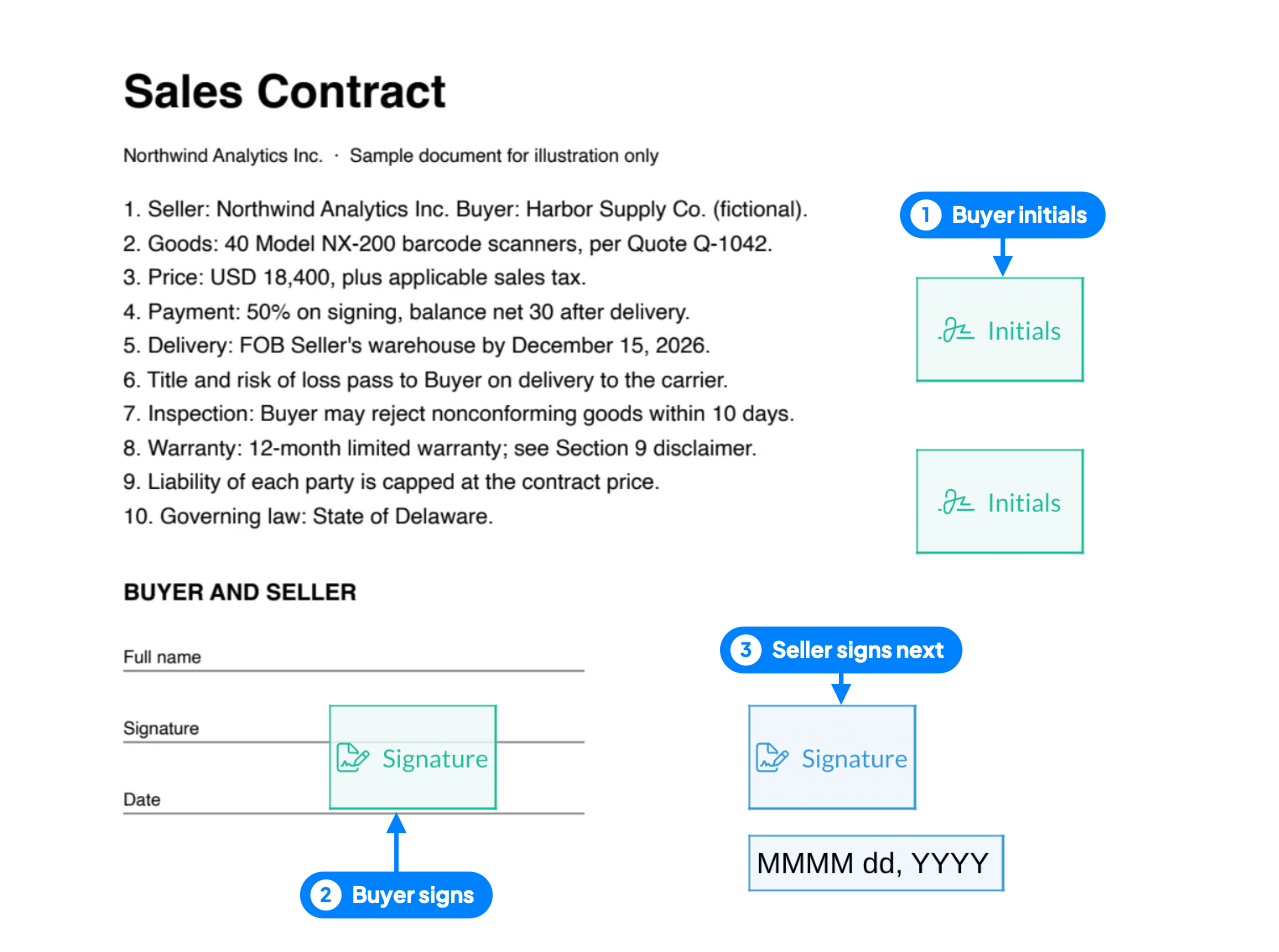
Signing steps control who goes first. A common setup puts the buyer in step one and your company’s signer in step two, so you countersign once the buyer has accepted the terms. If both sides should sign at the same time, put them in the same step.

4. Check who is signing
For a new customer or a high-value deal, add recipient verification: a passcode you share separately, an SMS code, or an ID check before the contract opens.
5. Place the fields
Add signature, name, title, and date fields for each signer, and initials next to the price, payment terms, and warranty clause. Fields are color-coded per signer, which makes a misassigned field easy to spot. Need a document back with the signature, such as the buyer’s purchase order? Add an Attachments field and the buyer uploads it as part of signing.
6. Set reminders and a deadline
Add a short message, turn on reminders, and set the request to expire when your quote expires. If the buyer doesn’t sign in time, the request closes instead of leaving an old price open.

7. Track it and file the record
Track the request under Documents. When everyone has signed, each party gets a copy. Download the signed contract and its Certificate of Completion, which records each signer, the verification step they passed, and timestamped events with IP address and device. If the terms change before signing, void the request and send a corrected one.
Is an electronically signed sales contract enforceable?
Yes, as a rule. Under the federal ESIGN Act, a signature or contract can’t be denied legal effect solely because it is in electronic form (15 U.S.C. § 7001), and most states have adopted the Uniform Electronic Transactions Act (UETA), which gives electronic records and signatures the same effect at state level. For more detail, see our overview of electronic signature laws in the United States.
Four things make an electronic signature hold up:
- Intent to sign: each signer takes a clear action, such as selecting a signature field and confirming it.
- Consent to do business electronically: both sides agree to sign electronically, which the context usually shows.
- A link to the document: the signature is attached to that exact contract.
- A record everyone can keep: each party can store and reproduce the signed contract later.
An electronic signature doesn’t make an unfair or unlawful term enforceable; it only means the signature method isn’t the weak point.
How do sales teams reuse the workflow?
- Templates for standard deals. Sign.Plus templates save the fields, roles, signing steps, reminders, and expiry, so a new contract takes minutes. Update the template when your standard terms change.
- In-person signing at the counter or a trade show. In-person signing lets a buyer sign on your tablet or computer on the spot.
- One check per deal size. Use an email link for routine reorders and a passcode or ID check for new accounts and large orders.
Why sales teams use Sign.Plus
- Signer checks before the contract opens. Passcode, SMS code, or ID Check per recipient; with ID Check, you see a confirmation and the legal name from the ID, while the ID images stay private.
- No account for the buyer. They sign from the email link on a laptop or a phone, on the web or with the iOS and Android apps.
- Evidence kept for the long run. The audit trail and Certificate of Completion are kept indefinitely, so the record is there if a dispute comes up years later.
- Independently audited security. Certified to ISO/IEC 27001:2022 by EY CertifyPoint, with a SOC 2 Type 2 report from EY.
Ready to send your next one? Start from our sales contract template and set it up as a Sign.Plus template for every deal.
FAQs
What is a sales agreement?

A sales agreement is the same as a sales contract: a written agreement in which a seller transfers goods to a buyer for a price, with terms for payment, delivery, and what happens if something goes wrong.
Does a sales contract need to be in writing?
Under UCC § 2-201, a contract for the sale of goods for $500 or more is generally not enforceable without a writing signed by the party it is enforced against. Below that amount, a written contract is still the best proof of what was agreed.
Is an electronic signature valid on a sales contract?
Yes. Under the ESIGN Act and state laws based on UETA, a contract can't be denied legal effect only because it was signed electronically, as long as the usual rules for a valid contract are met.
Who signs a sales contract first?
Either side can. Many sellers have the buyer sign first and countersign afterward, so the company signs once the terms are accepted. In Sign.Plus, signing steps set the order.
What are red flags on a sales contract?
Blank price or delivery fields, one-sided liability caps, warranty disclaimers in fine print, auto-renewal without notice, no rule on risk of loss, and a signer who isn't authorized to bind the company.
Can a sales contract be changed after signing?
Yes, if both parties agree. Put the change in a written amendment that both sides sign, and keep it with the original contract and its signing record.

Related guides


Confédération Suisse
Confederazione Svizzera
Confederaziun Svizra
Confederación Suiza
Innosuisse - Agencia Suiza de Innovación


