


How to Amend a Contract After Signing

Learn how to amend a signed B2B services contract with clear approvals, precise language, and organized records. Follow a practical workflow from scope review to signature and handoff.


- Gather the signed agreement and prior changes, then check its amendment and signing-approval clause before drafting.
- Use a separate contract amendment that identifies the original agreement, affected section, approved language, and effective date.
- Confirm authority, obtain required approvals and signatures, file the executed record with the original and evidence, and brief the delivery team.
Can you amend a contract after signing?
Yes, parties can often amend a contract after signing when they follow the change process in their agreement and any applicable legal requirements. Start with the signed agreement and any amendments. Contract terms and applicable law may affect the procedure, signers, notice, and formalities.
For a sales or account manager handling an agreed scope change, the goal is to turn that discussion into precise approved language and a clear operational handoff. The steps below show how to amend a contract without losing track of the original terms, prior changes, or signing evidence.
When should you consider a contract amendment?
Consider an amendment when both sides intend to revise an existing obligation during an active services agreement. Common examples include changing a deliverable, adding an acceptance milestone, revising a schedule, or updating a section that controls how work is approved.
A few document choices need early attention:
- Correction of a signed PDF: Identify whether the request concerns a drafting correction, a substantive term, or the integrity of the signed record. Preserve the executed file and review this guide to correcting a signed PDF before selecting a route.
- Renewal: Check whether the discussion extends or restarts the arrangement and addresses renewal terms. A contract renewal process may fit that request better than a scope amendment.
- Extensive rewrite: Map how many sections and dependencies are affected. If the right document is unclear, route the choice to Legal before circulating language.
How does the contract amendment process work?
- Gather the controlling documents. Collect the signed agreement, existing amendments, addenda, change orders, and relevant approved exhibits. Confirm the original title and date, party names, section numbering, and whether an earlier change already revised the provision under discussion.
- Read the amendment and signing-approval clause. Look for instructions about the form of a change, notice, approvals, authorized representatives, and execution. Check related sections referenced by that clause. Use the agreement as the starting point for the process the parties want to follow.
- Identify the affected section and dependencies. Ask, “Does scope, acceptance, pricing or scheduling also need review?” A new review milestone could affect delivery dates, customer responsibilities, acceptance criteria, or handoff tasks even when the commercial scope appears settled. Record each dependency and resolve it in the draft or confirm why no change is needed.
- Confirm feasibility, authority, and internal approvals. Ask Delivery and the account lead to validate the work and timing. Confirm who may approve and sign for each company under the arrangement. Follow the internal contract approval workflow, including Legal review of updated language where required.
- Draft a separate amendment. Reference the original agreement by title and date, identify the precise section, and describe the inserted, deleted, or replaced language. State the amendment effective date distinctly from the dates on which people sign. If useful, explain how the change interacts with the rest of the agreement, including any unchanged milestones or order of precedence.
- Compare the draft with the approved version. Before sending, check that section references, deliverables, dates, acceptance criteria, and effective-date wording match the approval record. Remove superseded drafting notes and confirm that the file sent for signature is the approved version.
- Obtain agreement and the required signatures. Use the approval and execution method required by the arrangement. Address questions through the designated contacts, keep the approval trail, and avoid treating a commercial email summary as a substitute for the required change process.
- File and hand off the change. Save the executed amendment with the signed original, prior changes, and signing evidence. Give Delivery, Finance, and other affected owners the final language, effective date, revised responsibilities, and location of the controlling record.
What should the amendment content include?
Use this concise checklist for a scope-change draft. Adapt it to the agreement and approved change.
- Original agreement title, date, and parties.
- Exact section or subsection being changed.
- Approved inserted, deleted, or replacement language.
- Amendment effective date and any related milestone dates.
- Interaction with other terms, where clarification is useful.
Example: adding a sandbox acceptance milestone
A fictional analytics vendor owes a dashboard delivery under a signed services agreement. The customer asks for a sandbox acceptance milestone before production. Both sides agree and review Section 4, which covers milestones and acceptance. They add “sandbox access and a test-data report” due July 15. The production handoff remains July 31 in this example, and the amendment states an effective date of July 1 after approval.
Delivery and the account lead confirm feasibility. Legal reviews the updated language, and authorized representatives for both companies sign the separate amendment as required by this fictional agreement. The account manager then files the executed document and communicates the new milestone to the delivery team.
Approved-text illustration: “Effective July 1, Section 4 is supplemented to add a sandbox acceptance milestone. The vendor will provide sandbox access and a test-data report by July 15. This milestone is ready for customer acceptance review when both deliverables are available for review. The production handoff remains scheduled for July 31.”
This illustration lists July 1 as the amendment effective date. The representatives’ signing dates are recorded separately, based on when each signing occurs.
Contract addendum vs amendment: which label fits?
Usage varies across organizations. Some teams use an addendum for supplemental material and an amendment to revise an existing term. The label alone does not settle the issue. Focus on the operative wording and the change process in the agreement, including any defined use of either term. If the document type or its interaction with existing provisions remains unclear, ask Legal to confirm the route.
How do you send and file the approved amendment?
After internal review, upload the approved amendment for signature. In Sign.Plus, follow these steps:
- Go to Sign and upload the approved file.
- Choose Request Signature.
- In Add Recipients, enter the relevant signers and select Next.
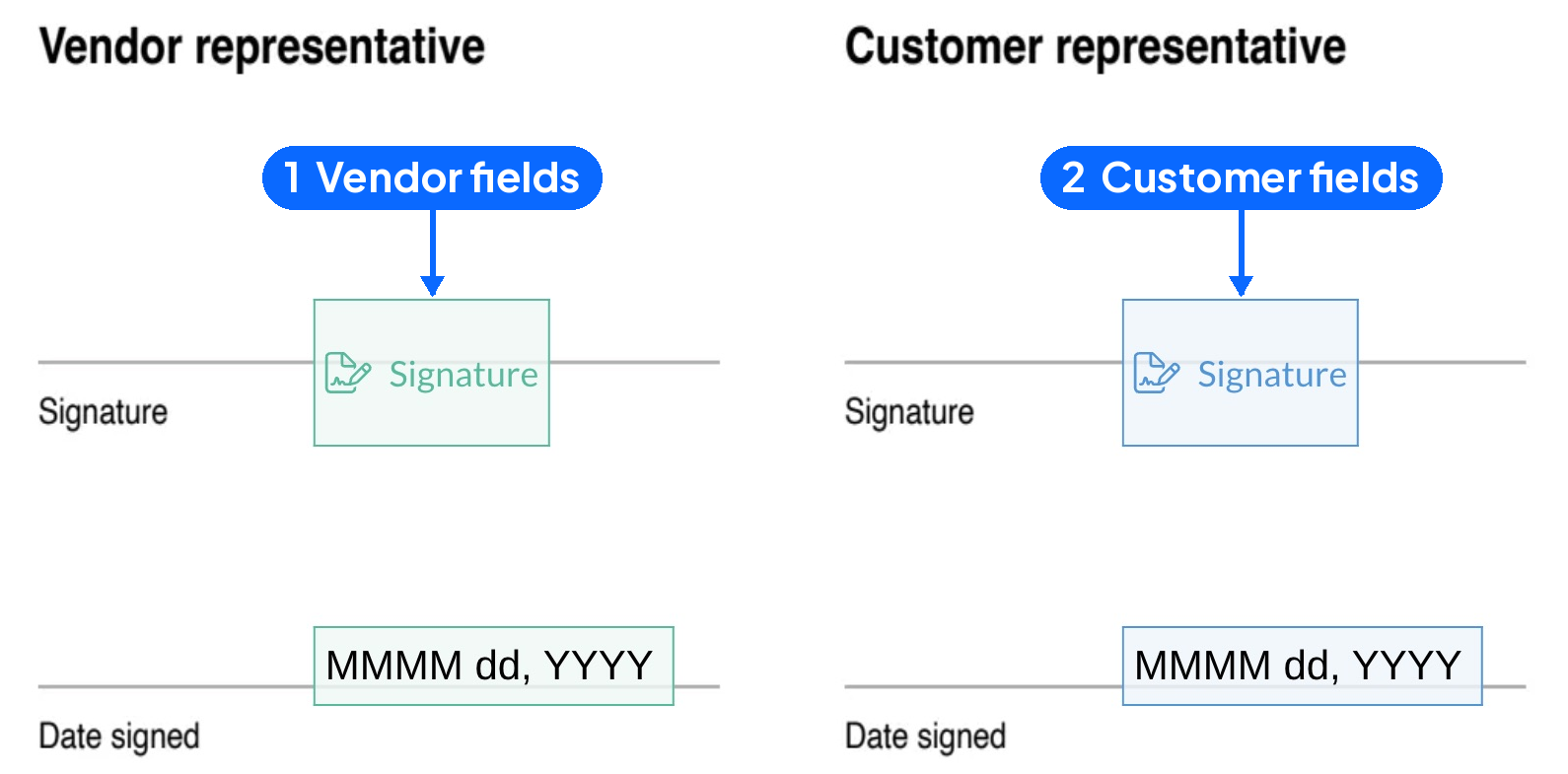
- In Add Fields, assign the relevant signature and date fields.
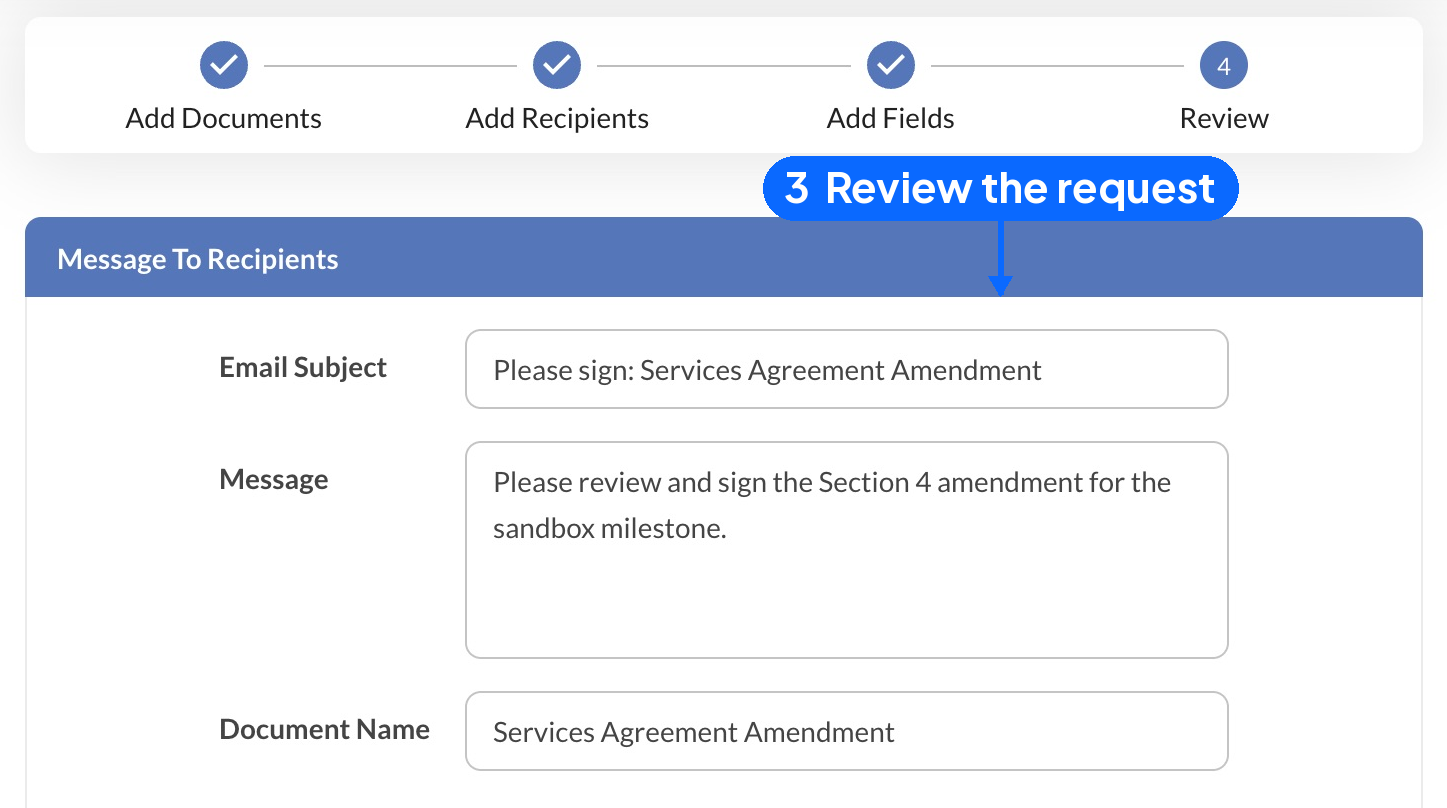
- Select Next to open Review, check the request, and then select Send.
Here is how the fictional Section 4 amendment looks in Sign.Plus before it is sent.
Check each recipient’s progress in Documents. When the request is complete, save the completed record alongside the signed original and supporting evidence. This guide to saving a signed agreement and evidence covers a practical filing approach. Finish by sending the delivery team the executed amendment, identifying the July 15 sandbox milestone and unchanged July 31 production handoff in the example, and confirming who owns each next action.
Legal notice. This guide is for general informational purposes only and does not constitute legal advice. For advice about a specific contract or signing requirement, consult a qualified legal professional.
FAQs
Can you amend a contract after it is signed?

Yes, parties can often make a post-signing amendment by following the signed agreement and applicable requirements. Review prior changes, the amendment clause, approval authority, notice, signing formalities, and dependent terms before preparing the document.
What does it mean to amend a contract?
To amend a contract means to change identified terms of an existing agreement, such as a deliverable, milestone, acceptance provision, or schedule. The amendment should connect the approved language to the original agreement and follow the applicable change process.
Can you edit a signed contract directly?
Whether direct editing is appropriate or legally effective depends on the agreement, the change, and applicable law. A working copy can help teams propose or review wording, but it should not replace the preserved signed PDF or its signing evidence. Keep the executed record intact and use the required amendment, correction, or other approved process.
Who signs an amendment?
The required signers depend on the signed agreement, the parties’ arrangement, authority, and applicable law. Check the amendment and signing-approval provisions and confirm that each representative has the necessary authority. Do not assume that the original signers must sign or that any particular representative is sufficient.

Related guides






Confédération Suisse
Confederazione Svizzera
Confederaziun Svizra
스위스 연방
Innosuisse - 스위스 혁신청



