


Best E-Signature Software for Legal Documents (2026): 7 Tools Compared

We compared seven e-signature tools for legal documents on QES access, signer verification, audit evidence, data location and pricing. Sign.Plus is our overall pick for legal teams wherever they operate.


- Sign.Plus is our overall pick, with QES on every plan including Free through Swisscom Trust Services under eIDAS and ZertES.
- Sign.Plus includes a Certificate of Completion with every signed document, per recipient verification, Swiss storage by default and 43 storage locations on Enterprise.
- DocuSign lists QES on Enhanced in the US, Dropbox Sign requires an API Premium add on, and Adobe does not publish QES pricing.
- Skribble offers Swiss or German hosting, Youtrust is a French QTSP, and Zoho Sign fits firms already using Zoho CRM or Zoho One.
- Compare signature level, signer verification, evidence, data location and feature pricing, and ask counsel about documents that may still require handwritten signatures.
The best e-signature software for legal documents combines the right signature level with signer verification and evidence your team can retrieve later. We tested these tools hands-on by sending real test agreements, and we keep retesting them as plans and features change.
Sign.Plus is our pick wherever you operate, whether you are a law firm, an in-house legal team, or a business sending contracts, engagement letters, NDAs and other legal documents in the US, Europe or elsewhere. We compared these e-signature solutions for legal documents on evidence, identity checks, signature levels, data location and published pricing, rather than brand recognition alone.
Best E-Signature Software for Legal Documents at a Glance
| Tool | Starting team plan | QES | Signer verification | Data location |
|---|---|---|---|---|
| Sign.Plus | Professional: $19.99 per user/month, annual | Every plan, including Free; $5 per recipient through Swisscom Trust Services | Per-recipient passcode, SMS code and ID Check | Switzerland by default; 43 locations on Enterprise |
| DocuSign | Standard: $25 per user/month, paid annually upfront | Enhanced; paid add-on on European Personal, Standard and Business Pro price lists | Email access codes; SMS delivery and ID verification add-ons; more options on Enhanced | Enhanced: US, Canada, Europe, Australia or Japan, set at account creation |
| Adobe Acrobat Sign | Acrobat Standard for teams: $16.99 per license/month, annual billed monthly | Cloud signature route through trust service providers; cost not published | Email OTP and signer password; phone, KBA and government ID depend on plan | Document Cloud regions across North America, Europe and Asia-Pacific; full Sign country list not published |
| Dropbox Sign | Standard: $25 per user/month, annual | Through the eID add-on on API Premium; price not published | SMS authentication on Standard; eID options through API Premium | US by default; six regions on Premium, with temporary US processing during the signing workflow |
| Skribble | Team: €23 or CHF 23 per user/month, annual | Included annual pool on Team and Pro, with paid additional signatures; one-time identification fee of €22.50 or CHF 22.50 per signer on Starter, Team and Pro, valid up to five years | Email for SES, mobile number for AES and online identification for QES | Customer chooses Switzerland or Germany at setup; the choice cannot change during the contract |
| Youtrust | Plus: $23 per user/month, annual | Plus and Pro; EUR 15 individually or EUR 10 in qualifying bundles | Email or SMS code for SES; asynchronous video identity check for QES | Hosted exclusively in France and replicated across several areas |
| Zoho Sign | Standard: $10 per user/month, annual | Enterprise, paid with credits | See Zoho Sign plans | See Zoho Sign plans |
Several tools list a lower starting price than Sign.Plus. For legal documents, what matters is which signature level, verification and evidence that price includes.
How We Chose the Best E-Signature Tools for Legal Documents
We read vendor pages, terms and security pages and tested each tool hands-on in November 2026. Our review of the best esignature platforms for legal documents focused on the following criteria:
- Evidence: audit trails, completion certificates, retention and access to signed records.
- Signer verification: passcodes, SMS codes, identity checks and whether verification can be set per recipient.
- Signature levels: access to SES, AES and QES, including the provider and plan required for QES.
- Data location and confidentiality: storage choices, temporary processing, certifications and HIPAA support where relevant.
- Published pricing: the cost of QES, verification, SSO, storage and compliance features, including sales-only add-ons.
- Legal-team usability: templates, reminders, bulk sending, field placement and the signer experience.
- Contract terms: envelope limits, renewals, cancellation, overages and automatic upgrades.
What Makes an E-Signature Strong Enough for Legal Documents
Sign.Plus states ESIGN Act compliance. Its US legality page lists signer intent, signer consent, record retention and accessibility, signature association with the document, and an audit trail with authentication as ESIGN Act requirements. Consult counsel for specific documents and jurisdictions.
A complete audit trail and certificate matter because they give your team evidence to review after signing. Verification adds another layer: a passcode, SMS code or identity check can be selected according to the recipient and document.
The three European signature levels serve different purposes:
- SES: a basic type of e-signature most commonly used for documents that do not have stringent legal form requirements and carry minimal liability risk.
- AES: a specialized type of e-signature that meets certain regulatory criteria to provide enhanced authenticity and security.
- QES: the only type of e-signature granted special legal status in EU member states, deemed the legal equivalent of a handwritten signature; the highest standard of e-signature legally recognized in courts. QES requires identity authentication before a digital certificate is issued.
Our eIDAS signature guide explains the framework.
Some documents may still require handwritten signatures in the US, including wills and trusts, court orders and legal notices, adoption paperwork, and divorce and family law documents. State laws may vary. See our US electronic signature legality guide, and ask counsel about specific documents.
1. Sign.Plus: Best Overall for Legal Documents
Sign.Plus-Preise
Professional costs $19.99 per user per month on annual billing and has no user minimum. It includes unlimited signature requests, 10 templates, reminders, passcode verification, in-person signing and 10 SMS or WhatsApp requests per seat per month.
Business costs $29.99 per user per month and adds bulk send, custom branding and Zapier, with 30 SMS or WhatsApp requests per seat. Enterprise costs $49.99 per user per month and adds storage choice across 43 locations, SSO, and HIPAA support with Advanced Security Controls and a signed BAA, plus 150 SMS or WhatsApp requests per seat.
A Free plan exists. QES is available on every plan, including Free, through Swisscom Trust Services under both eIDAS and ZertES. It costs $5 per recipient, including identity verification, and QES credits never expire. Separate ID Checks cost $2 per check, while SMS code verification uses SMS credits.
Why We Picked Sign.Plus
Sign.Plus covers the evidence and signature-level requirements without restricting QES to a sales-only tier. Every signed document comes with a Certificate of Completion, and passcode, SMS code and ID Check controls can be applied per recipient.
Documents are stored in Switzerland by default under the Swiss FADP, which has EU adequacy. Enterprise customers can choose among 43 storage locations and move documents later. Sign.Plus also lists ISO/IEC 27001:2022 certification from EY CertifyPoint, a SOC 2 Type 2 report from EY and CSA STAR listing.
Auto-Place suggests fields immediately after upload, including on flat scans. SSO and HIPAA support sit on an Enterprise plan with a published price rather than requiring a separate sales quote. The Sign.Plus legal industry solution covers engagement letters, retainer agreements and other client documents.
Things to Know About Sign.Plus
QES is charged per recipient rather than bundled into a yearly signature pool. The broadest storage, SSO and HIPAA controls require Enterprise. API plans are also separate: Grow costs $279.99 per month for 200 requests, and Scale costs $659.99 per month for 600 requests. Every API plan supports SES, AES and QES.
2. DocuSign: Best for US Firms Standardizing on One Brand
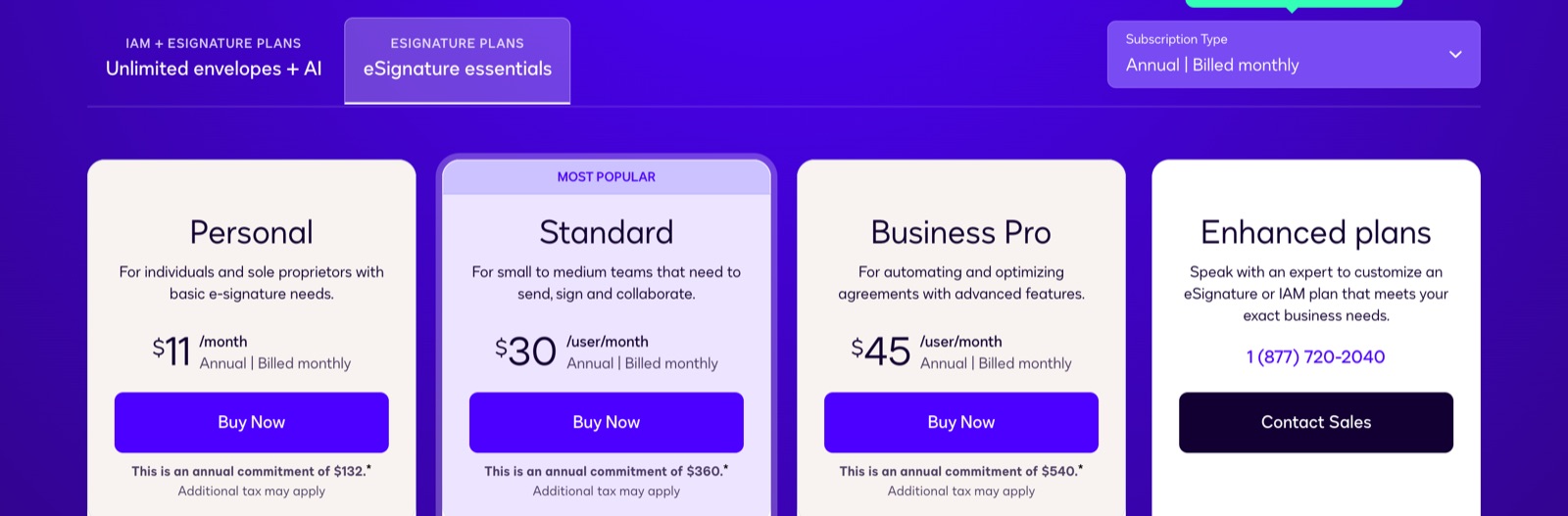
DocuSign Pricing
Personal costs $10 per month paid annually upfront for one user and five envelopes per month. Standard costs $25 per user per month paid annually upfront, while Business Pro costs $40. Enhanced, the plan formerly sold as Enterprise, requires contacting sales.
Standard and Business Pro each include 100 envelopes per user per year. An envelope counts when sent, whether or not it is signed. Voiding does not return it, bulk and API sends count, and overages are billed per envelope.
SMS delivery starts at $0.36 per delivery, and ID verification starts at $2.40 per attempt. Standard and Business Pro include five SMS deliveries and five identity verifications as a one-time bonus.
Why We Picked DocuSign
DocuSign gives US firms a single brand across a wide range of agreement workflows. All plans list an audit trail, certificate of completion, email access codes, reusable templates, mobile signing, ISO 27001, SOC 2 Type II and GDPR.
Standard and Business Pro add shared templates and documents, team reports, permissions, delegated signing and workplace integrations. Business Pro adds bulk send, PowerForms, web forms, signer attachments, payment collection and eWitness. Enhanced adds SSO, data residency, HIPAA support through a BAA and other organizational controls. Our DocuSign alternative comparison examines the plan differences.
DocuSign Limitations
On the US plan list, Personal, Standard and Business Pro list SES, while Enhanced lists SES, AES and QES. European price lists offer QES as a paid add-on on the lower plans. Data residency is limited to Enhanced and is set at account creation.
In our hands-on test, fields were placed by hand, and AutoPlace required anchor text that we added to the document ourselves. The request was set to expire four months after sending without the send flow asking. Annual plans can be canceled within 30 days without penalty once per customer; after that, the remaining annual balance is owed.
3. Adobe Acrobat Sign: Best for Teams Working in Acrobat
Adobe Acrobat Sign Pricing
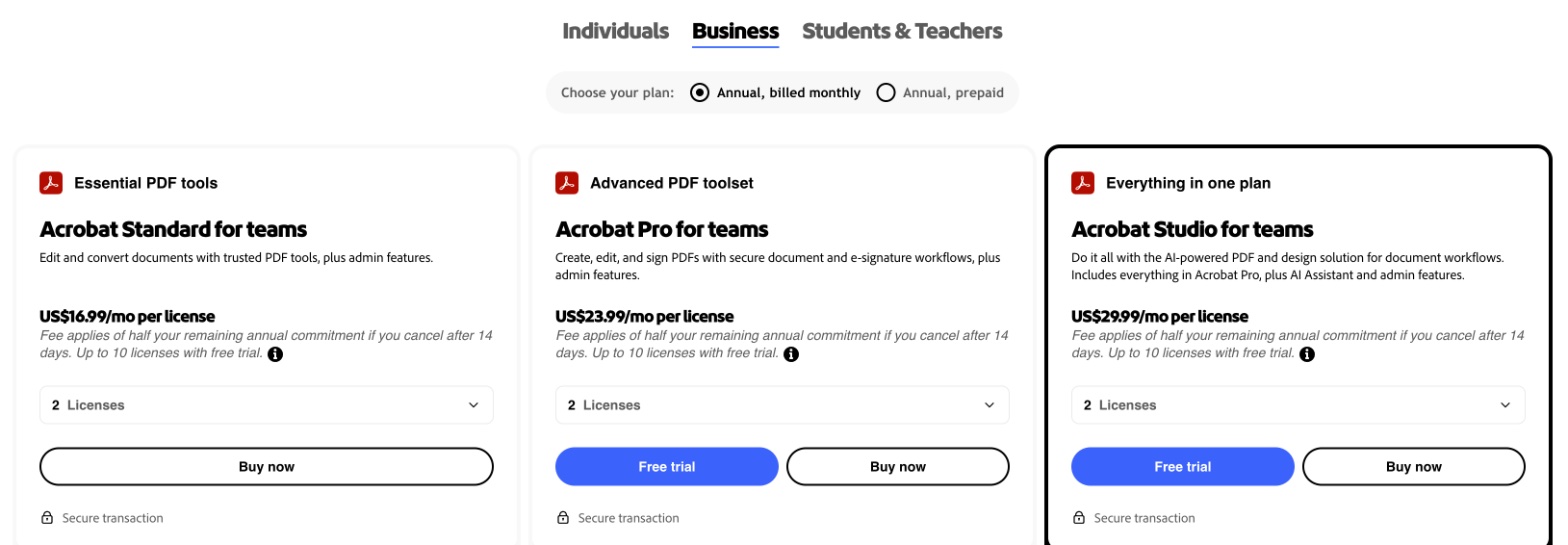
Acrobat Standard for teams costs $16.99 per license per month on annual billing, Acrobat Pro for teams costs $23.99, and Acrobat Studio for teams costs $29.99. Adobe says Acrobat for teams plans have no usage caps for collecting e-signatures.
Standalone Acrobat Sign Solutions is quote-only. User-license versions of Acrobat Sign generally include 150 transactions per user per year unless the contract says otherwise. A transaction occurs when a document or collection of related documents is sent, including qualifying API, bulk and web form sends.
Why We Picked Adobe Acrobat Sign
Acrobat team plans combine PDF work with signing, signature requests and response tracking. Digital signatures are available for Acrobat Standard, Acrobat Pro and Acrobat Sign Solutions.
Adobe also supports cloud signatures through trust service providers, including providers from the EU Trusted Lists and Adobe Approved Trust List. All accounts on the Acrobat Sign EU1 instance receive eIDAS-compliant qualified timestamps by default. Its enterprise compliance list includes SOC 2 Type 2, ISO 27001:2022 and QTSP status for timestamps. See our Adobe Sign alternative comparison for more detail.
Adobe Acrobat Sign Limitations
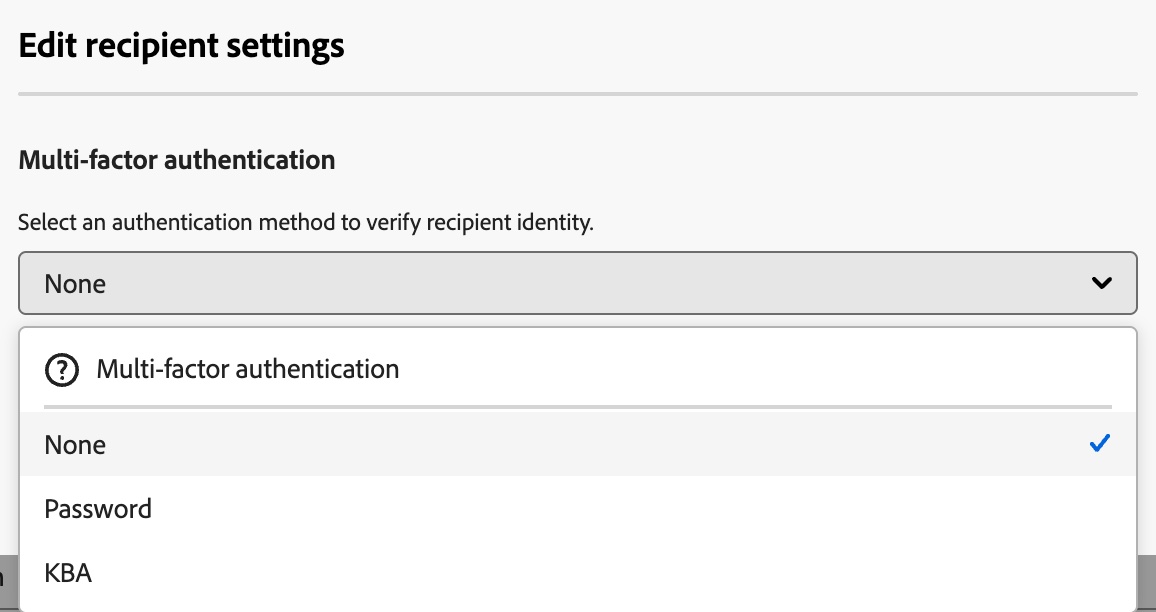
The product split matters. QES pricing is not published, and identity providers are not included in Acrobat Sign licensing. Some identity services require a separate contract with the provider. Phone authentication, knowledge-based authentication and government ID authentication carry per-use charges whose prices are not published, and government ID authentication is limited to enterprise ETLA plans.
Production API access is reserved for enterprise and developer accounts. Adobe does not publish a full Acrobat Sign data center country list or identify which plan can choose a region. Adobe IMS licensing and identity data are stored in the United States even when documents use a European instance. Adobe also uses its own signature labels, so buyers should confirm the exact legal level and provider for their configuration.
4. Dropbox Sign: Best for Firms Storing Files in Dropbox
Dropbox Sign Pricing
A Free plan exists. Essentials costs $15 per month on annual billing for one user, with unlimited signature requests and five templates. Standard costs $25 per user per month annually for two or more users and adds 15 templates, branding, bulk send, SMS authentication and in-person signing. Premium is quote-based and adds SSO, data residency, advanced signer fields and multi-team support.
Paid web plans include unlimited signature requests. Essentials and Standard offer a 30-day free trial. Some Dropbox storage plans also include plan-dependent signing features.
Why We Picked Dropbox Sign
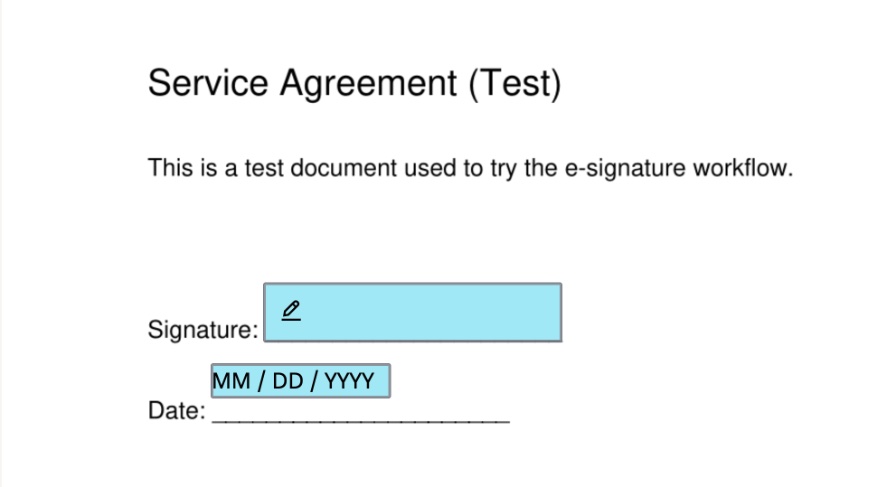
Dropbox Sign is a practical fit for firms already keeping client files in Dropbox. Its four-step send flow covers document selection, signers, fields and review. In our test, the signer needed no account, and the date field filled automatically in US month-first format.
Dropbox Sign lists SOC 2 Type II, ISO 27001, eIDAS and GDPR. HIPAA support is available to customers on annual Standard or Premium with a signed BAA and an unpublished minimum contract value. Our Dropbox Sign alternative comparison covers the main differences.
Dropbox Sign Limitations
AES and QES are available through an eID add-on on API Premium, with no published price. Listed providers include itsme, Belgian and Finnish eID and SPID for eIDAS QES. Swisscom is listed for AES under eIDAS and QES under Swiss ZertES.
Data residency requires UI Premium or API Premium. The default is the US, with Australia, the EU, Japan, Canada and the UK also available. A temporary copy is processed on US servers during editing, sending or signing, while completed documents remain in the chosen region.
Automatic field placement was labeled beta in our test and ran only after we opened its panel. The review screen also contained a pre-checked box allowing Dropbox to snapshot the document to improve the feature. Terms allow automatic upgrades when usage limits are exceeded, and upgrade fees are non-refundable.
5. Skribble: Best for Swiss and German Teams
Skribble Pricing
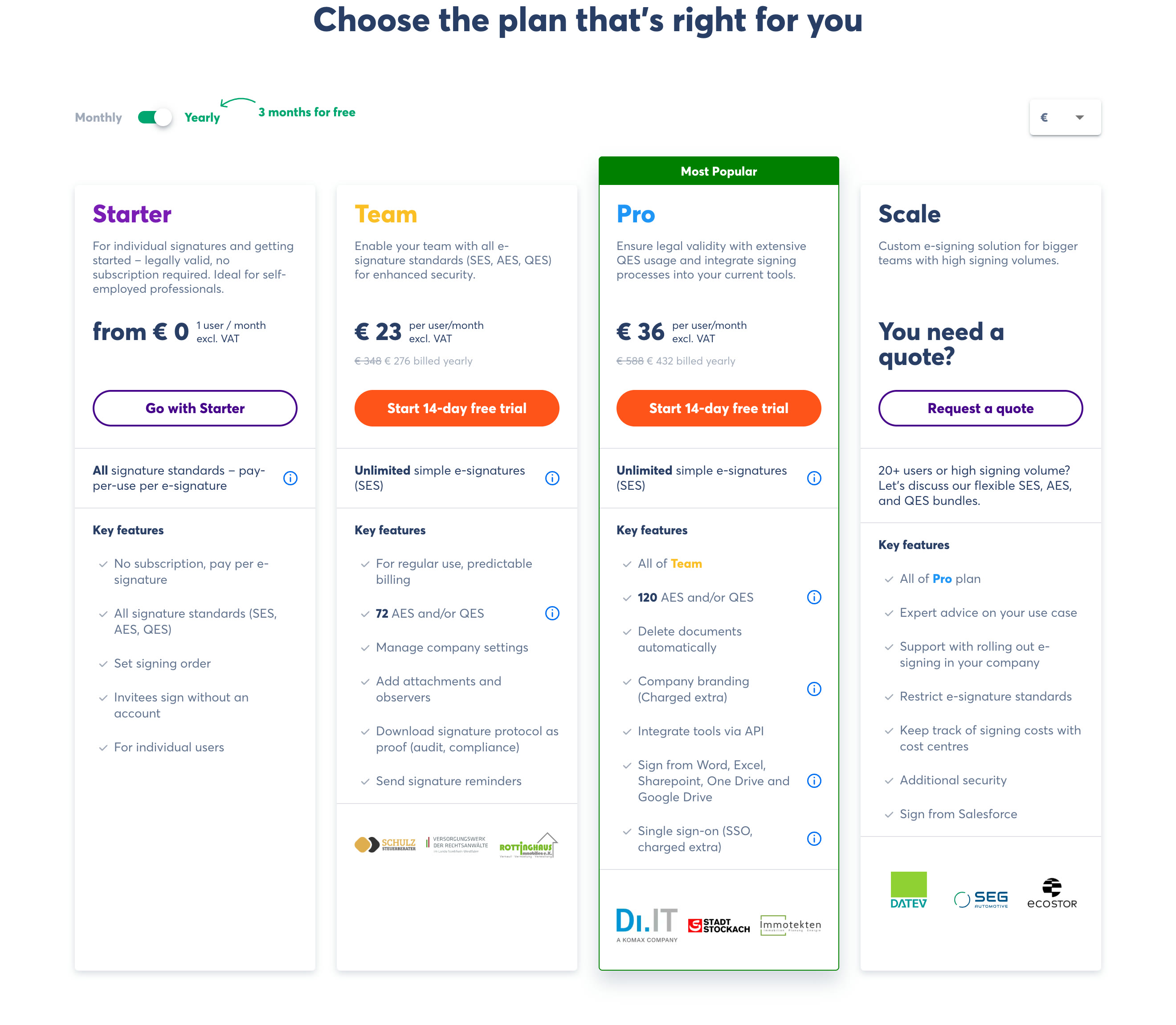
Skribble publishes prices excluding VAT. Team costs €23 or CHF 23 per user per month annually, while Pro costs €36 or CHF 36. Scale is quote-based.
Skribble’s sources conflict on Starter: the pricing page and German FAQ offer Starter pay-per-signature, while the English FAQ says pay-as-you-go is planned. This article follows the current pricing page.
Team includes 72 AES/QES signatures per user per year, pooled at company level. Additional QES signatures cost €4.50 or CHF 4.50. Starter, Team and Pro also charge a one-time identification fee of €22.50 or CHF 22.50 per signer identity, valid for up to five years. Sign.Plus charges $5 per recipient including identity verification, while Skribble’s identification fee is paid once per signer identity. Compare your own mix of new and repeat signers rather than unit prices alone.
Why We Picked Skribble
Skribble supports eIDAS and ZertES workflows from a Swiss company with operations in Switzerland and Germany. Customers choose a Swiss or German data center at setup. Its site lists ISO 27001 certification for the system architecture, AES-256 encryption, and DSG and GDPR compliance.
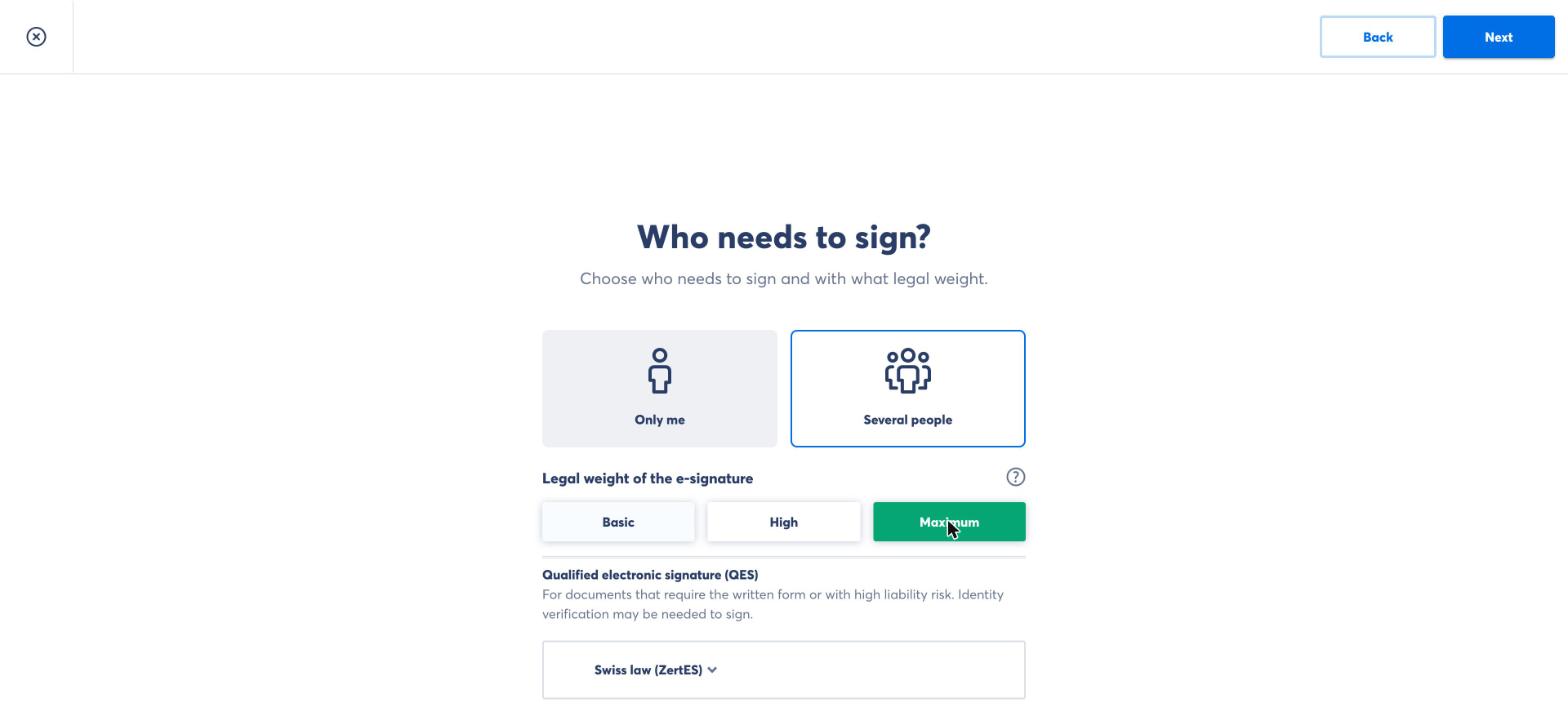
External signers need no Skribble account, and the inviting party pays. QES identification has several routes, including EU video identification, the Nect app for one EU route, Swiss identification options, partner locations and existing eIDs. An ID scan and selfie video are one example, not the universal process. Our Skribble alternative comparison provides additional context.
Skribble Limitations
The data center choice cannot be changed during the contract term, with no refunds, credits or migrations for a wrong selection. Skribble also says its web platform does not yet offer reusable templates with fixed field positions.
API access is included on Pro, but there is no separate published API price list. Pro branding costs €1,400 or CHF 1,400 per year. SSO costs €2,000 or CHF 2,000 one-time plus €2,490 or CHF 2,490 per year. SOC 2 and HIPAA support are not published.
6. Youtrust: Best for French Teams That Want a Domestic QTSP
Youtrust Pricing
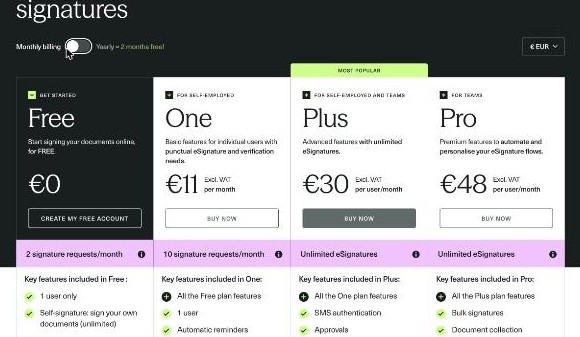
Yousign changed its name to Youtrust in 2026. A Free plan exists. On the published USD list, One costs $8 per month on annual billing, Plus costs $23 per user per month, and Pro costs $38 per user per month, excluding VAT. Teams with more than five users need a custom quote.
QES is available only on Plus and Pro. It costs EUR 15 per signature when bought individually, or EUR 10 per signature in bundles of 10 or more on an annual plan. Individually purchased credits expire after three months. The signer completes an asynchronous video identity check, and each credit allows up to three attempts.
Why We Picked Youtrust
Youtrust is a qualified trust service provider in France, qualified by ANSSI. The EU trusted list names it for qualified certificates for electronic signatures, seals and timestamps. Its product family also includes Verify for identity, company and bank-account checks, and Seal for electronic seals.
Data is hosted exclusively in France and replicated across several areas. SES and AES plans include an audit trail PDF archived for 10 years, with evidence files archived through a third-party provider. In our test, the sender could download the signed document, audit trail and field data separately. See our Youtrust alternative comparison.
Youtrust Limitations
Youtrust’s help center says QES requests do not get an audit trail in the app. AES costs extra, is available only with yearly billing and has no published price. SSO and SCIM are Pro-only add-ons, also with yearly billing, while Verify identity checks are paid add-ons.
ISO/IEC 27001 is listed for the system running its trust services. SOC 2 Type II appears only in a blog post rather than on its security page, and HIPAA is not mentioned in the reviewed materials. The rebrand will continue progressively through 2027, so emails and sign-in pages may still say Yousign.
7. Zoho Sign: Best for Firms on Zoho
Zoho Sign Pricing
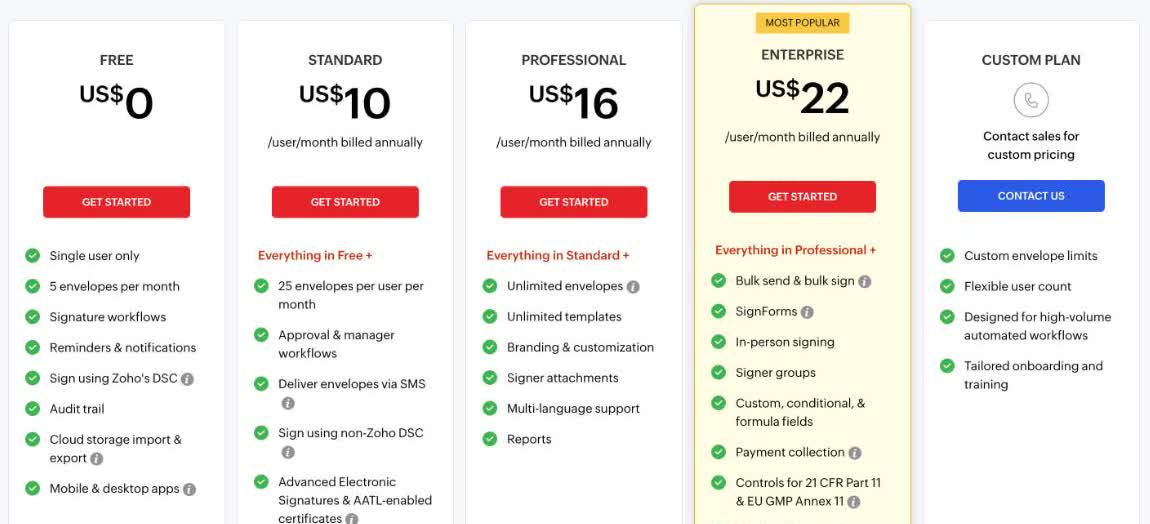
A Free plan exists. On annual billing, Standard costs $10 per user per month, Professional costs $16 and Enterprise costs $22. A 14-day trial is available.
Standard includes 25 envelopes per user per month. Professional includes unlimited envelopes, while its automations and integrations use paid credits priced at $0.10 per credit. Enterprise adds bulk send, SignForms, in-person signing, QES paid with credits, and APIs and webhooks using credits. API usage costs $0.50 per envelope.
Why We Picked Zoho Sign
Zoho Sign is the clearest fit for firms already using Zoho CRM or Zoho One. Its published per-user pricing provides a direct path from Standard to unlimited envelopes on Professional and broader signing features on Enterprise.
Its security page lists SOC 2 Type II, HIPAA and ISO 27001, 27017, 27018 and 27701. Our Zoho Sign alternative comparison looks at where it fits.
Zoho Sign Limitations
QES requires Enterprise and additional credits. Credit-based automation, integration and API charges also make the final bill dependent on usage. SSO is not listed on the pricing page.
How to Choose E-Signature Software for Legal Documents
- List your document types and jurisdictions. Ask counsel to identify documents that need a specific signature level or handwritten signature.
- Set a signature-level policy. Decide when your firm will use SES, AES or QES instead of treating every agreement identically.
- Check verification per recipient. Confirm whether passcodes, SMS codes and ID checks can reflect each signer’s role and risk.
- Inspect the evidence. Send a test agreement and download the final document, audit trail, certificate and any separate field-data record.
- Confirm storage and processing locations. Ask about default storage, available regions, temporary copies and account identity data.
- Review confidentiality requirements. Check certifications, retention controls and BAA eligibility where HIPAA applies.
- Read usage limits closely. Establish when sends, voids, bulk requests, web forms and API calls consume envelopes or transactions.
- Price the legal features, not just the base plan. Include QES, identification, SMS, SSO, data residency and compliance add-ons.
- Test renewal and exit terms. Check cancellation notice, automatic upgrades, refunds and how long you can export documents and evidence.
Which One Should You Pick?
After sending the same test agreements through all seven, each tool is good at one thing and gives something up for it, whether that is QES behind a sales call, a fixed data center, signature pools or credits.
- For US firms standardizing on one brand: DocuSign, with QES and several compliance controls tied to higher plans or add-ons.
- For Swiss or German hosting and identification routes: Skribble, with pooled signatures and a fixed data center choice.
- For a domestic French QTSP: Youtrust, with QES credits and plan restrictions to review.
Sign.Plus is at the top not because it wins every line item, but because it covers every signature level on every plan with evidence a legal team can rely on, wherever the firm operates. Start a Sign.Plus free trial and test it with one of your own agreements.
FAQs
Which e-signature app is best for legal documents?

Are electronic signatures legally binding for legal documents?
Which legal documents cannot be signed electronically?
What is the difference between AES and QES?
Do law firms need QES?
What should an audit trail include?

Ausgewählte Artikel



Confédération Suisse
Confederazione Svizzera
Confederaziun Svizra
Swiss Confederation
Innosuisse – Schweizerische Agentur für Innovationsförderung


