


Electronic Signatures for HR Documents: What to Sign and How

Offer letters, policy acknowledgments, and employment agreements all end the same way: someone has to sign. This guide shows which HR documents work well with electronic signatures and walks through an offer letter in Sign.Plus, from upload to the signed copy in your HR files.


- Offer letters, employment agreements, NDAs, and policy acknowledgments are good first candidates for electronic signing.
- In Sign.Plus, add each signer, set the signing order, and assign fields per person. Candidates sign from a link, without an account.
- Keep the signed document and its Certificate of Completion together. Run Form I-9 through a process built for its own federal rules.
Your offer letter is approved. Now you need the candidate's signature, a countersignature from the company, and a finished copy for the employee file, ideally before the candidate takes a call from another employer. Electronic signatures for human resources get you there without printing, scanning, or chasing a PDF across three email threads.
This guide covers which HR documents to sign electronically, a step-by-step offer letter in Sign.Plus, what makes the signature hold up, and the mistakes that quietly slow hiring down.
Why do HR teams switch to electronic signatures?
Paper slows hiring at the exact moment speed matters. A candidate who has to find a printer, sign, scan, and email a PDF back is a candidate who might accept another offer first. Electronic signatures fix the parts of HR paperwork that cost the most time:
- Offers go out and come back the same day. The candidate signs from a link on their phone, wherever they are.
- You can see where each request stands. Every request shows whether it was sent, opened, or signed, so nobody has to ask "did you get my email?"
- Remote hires sign like local ones. A new hire in another state signs the same way as someone down the hall.
- The signing evidence is recorded. Each signed document comes with a record of who signed, when, and how they were verified, which is what you need when a question comes up later.
- Less personal data floating around. No printed contracts on desks, no signed scans in shared inboxes.
Which HR documents can you sign electronically?
Most everyday HR paperwork works well with electronic signatures. What changes from document to document is what the signature means: accepting a job offer is a commitment, while acknowledging a handbook usually confirms receipt.
| Document | What the signature confirms | Check before you send |
|---|---|---|
| Offer letter | Acceptance of the offer as written | Final terms, acceptance deadline, company countersigner |
| Employment agreement or amendment | Agreement to that version's terms | Governing law, attachments, who signs for the company |
| Confidentiality agreement (NDA) | Agreement to the confidentiality terms | Scope and whether it goes out with the offer or separately |
| Handbook or policy acknowledgment | Receipt or agreement, as the wording says | The policy version and the exact acknowledgment sentence |
| Training acknowledgment | Completion of the named training | Whether you also need attendance or assessment records |
| Performance review | Acknowledgment of the review, or agreement with it | Which of the two the wording asks for |
| Separation or settlement agreement | Agreement to the final terms | Legal review and any required review or revocation period |
| Government, tax, or benefits forms | The attestation the form requires | The form's own signing and retention rules |
Start with two or three documents your team sends often, usually offer letters and policy acknowledgments, and build the process around those.
Make the acknowledgment clear
An employee should never have to guess what their signature means. Name the policy and its version, and say whether you are asking them to confirm receipt, confirm they read it, or agree to it. On a performance review, state whether signing acknowledges the conversation or agreement with the assessment. The wording in the document gives the signature its meaning; the field label alone can't.
How do you send an offer letter for electronic signature?
Here is the full flow in the Sign.Plus web app, from final file to signed copy.
Before you start: Recipient verification, attachment requests, in-person signing, and SMS/WhatsApp delivery require Professional or higher. ID Check also needs available verification credits. Check your plan and your admin's settings before building the workflow.
1. Finalize the offer letter
Check the candidate's name, role, compensation, start date, and conditions against the approved offer, and resolve every edit before you upload. Give the file a clear name, such as offer-letter-jordan-lee-final.pdf, and keep older drafts out of the folder you upload from.
Drafting a full employment agreement instead? Our employment contract agreement template is a starting point; adapt it to the role and the jurisdiction.
2. Upload the file and add recipients
Open Sign, upload the offer letter, and choose Request Signature. Under Add Recipients, enter each person's name and email address and check them against your HR records. Give every signer their own address, never a shared inbox, so each signature traces back to one person.
Add only the people who need to act. The candidate and an authorized company signer sign; a hiring manager who only needs the final copy can be set to receive a copy instead.
3. Set the signing order
Signing steps control who goes first. Recipients in the same step can sign in any order, and the next step starts once the earlier one is complete. Many teams put the candidate in step one and the company countersigner in step two, so the company signs once it knows the offer is accepted. If your process has the company sign first, swap the steps.
4. Choose how each recipient proves who they are
With recipient verification, you pick a check for each person: a passcode you share separately, a one-time code by text message, or ID Check with a government ID and a liveness selfie. Until the recipient passes, the document stays hidden, preview included.
ID Check suits HR well because it keeps the employer's view small: you see a confirmation and the legal name from the ID, while the ID images stay private. While ID Check is on, the request can't be passed on to someone else.

5. Place each person's fields
Select a recipient and place their signature, date, and any other fields, then repeat for the next signer. Fields are color-coded per recipient, which makes a misassigned field easy to spot. Check the candidate's line and the company line separately before moving on.

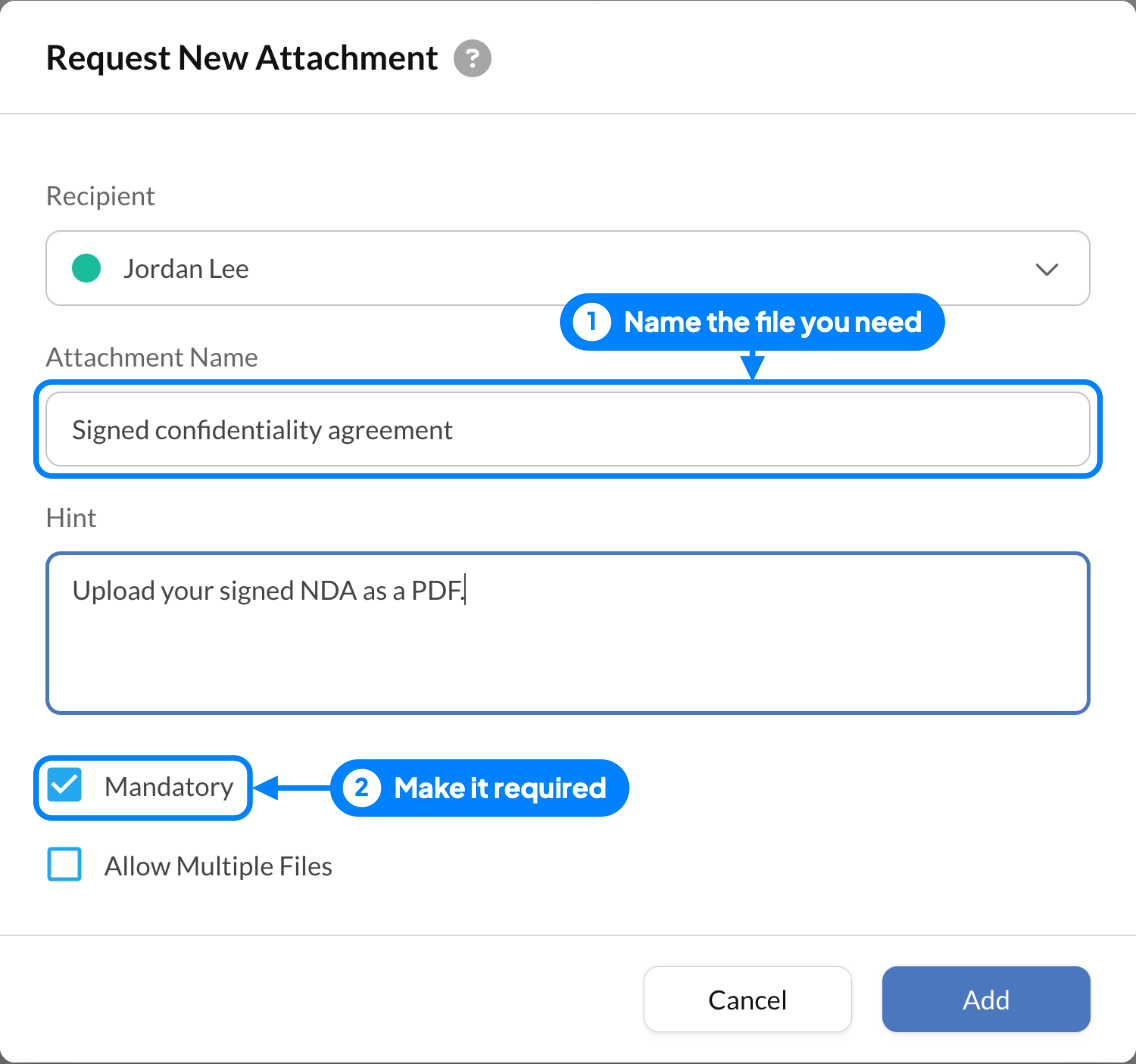
Need a document back with the signature, such as a signed NDA or a certification? Add an Attachments field and the candidate uploads the file as part of signing. Keep identity documents, payroll details, and medical information in the systems your organization designates for them.
6. Review and send
Add a short message that says what the document is and whom to contact with questions. Set reminders, and set the request's expiry to match the offer's acceptance deadline. Then review the file, addresses, signing order, verification, and fields together, and send.
The candidate signs from the email link, on a laptop or a phone, without creating a Sign.Plus account. If they answer texts faster than email, you can also send the request by SMS or WhatsApp.

7. Confirm completion and file the record
Track progress under Documents. "Viewed" means the document was opened, not signed. The signing request is complete once every required signer has finished signing. When the offer becomes binding depends on its terms and applicable law.
Then download the signed document and its Certificate of Completion, which records each recipient, the verification step they passed, and timestamped events with IP address and device. Sign.Plus keeps the certificate separate from the signed document by default to protect signers' personal data, and you can download both as one PDF when you want them together. File them in your HR system under the access and retention rules for that document type.
What if you're the candidate signing the offer letter?
Signing an offer letter online takes a few minutes. Open the email from the employer, select the review link, and read the whole letter before you sign, especially the salary, start date, and any conditions. If the request asks for a passcode or a text message code, the employer has added a check to make sure the right person signs. Select each highlighted field, add your signature, and finish. Once everyone has signed, you'll get a copy of the completed letter; keep it with your own records. If anything in the letter is wrong, decline and tell the employer instead of signing.
Are electronic signatures valid for employment documents?
US law looks for four things in a valid electronic signature, and a good signing platform covers each one:
- Intent to sign: the person takes a clear action, such as selecting a signature field and confirming it.
- Consent to sign electronically: everyone agrees to do business electronically. The context usually shows it, and an offer email that explains the process removes any doubt.
- A link to the document: the signature is attached to that exact document.
- A record everyone can keep: each signer can store and reproduce the signed document later.
In the US, the federal ESIGN Act says a signature or contract can't be denied legal effect solely because it is in electronic form (15 U.S.C. § 7001). Most states have also adopted the Uniform Electronic Transactions Act (UETA), which gives electronic records and signatures the same effect at state level. ESIGN doesn't require anyone to agree to electronic signatures, so keep a paper route for an employee who asks for one.
An electronic signature doesn't make an otherwise unenforceable term valid, and rules outside the US differ. For the US framework in more detail, see our overview of electronic signature laws in the United States. This guide explains general rules and is not legal advice.
Keep Form I-9 in its own workflow
Electronic signatures are allowed on Form I-9, but federal rules set specific requirements for electronic I-9 systems, including security, retention, and how signatures are captured (8 CFR § 274a.2). Adding a signature field to an I-9 PDF doesn't meet those requirements on its own, so run I-9s through a process designed for them. Check tax and benefits forms against their own rules too.
How can HR reuse the workflow?
Templates for documents you send every week
Sign.Plus templates save the fields, roles, signing steps, reminders, and expiry for documents you send repeatedly. Build each template from clean content, not a previous employee's signed file, give it an owner and a version label, and update it when the policy or agreement changes. Before each send, still check the person-specific terms: a reused layout doesn't update a salary.
Bulk Send for company-wide acknowledgments
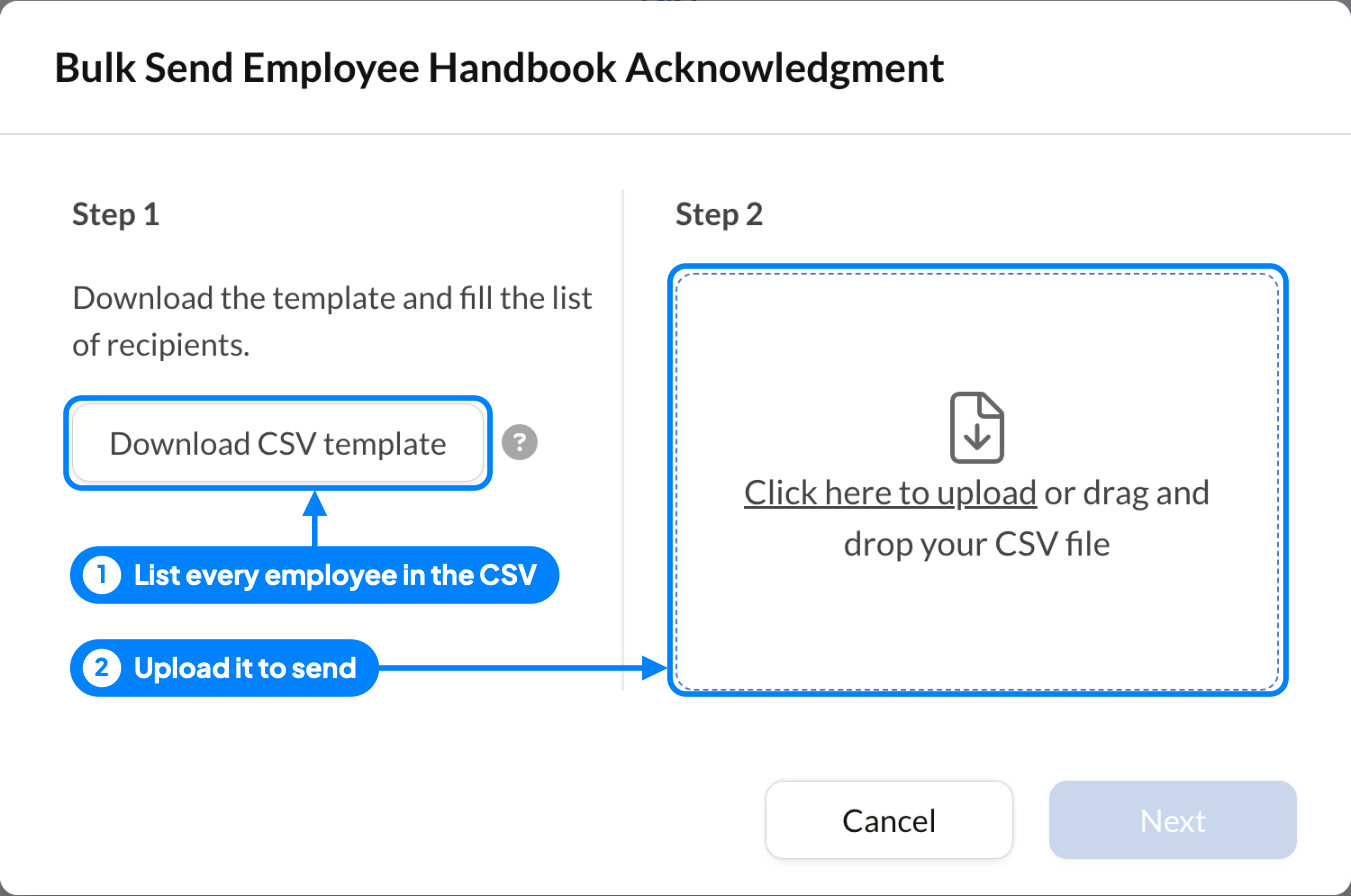
When a policy changes for everyone, Bulk Send on Business and Enterprise plans lets you send one template to a list of recipients. Download the CSV template, keep its headers unchanged, and add up to 100 rows. Upload the completed CSV, review the requests, then select Send. Each person gets their own request and their own signing record.
In-person signing on day one
For new hires who start at the office, in-person signing lets them sign on your tablet or computer without waiting for an email.
What mistakes slow down HR e-signatures?
- Sending before the terms are final. A signed offer with the wrong salary means starting over. Approve first, then send.
- One check for every document. An email link is fine for a handbook acknowledgment. A new hire you've never met signing an employment agreement deserves a passcode, a text message code, or an ID check.
- Vague acknowledgment wording. "Signature" alone doesn't say whether the employee received a policy or agreed to it.
- Fields assigned to the wrong person. The company signer's line ends up on the candidate's side. Color-coded fields make this easy to catch before sending.
- Leaving signed files in inboxes. Download the signed document and its Certificate of Completion and file them in your HR system right away.
- Forgetting people without a laptop. Field and shift workers often only have a phone. Make sure the request works on mobile and can arrive by text message.
What if a signing request needs attention?
| Situation | Next step |
|---|---|
| The candidate can't find the request | Confirm the address, ask them to check spam, or resend by SMS or WhatsApp |
| The candidate has a question about a term | Have the offer owner answer it before you send a reminder |
| The offer terms changed | Void the request, correct the document, and send a new one |
| The company signer is unavailable | Confirm an authorized replacement, then check whether reassignment is available for this request. If it is not, contact Support before reissuing it. |
| The employee prefers paper | Offer your approved paper process |
| Everyone has signed | Download and file the document and its Certificate of Completion |
Why HR teams use Sign.Plus
- Signer checks matched to the document. Passcode, SMS code, or ID Check per recipient, with the document hidden until the check is passed.
- Less personal data in view. ID Check shows the employer a confirmation and legal name only; the Certificate of Completion is kept separate from the signed document by default.
- Evidence kept for the long run. The audit trail and Certificate of Completion are kept indefinitely, so the record is there when a question comes up years later.
- Independently audited security. Certified to ISO/IEC 27001:2022 by EY CertifyPoint, with a SOC 2 Type 2 report from EY. Enterprise plans also offer data residency options for document storage.
Ready to send your first one? Set up an offer letter template and add recipient verification for candidates you haven't met in person.
FAQs
Can I send an offer letter for electronic signature?

Yes. In the US, ESIGN and state laws based on UETA say a signature can't be denied legal effect only because it is electronic. Finalize the terms, add the candidate and the company signer, set the signing order, and send. The offer still needs to meet the usual rules for the terms it contains.
Is a signed offer letter binding?
Signing an offer letter electronically has the same effect as signing it on paper. Whether the letter creates binding obligations depends on its wording and on state law; many US offer letters state that employment is at will. If you're unsure what a specific letter commits you to, ask an employment attorney.
What is the best electronic signature software for HR teams?
Look for verification you can choose per signer, a clear audit trail and completion certificate, templates and bulk sending for recurring documents, signing on mobile without an account, and independently audited security. Sign.Plus covers all five, with ID Check that shows the employer only a confirmation and the signer's legal name.
Does an employee's signature mean they agree with a performance review?
Only if the wording says so. State in the document whether signing acknowledges receipt of the review or agreement with the assessment.
Do candidates need a Sign.Plus account to sign?
No. Candidates sign from the link in their email, on a computer or phone, without creating an account.
Should the candidate or the employer sign an offer letter first?
Either works. Put the first signer in step one and the second in step two; Sign.Plus sends the request to step two once step one is complete.
Can I use the same workflow for Form I-9?
No. Electronic I-9s have their own federal requirements for systems, security, and retention. Use a process built for them.
What should HR keep after a document is signed?
The signed document and its Certificate of Completion, filed together under the access and retention rules for that document type.

Related guides





Confédération Suisse
Confederazione Svizzera
Confederaziun Svizra
Confederazione Svizzera
Innosuisse - Agenzia svizzera per l'innovazione



