


Yousign Review 2026 (Now Youtrust): Pricing, Limits, and the Best Yousign Alternatives
Yousign is now Youtrust, a French e-signature provider with its own qualified trust services. We compared every plan, the yearly-only features, QES pricing, data location, security, the API and contract terms, sent a test agreement, and ranked the best Yousign alternatives for 2026.


- Yousign is now called Youtrust. Free allows 2 signature requests a month, One costs €11 for 10 a month, and Plus (€30) and Pro (€48) per user per month include unlimited simple signatures, excluding VAT on monthly billing.
- AES, SSO, SCIM and archiving require yearly billing, and bulk send is capped at 1 campaign a month on Plus and 10 on Pro.
- Youtrust is its own qualified trust service provider, but QES is only on Plus and Pro at €15 per signature, or €10 in annual bundles of 10 or more.
- Documents are hosted only in France, and the terms require 15 or 30 days' notice before renewal with no partial refunds.
- Sign.Plus is our winner: unlimited signature requests on Professional at $19.99, QES on every plan for $5 per recipient and up to 43 storage locations.
Youtrust is the new name of Yousign, the French e-signature provider. The company changed its name in 2026, and the app is moving to the new brand step by step through 2027, so many users still see Yousign in emails and on the sign-in page.
Is Yousign (Youtrust) Worth It in 2026?
Only if you need a French qualified trust service provider and can commit to yearly billing for advanced features. For most teams, the plan card leaves out several conditions.
The Free plan allows two signature requests a month and One allows ten. Advanced signatures (AES), SSO and SCIM are sold only on yearly billing, and qualified signatures (QES) start on Plus at €15 per signature, or €10 when bought in bundles of ten or more on an annual plan. Bulk send is capped at one campaign a month on Plus and ten on Pro, and documents are hosted only in France.
Sign.Plus Professional costs $19.99 per user per month on annual billing and includes unlimited signature requests, 10 templates, in-person signing, public forms and a monthly SMS or WhatsApp allowance. QES is available on every Sign.Plus plan for $5 per recipient, and Enterprise customers can choose from 43 storage locations.
Yousign (Youtrust) Pros and Cons
Pros
- Plus and Pro include unlimited simple signatures, SMS authentication, templates, Zapier and HubSpot.
- Data is hosted in France, and the company lists ISO/IEC 27001 certification for the system that runs its trust services.
Cons
- One is capped at ten signature requests a month, and extra requests wait until the next month.
- AES, SSO, SCIM and electronic archiving are available only on yearly billing.
- QES starts on Plus at €15 per signature, or €10 in bundles of ten or more on annual plans, and is not available on Free or One.
- Bulk send is limited to one campaign a month on Plus and ten on Pro.
- Documents are hosted only in France, with no storage choice published.
- Youtrust's help center says QES requests do not get an audit trail in the app.
What Is Yousign (Youtrust)?
Youtrust is a French digital trust platform built on three products: Sign for simple, advanced and qualified electronic signatures, Verify for identity, company and bank-account checks, and Seal for electronic seals. Yousign announced the change of name in 2026 and moved its website to youtrust.com in July 2026. According to the company, the application moves to the new brand progressively by 2027, and pricing, contracts and support stay the same.
The signature application is sold in four plans, Free, One, Plus and Pro, with a sales quote for teams of more than five users. The API is sold separately on yearly plans.
Which Youtrust Plan Is Which?
| Name you see | What it is | Published price |
|---|---|---|
| Free | One user, 2 signature requests a month | €0 |
| One | One user with 10 signature requests a month | €11 per month, or €9 on annual billing |
| Plus | Unlimited simple signatures for individuals and teams | €30 per user per month, or €23 on annual billing |
| Pro | Adds bulk signatures, document collection and custom experiences | €48 per user per month, or €38 on annual billing |
| Custom offer | More than 5 users or extra modules | Contact sales |
All prices exclude VAT. Annual billing gives two months free.
How We Compared These Services
E-signature is what we work on every day. We build and run Sign.Plus for everyone from freelancers and small offices to healthcare providers, law firms and international companies, and we follow the questions teams ask when they compare tools or move away from one.
For this guide we read Youtrust's application and API pricing pages, plan comparison, security and certification pages, terms, privacy policy, data processing agreement, rebrand announcement and help center articles on QES, cancellation, account closure and declining to sign. We also checked the EU trusted list. We rechecked every price on the vendors' own pages in November 2026. Where a capability is marked as not published or not listed, Youtrust does not state it in the public materials reviewed. That makes it a question to confirm with Youtrust, not proof that the capability is unavailable.
We also tested Youtrust hands-on. We sent a test agreement and signed it as an external recipient.
1. Yousign (Youtrust) Pricing: Every Plan
Youtrust publishes prices in euros, excluding VAT. On monthly billing, One costs €11 per month, Plus €30 per user per month and Pro €48 per user per month. Annual billing gives two months free and brings the monthly equivalent down to €9, €23 and €38: €108 a year for One, €276 per user for Plus and €456 per user for Pro.
How to Read Youtrust's Plans
Five details determine the actual cost:
- Requests are capped on Free and One. Free allows two signature requests a month and One allows ten. On One, requests over the limit can be saved as drafts and sent the next month. A request can contain several documents and up to 100 signers.
- Some features need yearly billing. AES on Plus and Pro, and SSO, SCIM and electronic archiving on Pro, are marked yearly only.
- QES is paid per signature. It is available on Plus and Pro at €15 per signature when bought individually (one to nine), or €10 when bought in bundles of ten or more on an annual plan. Individually bought credits expire after three months.
- Bulk send has a monthly cap. Plus includes one bulk send a month and Pro ten.
- Forms cost extra below Pro. Automated Forms is a paid add-on from €10 per month on One and Plus and is included in Pro.
Youtrust Plans
| Plan | Monthly billing | Annual billing | Signature requests | Highlights |
|---|---|---|---|---|
| Free | €0 | €0 | 2 per month | Unlimited self-signing, inbox, automatic reminders, signature and seal verification |
| One | €11 per month | €108 a year (€9 per month) | 10 per month | Basic fields, custom logo, real-time tracking, 1 template |
| Plus | €30 per user per month | €276 per user a year (€23 per month) | Unlimited simple signatures | SMS authentication, approvals, unlimited templates, 5 workspaces, Zapier, HubSpot; AES yearly only, QES paid per signature |
| Pro | €48 per user per month | €456 per user a year (€38 per month) | Unlimited simple signatures | Bulk signatures (10 per month), document collection, custom experiences, Forms, 10 workspaces; SSO and SCIM yearly only |
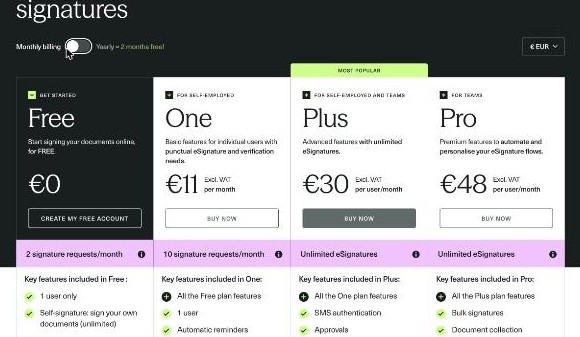
All prices exclude VAT. One, Plus and Pro include free verification credits: five identity, three company and two bank-account checks.
Is Yousign Free?
Yes. Youtrust's Free plan costs nothing and allows unlimited self-signing plus two signature requests a month for one user. Paid plans can also be tried with a 14-day free trial, and new sign-ups start on that trial.
How Youtrust Pricing Compares
| Platform | Team plan | Sending model |
|---|---|---|
| Sign.Plus | Professional: $19.99 per user per month, annual billing | Unlimited signature requests |
| Youtrust | Plus: €23 per user per month, annual billing (€30 monthly) | Unlimited simple signatures |
| DocuSign | Standard: $25 per user per month, annual billing | 100 envelopes per user per year |
| PandaDoc | Starter: $19 per seat per month, annual billing | Unlimited e-signatures in the app |
| Dropbox Sign | Standard: $25 per user per month, annual billing, 2-user minimum | Unlimited on paid plans |
| Skribble | Team: €23 or CHF 23 per user per month, annual billing | Unlimited SES; pooled AES and QES allowance |
2. Yousign QES and eIDAS
Youtrust is a qualified trust service provider in France. The EU trusted list names Youtrust with qualified certificates for electronic signatures, qualified seals and qualified time stamps, and its terms say it is qualified by ANSSI, the French cybersecurity agency.
For a QES, the signer completes an asynchronous video identity check: they film an identity card, passport or residence permit and their face. Each self-serve QES credit allows up to three identification attempts. QES is available only on Plus and Pro.
How Youtrust QES Access Compares
| Platform | Qualified signature (QES) | Cost |
|---|---|---|
| Sign.Plus | Available on every plan, including Free | $5 per recipient, identity verification included |
| Youtrust | Plus and Pro only | €15 per signature individually; €10 in bundles of 10+ on annual plans |
| Skribble | Every plan | €5 or CHF 5 per QES on Starter, plus a one-time €22.50 or CHF 22.50 identification fee per signer |
| DocuSign | Listed on Enhanced | Priced by sales |
| Signeasy | Not published | Not published |
Sign.Plus supports QES under eIDAS and Swiss ZertES through Swisscom Trust Services on every plan, including Free. QES uses separately purchased credits, and purchased credits do not expire. Read more about eIDAS signatures and ZertES signatures.
For simple and advanced signatures, both platforms keep a downloadable audit trail with timestamps for each step. One difference: Youtrust's help center says an audit trail is not available for QES requests in its app. Sign.Plus keeps an audit trail and an E-Signature Certificate for every completed document, whatever the signature level.
3. Where Your Documents Live
Youtrust says its solutions are hosted exclusively in France, with data replicated across several geographic areas. Evidence files are archived with Arkhinéo, a third-party archiving provider. No other storage location is published.
How Youtrust Data Residency Compares
| Platform | Company based in | Storage choice | Can documents move later? |
|---|---|---|---|
| Sign.Plus | Geneva, Switzerland | Switzerland by default; 43 locations on Enterprise | Yes |
| Youtrust | France | France only | Not published |
| DocuSign | United States | Five regions on Enhanced | No, the region is set when the account is created |
| Dropbox Sign | United States | US, Australia, EU, Japan, Canada or UK on Premium | Not published |
| Skribble | Switzerland | Switzerland or Germany | No, fixed while the customer contract is in force |
Both providers host documents in Europe by default: Youtrust in France and Sign.Plus in Switzerland. The difference is choice. Sign.Plus stores documents in Switzerland by default. Enterprise customers can select from 43 locations across the Americas, Europe, Asia Pacific, the Middle East and Africa, and documents can move later if business or regulatory requirements change. See the Sign.Plus guide to what data residency means for e-signatures.
Looking for a Swiss Alternative?
If your team wants documents outside France or a choice of location per customer, Sign.Plus stores data in Switzerland by default and offers 43 locations on Enterprise, with QES available on every plan.
Sign.Plus is built by Alohi, headquartered in Geneva. Alohi is dedicated to protecting personal data and upholds the standards set by the GDPR.
4. Youtrust Security and Compliance
Youtrust encrypts stored data with AES-256 and data in transit with TLS, runs annual third-party technical audits and a bug bounty program. Its certification page lists ISO/IEC 27001 for the system that operates its eIDAS trust services, and a Youtrust blog article also mentions SOC 2 Type II. On security certifications, both providers cover the main European buyer checklist. HIPAA and PHIPA are not mentioned in the public materials we reviewed.
How Youtrust Compliance Compares
| Platform | ISO 27001 | SOC 2 Type 2 | HIPAA and BAA | PHIPA |
|---|---|---|---|---|
| Sign.Plus | Certified to ISO/IEC 27001:2022 by EY CertifyPoint | Report from EY | Enterprise with Advanced Security Controls and a signed BAA | Enterprise with Advanced Security Controls and a signed PHIPA Service Provider Agreement |
| Youtrust | Listed for the system that runs its trust services | Mentioned in a Youtrust blog; not listed on its security page | Not published | Not published |
| Signeasy | Not listed on its security page | Type II per its help center | Add-on through sales; price and BAA terms not published | Not published |
| DocuSign | Yes | Yes | BAA available; listed on Enhanced | Not compared |
| Dropbox Sign | Yes | Yes | Annual Standard or Premium with a BAA and unpublished minimum contract value | Not compared |
Sign.Plus has ISO/IEC 27001:2022 certification from EY CertifyPoint, a SOC 2 Type 2 report from EY and a listing on the CSA STAR Registry. HIPAA support requires Sign.Plus Enterprise with Advanced Security Controls and a signed BAA, at a published $49.99 per user per month on annual billing. For Canadian health data, Sign.Plus supports PHIPA on Enterprise with Advanced Security Controls and a signed PHIPA Service Provider Agreement.
5. Signing Experience and Where Sign.Plus Does More
Youtrust lets external recipients sign without an account, and the signer can decline with a reason. SMS authentication starts on Plus, AES and QES identity checks require Plus or Pro, and bulk send is capped by plan.
What We Saw When Sending a Test Document
Setting Up the Request
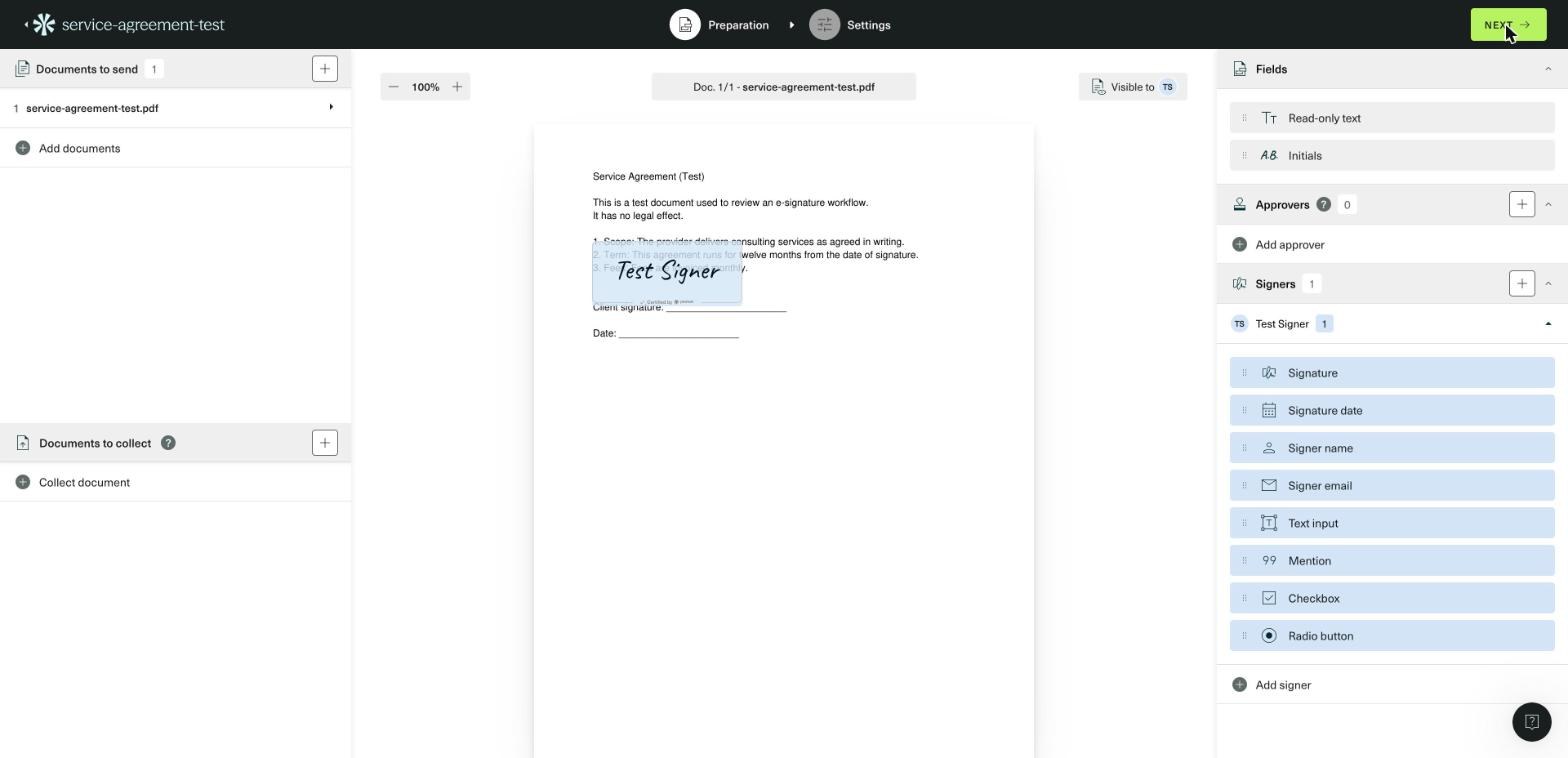
In our test, a new request opened a two-step flow, Preparation and Settings. Preparation holds the documents to send, optional documents to collect from the signer, approvers and signers. Each signer gets their own field set: signature, signature date, name, email, text input, mention, checkbox and radio button, plus read-only text and initials.
Settings and Sending
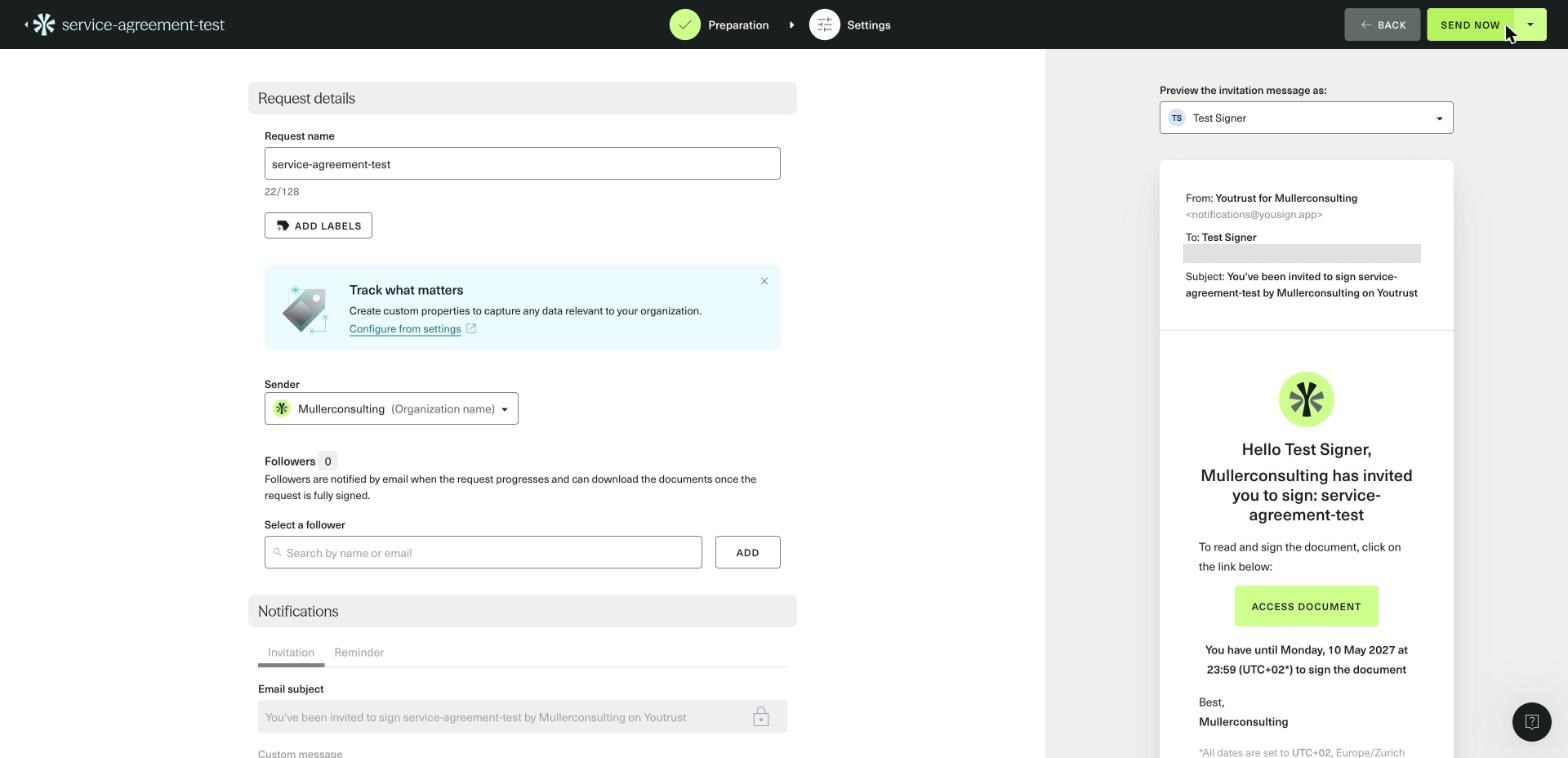
Settings covers the request name, labels, sender name, followers, a custom message and the security level. In our new account, the request was set to expire after six months, with weekly automatic reminders up to five times, and signers were allowed to decline. Simple signatures can be sent with no code, an email code or an SMS code. The email subject could not be edited, only the message. No verification step was required from the sender before sending.
The Signer's Side
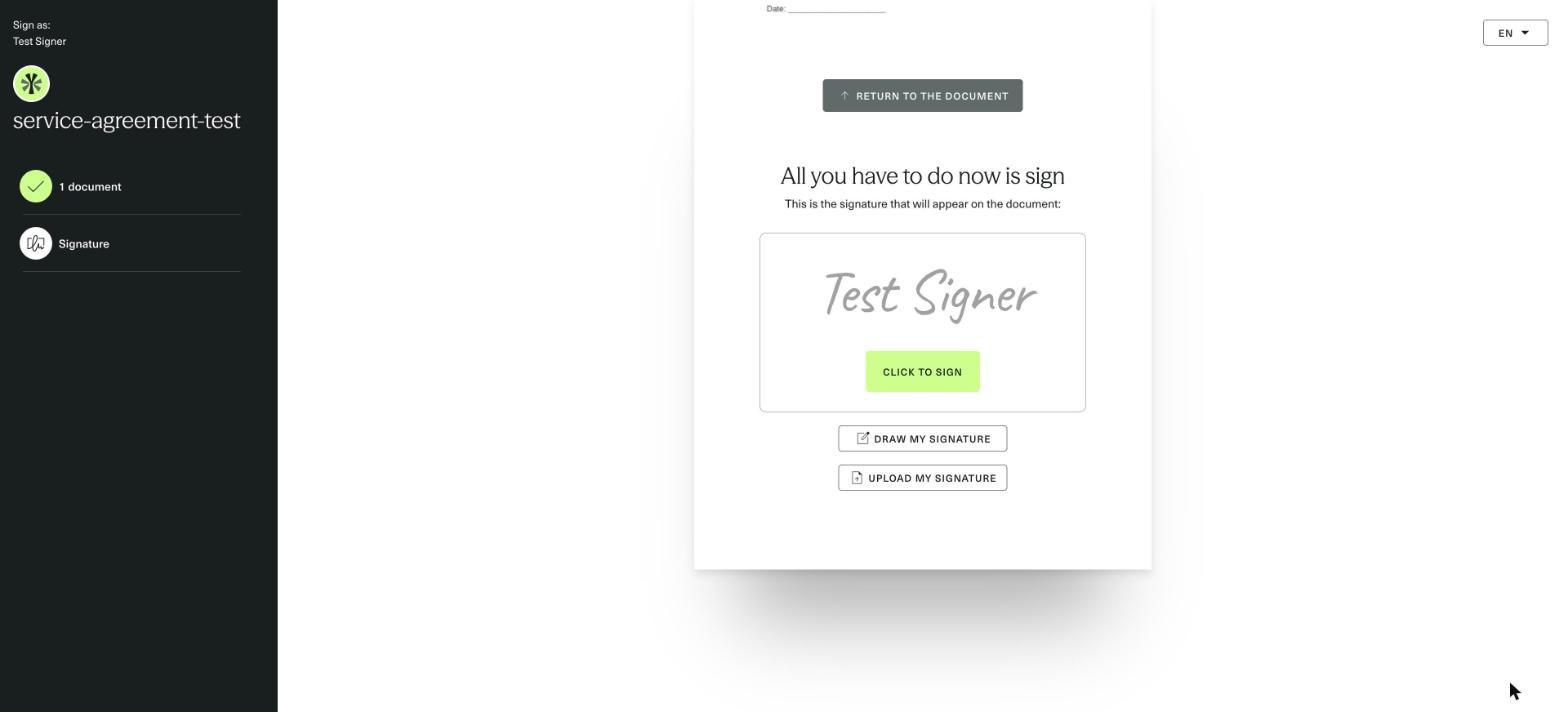
In our test, the invitation arrived within a minute and stated the signing deadline and its time zone. The link opened without an account, and the signer had to scroll to the end of the document before the Continue button became active. The signature was generated from the signer's name, with options to draw or upload one, and a single click completed the signature. The final screen offered the signed document for download right away.
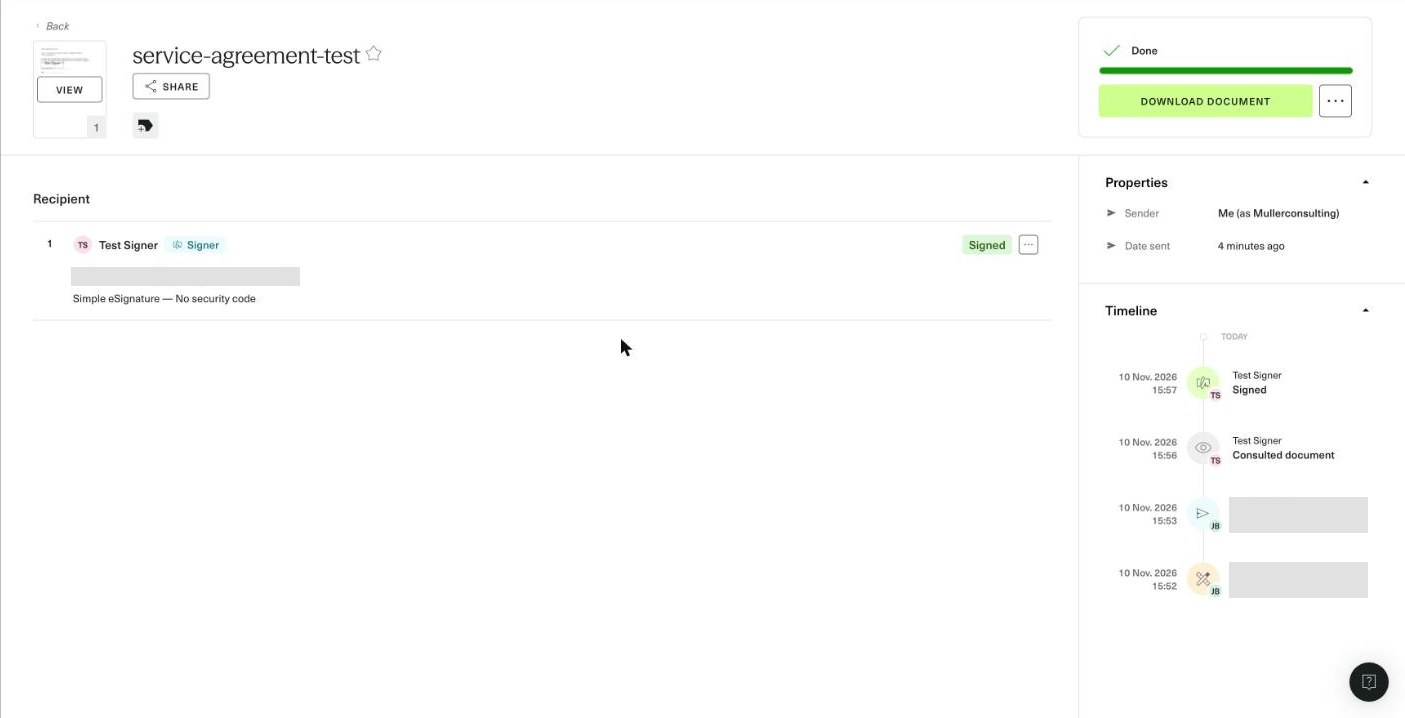
Back in the sender account in our test, the request page showed a timeline of each step, and the signed document, the audit trail and the field data could each be downloaded separately.
How the Youtrust Signing Experience Compares
Both platforms let external recipients sign from the email link without an account, and both let a signer decline with a reason, which cancels the request and shows the reason to the sender. Sign.Plus publishes the price of each signing workflow:
- Preparing the document. Sign.Plus Auto-Place places fields automatically on uploaded documents for the sender to review and assign.
- Choosing recipient verification. A sender can assign a different check to each recipient on Professional: passcode verification is included, SMS code verification is available, and ID Check with a government ID costs $2 per check. Youtrust's SMS authentication starts on Plus. The video below shows a sales contract sent with signing order, buyer verification, reminders and an expiration date.
- Reaching signers by phone. Sign.Plus requests can be delivered by SMS or WhatsApp, with an allowance included in every paid seat.
- Sending in bulk. Sign.Plus Business includes bulk send without a monthly campaign cap, while Youtrust allows one a month on Plus and ten on Pro.
6. Youtrust API and Developer Access
Youtrust sells its API separately from the application plans. A free sandbox runs for 40 days. Production API plans are billed yearly, signatures over the quota cost €2 each, and AES, QES, seals and verification services may involve additional charges. The base API prices were not visible on the pricing page we reviewed.
How Youtrust's API Compares
| Plan level | Youtrust API | Sign.Plus API, annual billing |
|---|---|---|
| Testing | 40-day free sandbox | Sandbox for testing |
| Entry | Yearly plans; price not visible on the pricing page | Essential: $75.99 per month, 50 requests |
| Higher volume | €2 per signature over quota | Grow: $279.99 per month, 200 requests; Scale: $659.99 per month, 600 requests |
| AES and QES | May involve additional charges | Supported on every API plan; QES credits cost extra |
What this means for you. Ask Youtrust for its API quote and check how multi-party documents count toward the quota. Every Sign.Plus API plan supports SES, AES and QES. See Sign.Plus API plans.
Single Sign-On (SSO)
Youtrust lists SSO and SCIM on Pro with yearly billing only. Sign.Plus includes SSO on Enterprise at $49.99 per user per month on annual billing.
7. Check Recent Yousign Reviews
Pricing pages and terms explain what a provider promises. Recent users can show how the product works in practice. We do not summarize changing review scores here. Instead, search for current experiences and look for patterns across several sources.
- "Yousign QES identification", to see how the video identity check works for signers.
- "Youtrust cancellation", to check notice periods and renewals in practice.
- "Yousign API pricing", if developers need a quote.
- "Yousign avis", for reviews from French users.
Sort independent review sites and community forums by the most recent date. Treat individual complaints as personal experiences and look for recurring themes rather than drawing a conclusion from one review.
Should You Switch?
Youtrust remains a reasonable choice for French and European teams that want a domestic qualified trust service provider and are happy with hosting in France and yearly billing for AES and SSO. Switching becomes more attractive when you need qualified signatures on every plan at a lower price, a choice of storage location, bulk send without monthly caps or monthly billing for advanced features.
Sign.Plus is the stronger overall choice for teams that want unlimited signature requests and common signing workflows on Professional, QES on every plan, published API tiers and Enterprise options for SSO, 43 storage locations and HIPAA support with Advanced Security Controls and a signed BAA.
Contract Terms to Read Before You Sign
- Automatic renewal. Monthly subscriptions renew each month and annual subscriptions each year unless you terminate them.
- Notice periods. Cancel at least 15 days before a monthly renewal and 30 days before an annual renewal. Multi-year terms require three or six months' notice.
- No partial refunds. The terms say no pro rata reimbursement may be requested when you cancel.
- Access after termination. The terms say access to the platform and documents is withdrawn when the contract ends, while the help center says documents remain accessible after canceling a paid plan. Download what you need before the end date.
- Closing the account. Closing an account is irreversible, and you have 14 days to download documents and audit trails.
How to Switch From Yousign
- Check the renewal date and notice period. Send your cancellation at least 15 or 30 days before renewal.
- Export signed documents and audit trails. Download the files your retention policy requires before access ends.
- List features in use. Note QES volume, bulk send, Forms, Verify checks, SSO and API dependencies so you can compare like for like.
- Rebuild recurring documents. Create your most-used templates and forms in the new platform first.
- Run an end-to-end test. Test one agreement on a computer and phone, including recipient verification and completion evidence.
- Cancel before renewal. Keep both systems available long enough to finish requests already in progress.
Best Yousign (Youtrust) Alternatives
Yousign Alternatives at a Glance
| Platform | Team plan, annual billing | Sending limit | Best for |
|---|---|---|---|
| Sign.Plus | $19.99 | Unlimited | In-person signing and forms on Professional, QES on every plan and flexible Swiss-led storage |
| Youtrust | €23 for Plus | Unlimited SES on Plus; 10 per month on One | French teams that want a domestic QTSP |
| DocuSign | $25 | 100 envelopes per user per year | Low-volume standard signing |
| PandaDoc | $19 | Unlimited in the app | Proposals and quotes |
| Dropbox Sign | $25, 2-user minimum | Unlimited on paid plans | Teams whose files live in Dropbox |
| SignNow | $8 per account | 100 invites per account per year | A few simple agreements each year |
| Adobe Acrobat Sign | $23.99 for Acrobat Pro for teams, billed monthly | No caps in Acrobat; 150 per user per year on Sign Solutions | Teams that edit PDFs in Acrobat |
| Zoho Sign | $16 for Professional | Unlimited from Professional | Teams already using Zoho CRM or Zoho One |
| Skribble | €23 or CHF 23 | Unlimited SES; pooled AES/QES allowance | DACH teams using several European signature standards |
| Signeasy | $20 for Business | Unlimited with fair usage; 5 per month on Personal | Individuals who mostly sign on mobile |
Sign.Plus: Best Overall Yousign Alternative
Sign.Plus is our pick for teams that send contracts every week and want common signing workflows at published prices. Professional includes unlimited signature requests, up to five users, 10 templates, in-person signing, public forms and attachment requests for $19.99 per user per month on annual billing. Passcode verification is included, SMS code verification is available and ID Check costs $2 per check.
Every Sign.Plus plan, including Free, supports QES at $5 per recipient, with identity verification included in that price. Purchased QES credits do not expire. Enterprise adds SSO and 43 storage-location choices. HIPAA support requires Enterprise with Advanced Security Controls and a signed BAA, and PHIPA support requires Enterprise with Advanced Security Controls and a signed PHIPA Service Provider Agreement. Sign.Plus is built by Alohi in Geneva, Switzerland, is certified to ISO/IEC 27001:2022 and has a SOC 2 Type 2 report. Compare Sign.Plus plans and start a free trial.
Best for: teams that need unlimited signing, reusable templates, in-person signing, public forms, optional recipient verification, qualified signatures and flexible storage choices.
DocuSign: Standard Signing With an Annual Envelope Allowance
DocuSign Standard costs $25 per user per month on annual billing and includes 100 envelopes per user per year. Qualified signatures, data residency, SSO and HIPAA support are listed on Enhanced, which is priced by sales. See our DocuSign review for the full breakdown.
Best for: teams that send a modest number of standard agreements and stay under the annual envelope allowance.
PandaDoc: Proposals and Quotes
PandaDoc Starter costs $19 per seat per month on annual billing, with unlimited uploads and e-signatures. Business costs $49 and adds CRM integrations, approval workflows and branding. Documents created through the API, forms or bulk send use paid usage credits. See our PandaDoc review for the full breakdown.
Best for: sales teams that build proposals and quotes every week.
Dropbox Sign: Signing Alongside Dropbox Files
Dropbox Sign costs $15 per month on Essentials for one user and $25 per user per month on Standard, with a two-user minimum, on annual billing. Paid plans include unlimited signature requests. SSO and data residency sit on Premium, priced by custom quote. See our Dropbox Sign review for the full breakdown.
Best for: teams whose files already live in Dropbox.
SignNow: Low Per-Account Subscription
SignNow prices its plans per account with unlimited users. Starter costs $8 per month and Business costs $30 per month on annual billing. Every self-serve annual plan shares 100 signature invites per account per year, and declined or canceled invites still count. See our SignNow review for the full breakdown.
Best for: small teams that send only a few simple agreements each year.
Adobe Acrobat Sign: Signing Inside a PDF Editor
Adobe builds e-signing into Acrobat Standard, Pro and Studio, from $14.99 per month for individuals and $23.99 per license per month for Acrobat Pro for teams on annual billing. Acrobat Sign Solutions is priced by quote and includes 150 transactions per user per year unless the contract states otherwise. See our Adobe Acrobat Sign review for the full breakdown.
Best for: teams that edit PDFs in Acrobat every day.
Zoho Sign: Signing Within the Zoho Ecosystem
Zoho Sign Standard costs $10 per user per month on annual billing, while Professional costs $16 and includes unlimited envelopes. In-person signing, bulk send, SignForms and API access are listed on Enterprise, and several actions use prepaid Zoho Sign credits. See our Zoho Sign review for the full breakdown.
Best for: teams already working in Zoho CRM, Zoho Books or Zoho One.
Skribble: Swiss QES With Expiring Quotas
Skribble Team costs €23 or CHF 23 per user per month and Pro €36 or CHF 36 on annual billing, excluding VAT, with unlimited simple signatures and a pooled 72 or 120 advanced and qualified signatures per user per year. Every signer counts separately, unused signatures expire, QES signers pay a one-time identification fee of €22.50 or CHF 22.50, and the Swiss or German data center is fixed for the whole contract. See our Skribble review for the full breakdown.
Best for: DACH teams that need SES, AES and QES in one platform.
Signeasy: Mobile Signing With Add-Ons Sold Through Sales
Signeasy Business costs $20 per seat per month on annual billing with unlimited sending under a fair-usage note, while Personal sends only five documents a month. SMS sending, bulk send, SSO and HIPAA are add-ons priced through sales, and no QES offering is published. See our Signeasy review for the full breakdown.
Best for: individuals who mostly sign on mobile.
Final Verdict
Youtrust, formerly Yousign, fits teams that want a French qualified trust service provider, unlimited simple signatures on Plus and identity verification in the same platform, and that accept hosting in France and yearly billing for AES and SSO.
Sign.Plus is our winner overall. Professional costs $19.99 per user per month on annual billing and includes unlimited signature requests, 10 templates, in-person signing, public forms, passcode verification and a monthly SMS or WhatsApp allowance. SMS codes and ID Check are available at separate published prices, and QES is available on every plan for $5 per recipient, including identity verification. Enterprise adds SSO, 43 storage locations, HIPAA support with Advanced Security Controls and a signed BAA, and PHIPA support with Advanced Security Controls and a signed PHIPA Service Provider Agreement.
FAQs
Is Yousign now Youtrust?

How much does Yousign cost?
Is Yousign free?
Does Yousign offer qualified electronic signatures?
Is Yousign legally binding?
Where does Yousign store data?

Articles à la une



Confédération Suisse
Confederazione Svizzera
Confederaziun Svizra
Confédération suisse
Innosuisse - Agence suisse pour l'encouragement de l'innovation


