


MSA vs SOW: Prepare and Sign Related Agreements
Compare MSA vs SOW, check precedence and signing sequence, and prepare approved related agreements for electronic signature with clear recipient access.


- The MSA sets relationship terms; the SOW defines a particular engagement. Their wording determines the actual allocation.
- Read incorporation, precedence and amendment clauses; neither document automatically overrides the other.
- Confirm applicable versions, authorized signers and completion conditions before sending or starting work.
- Group documents only when recipients may access the whole request, then retain the completed agreements and signing evidence together.
What is the difference between an MSA and an SOW?
A master services agreement (MSA) sets the framework for a services relationship; a statement of work (SOW) describes the work for a particular engagement. Businesses often use an MSA across several projects and prepare an SOW for each one. The documents’ wording determines their relationship, which terms control and what must happen before work begins.
For example, the MSA may address confidentiality and liability while the SOW specifies deliverables, project fees and milestones. These are common allocations, not mandatory document boundaries. An SOW may also be a standalone agreement if it contains the necessary terms; its title alone does not decide that.
| Question | Master services agreement (MSA) | Statement of work (SOW) |
|---|---|---|
| Main purpose | Sets a framework for the business relationship and the services it covers. | Describes a specific project or engagement and its agreed scope. |
| Typical content | General payment rules, confidentiality, intellectual property, liability, dispute resolution and termination. | Deliverables, milestones, responsibilities, assumptions, acceptance criteria, project fees and schedule. |
| Reuse | May govern several projects, subject to its coverage and term. | Usually prepared or updated for the particular engagement. |
| Before signature | Confirm entities, authority, approved terms, effective date and how later documents become part of the relationship. | Confirm the referenced MSA, project details, permitted variations and required signatures or approvals. |
| When documents conflict | Read its precedence and amendment provisions rather than assuming it always wins. | Check whether and how it can vary master terms; resolve conflicts before sending. |
The paired structure is used in practice: Harvard EHS publishes an MSA statement-of-work template for its service contractors and vendors. Its institutional process is an example, not a rule for every US services contract.
Which document takes priority?
Neither “the MSA always wins” nor “the latest SOW wins” is a safe universal rule. Read the incorporation, precedence and amendment clauses together. Check whether an SOW must identify a particular master clause to override it, and whether that variation needs additional approval.
A publicly filed MSA, section 2.3, illustrates one approach: master terms control a conflict unless the applicable SOW expressly identifies the term being superseded. That is the parties’ chosen wording in that agreement, not an SEC rule or a standard outcome for all contracts.
If the documents disagree on fees, intellectual property, acceptance or another material term, ask the contract owner to resolve the inconsistency before preparing the signing request. Sending both files together does not fix a contradiction.
Does the MSA have to be signed before the SOW?
The agreement and approved process determine the sequence. A business may complete the MSA first, sign both documents together, or prepare a later SOW under an existing MSA. Confirm the signatures, approvals and effective-date conditions required for the particular transaction.
Separate document sequence from signer order. The first asks which agreements must be in place; the second asks which people receive a request first. Completing one request does not automatically complete a related agreement in another request.
Prepare related agreements for signature
- Identify the correct relationship. Match the legal entities in both documents. Confirm the MSA is the applicable version, is in force where required and covers this engagement; a parent company’s agreement may not automatically cover its subsidiary.
- Make references traceable. Give the SOW its project name or identifier and identify the MSA it incorporates. Review attachments, effective dates and approved exceptions. Keep the final approved versions distinct from working drafts.
- Confirm who signs what. Check each representative’s authority and transaction limits. A project manager may approve delivery details without authority to enter the agreement; use the company-signing authority checklist where needed.
- Choose the request structure. Use a shared request only when the approved process and recipient access fit. Use separate requests when documents need different recipient groups, confidentiality boundaries or completion conditions.
- Check readiness to start. Record who confirms all required agreements and approvals are complete. A signature notification is not by itself authorization to begin work under every related document.
Send the approved documents with Sign.Plus
When the same recipient group needs both documents, you can upload the approved MSA and SOW into one Sign.Plus request. Add the required signers and any appropriate copy recipients, then assign each signer’s fields to the correct document.
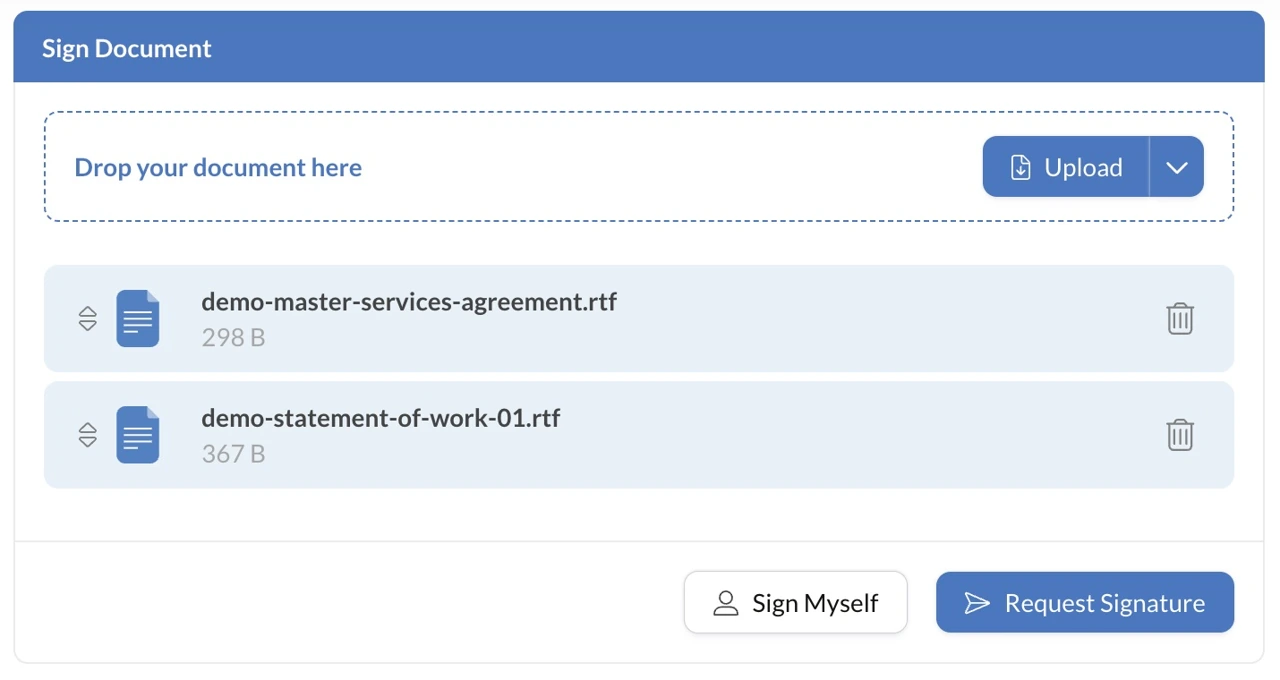
Assigning no fields on a document does not hide that document from a recipient. Everyone included in the request can access its documents. If an internal pricing schedule or another file must be restricted to a different group, keep it out of that shared request and use the appropriate separate process.
Configure signing steps to match the approved recipient sequence. Review every document, field assignment and recipient before sending; choose available verification, reminders and expiry settings appropriate to the transaction. Verification checks access or identity, not authority to bind the company.
After all required signers finish, retain the completed agreements and their signing evidence. Cross-reference any separately signed MSA, SOW and approved amendment in your designated contract record so a reviewer can identify the governing set.
A US services example
Illustrative scenario: a North Carolina IT consultancy has an approved MSA with a business customer. For a new network-assessment project, its SOW identifies that MSA and specifies deliverables, customer access responsibilities, fees and acceptance criteria.
The account owner checks that the entities and current terms match, confirms the authorized signers and sends the approved SOW. If the proposed project changes a master term, the contract owner first determines the required exception or amendment process. After completion, operations receives the signed SOW and the applicable MSA reference, rather than treating an accepted quote as the entire contract record.
FAQs
Do I need both an MSA and an SOW?

Not for every engagement: some businesses use a standalone services agreement, while others use an MSA with project-specific SOWs. Have the contract owner confirm which documents and approvals the transaction requires.
Does an SOW override an MSA?
Only as the applicable agreement and law allow; read the precedence and amendment provisions. Resolve any conflicting terms and obtain required approvals before sending the documents for signature.
Can I send an MSA and SOW in one Sign.Plus request?
Yes, when the approved process and recipient access fit a shared request. Every included recipient can access the request’s documents, so use separate requests where different confidentiality or recipient groups are required.

Related guides



Confédération Suisse
Confederazione Svizzera
Confederaziun Svizra
Confédération suisse
Innosuisse - Agence suisse pour l'encouragement de l'innovation


