


How to Route One Agreement to Multiple Signers
Choose parallel or sequential signing for one agreement. Set the right roles, assign each field and check which step must finish before the next begins.


- Use one signing request when several people must sign the same agreement.
- Signers in the same Sign.Plus signing step can act in parallel. A later step waits for all required signers in the preceding step.
- Needs to Sign and Receives a Copy serve different purposes. A copy recipient does not replace a required signer's action.
- Assign fields to the correct person and review the full route before sending. Bulk Send is a separate workflow for individual requests.
Start with one agreement, not a list of email addresses
When several parties need to sign the same agreement, prepare one request with the required signers and a deliberate signing order. Decide who can act at the same time and who must wait. Then assign each signature, date and other required field to its intended recipient.
When each person needs to sign a separate instance of the same document, start with separate requests prepared from a CSV. That is a different task from putting everyone on one agreement.
Choose parallel, sequential or a combination
| Route | Use it when | What to check |
|---|---|---|
| Parallel | Signers can act independently on the same approved terms | No signer's action must depend on another person's earlier signature |
| Sequential | A later signer should receive the request only after an earlier signing step finishes | The order reflects a real business requirement |
| Parallel group, then a later step | Several people may sign independently before a final countersignature | Every required signer in the earlier step must finish before the later step starts |
Parallel signing can avoid an unnecessary queue. Sequential signing is useful when the order matters, but every extra dependency creates another point where the request may wait.
A Texas property manager needs two tenants to sign the same approved lease before the management company countersigns. The tenants can share the first step; the company signer belongs in the second. If one tenant has not signed, the company's later step has not started.
Set the steps in Sign.Plus
In Add Recipients, add the people who need to sign and, where your plan makes the option available, people who only need a copy. Use Add Signing Step to separate a later stage. The documented recipient and signing-step setup supports several signers in one step followed by another step.
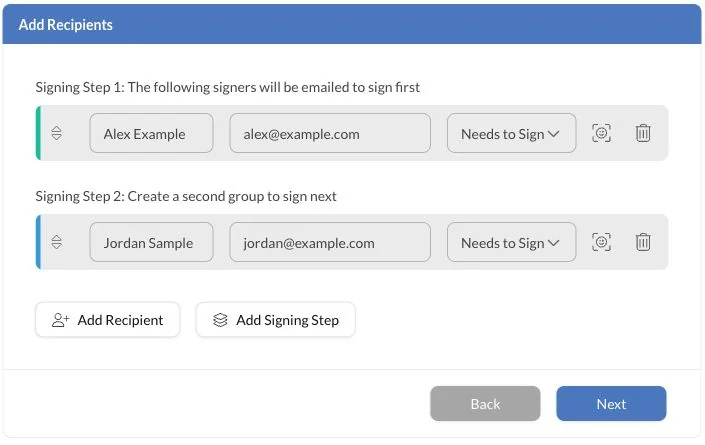
For a parallel group, place its required signers in the same step. Put a dependent signer in a later one. Do not use signing order as an internal negotiation process: settle the document terms and obtain any necessary internal approval before sending the signature request.
Separate signing from receiving a copy
Someone who must execute the agreement needs a signing role. Someone who only needs the record may be a copy recipient. An employee's job title, a message saying “please approve” or an email copy does not by itself create a required signing action.
Keep recipient roles distinct from your organization's authority to enter the agreement. A person can receive and complete a signing request without the software deciding whether they have the necessary corporate authority.
Assign fields one recipient at a time
- Select a recipient. Check the person's name, address and role before placing fields.
- Place that person's fields. Include the signatures, initials or information the approved document requires.
- Review the assignment. A field placed next to the right name can still belong to the wrong recipient.
- Repeat for each signer. Make sure a person who only receives a copy has not been substituted for someone who must sign.
- Review the whole request. Confirm the document version, route, authentication choices and expiry before sending.
For reused paperwork, template roles help prepare a consistent structure. You still need to connect each role to the correct actual recipient for this transaction.
Check the active step before chasing a signature
If a later signer says no request arrived, inspect the preceding step first. They may be waiting for another required signer rather than experiencing a delivery problem. Use the status-to-next-action checks to distinguish a routing dependency from missing email, a declined request or an expired document.
Completion also means checking the whole request, not just one person's confirmation email. When the signing process is complete, file the signed agreement and its completion evidence together.
FAQs
Can two people sign the same document at the same time?

Yes. In Sign.Plus, required signers in the same signing step can act in parallel. A subsequent step begins after the required signing actions in the earlier step are complete.
Should an internal reviewer be added as a copy recipient?
Use a copy role only when receiving a copy is the required action. It does not create an approval gate or a required signature. Complete internal approvals before sending, or include an actual required signer where the document and process call for one.
Why has the next signer not received the request?
First check whether every required signer in the preceding step has finished. If the next step is active, check the recipient address, request status and delivery. A later step waiting on an earlier signer is different from a missing email.

Related guides



Confédération Suisse
Confederazione Svizzera
Confederaziun Svizra
Swiss Confederation
Innosuisse - Swiss Innovation Agency


