


Xodo Sign Review 2026 (Formerly eversign): Pricing, Limits, and the Best Xodo Sign Alternatives
Xodo Sign, formerly eversign, publishes its prices, but Basic caps templates at three, no QES offering is published and there is no choice of storage region. We compared every plan, QES, data location, security, HIPAA, the API and contract terms, sent a test agreement, and ranked the best Xodo Sign alternatives for 2026.


- Xodo Sign is the new name of eversign. Basic costs $20 and Professional $32 per user per month, or $10 and $16 on annual billing; Basic includes only 3 templates.
- The Free plan allows one document every seven days, and SMS and bulk sending run on credits.
- No QES offering was found on Xodo Sign's public pages, and no customer-selectable storage region is published.
- HIPAA support needs a BAA through sales with no published plan or price, and refunds are generally not offered.
- Sign.Plus is our winner: unlimited signature requests and 10 templates on Professional at $19.99, QES on every plan for $5 per recipient and 43 storage locations.
Xodo Sign is the new name of eversign, an e-signature service owned by Apryse, the company behind the Xodo PDF tools. The website still runs on eversign.com, and emails say "Xodo Sign (formerly eversign)".
Is Xodo Sign Worth It in 2026?
Only if you need basic e-signing with PDF editing and do not need qualified signatures, a choice of data location or published healthcare terms. For most teams, the limits below matter more than the card price.
Basic includes only three templates, the Free plan allows one document every seven days, and no qualified electronic signature (QES) offering appears on Xodo Sign's public pages. HIPAA support requires a BAA through sales with no published plan or price, and Xodo Sign does not offer a customer-selectable storage region.
Sign.Plus Professional costs $19.99 per user per month on annual billing and includes unlimited signature requests, 10 templates, in-person signing, public forms and a monthly SMS or WhatsApp allowance. QES is available on every Sign.Plus plan for $5 per recipient, and Enterprise customers can choose from 43 storage locations.
Xodo Sign Pros and Cons
Pros
- Signers do not need a seat or an account and sign for free.
- Basic and higher plans include unlimited documents, and every account includes long-term validation (LTV) of signatures.
- Professional combines e-signing with PDF editing, redaction and an AI document summary.
Cons
- Basic includes only three templates.
- The Free plan allows one document every seven days, and Xodo Sign's help articles give different signer limits for it.
- No QES offering was found on Xodo Sign's public pages.
- HIPAA support requires a BAA through sales, with no published plan or price.
- No customer-selectable storage region is published, and the listed subprocessors show US data locations.
- Refunds are generally not offered.
What Is Xodo Sign?
Xodo Sign is a web-based e-signature service for individuals and small teams, with mobile apps, templates, in-person signing, bulk sending, an API and a built-in PDF editor. Apryse renamed eversign to Xodo Sign, and the contracting entity in its terms is eversign GmbH, doing business as Xodo Sign, under California law.
Xodo Sign sells Basic, Professional and Enterprise plans for e-signing, a Free plan described in its pricing FAQ, and separate API plans.
Which Xodo Sign Plan Is Which?
| Name you see | What it is | Published price |
|---|---|---|
| Free | One document every seven days | $0 |
| Basic | Unlimited documents with 3 templates | $20 per user per month, or $10 on annual billing |
| Professional | Adds unlimited templates, bulk sending, branding, in-person signing and PDF editing | $32 per user per month, or $16 on annual billing |
| Enterprise | Custom workflows, volume sending and a dedicated account manager | Contact sales |
How We Compared These Services
E-signature is what we work on every day. We build and run Sign.Plus for everyone from freelancers and small offices to healthcare providers, law firms and international companies, and we follow the questions teams ask when they compare tools or move away from one.
For this guide we read Xodo Sign's pricing page and plan comparison, compliance page, terms, the Apryse privacy notice, the Xodo Sign subprocessor list and help center articles on HIPAA, SOC 2, signer authentication, LTV, refunds and account deletion. We rechecked every price on the vendors' own pages in November 2026. Where a capability is marked as not published or not listed, Xodo Sign does not state it in the public materials reviewed. That makes it a question to confirm with Xodo Sign, not proof that the capability is unavailable.
We also tested Xodo Sign hands-on.
1. Xodo Sign Pricing: Every Plan
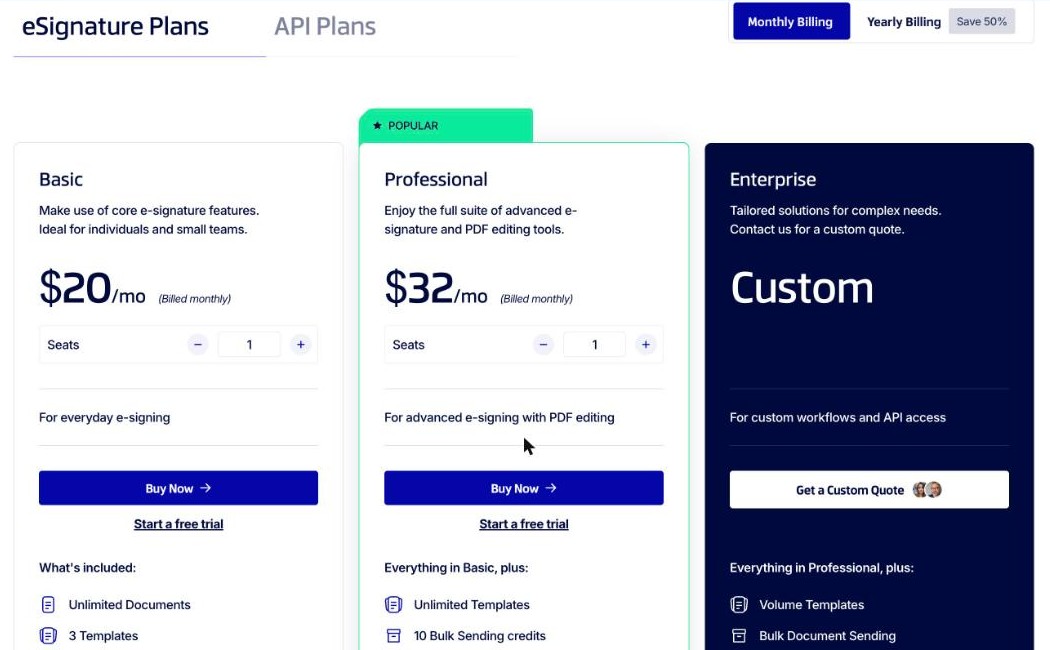
Xodo Sign publishes prices in US dollars per user. On monthly billing, Basic costs $20 and Professional $32 per user per month. Annual billing halves that to $10 and $16 per user per month.
How to Read Xodo Sign's Plans
Four details determine the actual cost:
- Templates are capped on Basic. Basic includes three templates, and unlimited templates start on Professional.
- SMS and bulk sending run on credits. Professional lists 10 bulk-sending credits and 10 SMS credits per seat, and Xodo Sign's help center charges $0.25 per SMS-authenticated signer over the allowance.
- The Free plan has a weekly limit. The pricing FAQ describes it as up to five documents a month, or one document every seven days.
- Annual billing halves the price. Yearly billing saves 50%, and plans renew automatically.
Xodo Sign Plans
| Plan | Monthly billing | Annual billing | Documents | Highlights |
|---|---|---|---|---|
| Free | $0 | $0 | 1 every 7 days | Audit trail |
| Basic | $20 per user | $10 per user per month | Unlimited | 3 templates, mobile apps, Zapier, Dropbox and Gmail integrations, email support |
| Professional | $32 per user | $16 per user per month | Unlimited | Unlimited templates, 10 bulk and 10 SMS credits per seat, branding, in-person signing, PDF editing, AI summary |
| Enterprise | Contact sales | Contact sales | Unlimited | Volume templates and SMS, extra seats, dedicated account manager |
Is Xodo Sign Free?
Xodo Sign has a Free plan that allows one document every seven days. Its help articles give different signer limits for the Free plan, so check the current limit before relying on it. A seven-day free trial of Professional is also available without a card, and the account moves to Free when it ends.
How Xodo Sign Pricing Compares
| Platform | Team plan, annual billing | Sending model |
|---|---|---|
| Sign.Plus | Professional: $19.99 per user per month | Unlimited signature requests, 10 templates |
| Xodo Sign | Professional: $16 per user per month ($32 monthly) | Unlimited documents, unlimited templates |
| DocuSign | Standard: $25 per user per month | 100 envelopes per user per year |
| Dropbox Sign | Standard: $25 per user per month, 2-user minimum | Unlimited on paid plans |
| Signeasy | Business: $20 per seat per month | Unlimited, with a fair-usage restriction |
2. Xodo Sign QES and eIDAS
Xodo Sign says its signatures work in compliance with the US ESIGN Act and the EU eIDAS regulation, and every account includes long-term validation (LTV). No QES offering or qualified trust service provider was found on the pricing, compliance or help pages we reviewed. For agreements that legally require a qualified signature in the EU or Switzerland, confirm with Xodo Sign before relying on it.
How Xodo Sign QES Access Compares
| Platform | Qualified signature (QES) | Cost |
|---|---|---|
| Sign.Plus | Available on every plan, including Free | $5 per recipient, identity verification included |
| Xodo Sign | Not published | Not published |
| Youtrust | Plus and Pro only | €15 per signature individually; €10 in bundles of 10+ on annual plans |
| Skribble | Every plan | €5 or CHF 5 per QES on Starter, plus a one-time €22.50 or CHF 22.50 identification fee per signer |
| DocuSign | Listed on Enhanced | Priced by sales |
Sign.Plus supports QES under eIDAS and Swiss ZertES through Swisscom Trust Services on every plan, including Free. QES uses separately purchased credits, and purchased credits do not expire. Read more about eIDAS signatures and ZertES signatures.
3. Where Your Documents Live
Xodo Sign does not publish a customer-selectable storage region. The Apryse privacy notice allows personal data to be processed in Canada, the United States, Europe, the UK and other countries, and the Xodo Sign subprocessor list shows US data locations for providers including Amazon Web Services, Twilio and Mailchimp. When the AI summary is used, document content is sent to Google Gemini.
How Xodo Sign Data Residency Compares
| Platform | Company based in | Storage choice | Can documents move later? |
|---|---|---|---|
| Sign.Plus | Geneva, Switzerland | Switzerland by default; 43 locations on Enterprise | Yes |
| Xodo Sign | eversign GmbH, part of Apryse | No region choice published; subprocessors list US data locations | Not published |
| DocuSign | United States | Five regions on Enhanced | No, the region is set when the account is created |
| Dropbox Sign | United States | US, Australia, EU, Japan, Canada or UK on Premium | Not published |
| Youtrust | France | France only | Not published |
Sign.Plus stores documents in Switzerland by default. Enterprise customers can select from 43 locations across the Americas, Europe, Asia Pacific, the Middle East and Africa, and documents can move later if business or regulatory requirements change. See the Sign.Plus guide to what data residency means for e-signatures.
Sign.Plus is built by Alohi, headquartered in Geneva. Alohi is dedicated to protecting personal data and upholds the standards set by the GDPR.
4. Xodo Sign Security and Compliance
Xodo Sign lists SOC 2 Type 2, and its help center describes this as certification through its infrastructure partners. It uses 256-bit encryption during signing, and each document comes with a tamper-evident audit trail. ISO 27001 is not published on the Xodo Sign product pages we reviewed.
On HIPAA, Xodo Sign's compliance page says customers must sign a BAA before handling protected health information, and its help center says using Xodo Sign alone does not constitute HIPAA compliance. No eligible plan or price is published. PHIPA is not mentioned on the pages we reviewed.
How Xodo Sign Compliance Compares
| Platform | ISO 27001 | SOC 2 Type 2 | HIPAA and BAA | PHIPA |
|---|---|---|---|---|
| Sign.Plus | Certified to ISO/IEC 27001:2022 by EY CertifyPoint | Report from EY | Enterprise with Advanced Security Controls and a signed BAA | Enterprise with Advanced Security Controls and a signed PHIPA Service Provider Agreement |
| Xodo Sign | Not published on its product pages | Listed, through its infrastructure partners | BAA through sales; plan and price not published | Not published |
| DocuSign | Yes | Yes | BAA available; listed on Enhanced | Not compared |
| Dropbox Sign | Yes | Yes | Annual Standard or Premium with a BAA and unpublished minimum contract value | Not compared |
| Signeasy | Not listed on its security page | Type II per its help center | Add-on through sales; price and BAA terms not published | Not published |
Both Xodo Sign and Sign.Plus list SOC 2 Type 2. The differences are ISO 27001, which Sign.Plus holds from EY CertifyPoint, and how healthcare support is sold. HIPAA support requires Sign.Plus Enterprise with Advanced Security Controls and a signed BAA, at a published $49.99 per user per month on annual billing. For Canadian health data, Sign.Plus supports PHIPA on Enterprise with Advanced Security Controls and a signed PHIPA Service Provider Agreement. Sign.Plus is also listed on the CSA STAR Registry.
5. Signing Experience and Where Sign.Plus Does More
Xodo Sign lets external recipients sign without a seat or an account, supports SMS or PIN authentication per signer, and includes in-person signing on Professional.
What We Saw When Sending a Test Document
Setting Up the Request
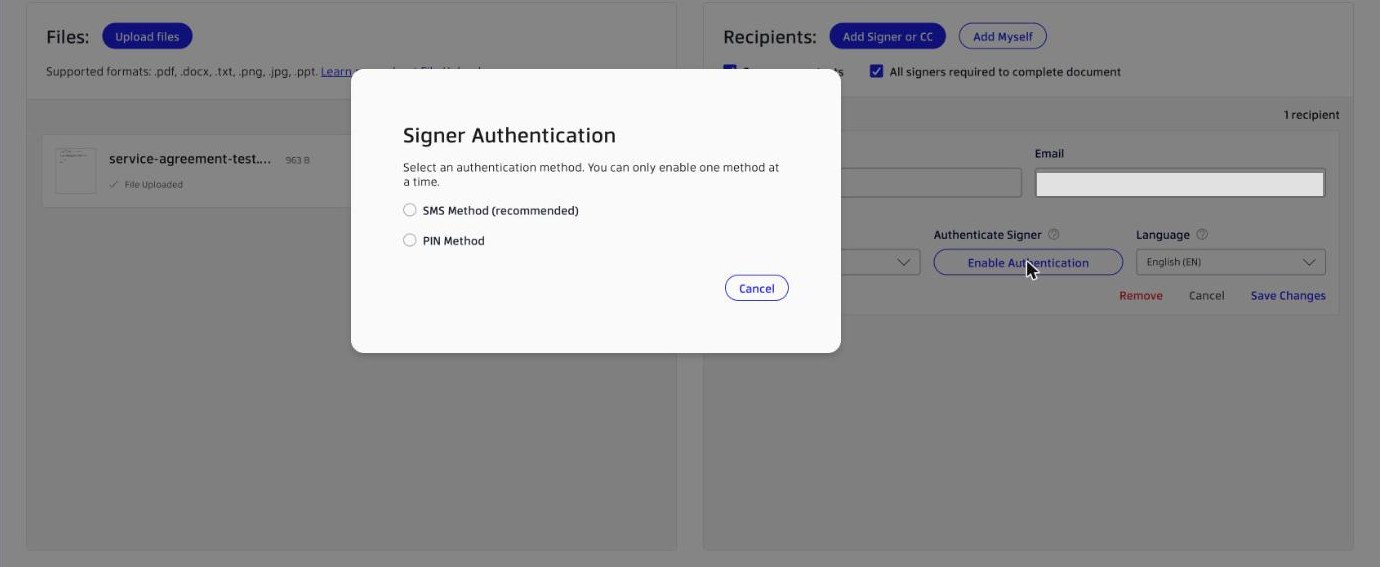
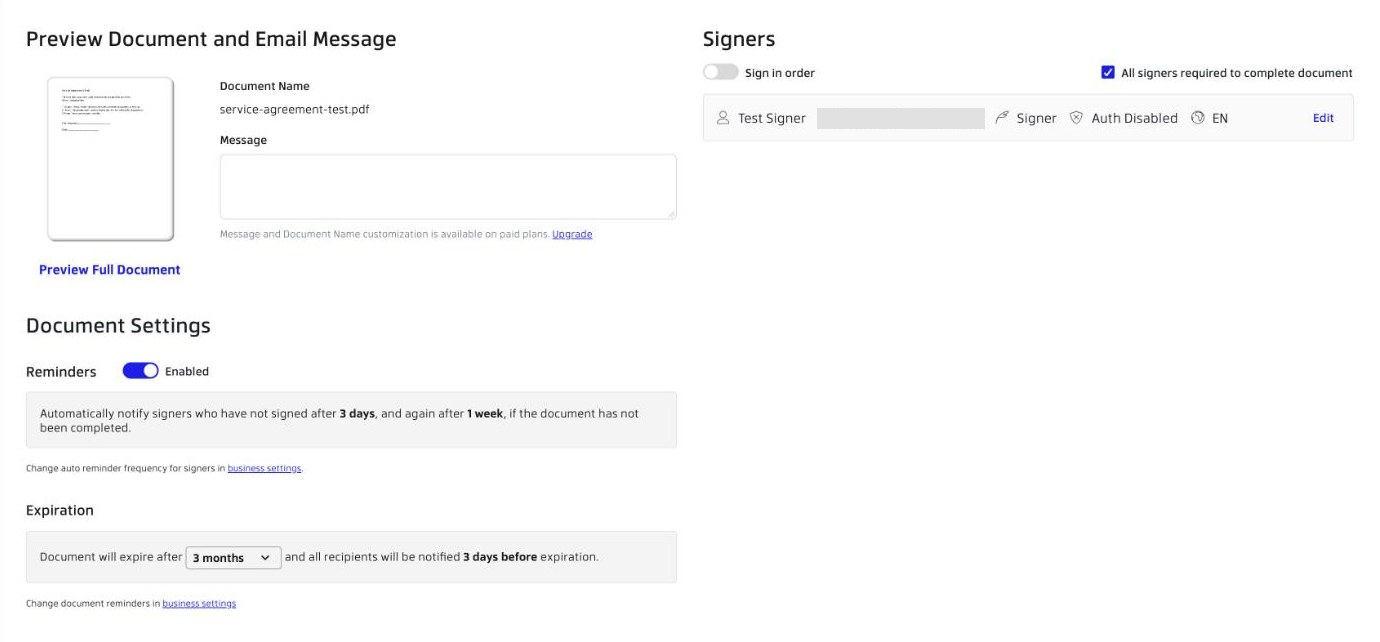
In our test, a new document followed three steps: Edit, Prepare and Review. In Edit, each recipient is a signer or a CC with a language and an optional authentication method. Xodo Sign offers SMS (marked as recommended) or a PIN, one method per signer.
Placing Fields
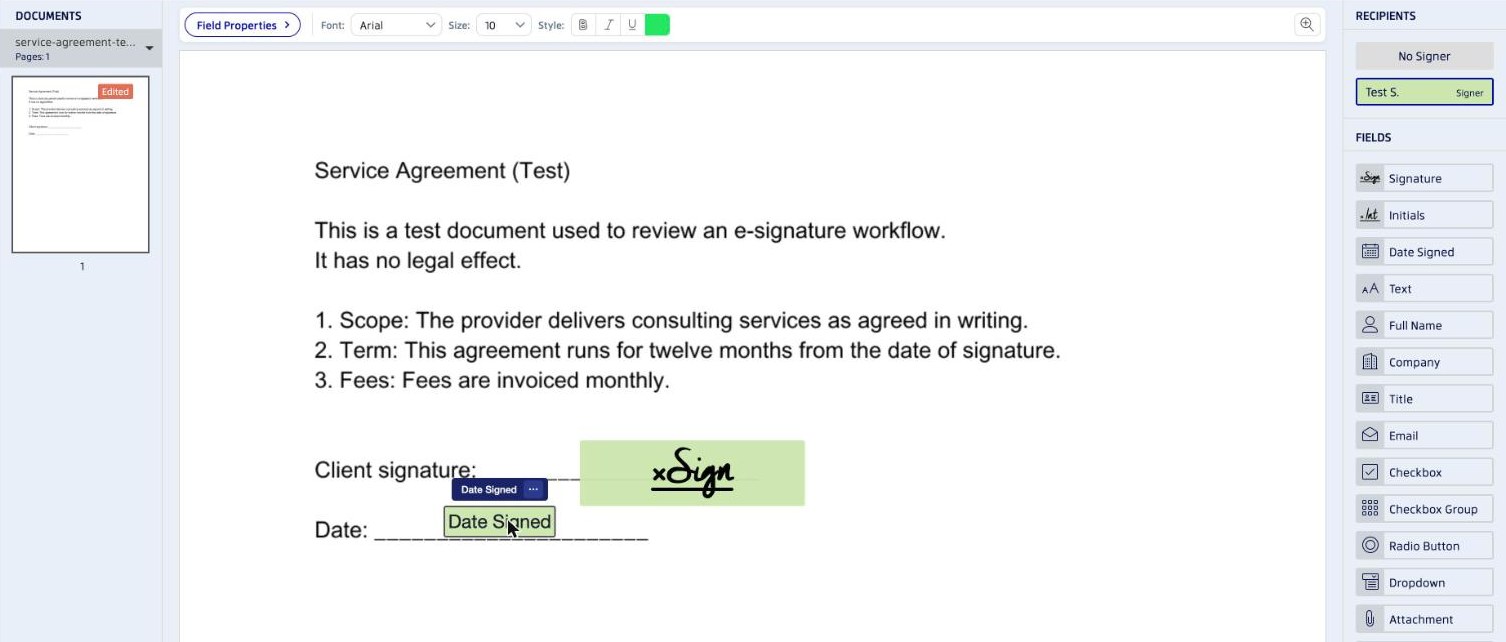
The Prepare step lists signature, initials, date signed, text, full name, company, title, email, checkbox, checkbox group, radio button, dropdown and attachment fields. Fields could be dragged straight onto the page.
Review and Sending
In our account, reminders were on by default after three days and one week, and the document was set to expire after three months, with a notice three days before. Xodo Sign's help center describes other reminder defaults, so these settings can differ by account. A final dialog warned that no changes can be made after sending.
The Signer's Side
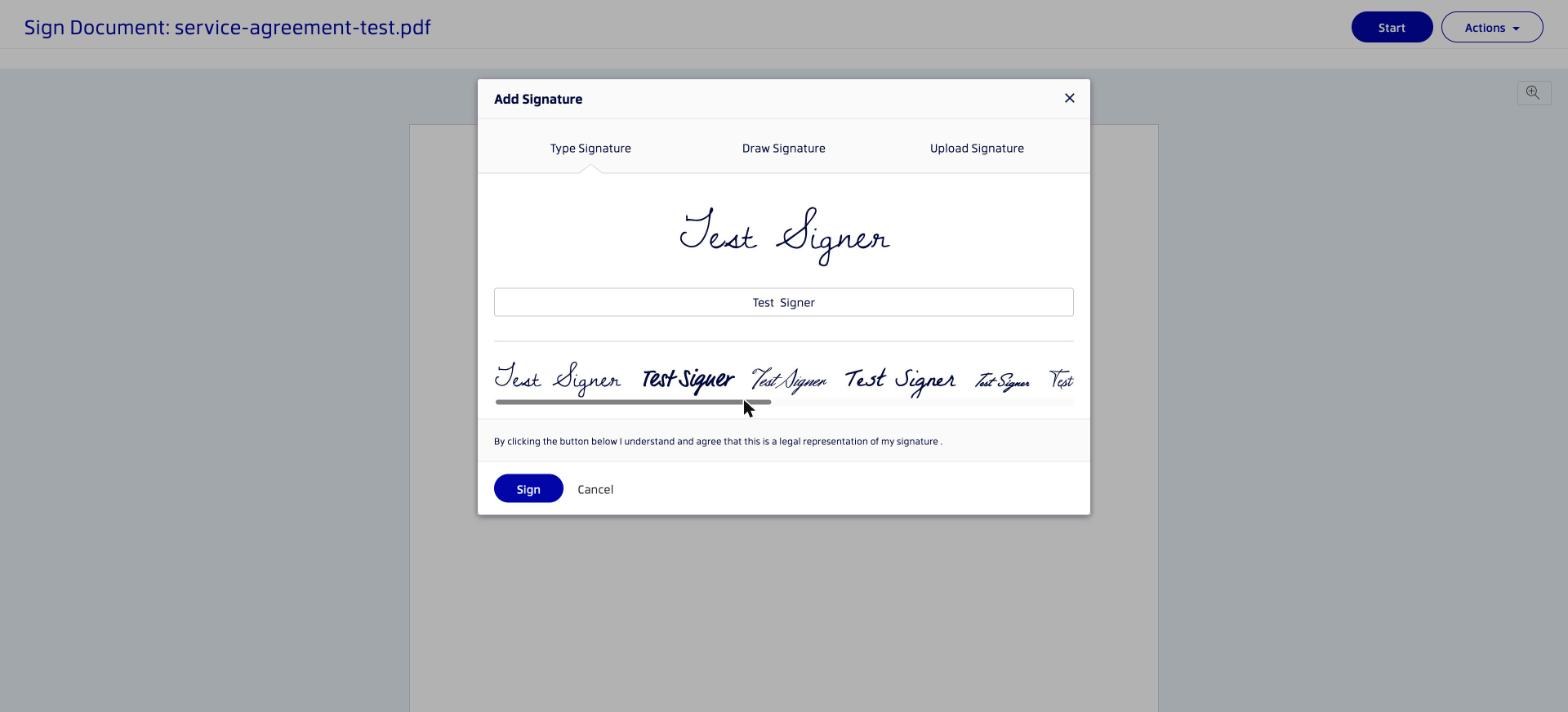
In our test, the invitation came from Xodo Sign on the sender's behalf and showed the sender's own email address. The signing page offered Reassign, Decline and Download as PDF, and the date field was already filled before the signer signed. The signature window offers typed, drawn and uploaded signatures, and the signer confirms with "I Agree" to be bound by the document and the Xodo Sign terms. The completion page showed the sender's name and email and invited the signer to create a free Xodo Sign account.
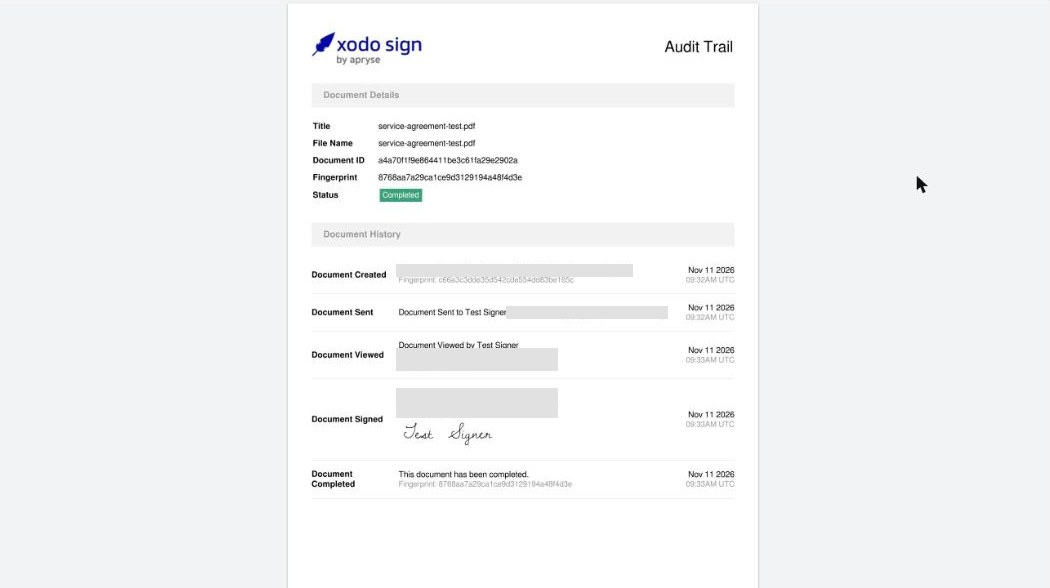
Back in the sender account, the audit trail listed when the document was created, sent, viewed, signed and completed, with the signer's IP address and UTC times, and the audit trail PDF was digitally sealed by the platform.
How the Xodo Sign Signing Experience Compares
As with Sign.Plus, recipients sign from the email link without an account and can decline, and both keep an audit trail with timestamps for each step. Where Sign.Plus goes further:
- Preparing the document. Sign.Plus Auto-Place places fields automatically on uploaded documents for the sender to review and assign.
- Choosing recipient verification. A sender can assign a different check to each recipient on Professional: passcode verification is included, SMS code verification is available, and ID Check with a government ID costs $2 per check. Xodo Sign offers SMS or PIN. The video below shows an offer letter sent with signing order, candidate verification, reminders and an expiry date.
- Reaching signers by phone. Sign.Plus requests can be delivered by SMS or WhatsApp, with an allowance included in every paid seat.
- Using reusable templates. Sign.Plus Professional includes 10 templates, while Xodo Sign Basic includes three.
6. Xodo Sign API and Developer Access
Xodo Sign sells its API separately. The sandbox is free for testing, API Light costs $50 per month on annual billing for 50 documents with 10 templates, five fixed seats and a 20-credit SMS cap, and API Business is priced by quote. API plans include embedded signing, embedded requesting, webhooks, SDKs and Hidden Tags.
How Xodo Sign's API Compares
| Plan level | Xodo Sign API | Sign.Plus API, annual billing |
|---|---|---|
| Testing | Free sandbox | Sandbox for testing |
| Entry | API Light: $50 per month billed yearly, 50 documents | Essential: $75.99 per month, 50 requests |
| Higher volume | API Business: custom quote | Grow: $279.99 per month, 200 requests; Scale: $659.99 per month, 600 requests |
| AES and QES | QES not published | Supported on every API plan; QES credits cost extra |
What this means for you. If you need qualified or advanced signatures through the API, Sign.Plus supports SES, AES and QES on every API plan. See Sign.Plus API plans.
Single Sign-On (SSO)
SSO is not listed on Xodo Sign's pricing page. Sign.Plus includes SSO on Enterprise at $49.99 per user per month on annual billing.
7. Check Recent Xodo Sign Reviews
Pricing pages and terms explain what a provider promises. Recent users can show how the product works in practice. We do not summarize changing review scores here. Instead, search for current experiences and look for patterns across several sources.
- "eversign refund", to see how the no-refund policy works in practice.
- "Xodo Sign HIPAA BAA", if your team handles health data.
- "Xodo Sign free plan limit", to check the current Free plan rules.
- "Is Xodo Sign legit?", followed by the certification your procurement team requires.
Sort independent review sites and community forums by the most recent date. Treat individual complaints as personal experiences and look for recurring themes rather than drawing a conclusion from one review.
Should You Switch?
Xodo Sign can fit individuals and small US teams that want e-signing and PDF editing in one tool and do not need qualified signatures or a choice of data location. Switching becomes more attractive when you need QES, a defined storage region, published healthcare terms or more templates on an entry plan.
Sign.Plus is the stronger overall choice for teams that want unlimited signature requests and common signing workflows on Professional, QES on every plan, published API tiers and Enterprise options for SSO, 43 storage locations and HIPAA support with Advanced Security Controls and a signed BAA.
Contract Terms to Read Before You Sign
- Automatic renewal. Subscriptions renew automatically unless you terminate them, and cancellation only stops future billing.
- Refunds. Xodo Sign's help center says it does not offer refunds, and its terms limit them to narrow exceptions such as mandatory law.
- Downgrades. An annual plan downgrade takes effect at the next renewal date.
- After termination. The terms let you request your files within 30 days, after which Xodo Sign says it will delete them unless legally prohibited. Deleting the account removes all documents, templates and data permanently.
How to Switch From Xodo Sign
- Check the renewal date. Cancel before the next billing date, since refunds are generally not offered.
- Export signed documents and audit trails. Download them before closing the account, since deletion is permanent.
- List features in use. Note SMS credits, bulk sending, templates, API and integrations so you can compare like for like.
- Rebuild recurring documents. Create your most-used templates in the new platform first.
- Run an end-to-end test. Test one agreement on a computer and phone, including recipient verification and completion evidence.
- Cancel before renewal. Keep both systems available long enough to finish requests already in progress.
Best Xodo Sign Alternatives
Xodo Sign Alternatives at a Glance
| Platform | Team plan, annual billing | Sending limit | Best for |
|---|---|---|---|
| Sign.Plus | $19.99 | Unlimited | In-person signing and forms on Professional, QES on every plan and flexible Swiss-led storage |
| Xodo Sign | $16 for Professional | Unlimited on paid plans; 1 every 7 days on Free | Small US teams that also edit PDFs |
| DocuSign | $25 | 100 envelopes per user per year | Low-volume standard signing |
| PandaDoc | $19 | Unlimited in the app | Proposals and quotes |
| Dropbox Sign | $25, 2-user minimum | Unlimited on paid plans | Teams whose files live in Dropbox |
| SignNow | $8 per account | 100 invites per account per year | A few simple agreements each year |
| Adobe Acrobat Sign | $23.99 for Acrobat Pro for teams, billed monthly | No caps in Acrobat; 150 per user per year on Sign Solutions | Teams that edit PDFs in Acrobat |
| Zoho Sign | $16 for Professional | Unlimited from Professional | Teams already using Zoho CRM or Zoho One |
| Skribble | €23 or CHF 23 | Unlimited SES; pooled AES/QES allowance | DACH teams using several European signature standards |
| Signeasy | $20 for Business | Unlimited with fair usage; 5 per month on Personal | Individuals who mostly sign on mobile |
| Youtrust (Yousign) | €23 for Plus | Unlimited SES on Plus; 10 per month on One | French teams that want a domestic QTSP |
Sign.Plus: Best Overall Xodo Sign Alternative
Sign.Plus is our pick for teams that send contracts every week and want common signing workflows at published prices. Professional includes unlimited signature requests, up to five users, 10 templates, in-person signing, public forms and attachment requests for $19.99 per user per month on annual billing. Passcode verification is included, SMS code verification is available and ID Check costs $2 per check.
Every Sign.Plus plan, including Free, supports QES at $5 per recipient, with identity verification included in that price. Purchased QES credits do not expire. Enterprise adds SSO and 43 storage-location choices. HIPAA support requires Enterprise with Advanced Security Controls and a signed BAA, and PHIPA support requires Enterprise with Advanced Security Controls and a signed PHIPA Service Provider Agreement. Sign.Plus is built by Alohi in Geneva, Switzerland, is certified to ISO/IEC 27001:2022 and has a SOC 2 Type 2 report. Compare Sign.Plus plans and start a free trial.
Best for: teams that need unlimited signing, reusable templates, in-person signing, public forms, optional recipient verification, qualified signatures and flexible storage choices.
Adobe Acrobat Sign: Signing Inside a PDF Editor
Adobe builds e-signing into Acrobat Standard, Pro and Studio, from $14.99 per month for individuals and $23.99 per license per month for Acrobat Pro for teams on annual billing. Acrobat Sign Solutions is priced by quote and includes 150 transactions per user per year unless the contract states otherwise. See our Adobe Acrobat Sign review for the full breakdown.
Best for: teams that edit PDFs in Acrobat every day.
Signeasy: Mobile Signing With Add-Ons Sold Through Sales
Signeasy Business costs $20 per seat per month on annual billing with unlimited sending under a fair-usage note, while Personal sends only five documents a month. SMS sending, bulk send, SSO and HIPAA are add-ons priced through sales, and no QES offering is published. See our Signeasy review for the full breakdown.
Best for: individuals who mostly sign on mobile.
Final Verdict
Xodo Sign, formerly eversign, fits individuals and small US teams that want e-signing with PDF editing and accept the template cap on Basic, the absence of a published QES offering and no choice of storage region.
Sign.Plus is our winner overall. Professional costs $19.99 per user per month on annual billing and includes unlimited signature requests, 10 templates, in-person signing, public forms, passcode verification and a monthly SMS or WhatsApp allowance. SMS codes and ID Check are available at separate published prices, and QES is available on every plan for $5 per recipient, including identity verification. Enterprise adds SSO, 43 storage locations, HIPAA support with Advanced Security Controls and a signed BAA, and PHIPA support with Advanced Security Controls and a signed PHIPA Service Provider Agreement.
FAQs
Is Xodo Sign the same as eversign?

How much does Xodo Sign cost?
Is Xodo Sign free?
Does Xodo Sign support qualified electronic signatures?
Is Xodo Sign HIPAA compliant?
Where does Xodo Sign store data?

Featured Articles



Confédération Suisse
Confederazione Svizzera
Confederaziun Svizra
Swiss Confederation
Innosuisse - Swiss Innovation Agency


