


Dropbox Sign (Formerly HelloSign) vs SignNow (2026): Costs and a Third Option
Compare Dropbox Sign, formerly HelloSign, with SignNow on pricing, sending limits, signer verification, QES, storage and HIPAA, then consider Sign.Plus as a third option for US small teams.


- HelloSign is now Dropbox Sign. Its paid web plans include unlimited signature requests, while Standard requires at least two users.
- SignNow prices per account with unlimited users. Annual plans share up to 100 invites per account per year, and declined or canceled invites still count.
- Dropbox Sign offers QES through an eID add-on on API Premium. SignNow offers QES as a paid Site License add-on.
- Sign.Plus Professional costs $19.99 per user per month on annual billing, with no user minimum, unlimited signature requests and passcode verification.
- Sign.Plus offers QES on every plan, including Free, for $5 per recipient including identity verification. Purchased credits never expire.
HelloSign is now Dropbox Sign. Dropbox acquired HelloSign and renamed it, so searches for hellosign vs signnow or signnow vs hellosign refer to the current Dropbox Sign vs SignNow choice. This 2026 guide is for US small teams that want a simple way to upload documents, add fields and collect signatures. We tested Dropbox Sign and SignNow hands-on, sending a real test agreement through each service, and we continue retesting both as they change.
The main trade-off is clear. Dropbox Sign charges per user and includes unlimited signature requests on paid web plans. SignNow charges per account with unlimited users, but annual plans share up to 100 invites across the account. Sign.Plus offers a third model, with unlimited requests per user.
Dropbox Sign vs SignNow at a Glance
| Feature | Dropbox Sign | SignNow | Sign.Plus |
|---|---|---|---|
| Pricing Model | Per user on Standard, with a two-user minimum | Per account on Business through Enterprise, with unlimited users | Per user, with no user minimum |
| Sending Limit | Unlimited requests on paid web plans; Free includes 3 per month | Up to 100 shared invites per account per year on annual plans; 10 per account per month on monthly plans | Unlimited signature requests per user on Professional |
| Signer Verification | SMS authentication on Standard; eID add-on on API Premium | Password, SMS or phone authentication on Enterprise | Passcode verification included on Professional; SMS code and ID Check available per recipient |
| QES | Available through an eID add-on on API Premium | Available on Site License as a paid add-on | Available on every plan, including Free |
| Storage Region | US by default; six residency options on Premium tiers | US or EU from Business Premium | Switzerland by default; 43 location choices on Enterprise |
| HIPAA | Annual Standard or Premium, signed BAA and an unpublished minimum contract value | HIPAA BAA available as a paid Site License add-on | Enterprise with Advanced Security Controls and a signed BAA |
| Company | Dropbox, Inc., San Francisco | airSlate, Inc., US | Alohi, Geneva, Switzerland |
Dropbox Sign or SignNow: Which Should You Choose?
- Choose Dropbox Sign if your team sends regularly and values unlimited requests on paid web plans. Standard is the multi-user option, but it requires at least two users.
- Choose SignNow if many people need access and your account can work within its shared invite allowance. Extra invites are available, but declined and canceled invites still count.
- Consider Sign.Plus if you want unlimited requests per user. Professional also includes passcode verification, while QES is available on every Sign.Plus plan.
What Are Dropbox Sign and SignNow?
Dropbox Sign (Formerly HelloSign)
Dropbox Sign is the e-signature product of Dropbox, Inc., based in San Francisco. Dropbox acquired HelloSign and later renamed it. The HelloSign API is now the Dropbox Sign API.
Some Dropbox storage plans, including Essentials, Business and Business Plus, also include plan-dependent signing features. Check whether you are evaluating standalone Dropbox Sign or signing features included with a Dropbox storage plan.
SignNow
SignNow, also called airSlate SignNow, is the e-signature product of airSlate, Inc. The US company also owns pdfFiller, DocHub and US Legal Forms.
SignNow prices its Business through Enterprise plans per account with unlimited users. Its iOS and Android apps support sending and signing, document scanning and in-person signing.
What Is the Main Difference?
Dropbox Sign primarily ties cost to users and gives paid web plans unlimited signature requests. SignNow ties cost to the account and allows unlimited users, but limits the invites that everyone on that account shares.
The better fit depends on whether your team needs broad access or frequent sending. Sign.Plus is the third option: Professional combines per-user pricing and unlimited signature requests.
How We Compared Dropbox Sign and SignNow
We read vendor pages and sent a test agreement through each in November 2026. We compared pricing, sending limits, field placement, signer verification, QES, storage, HIPAA, API access and contract terms.
Our hands-on notes describe that test agreement and its settings, not every possible configuration. We also assessed Sign.Plus against the same categories as a third option.
1. Dropbox Sign vs SignNow Pricing
Dropbox Sign Pricing
| Plan | Published Price | Users And Main Features |
|---|---|---|
| Free | Free | Individual account; 3 signature requests per month |
| Essentials | $15 per month with annual billing; $20 monthly | 1 user; unlimited signature requests; 5 templates |
| Standard | $25 per user per month with annual billing; $30 monthly | 2 or more users; from $600 a year; 15 templates, branding, bulk send, SMS authentication and in-person signing |
| Premium | By quote | 5 or more users; SSO, data residency, advanced signer fields and multi-teams |
Contact sales for Standard with five or more users. The pricing page offers a 30-day free trial on Essentials and Standard.
SignNow Pricing
Business, Business Premium and Enterprise are priced per account and include unlimited users.
| Plan | Published Price | Main Features |
|---|---|---|
| Business | $8 per month with annual billing; $20 monthly | Core sending and signing, subject to the account invite allowance |
| Business Premium | $20 per month with annual billing; $30 monthly | Bulk send, signing links, payments, scheduled sending, team sharing and US or EU data residency |
| Enterprise | $30 per month with annual billing; $50 monthly | Branding, SMS delivery, password/SMS/phone authentication, conditional and formula fields, and approval workflows |
| Site License | From $1.50 per signature invite | Full API, SSO and premium integrations; QES, HIPAA BAA and 21 CFR Part 11 are paid add-ons |
Annual plans include up to 100 invites per account per year. Monthly plans include 10 per account per month.
How Much Does Dropbox Sign Cost Compared With SignNow?
The entry prices are not like-for-like. Dropbox Sign Essentials covers one user, while Standard requires two users. SignNow's Business through Enterprise prices cover an account with unlimited users.
Sending volume changes the comparison. Dropbox Sign's paid web plans include unlimited requests. SignNow's annual plans share up to 100 invites, with additional invites billed at a plan-dependent rate of up to $3.60.
Feature gating matters too. Dropbox Sign Standard includes branding, bulk send and SMS authentication. SignNow places bulk send and US or EU residency in Business Premium, while signer authentication and approval workflows require Enterprise.
How Dropbox Sign and SignNow Pricing Compare With Sign.Plus
The relevant Sign.Plus price comparison is with Dropbox Sign Standard. Standard costs $25 per user per month on annual billing, requires at least two users and starts from $600 a year. Sign.Plus Professional costs $19.99 per user per month on annual billing and has no user minimum.
Professional includes unlimited signature requests, 10 templates, automatic reminders, passcode verification, in-person signing and 10 SMS or WhatsApp requests per seat per month.
Against SignNow, compare usage and plan gating rather than entry prices. SignNow's annual account shares up to 100 invites, while Sign.Plus Professional includes unlimited requests. Sign.Plus includes passcode verification in Professional and places bulk send and custom branding in Business.
2. Usage Limits: Unlimited Requests vs Shared Invites
Dropbox Sign Usage Limits
Dropbox Sign's paid web plans include unlimited signature requests. Its Free plan is limited to three requests per month. Essentials includes five templates, and Standard includes 15.
The terms say that exceeding a plan's usage limits automatically upgrades the customer to the next plan. Upgrade fees are non-refundable.
SignNow Usage Limits
SignNow's unlimited users do not mean unlimited sending. Annual plans provide up to 100 invites per account per year, and monthly plans provide 10 per account per month. Everyone on the account draws from that allowance.
Declined and canceled invites still count. Additional invites can be purchased at a plan-dependent rate, up to $3.60, so the allowance is not a hard stop but does require monitoring.
How Their Usage Compares With Sign.Plus
Sign.Plus Professional includes unlimited signature requests per user. That differs from SignNow's shared account pool and Dropbox Sign Standard's two-user requirement.
For a small team, the practical choice is between paying for unlimited users with shared sending, paying per user for unlimited sending, or choosing Sign.Plus for per-user unlimited requests.
3. QES and eIDAS: Dropbox Sign vs SignNow
Which Signature Level Do You Need?
For documents that require a particular assurance level, the eIDAS regulation defines three levels:
- SES: Simple Electronic Signature
- AES: Advanced Electronic Signature
- QES: Qualified Electronic Signature
Match the level to the legal, customer or partner requirements for the document. Do not assume that every agreement needs QES or that every plan supports the same level.
How Dropbox Sign Handles QES
Dropbox Sign offers AES and QES through an eID add-on on the API Premium plan. It is arranged through an account manager or support, and its price is not published.
Providers include itsme, Belgian and Finnish eID, and SPID for eIDAS QES. Swisscom is listed for AES under eIDAS and QES under Swiss ZertES.
How SignNow Handles QES
SignNow provides SES on Business through Enterprise. AES and QES are associated with Site License, and QES is a paid add-on.
A team that needs QES should therefore look beyond SignNow's standard per-account plans and confirm the Site License requirements.
How Dropbox Sign and SignNow QES Compare With Sign.Plus
Sign.Plus offers QES on every plan, including Free, through Swisscom Trust Services for eIDAS and ZertES. QES costs $5 per recipient, including identity verification, and purchased credits never expire. Every Sign.Plus API plan also supports SES, AES and QES.
4. Where Your Documents Live
Dropbox Sign Data Residency
Dropbox Sign stores documents in the US by default. Data residency is available on UI Premium and API Premium, with a choice of the US, Australia, EU, Japan, Canada or UK.
During editing, sending or signing, a temporary copy is processed on US servers. Completed documents stay in the selected region.
SignNow Data Residency
SignNow offers US or EU data residency from Business Premium. This places residency above the entry Business plan.
SignNow does not publish whether customers can move their data residency later. Confirm that point before choosing a region if future relocation matters.
How Their Storage Options Compare With Sign.Plus
Sign.Plus stores documents in Switzerland by default. Enterprise customers can choose among 43 storage locations, and documents can move later.
That makes Sign.Plus the third option to evaluate if storage location and later relocation are part of your selection criteria.
5. HIPAA and Security Certifications
Dropbox Sign HIPAA and Security
Dropbox Sign lists SOC 2 Type II, ISO 27001, eIDAS and GDPR. HIPAA is available to customers on annual Standard or Premium with a signed BAA.
An unpublished minimum contract value also applies. A team should confirm eligibility before assuming that its chosen plan supports its HIPAA requirements.
SignNow HIPAA and Security
SignNow lists ISO 27001, SOC 2 Type II and GDPR on all plans. A HIPAA BAA is available as a paid add-on with Site License.
21 CFR Part 11 is also a paid Site License add-on. These capabilities are not included simply because an account has unlimited users.
How Their Compliance Compares With Sign.Plus
Sign.Plus Enterprise supports HIPAA with Advanced Security Controls and a signed BAA. It also supports PHIPA with a signed agreement.
Sign.Plus lists ISO/IEC 27001:2022 through EY CertifyPoint, a SOC 2 Type 2 report from EY and a CSA STAR listing. It is the third option for teams comparing the plan conditions attached to compliance.
6. Signing Experience: What We Saw Hands-On
Sending With Dropbox Sign
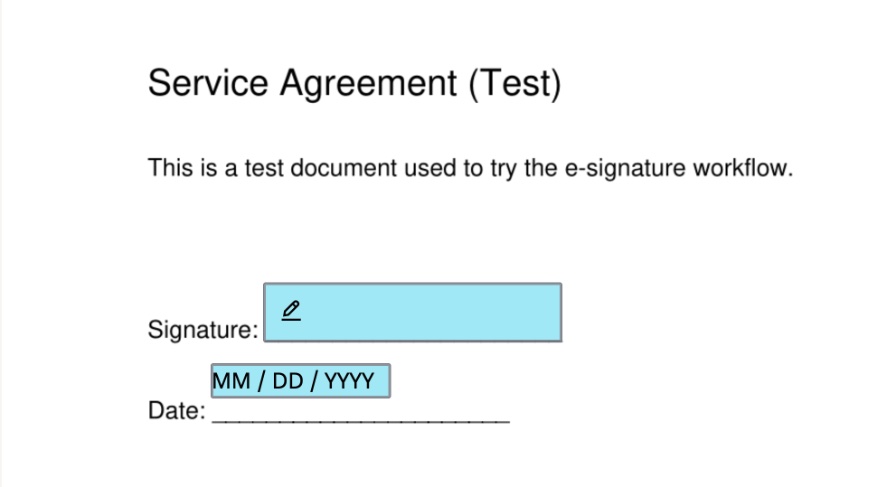
Dropbox Sign used a four-step flow: select documents, add signers, place fields, then review and send.
Automatic field placement was labeled beta. It ran only after we opened the Auto-place fields panel. It placed a signature and a date field, although the date sat slightly above the line.
The review panel had a pre-checked box allowing Dropbox to snapshot the document to improve the feature. The signer needed no account, and the date filled automatically in US month-first format.
Sending With SignNow
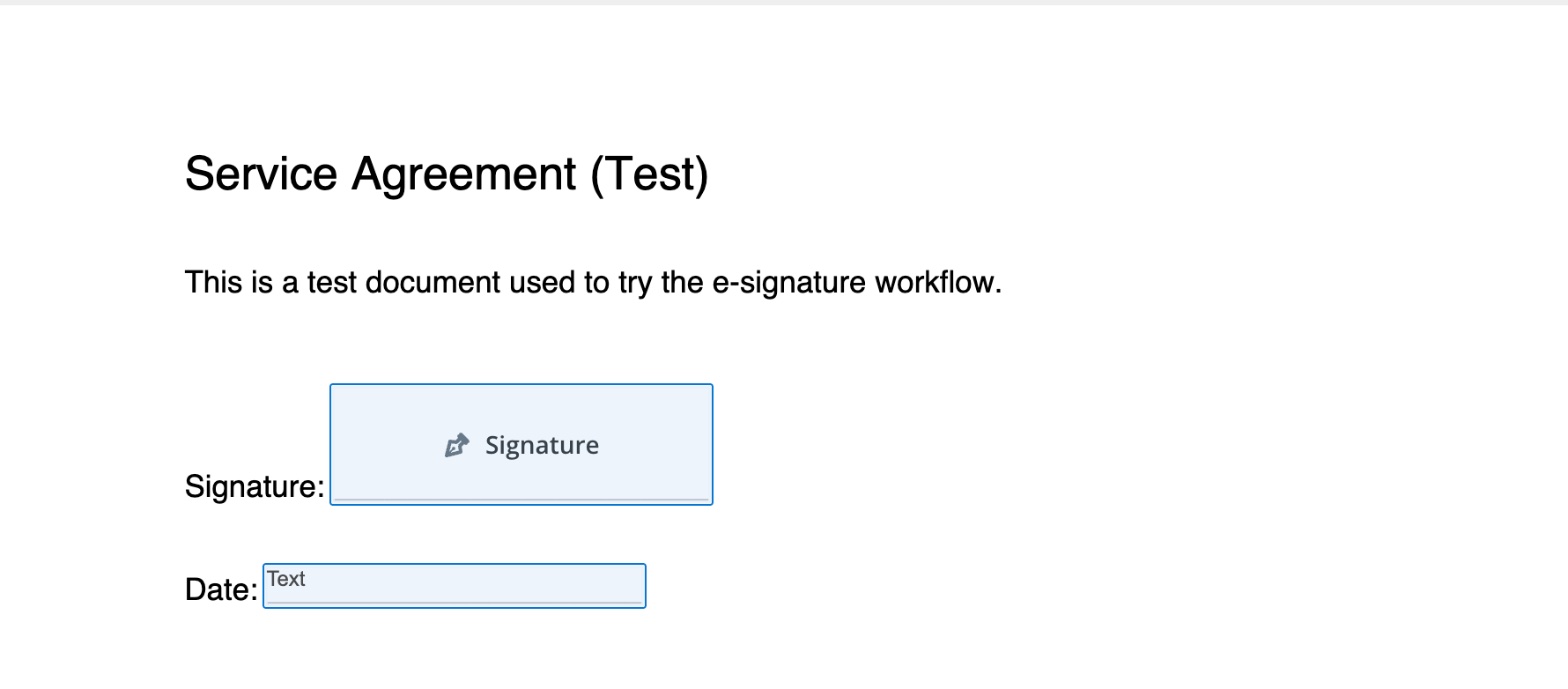
SignNow did not suggest fields after upload. Magic Fields in the editor menu placed a signature and a text field with one click once we found it.
A "Date:" line became a free text field rather than an automatically formatted date. In our test, invites expired after 30 days and reminders were off by default.
The available authentication options were password, text message or phone call. There was no government ID check among those options.
How the Signing Experience Compares With Sign.Plus
Sign.Plus is the third option in this comparison. Auto-Place suggests fields right after upload, including on flat scans, rather than waiting for the sender to open a separate field-suggestion panel.
Senders can apply per-recipient checks using a passcode, SMS code or ID Check. ID Check costs $2 per check. Every signed document includes a Certificate of Completion.
7. Dropbox Sign API vs SignNow API
The HelloSign API is now the Dropbox Sign API. Dropbox Sign uses API tiers with monthly request allotments, including a quote-based Premium tier. Exceeding an allotment upgrades the account.
SignNow offers a free Dev Mode. Its Professional API plans are priced by yearly invite volume, while AES, QES and HIPAA are handled through Enterprise API sales.
The models therefore differ: Dropbox Sign meters monthly API requests, while SignNow's Professional API pricing is based on yearly invite volume. Sign.Plus is the third option. Its API plans have published prices and a monthly request allowance, and every API plan supports SES, AES and QES.
8. Single Sign-On (SSO)
Dropbox Sign includes SSO on Premium, which is quote-based and intended for five or more users. SignNow includes SSO with Site License rather than its Business through Enterprise plans.
For a small team, SSO may therefore require a different tier from the one that otherwise fits its sending needs. Sign.Plus is the third option, with SSO available on Enterprise.
9. Contract Terms and Canceling
Dropbox Sign renews automatically for the same term unless the customer gives notice 30 days before the term ends. Cancellation takes effect at the end of the term, after which the account moves to Free. Fees are non-refundable except where law requires.
SignNow offers a 7-day trial and a 30-day refund window for new customers. Its plans renew automatically. Test invite counting and required features during the trial rather than waiting until after renewal.
Sign.Plus is the third option to assess against the same contract checklist. You should still review its current renewal and cancellation terms before subscribing.
Check Recent Dropbox Sign and SignNow Reviews
Search for recent reviews from teams similar to yours. Check the review date, plan name and whether the writer used the web product or API. Older HelloSign comments may describe an earlier product experience.
- Search "Dropbox Sign reviews 2026 small business"
- Search "Dropbox Sign automatic upgrade cancellation terms"
- Search "SignNow reviews 2026 100 invites"
- Search "SignNow declined canceled invites"
- Search "Sign.Plus reviews 2026" for a third set of customer feedback
Final Verdict: Dropbox Sign vs SignNow
Dropbox Sign is the clearer fit when paid users send often and unlimited signature requests matter. Check Standard's two-user minimum and the tier containing each feature you need.
SignNow is the clearer fit when unlimited users matter more than high sending volume. Confirm that the shared invite allowance is sufficient and remember that declined and canceled invites count.
Sign.Plus is the third option for teams that want unlimited requests per user, no user minimum, included passcode verification and QES on every plan. Start a Sign.Plus free trial to test it alongside your preferred alternative.
FAQs
Is HelloSign now Dropbox Sign?

Is Dropbox Sign better than SignNow?
Is SignNow cheaper than Dropbox Sign?
Does Dropbox Sign have a free plan?
Is SignNow legally binding?
Can Dropbox Sign and SignNow do QES?

Featured Articles






Confédération Suisse
Confederazione Svizzera
Confederaziun Svizra
Swiss Confederation
Innosuisse - Swiss Innovation Agency



