


Best E-Signature Software for Small Business (2026): Top Tools Compared
We compared nine e-signature tools for small businesses. Sign.Plus is our top pick for unlimited signature requests on paid plans, signer verification and a clear path to QES, HIPAA and storage choice.


- Sign.Plus is the best overall pick, with unlimited signature requests on paid plans, per recipient verification and no user minimum.
- Professional costs $19.99 per user per month on annual billing, and QES is available on every plan.
- DocuSign and SignNow meter sending, so teams should check what counts and how overages are billed.
- Dropbox Sign fits Dropbox teams, PandaDoc fits proposals, Zoho Sign fits Zoho users and DocuSeal can run on your own servers.
- Before buying, check signer verification, storage locations, HIPAA and SSO requirements, and renewal terms.
The best e signature software for small business gives a growing team a predictable bill, simple sending and signer checks that fit each agreement. We tested these tools hands-on by sending real test agreements, and we keep retesting them to catch changes in pricing, limits and default settings.
This guide is for small business owners and office managers in teams of 2 to 50, in the US, Europe or elsewhere, choosing their first tool or replacing an existing one. It focuses on e signature for small business needs: clear per-user costs, no surprise envelope meter, verification options and a path to QES, HIPAA or storage choice later. Sign.Plus is our best overall pick for small businesses wherever they operate. It is built for compliance with the US ESIGN Act as well as QES under eIDAS and Swiss ZertES on every plan, with storage in Switzerland by default and 43 storage locations on Enterprise. Each tool below has a distinct fit.
Best E-Signature Software for Small Business at a Glance
| Tool | Team plan (annual) | Sending limit | QES | Best for |
|---|---|---|---|---|
| Sign.Plus | Professional $19.99 per user per month | Unlimited signature requests | Every plan, including Free | Predictable sending and compliance growth |
| DocuSign | Standard $25 per user per month | 100 envelopes per user per year | Listed on Enhanced (contact sales) | Teams that need the best-known brand |
| Dropbox Sign | Standard $25 per user per month, 2+ users | Unlimited requests on paid web plans | eID add-on with API Premium; price not published | Teams already using Dropbox |
| PandaDoc | Starter $19 per seat per month | Unlimited signing in the app; automation uses credits | Via trust service providers on higher plans; paid per signer | Proposals, quotes and sales documents |
| Zoho Sign | Professional $16 per user per month | Unlimited envelopes | Enterprise; paid with credits | Zoho CRM and Zoho One teams |
| SignNow | Business $8 per account per month | Unlimited users share up to 100 invites per account per year on annual plans | Site License; paid add-on | Low annual agreement volume |
| Signeasy | Business $20 per seat per month | Unlimited documents, with fair usage restrictions | No QES offering found | Sending and signing on mobile |
| Xodo Sign | Basic $10 per user per month | Unlimited documents on paid plans | No QES offering found | Freelancers and small offices |
| DocuSeal | Pro $20 per user per month or $200 per user per year | Unlimited signature requests on Pro | European Cloud; paid per signature | Open source and self-hosting |
Several tools list a lower starting price. For a small business, the comparison that matters is what that price includes: how sending is metered, whether signer verification is included, and whether QES, HIPAA or a storage choice needs a sales call. Sign.Plus Professional includes unlimited signature requests, passcode verification and QES access on every plan, with SSO, HIPAA and 43 storage locations at a published Enterprise price.
How We Chose the Best E-Signature Tools for Small Business
We compared these top e-signature solutions for small business on the costs and controls that affect daily use, not on brand recognition alone. We read vendor pricing pages, product documentation, help centers and terms, then tested each tool hands-on in November 2026. Our tests included uploading agreements, placing fields, sending documents and completing signatures as recipients.
- Predictable pricing and sending limits: We checked whether sending is unlimited or metered, what counts toward the limit and how overages are billed.
- Per-user cost without minimums: We looked at the cost for a small team and whether a plan requires multiple seats or a sales quote.
- Signer verification: We checked for passcodes, SMS codes, phone checks and government ID verification.
- Ease of sending: We examined field placement, templates, reminders, default expiration settings and the recipient experience.
- Compliance you can add later: We checked where SSO, HIPAA support and storage-location choice become available.
- Support for QES: We reviewed eligible plans, trust service providers, per-signer costs and credit expiration rules.
The hands-on observations below describe behavior in our test accounts. Defaults and plan packaging can change, so confirm current terms before subscribing.
What Small Businesses Need From E-Signature Software
A small business e signature setup should handle routine agreements today without blocking stricter requirements later.
- A clear monthly or annual bill, with sending limits and overage rules in writing.
- Pricing that works for a two-person office and still makes sense at 50 users.
- Fast document preparation, reusable templates, reminders and mobile signing.
- Per-recipient verification that can match the risk of each agreement.
- An audit trail or completion certificate for every signed document.
- A practical upgrade path for QES, HIPAA, SSO and document storage requirements.
1. Sign.Plus: Best Overall for Small Business
Sign.Plus Pricing
Professional costs $19.99 per user per month with annual billing and has no user minimum. It includes unlimited signature requests, 10 templates, reminders, passcode verification, in-person signing and 10 SMS/WhatsApp requests per seat per month.
Business costs $29.99 per user per month annually. It adds bulk send, custom branding and Zapier, with 30 SMS/WhatsApp requests per seat. Enterprise costs $49.99 per user per month annually and adds storage choice across 43 locations, SSO, and HIPAA support with Advanced Security Controls and a signed BAA. It includes 150 SMS/WhatsApp requests per seat. Documents can move between storage locations later.
Current plan details are published on the Sign.Plus pricing page, including Enterprise pricing.
Why We Picked Sign.Plus
Sign.Plus combines unlimited signature requests on paid plans with verification that can be set per recipient. Options include a passcode, an SMS code and ID Check. That lets a team apply extra checks to sensitive agreements without treating every routine document the same way.
Auto-Place suggests fields immediately after upload, including on flat scans. Every signed document comes with a Certificate of Completion. In our evaluation, this combination made routine sending straightforward while keeping the sending bill easy to understand.
Sign.Plus also provides a clear growth path for small businesses wherever they operate. It covers US e-signature laws (ESIGN and UETA), and QES is available on every plan through Swisscom Trust Services under eIDAS and Swiss ZertES. Documents are stored in Switzerland by default under the Swiss FADP, with EU adequacy, and Enterprise offers a choice of 43 storage locations. SSO, HIPAA and storage choice have published Enterprise prices, so a team can budget for later requirements without first scheduling a sales call. Security credentials include ISO/IEC 27001:2022 certification from EY CertifyPoint, a SOC 2 Type 2 report from EY and a CSA STAR listing.
Things to Know About Sign.Plus
QES costs $5 per recipient, including identity verification, and QES credits never expire. ID Check costs $2 per check, while SMS code verification uses SMS credits. These usage-based charges should be included in your estimate if you verify signers frequently.
Bulk send and custom branding require Business or above. SSO, HIPAA and storage choice require Enterprise.
2. DocuSign: Best for Teams That Need the Best-Known Brand
DocuSign Pricing
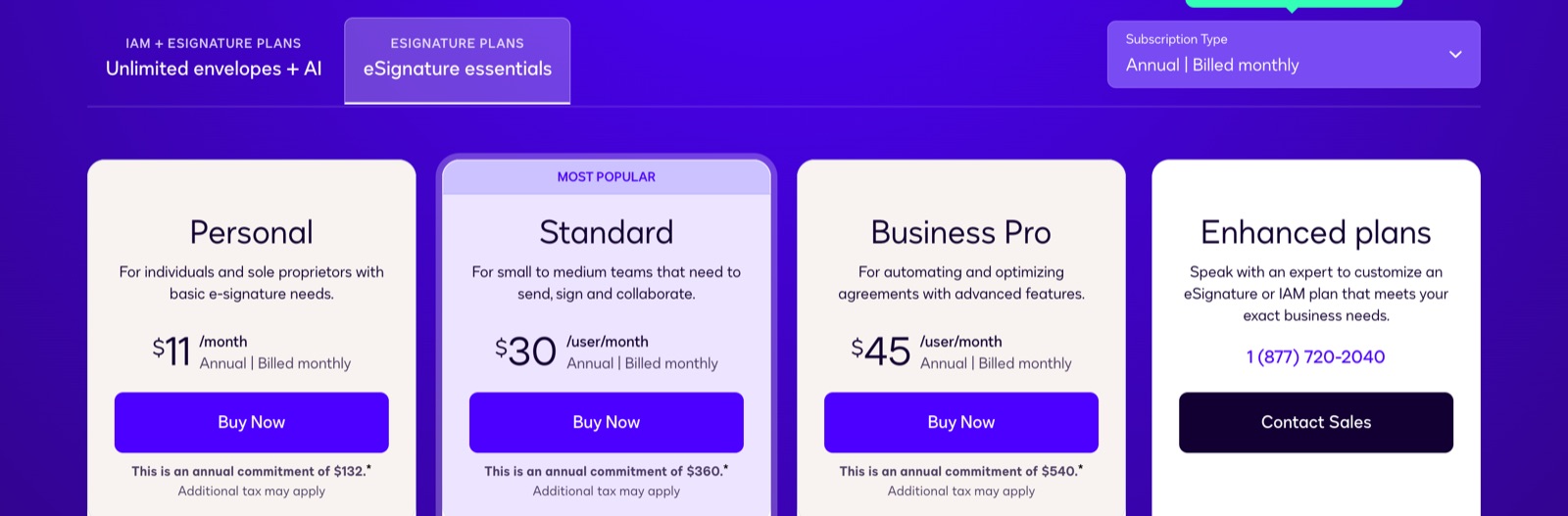
Standard costs $25 per user per month paid annually upfront, $30 on an annual plan billed monthly, or $45 month to month. Business Pro costs $40 per user per month paid annually upfront, $45 on an annual plan billed monthly, or $65 month to month. Both support up to 50 users and include 100 envelopes per user per year. Enhanced is sold through contact sales for 50 or more users, with custom envelope limits.
Why We Picked DocuSign
DocuSign suits teams that prefer the best-known brand. Standard and Business Pro include shared templates, team reports, permissions, scheduled sending and in-person signing. Business Pro adds bulk send, payment collection, PowerForms, web forms and more than 1,000 partner integrations. All plans include an audit trail, certificate of completion, mobile app and reusable templates.
DocuSign Limitations
An envelope counts when sent, signed or not. Voiding does not restore it, bulk and API sends count, and overage is billed per envelope. SSO, HIPAA support through a BAA, data residency and 24/7 live support require Enhanced in the US plan list. Standard and Business Pro list SES; Enhanced lists SES, AES and QES. SMS delivery starts at $0.36 per delivery and ID verification at $2.40 per attempt.
Our test required manually added anchor text for AutoPlace. Annual plans have a one-time 30-day cancellation window; after that, the remaining annual balance is owed.
See our full DocuSign alternative comparison.
3. Dropbox Sign: Best for Teams Already on Dropbox
Dropbox Sign Pricing
A free plan exists. Essentials costs $15 per month with annual billing or $20 with monthly billing for one user, with unlimited requests and five templates. Standard costs $25 per user per month with annual billing or $30 with monthly billing for teams of two or more, starting at $600 a year. It adds 15 templates, branding, bulk send, SMS authentication and in-person signing. Premium is quoted for five or more users and adds SSO, data residency and multi-teams. Paid web plans include unlimited requests.
Why We Picked Dropbox Sign
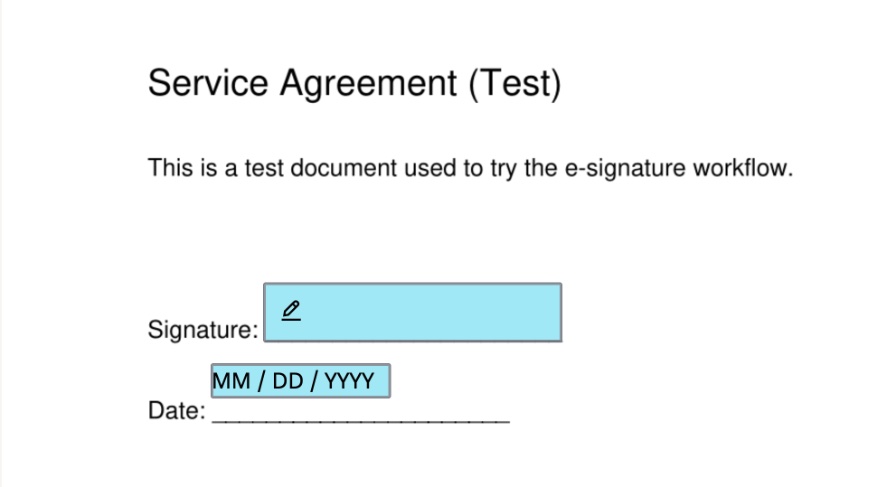
Dropbox Sign suits teams already using Dropbox, and some Dropbox storage plans include plan-dependent signing features. Our test found a clear four-step send flow. The signer needed no account, and the date filled automatically in US month-first format.
Dropbox Sign Limitations
Automatic field placement was labeled beta and ran only after we opened its panel. AES and QES require the eID add-on on API Premium, with no published price. HIPAA requires annual Standard or Premium, a signed BAA and an unpublished minimum contract value.
Data residency is Premium-only, and temporary copies are processed on US servers during editing, sending or signing. Exceeding usage limits can trigger an automatic upgrade with non-refundable fees. Renewal requires 30 days’ notice.
See our full Dropbox Sign alternative comparison.
4. PandaDoc: Best for Proposals and Quotes
PandaDoc Pricing
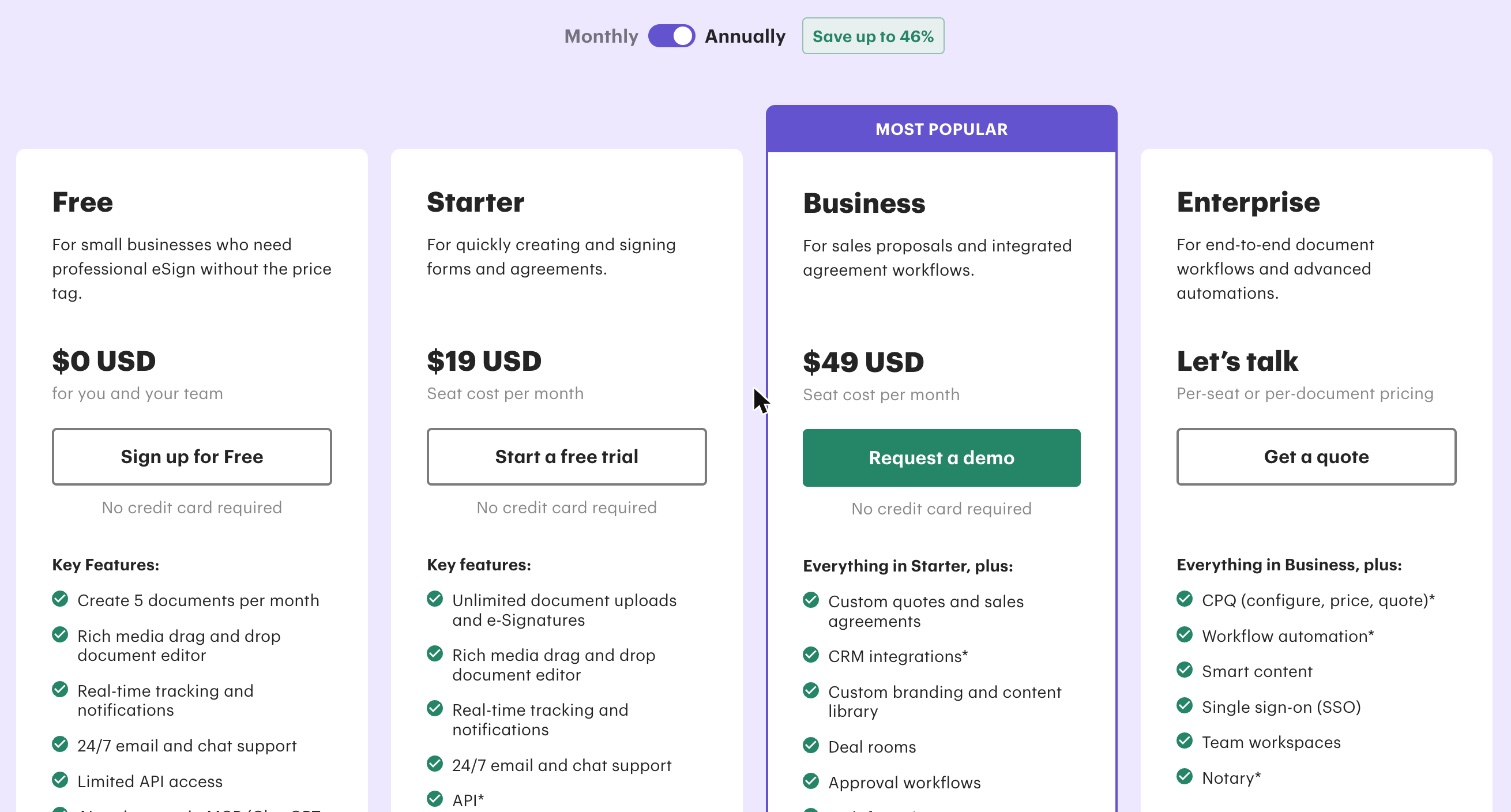
A free plan exists. Starter costs $19 per seat per month with annual billing or $35 with monthly billing. Business costs $49 per seat per month with annual billing or $65 with monthly billing. Enterprise is sold by quote. Signing in the app is unlimited from Starter upward.
Automation is separate: creating a document through an integration or automated workflow uses a credit. After trial credits for first-time customers, a recurring pack is required, but its price is not published. Automated workflows can bill up to $5 per document without a per-unit price on the order form.
Why We Picked PandaDoc
PandaDoc is built for proposals, quotes, contracts and forms created inside the app. Business adds branding, CRM integrations, approval workflows and a content library, while Enterprise adds CPQ and workflow automation. In our test, it suggested and placed a signature and date field with one click.
PandaDoc Limitations
Starter omits automatic reminders and signer verification; Business adds them, with verification labeled annual-plan-only. QES is listed for Business and Enterprise, but the pricing table also labels it annual-plan-only. It costs $5 per signer credit in packs of 10, and packs expire at the end of the billing cycle. QES can be set in a document, not a template or form.
US or EU residency and HIPAA are Enterprise features. SSO is available on Enterprise or as a paid Business add-on. Data cannot move between US and EU data centers. Annual terms renew for another year unless written notice is given at least 30 days before the end date.
See our full PandaDoc alternative comparison.
5. Zoho Sign: Best for Teams on Zoho CRM or Zoho One
Zoho Sign Pricing
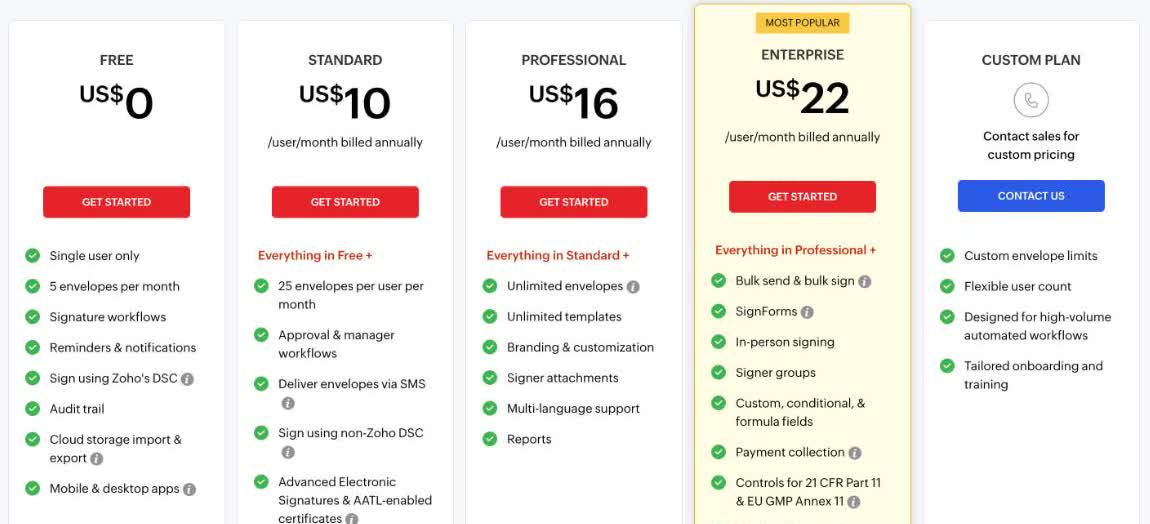
A free plan exists. With annual billing, Standard costs $10 per user per month, Professional $16 and Enterprise $22. With monthly billing, they cost $12, $20 and $28 per user per month, respectively. Annual billing saves 20%, and a 14-day trial is available.
Standard includes 25 envelopes per user per month. Professional includes unlimited envelopes, but automations and integrations use credits at $0.10 each. Enterprise adds bulk send, SignForms, in-person signing, QES paid with credits, and credit-based APIs and webhooks. API usage costs $0.50 per envelope.
Why We Picked Zoho Sign
Zoho Sign is a natural candidate for businesses already using Zoho CRM or Zoho One. Professional removes the monthly envelope cap, while Enterprise adds higher-volume and in-person features. Its security page lists SOC 2 Type II, HIPAA and several ISO 27001-series certifications.
Zoho Sign Limitations
Standard’s allowance may be restrictive for an active office. Professional removes that cap, but automation and integration credits add another cost to track. QES requires Enterprise and paid credits. SSO is not listed on the pricing page, so teams that need it should confirm availability before committing.
See our full Zoho Sign alternative comparison.
6. SignNow: Best for a Few Agreements a Year
SignNow Pricing
SignNow prices per account with unlimited users. Business costs $8 per month with annual billing or $20 monthly. Business Premium costs $20 per month with annual billing or $30 monthly. Enterprise costs $30 per month with annual billing or $50 monthly.
Annual plans include up to 100 invites per account per year; monthly plans include 10 per account per month. Extra invites cost up to $3.60 at a plan-dependent rate. Site License starts at $1.50 per signature invite.
Why We Picked SignNow
The per-account model can suit an office with low sending volume but several users. Business Premium adds bulk send, signing links, payments, scheduled sending, team sharing and US or EU residency. Enterprise adds branding, SMS delivery, signer authentication and approval workflows.
SignNow Limitations
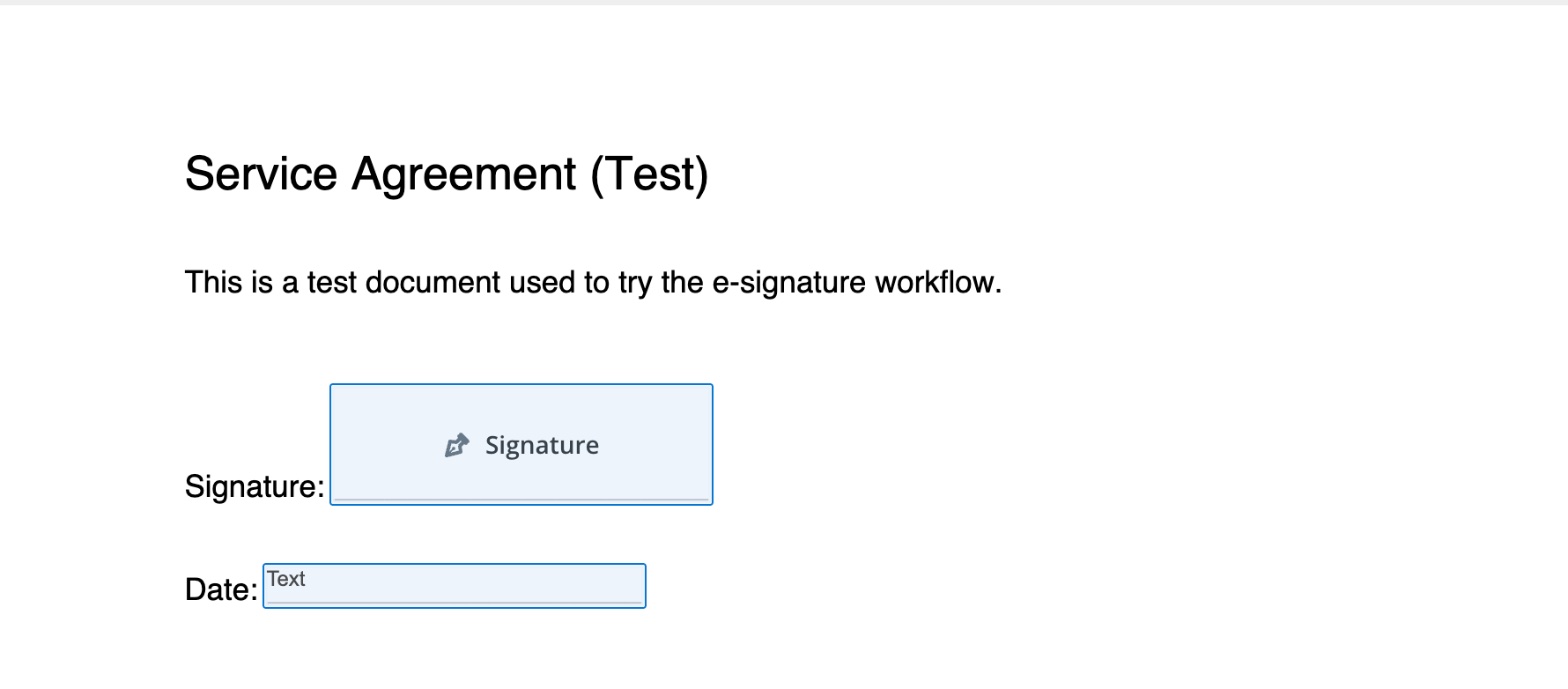
Declined and canceled invites still count. AES and QES are associated with Site License, with QES, HIPAA BAA and 21 CFR Part 11 support as paid add-ons. Moving data between regions later is not published.
In our test, reminders were off by default, invites expired after 30 days, and authentication covered password, text message or phone call, with no government ID check.
See our full SignNow alternative comparison.
7. Signeasy: Best for Signing on Mobile
Signeasy Pricing
A free plan exists, and a 14-day trial is available. Personal costs $10 per seat per month with annual billing and includes five contract sends per month. Business costs $20 per seat per month with annual billing and includes unlimited sending, subject to fair usage restrictions, up to five shared team templates, reminders, in-person signing, signing links and sequential signing.
Business Pro costs $30 per seat per month with annual billing and adds unlimited templates, roles and permissions, approval workflows, branding, signer attachments and signer authentication. Build Your Plan handles SSO, HIPAA, SMS, bulk send and API access through sales.
Why We Picked Signeasy
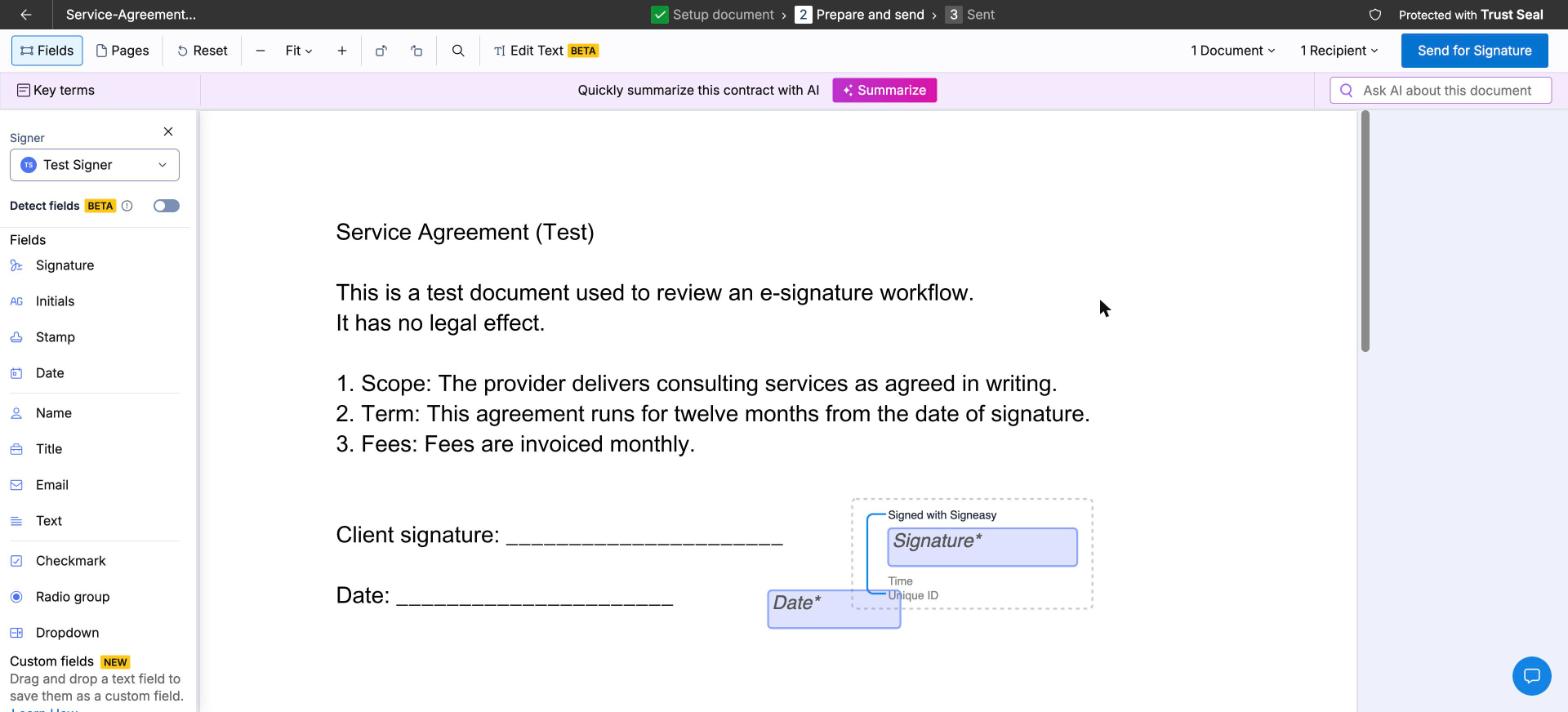
Mobile apps, offline signing, passcode and biometric authentication, and 2FA login suit teams working away from a desk. Signers need no account. In our test, the signer link opened directly into the document, and signatures could be typed, drawn, uploaded or saved.
Signeasy Limitations
Several Business Pro add-ons, including SMS, bulk send, HIPAA and SSO, have no published price. No QES offering or storage-location choice was found on the reviewed pages; personal data is mainly processed in the US. Our test used a 90-day default expiry and added a “Signed with Signeasy” frame around signatures by default.
Refund terms conflict across the pricing page, help center and terms, so confirm the policy in writing. Exceeding a plan limit can also trigger a higher plan with non-refundable upgrade fees.
See our full Signeasy alternative comparison.
8. Xodo Sign: Best for Freelancers and Small Offices
Xodo Sign Pricing
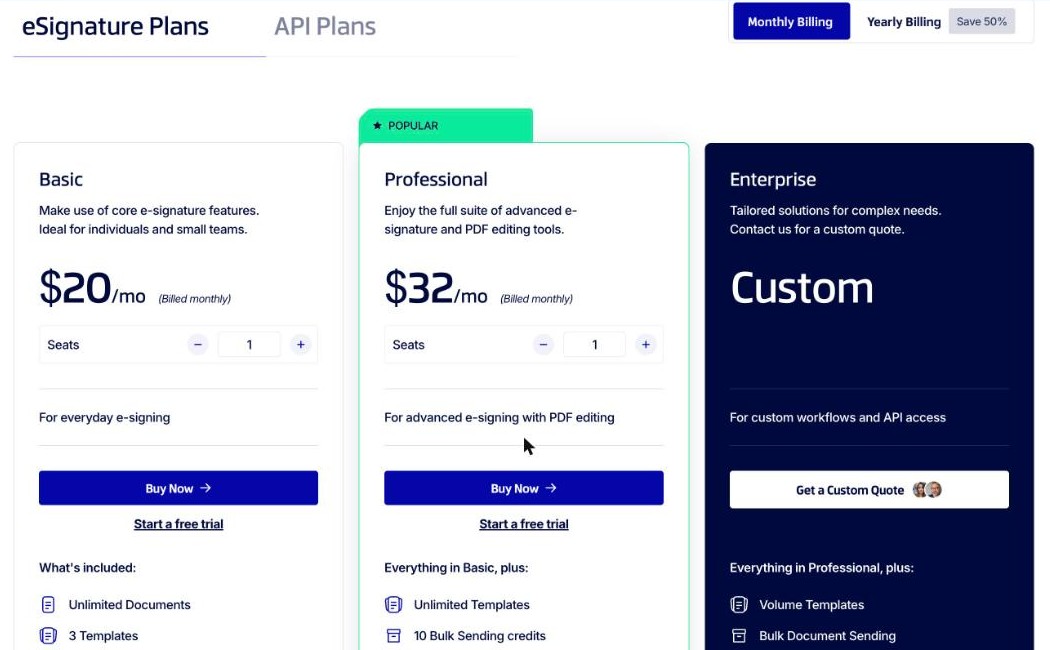
A free plan exists. Basic costs $10 per user per month with yearly billing or $20 with monthly billing, with unlimited documents, three templates, mobile apps and integrations. Professional costs $16 per user per month with yearly billing or $32 with monthly billing. It adds unlimited templates, 10 bulk-sending credits and 10 SMS credits per seat, advanced PDF editing, an AI summarizer, branding and in-person signing.
Enterprise is by quote. Signers need no seat, and a seven-day Professional trial requires no credit card.
Why We Picked Xodo Sign
Xodo Sign suits freelancers and small offices that want unlimited documents on paid plans. Our test used a clear three-step flow with drag-and-drop fields and per-recipient SMS or PIN authentication. The audit trail included a document ID, fingerprint and event history.
Xodo Sign Limitations
Paid plans include at least 10 SMS-authenticated signers per month, then charge $0.25 per signer. No QES offering or customer-selectable storage region was published, and listed subprocessors show US data locations. AI summary sends document content to Google Gemini. HIPAA support requires a BAA through sales, with no published plan or price.
In our test account, reminders were on by default, expiry was three months, and the Date Signed field was filled before signing. Plans auto-renew, and native files are available on request within 30 days after termination.
See our full Xodo Sign alternative comparison.
9. DocuSeal: Best for Teams That Want Open Source
DocuSeal Pricing
A free cloud plan exists. Cloud Pro costs $20 per user per month or $200 per user per year. It includes unlimited signature requests, a company logo, your own email address and personalized emails. It also covers reminders, payments, Zapier, Make, webhooks, user roles and teams, spreadsheet bulk send, SSO/SAML, API access and embedding.
SMS identity verification includes 20 SMS messages, then costs $0.20 per SMS. Production API and embedding usage costs $0.20 per signed document and requires Pro. The open-source on-premises edition is free. Its Pro license costs $20 per user per month and adds white-labeling, SSO/SAML, SMS through Twilio or webhook, and API access.
Why We Picked DocuSeal
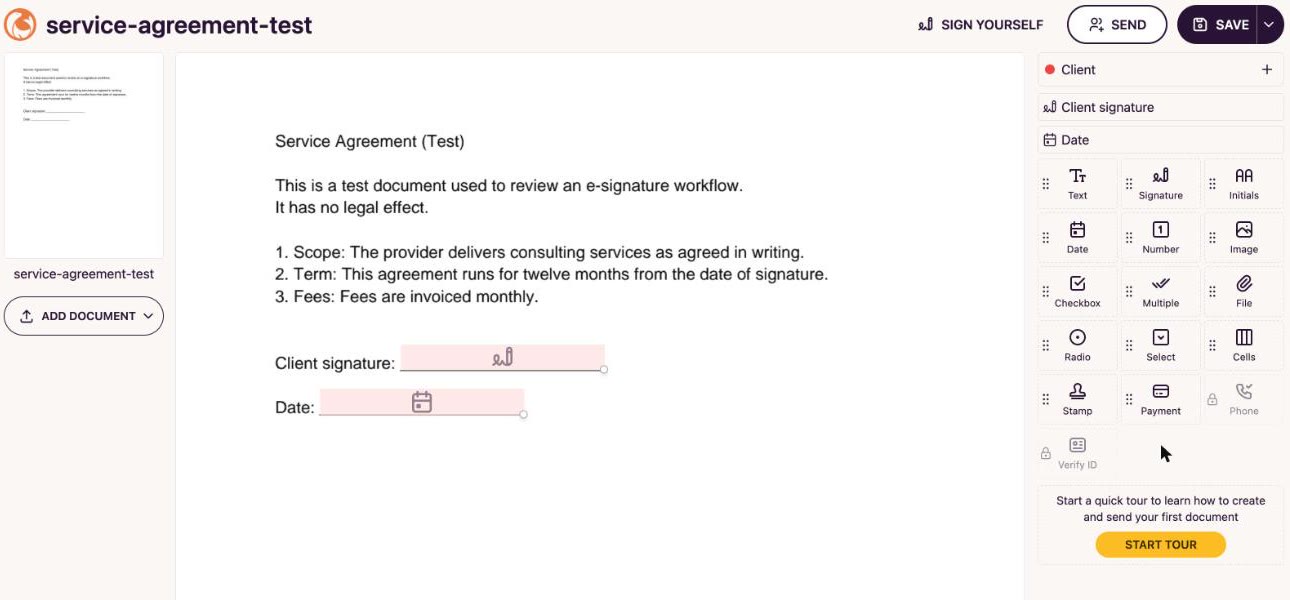
DocuSeal offers hosted and self-hosted deployment. Cloud runs on AWS US East in Virginia, and European Cloud runs on AWS EU in Dublin. In our test, Autodetect Fields quickly placed signature and date fields. Signers needed no account and could sign by drawing, typing, uploading or using a phone through QR code.
DocuSeal Limitations
Self-hosting requires your team to run, update, back up and secure the servers. AES and QES are available on European Cloud; on the US cloud they need a custom setup through support. Pricing depends on method and provider, and some providers must be enabled by support.
HIPAA requires a BAA through support and is not on by default. There is no native mobile app, only a progressive web app. Our test also found an unprefilled date field and different date formats in the picker and audit log.
See our full DocuSeal alternative comparison.
How to Choose E-Signature Software for Your Small Business
Use this checklist to narrow the options before buying e-signature software for small business use.
- Count users: Include everyone who prepares, sends or manages agreements, then check seat minimums and plan user caps.
- Estimate monthly volume: Count routine sends, seasonal peaks, bulk sends and documents created through integrations.
- Check how sending is metered: Ask whether voided, declined or canceled requests count, and find the overage rate before subscribing.
- Match signer verification to the document: Decide where a passcode is enough and where you need SMS, phone or government ID verification.
- Check document storage: Confirm the default location, available regions, temporary processing locations and whether documents can move later.
- Map future QES or HIPAA needs: Check the eligible plan, BAA requirements, per-signer fees, credit expiration and whether a sales quote is required.
- Read renewal terms: Record the renewal date, cancellation notice period, refund policy, automatic upgrade rules and any remaining balance owed.
Are E-Signatures Legally Binding for Small Businesses?
For US use, ESIGN and UETA are the laws vendors cite for electronic signatures. In the European Union, Sign.Plus supports SES, AES and QES under eIDAS. In Switzerland, it supports SES, AES and QES under Swiss ZertES. QES is available on every Sign.Plus plan.
The appropriate signature type and requirements for a specific document depend on the transaction and applicable rules. This guide does not provide legal advice or determine the validity of a particular agreement. Ask qualified counsel about specific documents, regulated transactions and signature-level requirements.
Which One Should You Pick?
After sending the same test agreements through all nine tools, we found that each is good at one thing and gives something up for it. The tradeoffs include envelope meters, per-account invite pools, QES behind a sales call, or servers you have to run yourself.
- If you want the best-known brand: DocuSign, with shared templates, team reports and broad integrations on its team plans.
- If you build proposals and quotes: PandaDoc, which combines document creation with CRM integrations and approval workflows on Business.
- If your team already uses Dropbox: Dropbox Sign, with unlimited signature requests on paid web plans.
Sign.Plus sits at the top not because it wins every line item, but because it is the one a small business does not outgrow. Paid plans include unlimited signature requests, verification can be set per recipient, and QES is available on every plan. Published Enterprise prices cover SSO, HIPAA and storage choice, wherever the business operates. That keeps the next stage of growth visible before you need it. Start a Sign.Plus free trial.
FAQs
What is the best e-signature software for small business?

How much does e-signature software cost for a small business?
Is there a free e-signature tool for small business?
What features should a small business look for in e-signature software?
Do small businesses need QES?
Can a small business switch e-signature providers easily?

Featured Articles


Confédération Suisse
Confederazione Svizzera
Confederaziun Svizra
Swiss Confederation
Innosuisse - Swiss Innovation Agency


