


PandaDoc vs SignNow (2026): Features, Usage Limits and a Third Option
Compare PandaDoc and SignNow on pricing, sending limits, proposals, QES, storage, HIPAA and APIs, with Sign.Plus as a third option for unlimited requests per user and QES on every plan.


- PandaDoc is a per seat document workspace for proposals, quotes and contracts. Signing in the app is unlimited from Starter up, while automated document creation uses credits.
- SignNow prices per account with unlimited users. Annual plans share up to 100 invites per account per year, and declined or canceled invites still count.
- PandaDoc Business adds CRM integrations, approvals and a content library. SignNow puts bulk send on Business Premium and signer authentication on Enterprise.
- QES requires annual Business or Enterprise with credit packs at PandaDoc, or Site License with a paid add on at SignNow. Sign.Plus offers QES on every plan, including Free.
- Sign.Plus is the third option for unlimited signature requests per user, per recipient verification and published QES pricing, with documents stored in Switzerland by default.
PandaDoc and SignNow solve different document problems. PandaDoc is a per-seat workspace for creating proposals, quotes and contracts, with signing built into the process. SignNow is a per-account e-signature tool for uploaded documents, with unlimited users but a shared invite allowance. We tested PandaDoc and SignNow hands-on using a real test agreement sent through each, and we keep retesting both products as they change.
This PandaDoc vs SignNow feature comparison covers pricing, usage limits, verification, QES, storage, HIPAA, APIs and contract terms. Sign.Plus is included as a third option for teams that need unlimited signature requests per user and published verification and QES pricing.
PandaDoc vs SignNow at a Glance
| Category | PandaDoc | SignNow | Sign.Plus |
|---|---|---|---|
| Pricing model | Per seat, with Free, Starter, Business and Enterprise plans | Per account, with unlimited users | Per user, with Professional, Business and Enterprise plans |
| Sending limits | Unlimited signing in the app from Starter up; automated document creation uses credits | Annual plans allow up to 100 invites per account per year; monthly plans allow 10 per account per month | Unlimited signature requests per user on Professional and above |
| Signer verification | Business adds signer verification, labeled annual-plan-only; Starter leaves it out | Enterprise adds password, SMS and phone authentication; no government ID check appeared in the test | Per-recipient passcode, SMS code and ID Check; ID Check costs $2 per check |
| QES | Available through European trust service providers, with plan and credit restrictions | Site License only, as a paid add-on | Every plan, including Free; $5 per recipient including identity verification |
| Storage region | US or EU on AWS for Enterprise; transfers between regions are not supported | US or EU from Business Premium; later moves are not published | Switzerland by default; Enterprise offers 43 locations and later document moves |
| HIPAA | Optional on Enterprise, with a BAA through the account team | HIPAA BAA available as a paid Site License add-on | Enterprise includes HIPAA with Advanced Security Controls and a signed BAA |
| Company | PandaDoc, Inc., a US company founded in 2014 | An e-signature product of US-based airSlate, Inc. | A product of Alohi, based in Geneva, Switzerland |
PandaDoc or SignNow: Which Should You Choose?
- Choose PandaDoc if your team builds proposals, quotes or contracts inside the document tool. Business adds CRM integrations, approvals, branding and a content library. Budget for each seat and check how automation credits apply.
- Choose SignNow if you mainly upload documents for signature and want unlimited users under one account. Its shared invite allowance is the central constraint. Bulk send, signer authentication, SSO and QES also sit on different plans or add-ons.
- Consider Sign.Plus if signing volume varies across the team and you do not want a shared annual invite pool. Professional includes unlimited signature requests per user, reminders and passcode verification. QES is available on every plan at a published per-recipient price.
What Are PandaDoc and SignNow?
PandaDoc is a document workflow product for sales and operations. It covers proposals, quotes, contracts, forms, payments and e-signatures. You create the document inside PandaDoc, and signing is one step in that workflow. The company lists San Francisco first among its offices, which also include Kyiv, Manila and Warsaw.
SignNow is airSlate's e-signature product. Its core job is to prepare uploaded documents, send signature invites and collect signatures. airSlate also owns pdfFiller, DocHub and US Legal Forms. SignNow prices by account rather than by user.
The main difference is where work starts. PandaDoc starts with document creation and adds signing to a broader sales workflow. SignNow starts with an existing document and focuses on sending and signing it.
Sign.Plus is the third option for teams that already have their documents and want signing, verification and qualified signatures (QES) on every plan, including Free. It stores documents in Switzerland by default and provides a Certificate of Completion with every signed document.
How We Compared PandaDoc and SignNow
We read vendor pricing, help, security and plan pages, then sent a test agreement through each product in November 2026. The hands-on checks covered field placement, recipient setup, date fields, reminders, expiration and authentication. We also checked published limits for credits, invites, QES, APIs and storage.
For Sign.Plus, we checked Auto-Place, per-recipient verification, completion certificates and the published QES terms. Plan labels matter in this comparison because several features change with annual billing or higher tiers.
1. PandaDoc vs SignNow Pricing
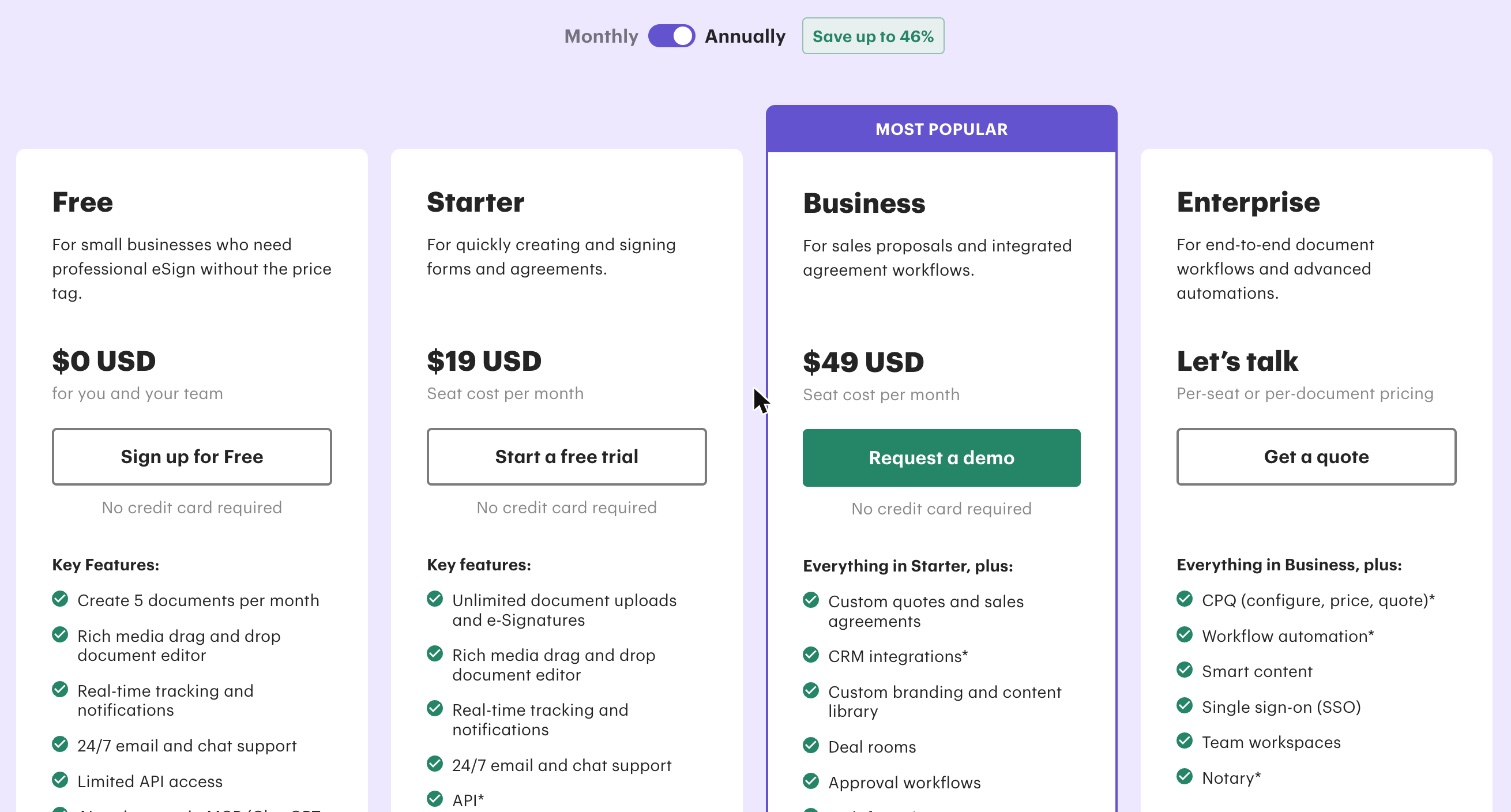
PandaDoc Pricing
| Plan | Annual price per seat per month | Monthly price per seat per month | Key points |
|---|---|---|---|
| Free | $0 | $0 | Free plan |
| Starter | $19 | $35 | Unlimited in-app signing; no automatic reminders or signer verification |
| Business | $49 | $65 | Reminders, verification (annual plans only), branding, CRM integrations, approvals and content library |
| Enterprise | By quote | By quote | Adds CPQ and workflow automation, with other enterprise options |
PandaDoc's subscription is only part of the cost check. Starter and Business include trial automation credits for first-time customers, followed by a recurring credit pack whose price is not published. Automated workflows can bill per document, up to $5 per document if the order form has no per-unit price.
SignNow Pricing
| Plan | Published price | Key additions |
|---|---|---|
| Business | $8 per month annually, or $20 monthly | Account-based e-signature plan with unlimited users |
| Business Premium | $20 per month annually, or $30 monthly | Bulk send, signing links, payments, scheduled sending, team sharing and US or EU residency |
| Enterprise | $30 per month annually, or $50 monthly | Branding, SMS delivery, signer authentication, conditional and formula fields, and approvals |
| Site License | From $1.50 per signature invite | Full API, SSO and premium integrations; QES, HIPAA BAA and 21 CFR Part 11 are paid add-ons |
SignNow's unlimited-user model can suit a large account with modest sending. The allowance is shared across that account, however, and extra invites are billed at a plan-dependent rate of up to $3.60. Higher sending volume does not remove the need to check plan gates.
How Much Does PandaDoc Cost Compared With SignNow?
PandaDoc ties cost to the number of seats and separates in-app signing from metered automation. SignNow ties cost to the account and separates the subscription from shared invite consumption. PandaDoc buyers should count document creators and automated creation. SignNow buyers should count total account invites, including invites that recipients decline or cancel.
How PandaDoc and SignNow Pricing Compare With Sign.Plus
| Plan | Annual price per user per month | Included usage and features |
|---|---|---|
| Professional | $19.99 | Unlimited requests, 10 templates, reminders, passcode verification, in-person signing and 10 SMS or WhatsApp requests per seat per month |
| Business | $29.99 | Professional features plus bulk send, custom branding, Zapier and 30 SMS or WhatsApp requests per seat |
| Enterprise | $49.99 | Storage choice, SSO, HIPAA and PHIPA options, plus 150 SMS or WhatsApp requests per seat |
The direct subscription comparison is PandaDoc Business at $49 per seat per month on annual billing and Sign.Plus Business at $29.99 per user per month on annual billing. They are not feature-equivalent. PandaDoc Business is broader for document building, CRM and approvals. Sign.Plus Business focuses on unlimited signing, bulk send, branding and Zapier.
Against SignNow, the practical comparison is usage and plan gating rather than a headline price. SignNow shares invites across unlimited users. Sign.Plus provides unlimited signature requests per user, while placing bulk send on Business and SSO, HIPAA and storage choice on Enterprise.
2. Usage Limits: Credits vs Invites
PandaDoc allows unlimited signing in the app from Starter up. A credit is used when a new document is created through an integration or automated workflow, including the API, Zapier, Make, Forms or bulk send. The API works on credit packs only, and API document creation pauses when credits run out on Starter and Business.
SignNow counts signature invites. Annual plans provide up to 100 invites per account per year, while monthly plans provide 10 per account per month. Every user draws from the same allowance. Declined and canceled invites still count, so unsuccessful sending can consume capacity.
These limits affect different work. PandaDoc's credits matter when software creates the document for you. SignNow's invites matter whenever the account sends, regardless of which user initiated the request.
Sign.Plus is the third option for teams that want fewer sending caps to track. Professional and above include unlimited signature requests per user. SMS and WhatsApp requests remain metered by plan, and ID Check and QES have separate published charges.
3. Features for Proposals vs Signing
PandaDoc is stronger for proposal production. It supports proposals, quotes, contracts, forms and payments. Business adds a content library, CRM integrations and approval workflows. Enterprise adds CPQ and workflow automation. Bulk send is available as an automated workflow, so document creation consumes credits.
SignNow's Business Premium plan adds bulk send, signing links, payments, scheduled sending and team sharing. Enterprise adds conditional and formula fields, approval workflows, branding and SMS delivery. Site License lists premium integrations, although the plan summary does not name CRM integrations.
For templates and reusable content, PandaDoc Business includes a content library. SignNow's listed plan features emphasize team sharing rather than a comparable content library. Both vendors also have mobile apps: PandaDoc supports creating, sending, signing and tracking, while SignNow supports sending, signing, scanning and in-person signing.
Sign.Plus is the third option when the document is already prepared elsewhere. Professional includes 10 templates and in-person signing. Business adds bulk send, custom branding and Zapier, but its listed plans do not position it as a proposal or CPQ workspace.
4. QES and eIDAS: PandaDoc vs SignNow
PandaDoc provides QES through European trust service providers. Its help page lists Business and Enterprise, while the pricing table labels QES annual-plan-only. QES costs $5 per signer, with credits sold in packs of 10. Purchased packs expire at the end of the billing cycle. QES can be set in a document, but not in a template or form.
SignNow supports SES on Business through Enterprise. AES and QES require Site License, and QES is a paid add-on. That makes the signature level and the commercial plan separate checks for an eIDAS project.
Sign.Plus is the third option for published QES access. It offers QES on every plan, including Free, through Swisscom Trust Services under eIDAS and ZertES. The price is $5 per recipient including identity verification, and purchased credits never expire. See the Sign.Plus eIDAS signature details.
5. Where Your Documents Live
PandaDoc offers US or EU storage on AWS as an Enterprise feature. Data cannot be transferred between its US and EU data centers, so the initial region choice matters.
SignNow offers US or EU data residency from Business Premium. It does not publish whether an account can move regions later.
Sign.Plus stores documents in Switzerland by default. Its Enterprise plan offers a choice of 43 storage locations, and documents can move later. Storage choice is therefore an Enterprise feature, not part of every plan.
6. HIPAA and Security Certifications
PandaDoc lists SOC 2 Type II and GDPR. HIPAA is optional on Enterprise, with a BAA arranged through the account team. Its security page does not claim ISO 27001.
SignNow lists ISO 27001, SOC 2 Type II and GDPR on all plans. HIPAA BAA support is a paid Site License add-on. The 21 CFR Part 11 option is also a paid add-on at that level.
A compliance label does not remove the need to check the exact plan, settings and signed agreement. This is especially important when HIPAA support sits outside the standard subscription.
Sign.Plus is the third option for teams that want named audit and certification details. It lists ISO/IEC 27001:2022 certification from EY CertifyPoint, a SOC 2 Type 2 report from EY and CSA STAR listing. Enterprise provides HIPAA with Advanced Security Controls and a signed BAA, plus PHIPA with a signed agreement.
7. Signing Experience: What We Saw Hands-On
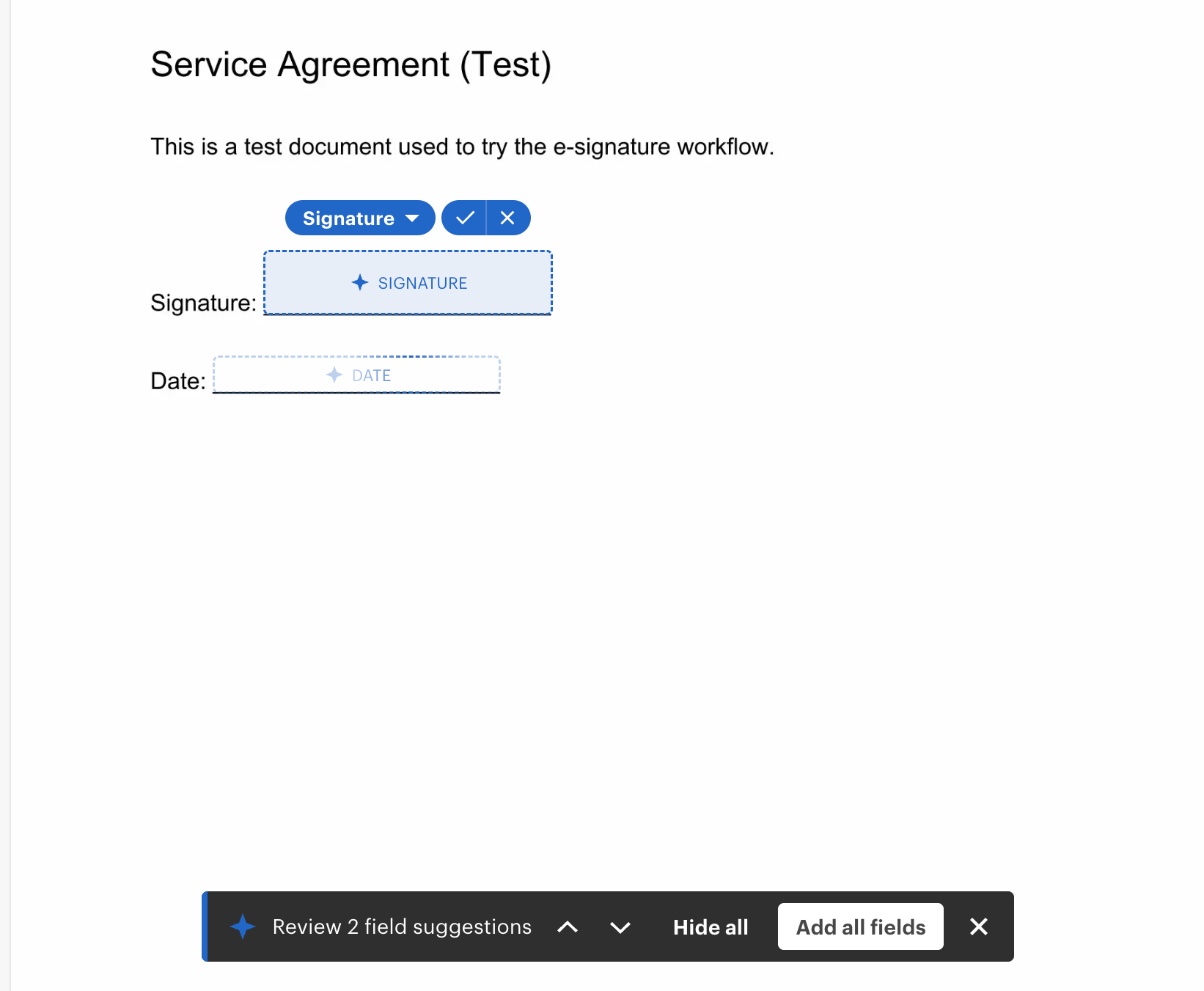
PandaDoc suggested a signature field and a date field on our simple PDF and placed both with one click. The outside recipient was initially added as a CC until fields were assigned. The date became a "Select date" picker for the signer rather than an automatic signing date.
PandaDoc also enabled "Signers can delegate signing" by default. The test document was set to expire after about 60 days. Teams should review those defaults before sending documents that need tighter recipient control.
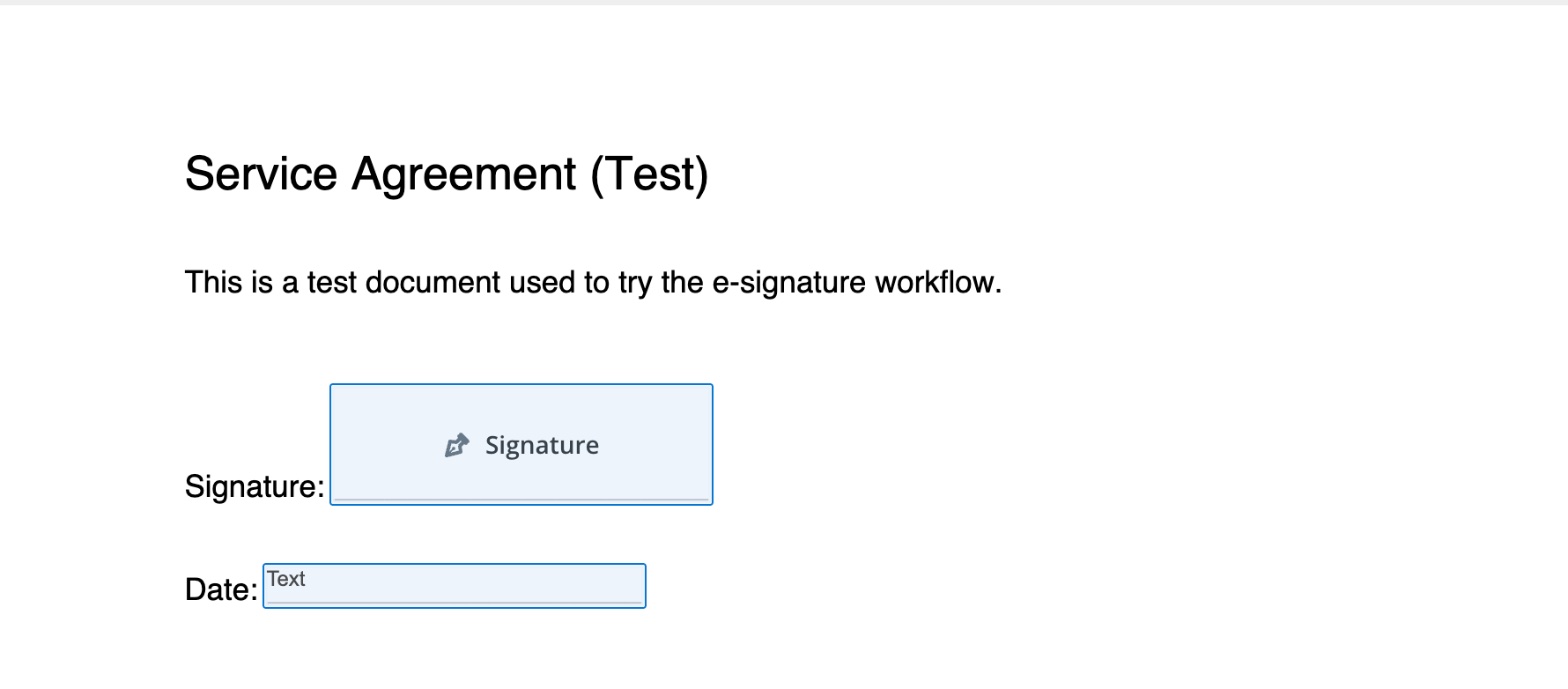
SignNow did not suggest fields after upload. Magic Fields in the editor menu placed a signature and a text field with one click once we found the option. A "Date:" line became a free text field. Invites expired after 30 days, and reminders were off by default.
SignNow offered password, text message or phone call authentication, but no government ID check in the tested flow. Those authentication options require the Enterprise plan.
Sign.Plus is the third option for assisted setup and recipient checks. Auto-Place suggests fields immediately after upload, including on flat scans. Each recipient can have a passcode, SMS code or ID Check, and every signed document includes a Certificate of Completion.
8. PandaDoc API vs SignNow API
PandaDoc has a free API plan and a Developer plan with a monthly document allowance, with higher volumes on Enterprise by quote. API document creation pauses when credits run out on Starter and Business.
SignNow has a free Dev Mode and Professional API plans priced by yearly invite volume, with AES, QES and HIPAA on the Enterprise API plan priced by sales.
Sign.Plus API plans have published prices and a monthly request allowance, and every plan supports SES, AES and QES. See Sign.Plus API pricing for the plan details.
9. Single Sign-On (SSO)
PandaDoc includes SSO on Enterprise and offers it as a paid add-on on Business. SignNow includes SSO with Site License. Neither product makes SSO a standard entry-level feature.
Sign.Plus is the third option, with SSO on Enterprise. That plan also contains storage choice and the HIPAA options, so organizations should include those requirements in the same plan review.
10. Contract Terms and Canceling
PandaDoc annual terms renew for another year unless written notice is given at least 30 days before the end date. Its orders are non-cancelable. Record the renewal date and notice requirement when the order is signed.
SignNow offers a 7-day trial and a 30-day refund window for new customers. Its plans renew automatically. The refund window and renewal terms should be checked against the actual order.
Sign.Plus is the third option to review on the same basis. Its published paid-plan prices use per-user annual billing, and purchased QES credits do not expire. Review the selected order for its renewal and cancellation terms before purchasing.
Check Recent PandaDoc and SignNow Reviews
Search for recent, plan-specific comments rather than relying on an overall rating. Useful search prompts include:
- PandaDoc automation credits review 2026
- PandaDoc annual renewal review 2026
- SignNow 100 invites review 2026
- SignNow signer authentication review 2026
- PandaDoc vs SignNow feature comparison 2026
Look for repeated reports about billing, sending limits, support and recipient setup. Check the date and plan named in each review, since older comments may describe different packaging.
For the third option, search "Sign.Plus reviews 2026" and "Sign.Plus QES review." Compare those comments with your own test of unlimited requests, verification and field placement.
Final Verdict: PandaDoc vs SignNow
PandaDoc is the better fit for teams that want to build proposals and quotes in the same workspace used for signing. Its per-seat pricing, Business feature gates and automation credits need to be part of the decision.
SignNow is the better fit for account-based signing with unlimited users, provided the shared invite allowance covers the whole team. Check the cost of extra invites and the plan required for bulk send, authentication, SSO or QES.
Sign.Plus is the third option for teams that prioritize unlimited signature requests per user, per-recipient verification and QES on every plan. Its published QES price includes identity verification, and purchased credits do not expire.
Start a Sign.Plus free trial and test it with the same agreement, recipients and verification settings you would use in production.
FAQs
Is PandaDoc better than SignNow?

Is SignNow cheaper than PandaDoc?
Does SignNow have a free plan?
Is SignNow legally binding?
Which is better for proposals?
Can PandaDoc and SignNow do QES?

Featured Articles






Confédération Suisse
Confederazione Svizzera
Confederaziun Svizra
Swiss Confederation
Innosuisse - Swiss Innovation Agency



