


Signeasy vs SignNow (2026): Pricing, Limits, QES and a Third Option
Compare Signeasy vs SignNow on pricing, sending limits, signer verification, QES, storage and HIPAA, then see how Sign.Plus offers a third option for US small teams signing uploaded documents.


- Signeasy charges per seat. Personal allows 5 sends a month, while Business and up allow unlimited documents under fair usage, with up to 5 templates on Business.
- SignNow charges per account with unlimited users, but annual plans share up to 100 invites a year. Declined and canceled invites still count.
- No QES offering appeared on Signeasy's reviewed public pages. SignNow offers QES as a paid Site License add-on.
- Signeasy offers SMS, bulk send, SSO and HIPAA through sales. SignNow offers US or EU residency from Business Premium and signer authentication on Enterprise.
- Sign.Plus is the third option, with unlimited requests per user on paid plans, no user minimum and included passcode verification on Professional, and QES on every plan, including Free.
Signeasy vs SignNow at a Glance
Signeasy is priced per seat, while SignNow is priced per account with unlimited users and a shared invite pool. This Signeasy vs SignNow comparison focuses on uploading documents, preparing fields and collecting signatures, with Sign.Plus included as a third option. We tested Signeasy and SignNow hands-on by sending a real test agreement through each service, and we continue retesting both as they change.
| Comparison point | Signeasy | SignNow | Sign.Plus |
|---|---|---|---|
| Pricing model | Per seat | Per account, with unlimited users | Per user, with no user minimum on Professional |
| Sending limit | Personal allows 5 contracts per month. Business and up allow unlimited documents, subject to fair usage. | Annual plans allow up to 100 invites per account per year. Monthly plans allow 10 per account per month. | Unlimited signature requests on Professional, Business and Enterprise |
| Signer verification | Passcode and biometric authentication on all plans. Signer authentication is listed on Business Pro. | Password, SMS or phone authentication on Enterprise. No government ID check appeared in our test. | Passcode verification included on Professional. SMS code and ID Check available per recipient. |
| QES | No QES offering found on the reviewed public pages | Paid add-on on Site License | Available on every plan, including Free |
| Storage region | Personal data is mainly processed in the US. No storage-location choice was published. | US or EU data residency from Business Premium | Switzerland by default. Enterprise offers 43 storage locations. |
| HIPAA | Sales add-on | HIPAA BAA available as a paid Site License add-on | Enterprise includes Advanced Security Controls and a signed BAA |
| Company | US e-signature company | Product of US-based airSlate, Inc. | Swiss product by Alohi in Geneva |
Signeasy or SignNow: Which Should You Choose?
Choose Signeasy if your team prefers per-seat pricing, sends frequently and wants Business features such as shared templates, automatic reminders, in-person signing and shareable signing links. Its unlimited sending is subject to fair usage restrictions.
Choose SignNow if unlimited users on one account is the priority and your team can manage a shared invite allowance. For teams weighing SignNow vs Signeasy, annual sending volume is a better starting point than the headline monthly price.
Sign.Plus is the third option for teams that want unlimited requests per user, no user minimum on Professional, included passcode verification and QES on every plan.
What Are Signeasy and SignNow?
Signeasy
Signeasy is a US e-signature company priced per seat. Signers pay nothing and do not need an account. All plans include mobile apps, offline signing, passcode and biometric authentication, two-factor login and an audit trail. Its plans range from a low-volume Personal tier to a sales-led Build Your Plan option.
SignNow
SignNow is the e-signature product of airSlate, Inc., which also owns pdfFiller, DocHub and US Legal Forms. It charges per account with unlimited users. Its iOS and Android apps support sending, signing, document scanning and in-person signing.
What Is the Main Difference?
The main difference is how usage is metered. Signeasy limits Personal to five monthly sends, then removes the document sending cap on Business and up under fair usage. SignNow gives the account unlimited users, but those users share the invite allowance. Sign.Plus takes a third approach, with unlimited signature requests per user on its paid plans.
How We Compared Signeasy and SignNow
In November 2026, we read the vendors’ public pages and sent a test agreement through each product. We reviewed pricing, plan limits, signer verification, QES, storage, security and contract terms, then recorded the upload, field placement and sending experience. Our hands-on notes describe that test rather than every possible configuration.
1. Signeasy vs SignNow Pricing
Signeasy Pricing
| Plan | Annual price per seat | Main limits and features |
|---|---|---|
| Personal | $10 per month, or $120 per year | Unlimited signing, 5 contracts sent per month and mobile apps |
| Business | $20 per month, or $240 per year | Unlimited document sending under fair usage, up to 5 shared team templates, reminders, in-person signing, signing links, sequential signing, admin dashboard, AI term extraction and summary, and 24/7 email support |
| Business Pro | $30 per month, or $360 per year | Unlimited templates, roles and permissions, approval and delegation workflows, custom branding, signer attachments, signer authentication, SharePoint, HubSpot, usage reports, audit log and priority support |
| Build Your Plan | Sales pricing for 5 or more seats or high volume | SSO, HIPAA, SMS notifications, bulk send, 21 CFR Part 11, API and a dedicated success manager |
Annual billing saves up to 33%. Signeasy offers a 14-day free trial, and its help center also describes a Free plan limited to three documents. SMS sending, bulk send, HIPAA and SSO are available through sales as Business Pro add-ons, with no published add-on price.
SignNow Pricing
| Plan | Price | Main features |
|---|---|---|
| Business | $8 per month with annual billing, or $20 monthly | SES signing; 100 invites per account per year |
| Business Premium | $20 per month with annual billing, or $30 monthly | Bulk send, signing links, payments, scheduled sending, team sharing, and US or EU data residency |
| Enterprise | $30 per month with annual billing, or $50 monthly | Branding, SMS delivery, password, SMS and phone signer authentication, conditional and formula fields, and approval workflows |
| Site License | From $1.50 per signature invite | Full API, SSO and premium integrations. QES, HIPAA BAA and 21 CFR Part 11 are paid add-ons. |
These prices sit alongside account-wide invite limits. Extra invites are billed at a plan-dependent rate, up to $3.60 each.
How Much Does Signeasy Cost Compared With SignNow?
The list prices are not directly interchangeable. Signeasy multiplies its per-seat price by the number of users. SignNow prices the account and includes unlimited users, but sending draws from one shared pool.
A useful buying estimate should include seat count, annual invite volume, likely overages and any sales add-ons. It should also separate monthly billing from annual billing, since SignNow publishes different prices for each.
How Signeasy and SignNow Pricing Compare With Sign.Plus
Signeasy Business costs $20 per seat per month on annual billing. Sign.Plus Professional costs $19.99 per user per month on annual billing, so the list prices are about the same. The useful comparison is what each includes.
Signeasy Business provides unlimited sending under fair usage and up to five shared templates. Sign.Plus Professional provides unlimited requests, 10 templates, reminders, passcode verification and 10 SMS or WhatsApp requests per seat per month. Both include in-person signing at these tiers. Sign.Plus also offers SMS code verification through SMS credits and ID Check at $2 per check, while Signeasy lists signer authentication on Business Pro.
Against SignNow, the main differences are usage and plan gating. SignNow accounts share their invites, while Sign.Plus paid plans include unlimited requests per user. SignNow places data residency, advanced signer authentication and SSO in higher tiers. Sign.Plus includes passcode verification on Professional and places storage choice and SSO on Enterprise.
2. Usage Limits: Unlimited Requests vs Shared Invites
Signeasy
Personal users can sign an unlimited number of documents but send only five contracts per month. Business and above allow unlimited document sending, subject to fair usage restrictions. Business supports up to five shared team templates, while Business Pro removes the template cap.
SignNow
Annual plans provide up to 100 invites per account per year, and monthly plans provide 10 per account per month. Unlimited users does not mean unlimited sending. Every user draws from the same allowance. Declined and canceled invites still count, and additional invites can cost up to $3.60 each, depending on the plan.
How Their Usage Compares With Sign.Plus
Sign.Plus Professional, Business and Enterprise include unlimited signature requests per user. Bulk send starts on Business, and the monthly SMS or WhatsApp allowance rises from 10 requests per seat on Professional to 30 on Business and 150 on Enterprise. This makes Sign.Plus the third option for teams that do not want to manage a shared annual invite pool.
3. QES and eIDAS: Signeasy vs SignNow
Which Signature Level Do You Need?
For teams working with European signature requirements, the eIDAS regulation defines three levels of electronic signature. The required level depends on the document, jurisdiction and assurance needed.
- SES: Simple Electronic Signature
- AES: Advanced Electronic Signature
- QES: Qualified Electronic Signature
How Signeasy Handles QES
We found no QES offering on Signeasy’s reviewed public pages. Signeasy states adherence to eIDAS and the ESIGN Act, but that statement should not be treated as evidence that QES is available. A team with a QES requirement should request written confirmation before buying.
How SignNow Handles QES
SignNow supports SES on Business through Enterprise. AES and QES are tied to Site License, and QES is a paid add-on. This places qualified signatures outside its standard Business, Business Premium and Enterprise packages.
How Signeasy and SignNow QES Compare With Sign.Plus
Sign.Plus offers QES on every plan, including Free, with support for eIDAS and ZertES through Swisscom Trust Services. QES costs $5 per recipient, including identity verification, and credits never expire. That contrasts with Signeasy’s lack of a public QES offering on the reviewed pages and SignNow’s paid Site License add-on model. See the Sign.Plus eIDAS signature guide.
4. Where Your Documents Live
Signeasy
Signeasy’s privacy policy says personal data is mainly processed in the US. The reviewed pages did not publish a choice of storage location. Teams with a residency requirement should distinguish general processing language from a contractual storage commitment.
SignNow
SignNow offers US or EU data residency from Business Premium. The reviewed material did not publish whether an account can move to another residency region later, so teams should confirm that point before choosing the initial region.
How Their Storage Options Compare With Sign.Plus
Sign.Plus stores documents in Switzerland by default under the Swiss FADP, with EU adequacy. Enterprise customers can choose from 43 storage locations, and documents can move later. That makes Sign.Plus the third option for teams that want a published default location and a broader Enterprise storage menu.
5. HIPAA and Security Certifications
Signeasy
Signeasy’s help center describes SOC 2 Type II audits, with the report available on request. ISO 27001 was not listed on its reviewed security page. HIPAA is sold through sales as an add-on. Its terms also restrict storing sensitive personal information, while the reviewed public pages did not explain the HIPAA exception. Ask for the relevant contract language in writing.
SignNow
SignNow lists ISO 27001, SOC 2 Type II and GDPR on all plans. A HIPAA BAA is available as a paid Site License add-on, as is 21 CFR Part 11. HIPAA-related API requirements are handled through Enterprise API sales.
How Their Compliance Compares With Sign.Plus
Sign.Plus Enterprise includes HIPAA with Advanced Security Controls and a signed BAA. The company lists ISO/IEC 27001:2022 through EY CertifyPoint, a SOC 2 Type 2 report from EY and a CSA STAR listing. These facts help with vendor review, but they do not determine whether a particular customer workflow is compliant.
6. Signing Experience: What We Saw Hands-On
Sending With Signeasy
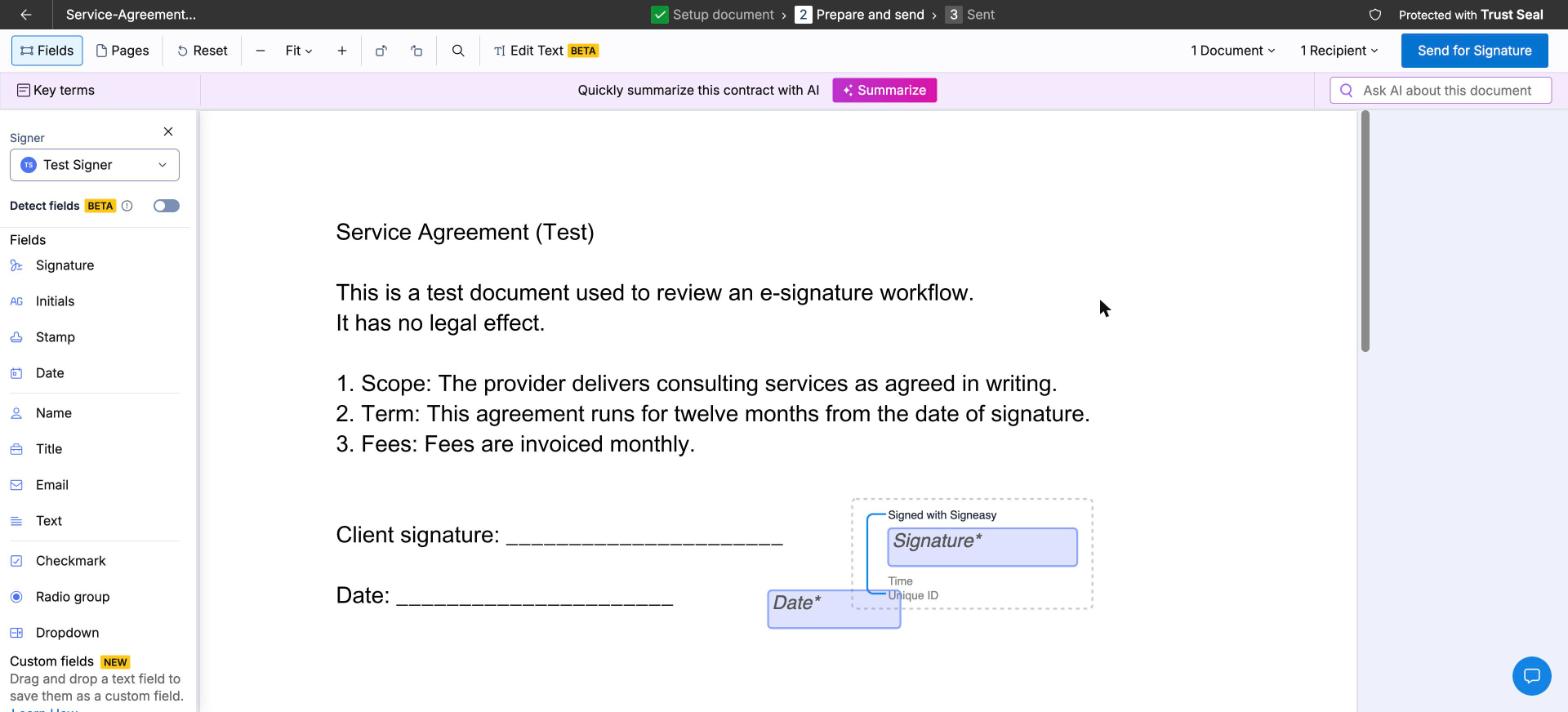
Our November 2026 send flow included an optional contract type, approvers, signers with optional SMS and two-step verification, and observers. The editor showed Detect fields in beta and an AI Summarize bar. The default expiry was 90 days.
The signer link opened directly into the document. Signatures could be typed, drawn, uploaded or saved. A “Signed with Signeasy” frame was added around each signature by default, and the date filled automatically in US format as 11/10/26.
Sending With SignNow
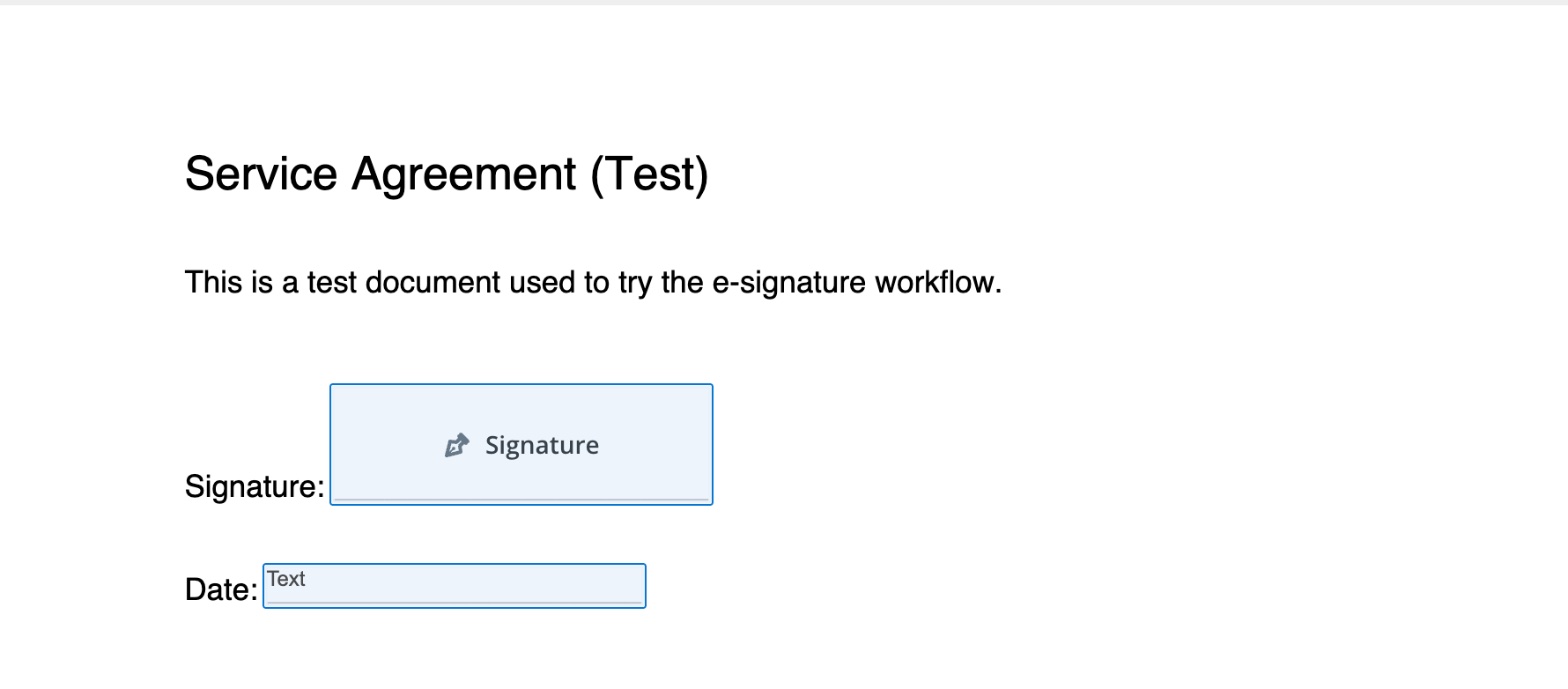
SignNow did not suggest fields after our upload. Once we found Magic Fields in the editor menu, it placed a signature and text field with one click. A “Date:” line became a free text field. Invites expired after 30 days, and reminders were off by default. Authentication options were password, text message or phone call, with no government ID check in our test.
How the Signing Experience Compares With Sign.Plus
Sign.Plus Auto-Place suggests fields immediately after upload, including on flat scans. That differs from our SignNow test, where no suggestions appeared, and from Signeasy’s beta Detect fields option. Sign.Plus also supports per-recipient passcode, SMS code and ID Check controls.
Every signed Sign.Plus document comes with a Certificate of Completion. In-person signing and branding are not reasons to prefer it over Signeasy: Signeasy includes in-person signing on Business and custom branding on Business Pro. The practical distinction here is field placement and the available recipient checks.
7. Signeasy API vs SignNow API
Signeasy provides a free sandbox, published API tiers with annual request allowances and a quote-based Build Your Plan route. SignNow provides free Dev Mode, Professional API plans priced by yearly invite volume and Enterprise API sales for AES, QES and HIPAA.
The models therefore differ in both metering and access to advanced signature levels. Development teams should check whether an allowance counts requests or signature invites, and whether the required signature level is included.
Sign.Plus API plans have published prices and a monthly request allowance. Grow costs $279.99 per month for 200 requests, while Scale costs $659.99 per month for 600 requests. Every API plan supports SES, AES and QES. See Sign.Plus API pricing.
8. Single Sign-On (SSO)
Signeasy lists SSO on Build Your Plan and as a sales add-on from Business Pro, without a published add-on price. SignNow includes SSO with Site License. Sign.Plus includes SSO on Enterprise, alongside storage location choice and HIPAA with Advanced Security Controls and a signed BAA. SSO is therefore gated above the basic tier with all three vendors, but each uses a different packaging model.
9. Contract Terms and Canceling
Signeasy plans auto-renew, and canceling keeps the plan active until the end of the period. Its refund terms conflict. The pricing page offers a 100-day money-back guarantee on yearly plans, the help center describes refunds up to 30 days after purchase, and the terms say charges are non-refundable unless otherwise specified. Confirm the applicable term in writing. Exceeding a plan limit can also move you to a higher plan, and upgrade fees are non-refundable.
SignNow offers a seven-day trial and a 30-day refund window for new customers. Its plans renew automatically. Review those terms together with the invite allowance and overage rules.
For Sign.Plus, one usage term is explicit: QES credits never expire. Review the current subscription terms before starting a trial, just as you should with either competitor.
Check Recent Signeasy and SignNow Reviews
Search for recent customer experiences, then check whether complaints or praise relate to your intended plan. Useful search prompts include:
- “Signeasy reviews 2026 sending limits”
- “Signeasy yearly plan refund policy”
- “SignNow reviews 2026 100 invites”
- “SignNow declined canceled invites”
- “Signeasy SignNow support and canceling”
- “Sign.Plus reviews 2026 QES Auto-Place”
Final Verdict: Signeasy vs SignNow
Signeasy makes sense for teams that want per-seat plans, frequent sending on Business and features such as reminders, in-person signing and signing links. SignNow makes sense for teams that value unlimited users on one account and can manage shared invites and higher-tier feature gates.
Sign.Plus is the third option for small teams that want unlimited requests per user, no user minimum on Professional, included passcode verification and QES on every plan.
To test that option, start a Sign.Plus free trial and review the current plan details.
FAQs
Is Signeasy better than SignNow?

Is SignNow cheaper than Signeasy?
Does Signeasy have a free plan?
Is Signeasy legit?
Is SignNow legally binding?
Can Signeasy and SignNow do QES?

Featured Articles






Confédération Suisse
Confederazione Svizzera
Confederaziun Svizra
Swiss Confederation
Innosuisse - Swiss Innovation Agency



