


Yousign vs DocuSign (2026): Pricing, QES, Limits and Features
Compare Yousign, now Youtrust, and DocuSign on pricing, envelope and request limits, QES, storage and HIPAA, with Sign.Plus included as a Swiss third option.


- Yousign is now Youtrust, a French qualified trust service provider that hosts data exclusively in France.
- Youtrust Plus costs $23 per user per month on annual billing, while DocuSign Standard and Business Pro cost $25 and $40 when paid annually upfront.
- DocuSign Standard and Business Pro include 100 envelopes per user per year, and an envelope counts when sent even if unsigned.
- Youtrust offers QES only on Plus and Pro at EUR 10 to EUR 15 per signature, while DocuSign lists QES on Enhanced in the US.
- Sign.Plus offers QES on every plan, unlimited requests on paid plans and 43 storage location choices on Enterprise.
Yousign is now called Youtrust. This Yousign vs DocuSign (2026) comparison examines pricing, sending limits, QES, storage, compliance and the signing experience, with Sign.Plus included as a third option. We tested Yousign, now Youtrust, and DocuSign hands-on, sending a real test agreement through each one, and we continue retesting both as they evolve.
Yousign vs DocuSign at a Glance
| Feature | Yousign (Youtrust) | DocuSign | Sign.Plus |
|---|---|---|---|
| Pricing Model | Per user, with a USD and a euro price list | Per user, in US dollars; Enhanced by quote | Per user; published plans |
| Sending Limit | 2 requests a month on Free, 10 on One; unlimited simple signatures on Plus | 5 envelopes a month on Personal; 100 per user per year on Standard and Business Pro | Unlimited signature requests on paid plans |
| Signer Verification | SMS authentication on Plus; Verify add-on; video identity check for QES | Email access codes on all plans; SMS and ID verification options vary by plan | Passcode, SMS code and ID Check; identity verification included with QES |
| QES | Plus and Pro only, with per-signature credits | Enhanced in the US; paid add-on on European price lists for Personal, Standard and Business Pro | Available on every plan, including Free |
| Storage Region | France exclusively | US, Canada, Europe, Australia or Japan on Enhanced | Switzerland by default; 43 location choices on Enterprise |
| HIPAA | Not mentioned in reviewed materials | Enhanced only, through a BAA | Enterprise, with Advanced Security Controls and a signed BAA |
| Company | French provider, Youtrust SAS, registered in Caen | DocuSign, Inc., San Francisco | Swiss provider, by Alohi, Geneva |
DocuSign details refer to US eSignature plans unless noted. Youtrust prices exclude VAT.
Yousign or DocuSign: Which Should You Choose?
The quick choice depends on your location, signature level and tolerance for usage meters.
- Choose Yousign if you want France-only hosting and a French qualified trust service provider. QES requires Plus or Pro.
- Choose DocuSign if you want its US plan ecosystem, Business Pro integrations and quote-based Enhanced options for compliance and data residency. Its envelope limits need closer attention.
- Consider Sign.Plus if you want Swiss default storage, unlimited requests on paid plans and QES on every plan.
What Are Yousign and DocuSign?
Yousign (Now Youtrust)
Yousign changed its name to Youtrust in 2026, following an announcement in November 2025. The website moved to youtrust.com in July 2026. The app will adopt the new brand progressively through 2027, so emails and sign-in pages may still say Yousign. The company says pricing, contracts and support stay the same.
Youtrust SAS is registered in Caen, France. Its products are Sign for SES, AES and QES, Verify for identity, company and bank-account checks, and Seal for electronic seals. It is a qualified trust service provider in France, qualified by ANSSI and named on the EU trusted list for qualified certificates for electronic signatures, seals and time stamps.
DocuSign
DocuSign, Inc. is based in San Francisco. Its eSignature range covers Personal, Standard, Business Pro and Enhanced, the quote-based plan formerly sold as Enterprise. Separate IAM plans add AI agreement management, Workflow Builder and unlimited envelope sends, though their prices are not covered here.
All eSignature plans include an audit trail, reusable templates, a certificate of completion, email access codes, mobile apps and 44 or more signing languages. Business Pro adds bulk send, payment collection, PowerForms, web forms, a developer account and APIs and more than 1,000 partner integrations.
What Is the Main Difference?
Youtrust vs DocuSign is primarily a choice between different structures. Youtrust combines French hosting, per-user plans and eIDAS trust services. DocuSign's US self-serve plans center on envelopes, while QES, SSO, data residency and HIPAA move to quote-based Enhanced.
Sign.Plus provides a third structure: Swiss default storage and broader QES access across its plans.
How We Compared Yousign and DocuSign
We read vendor pages and sent a test agreement through each in November 2026. We compared pricing, usage limits, QES, storage, security, HIPAA, APIs, SSO and contract terms.
The hands-on observations below describe the defaults and flows in our tests, not every possible configuration. We then assessed where Sign.Plus offers a different third option.
1. Yousign vs DocuSign Pricing
Yousign (Youtrust) Pricing
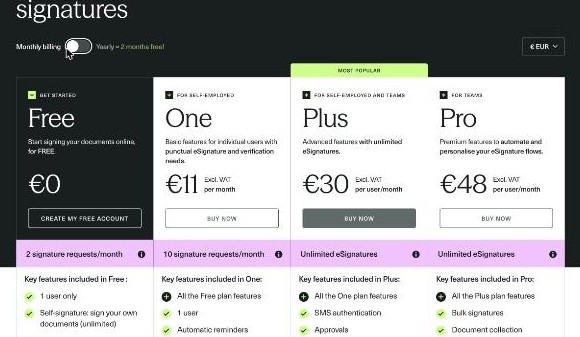
Yousign pricing is published in US dollars and euros, excluding VAT. The table below uses the USD price list. A euro price list (EUR 11/9, 30/23, 48/38) also exists. Annual billing is marketed as 3 months free in USD and 2 months free in euros. On the euro list, annual billing is a 12-month commitment paid upfront.
| Plan | Monthly Billing | Annual Billing | Main Limits and Features |
|---|---|---|---|
| Free | $0 | $0 | 1 user, 2 signature requests a month, unlimited self-signing |
| One | $13 a month | $8 a month, or $96 a year | 1 user, 10 requests a month, 1 template, custom logo |
| Plus | $35 per user a month | $23 per user a month, or $276 per user a year | Unlimited simple signatures, SMS authentication, approvals, unlimited templates, 5 workspaces, Zapier and HubSpot; 1 bulk-send campaign a month, up to 500 recipients |
| Pro | $55 per user a month | $38 per user a month, or $456 per user a year | 10 bulk-send campaigns a month, up to 500 recipients each; document collection, custom experiences, Forms and 10 workspaces |
Organizations with more than five users need a custom quote. A 14-day free trial is available. One, Plus and Pro include five identity, three company and two bank-account verification credits.
AES costs extra on Plus and Pro and requires yearly billing; its price is not shown. SSO and SCIM are Pro-only extras with yearly billing. Electronic archiving is also a yearly Pro add-on, while Verify identity checks are a paid add-on.
DocuSign Pricing
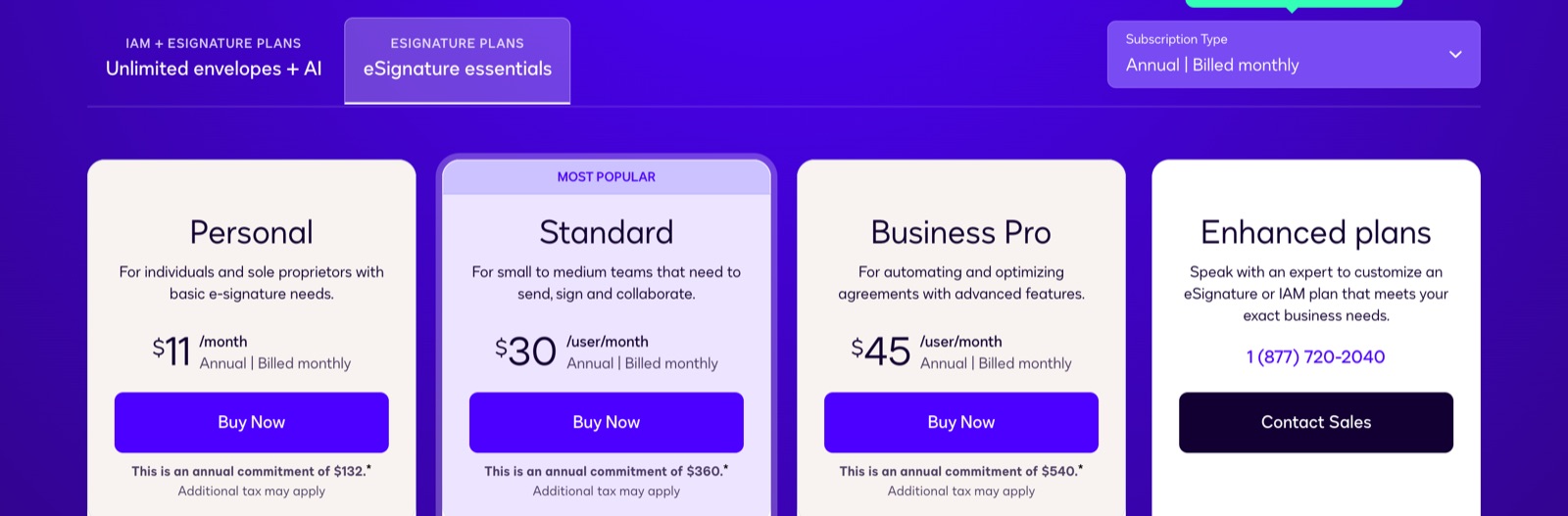
| Plan | Price | Users and Sending Limit |
|---|---|---|
| Personal | $10 a month paid annually upfront; $11 annual billed monthly, totaling $132 a year; $15 month to month | 1 user and 5 envelopes a month |
| Standard | $25 per user a month paid annually upfront; $30 annual billed monthly, totaling $360 per user a year; $45 month to month | Up to 50 users and 100 envelopes per user per year |
| Business Pro | $40 per user a month paid annually upfront; $45 annual billed monthly, totaling $540 per user a year; $65 month to month | Up to 50 users and 100 envelopes per user per year |
| Enhanced | Contact sales | 50 or more users and custom envelope limits |
For Standard and Business Pro, SMS delivery starts at $0.36 per delivery and ID verification at $2.40 per attempt. Both plans include five SMS deliveries and five identity verifications as a one-time bonus. Our DocuSign Standard vs Business Pro guide covers that tier choice in more detail.
How Much Does Yousign Cost Compared With DocuSign?
On annual billing, Youtrust Plus is $23 per user per month and Pro is $38 per user per month. DocuSign Standard is $25 per user per month and Business Pro is $40 per user per month when paid annually upfront.
Youtrust Plus includes unlimited simple signatures, while DocuSign Standard and Business Pro each meter 100 envelopes per user per year. Total cost also depends on QES, add-ons, sending volume and required features.
How Yousign and DocuSign Pricing Compare With Sign.Plus
Sign.Plus Professional is $19.99 per user per month on annual billing, compared with Youtrust Plus at $23 per user per month on annual billing or $35 per user per month on monthly billing. Professional includes unlimited signature requests, while Youtrust Plus includes unlimited simple signatures.
DocuSign Standard is $25 per user per month and Business Pro is $40 per user per month when paid annually upfront. Both meter 100 envelopes per user per year.
Sign.Plus Business is $29.99 and adds bulk send, a feature DocuSign places on Business Pro. Sign.Plus Enterprise is $49.99 and includes SSO, HIPAA support and storage choice; DocuSign places those requirements in quote-based Enhanced.
Beyond subscription prices, Sign.Plus offers QES on every plan rather than limiting it to Plus and Pro as Youtrust does. Sign.Plus Business also provides bulk send without a monthly campaign cap, and Sign.Plus offers monthly billing for advanced features. Professional has no user minimum. The Sign.Plus Youtrust alternative page provides a focused third-option comparison.
2. Usage Limits: Requests vs Envelopes
Yousign (Youtrust) Usage Limits
Free includes two signature requests a month. One includes ten, and additional requests wait as drafts until the following month. Plus removes the cap for simple signatures.
Bulk send has separate campaign limits. Plus allows one campaign a month and Pro allows ten, with up to 500 recipients in each campaign.
DocuSign Usage Limits
Personal includes five envelopes a month. Standard and Business Pro each include 100 envelopes per user per year.
An envelope counts when sent, whether or not it is signed. Voiding it does not restore the allowance, and bulk and API sends also count. Overage is billed per envelope.
How Their Usage Compares With Sign.Plus
Every paid Sign.Plus plan includes unlimited signature requests. Business adds bulk send without a monthly campaign cap. This avoids both Youtrust's campaign limits and DocuSign's envelope meter, although SMS and WhatsApp allowances still vary by plan.
3. QES and eIDAS: Yousign vs DocuSign
Which Signature Level Do You Need?
For European buyers, the eIDAS regulation defines three levels of electronic signature.
- SES: Simple electronic signature.
- AES: Advanced electronic signature.
- QES: Qualified electronic signature.
Our eIDAS signature guide explains the framework in more detail.
How Yousign Handles QES
Youtrust offers QES only on Plus and Pro, not Free or One. Youtrust displays its QES prices only in euros, even on the USD price view. It costs EUR 15 per signature when bought individually in quantities of one to nine, or EUR 10 per signature in bundles of ten or more on an annual plan. Individually purchased credits expire after three months.
The signer completes an asynchronous video identity check by filming an ID document and their face. Each credit permits up to three attempts. Youtrust's help center also says QES requests do not receive an audit trail in the app. For SES and AES, an audit trail PDF is available on all plans and archived for ten years.
How DocuSign Handles QES
In the US, Personal, Standard and Business Pro list SES. Enhanced lists SES, AES and QES and requires contacting sales.
European price lists differ: they offer QES as a paid add-on on Personal, Standard and Business Pro. US and European buyers should therefore check the plan terms for their own region.
How Yousign and DocuSign QES Compare With Sign.Plus
Sign.Plus offers QES on every plan, including Free, through Swisscom Trust Services under eIDAS and ZertES. It costs $5 per recipient, including identity verification, and credits never expire. Youtrust charges EUR 10 to EUR 15 per signature on Plus and Pro, while DocuSign's US route is quote-based Enhanced. The practical differences are plan access, included identity verification and credit expiry.
4. Where Your Documents Live
Yousign (Youtrust) Storage
Youtrust hosts data exclusively in France, replicated across several areas. Evidence files are archived with a third-party archiving provider. No other storage location is published.
DocuSign Storage
Data residency is available only on Enhanced. The choices are the US, Canada, Europe, Australia and Japan, and the region is set when the account is created.
How Their Storage Options Compare With Sign.Plus
Sign.Plus stores documents in Switzerland by default under the Swiss FADP, with EU adequacy. Enterprise offers 43 storage locations, and documents can move later. This is a third model between Youtrust's single published country and DocuSign's Enhanced-only regional selection.
5. HIPAA and Security Certifications
Yousign (Youtrust) Security
Youtrust uses AES-256 encryption at rest and TLS in transit, with annual third-party audits and a bug bounty. ISO/IEC 27001 is listed for the system running its trust services.
SOC 2 Type II appears in a blog post but not on its security page. HIPAA was not mentioned in the reviewed materials, so healthcare buyers should request written clarification rather than assume support.
DocuSign Security and HIPAA
All DocuSign plans list ISO 27001, SOC 2 Type II, GDPR and WCAG 2.0 AA. HIPAA support through a BAA requires Enhanced. FedRAMP Moderate, DoD IL4 and 21 CFR Part 11 are also Enhanced-only features.
How Their Compliance Compares With Sign.Plus
Sign.Plus lists ISO/IEC 27001:2022 certification from EY CertifyPoint, a SOC 2 Type 2 report from EY and CSA STAR listing.
HIPAA is available on Enterprise with Advanced Security Controls and a signed BAA at a published price of $49.99 per user per month on annual billing. DocuSign requires an Enhanced quote for HIPAA.
6. Signing Experience: What We Saw Hands-On
Sending With Yousign
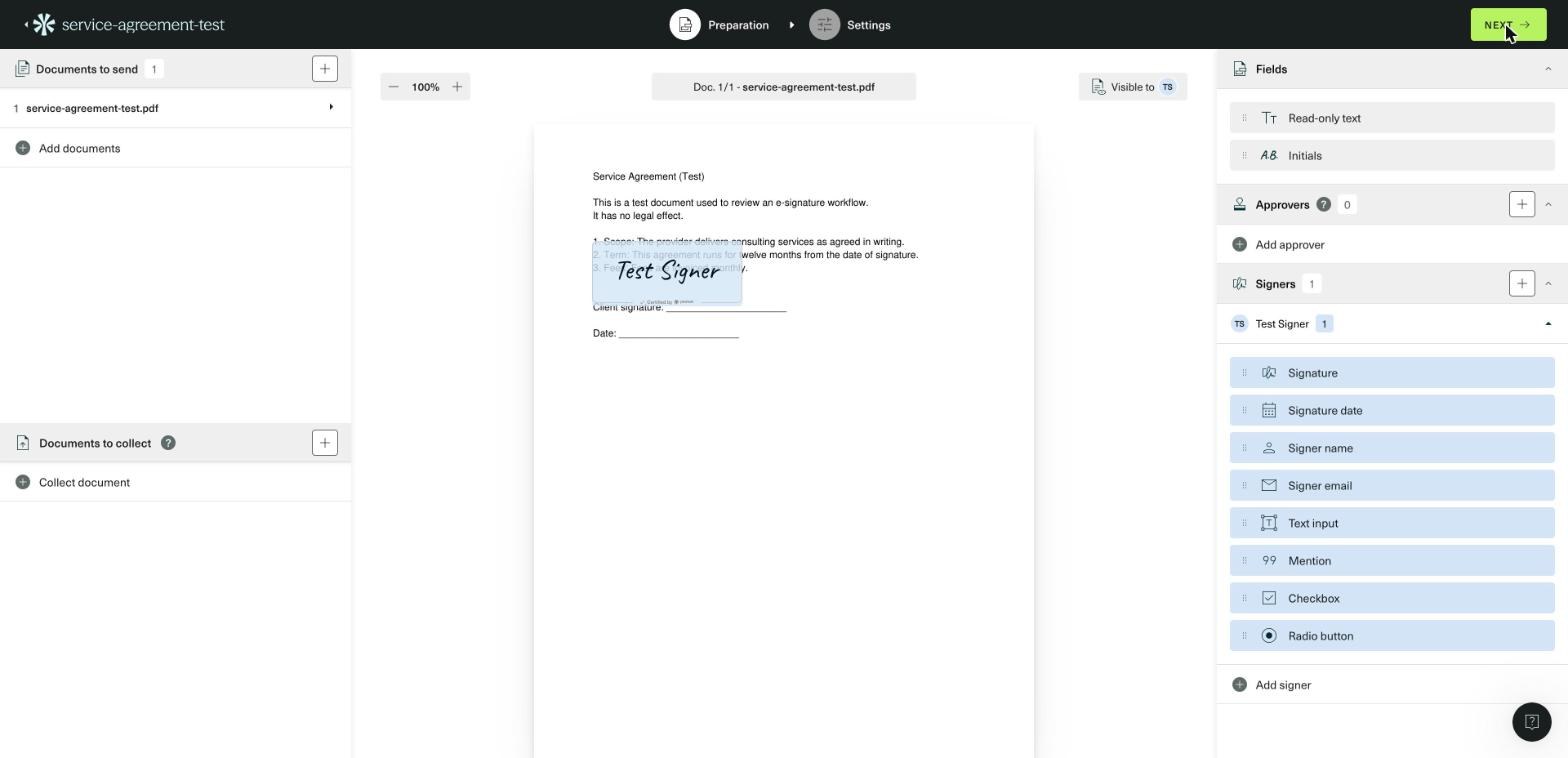
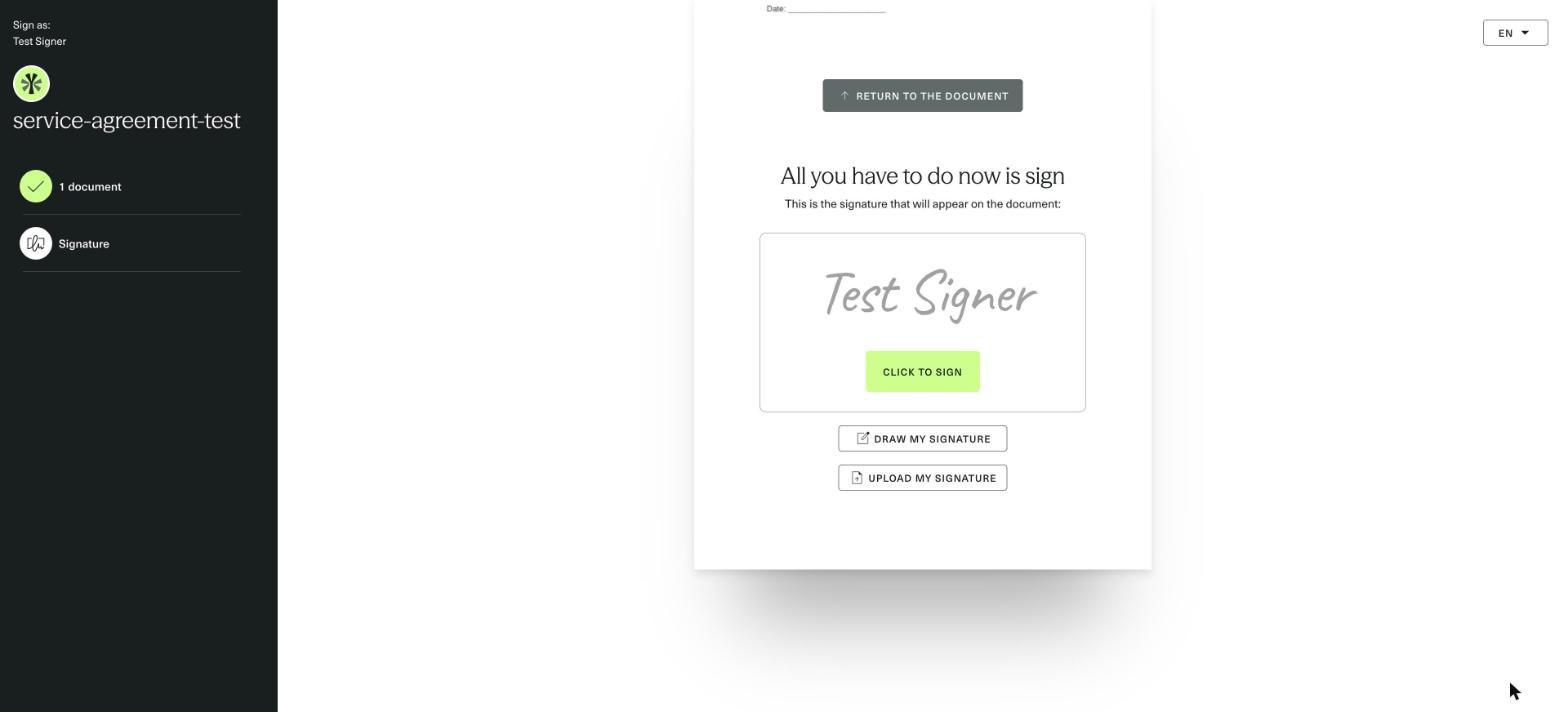
Our test used a two-step flow: Preparation and Settings. We placed each signer's fields manually, including signature, date, name, email, text, checkbox and initials.
The request expiry defaulted to six months, with weekly reminders up to five times. We could edit the message but not the email subject. SES could be sent with no code, an email code or an SMS code.
The signer opened the link without an account and had to scroll to the end before Continue became active. A signature was generated from the signer's name, with draw and upload options. The signed document was immediately downloadable. The sender received a timeline and separate downloads for the document, audit trail and field data.
Sending With DocuSign
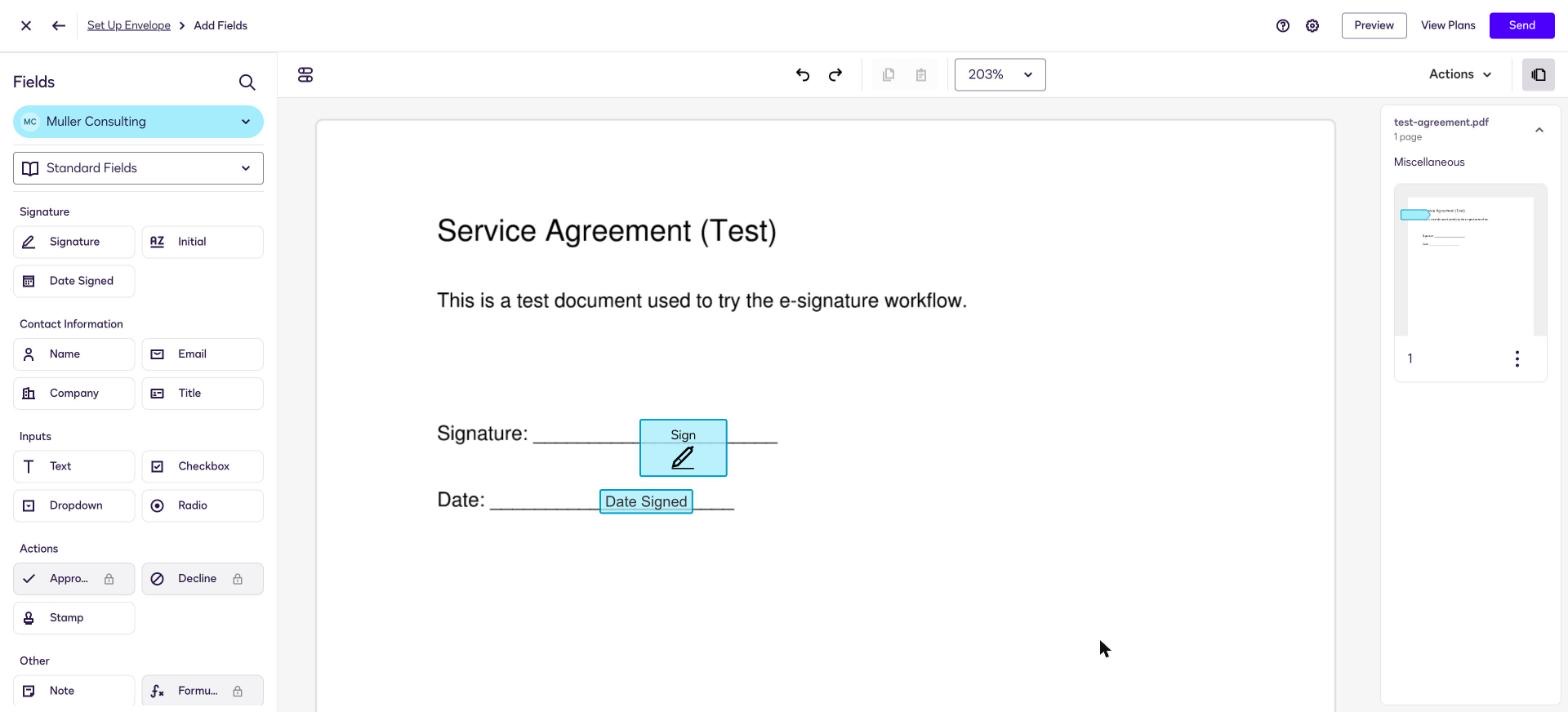
DocuSign also required manual field placement in our test. Its AutoPlace feature works from anchor text that you add to the document yourself.
The default envelope name was "Complete with Docusign: <file>". The request was set to expire four months after sending without the send flow asking us to choose that period.
How the Signing Experience Compares With Sign.Plus
Sign.Plus Auto-Place suggests fields immediately after upload, including on flat scans. Auto-Place differs from the manual field placement in our two tests; DocuSign AutoPlace works from anchor text added to the document.
Sign.Plus also provides per-recipient passcode, SMS code and ID Check options. ID Check costs $2 per check, and every signed document includes a Certificate of Completion.
7. Yousign API vs DocuSign API
Youtrust sells its API separately with yearly billing only. It provides a free 40-day sandbox. AES, QES, seals and verification may cost extra.
DocuSign adds a developer account and APIs on Business Pro. API sends count against envelope usage, so development and production volume should be considered together.
Sign.Plus publishes its API pricing: Essential is $75.99 a month for 50 requests, Grow is $279.99 for 200 requests, and Scale is $659.99 for 600 requests. Every API plan supports SES, AES and QES. See Sign.Plus API pricing for the third-option details.
8. Single Sign-On (SSO)
Youtrust restricts SSO and SCIM to Pro. Both cost extra and require yearly billing.
DocuSign places SSO and access management on Enhanced. They are not included on Standard or Business Pro, and Enhanced requires a sales quote.
Sign.Plus includes SSO on Enterprise. Advanced features are also available with monthly billing, providing an alternative to Youtrust's yearly-only add-on and DocuSign's quote-based route.
9. Contract Terms and Canceling
Youtrust subscriptions renew monthly or yearly. Cancellation requires at least 15 days' notice before a monthly renewal and 30 days before an annual renewal. Multi-year terms require three or six months' notice, and there are no pro rata refunds.
Closing a Youtrust account is irreversible. Customers then have 14 days to download documents and audit trails.
DocuSign annual plans can be canceled within 30 days without penalty, once per customer. After that window, the remaining annual subscription balance is owed. Subscriptions renew.
Sign.Plus is the third option for buyers who want published plan boundaries and monthly billing for advanced features. Its QES credits never expire. As with either competitor, review the current renewal and cancellation terms before purchasing.
Check Recent Yousign and DocuSign Reviews
Search both Yousign and Youtrust because the app rebrand is still progressing. Check review dates, the reviewer's plan and whether they used a US or European subscription.
- "Youtrust reviews 2026"
- "Yousign QES review"
- "Youtrust cancellation renewal"
- "DocuSign 100 envelope limit review"
- "DocuSign Enhanced SSO HIPAA review"
- "DocuSign annual renewal cancellation"
Include Sign.Plus in the same review pass if you want to assess a third provider against recurring themes.
Final Verdict: Yousign vs DocuSign
The DocuSign vs Yousign decision favors different priorities. Youtrust is the clearer fit for France-only hosting and direct access to a French qualified trust service provider. Its QES restrictions, yearly add-ons and cancellation notice periods deserve attention.
DocuSign suits organizations that value its US plan ecosystem, Business Pro integrations and Enhanced compliance options. Buyers should budget around envelope consumption and request quotes for QES, SSO, data residency or HIPAA.
Sign.Plus is the third option for Swiss default storage, unlimited requests on paid plans and QES on every plan. Enterprise adds 43 storage choices and HIPAA support at a published price.
Start a Sign.Plus free trial to test that option alongside your Yousign and DocuSign shortlist.
FAQs
Is Yousign better than DocuSign?

Is Yousign cheaper than DocuSign?
Is Yousign the same as Youtrust?
Is Yousign free?
Does Yousign support QES?
Is Yousign legally binding in the US?

Featured Articles






Confédération Suisse
Confederazione Svizzera
Confederaziun Svizra
Swiss Confederation
Innosuisse - Swiss Innovation Agency



