


Zoho Sign vs DocuSign (2026): Pricing, Credits, QES and a Third Option
Zoho Sign and DocuSign compared on pricing, envelope limits, credits, QES, data centers, HIPAA, the API, SSO and contract terms, with a hands-on test of each and Sign.Plus as the third option.


- Zoho Sign costs $10 to $22 per user per month on annual billing; Standard caps envelopes at 25 per user per month, and SMS, bulk send, the API and QES run on credits.
- DocuSign Standard costs $25 per user per month paid upfront, with 100 envelopes per user per year.
- On DocuSign's US price list, QES, storage choice and HIPAA support need the quote-based Enhanced plan, and European plans offer QES as a paid add-on; on Zoho Sign, QES is paid in credits and the plan behind a BAA is not published.
- Zoho Sign suits teams already on Zoho; DocuSign suits teams that want its brand and integration catalog.
- If you want unlimited sending without credits for everyday features, and QES or HIPAA at a published price, Sign.Plus is worth a look: unlimited requests and passcode verification from $19.99, and QES on every plan at $5 per recipient.
Zoho Sign and DocuSign meter usage in different ways. Zoho Sign is part of the Zoho suite and charges per user, with envelope caps on its lower plans and credits for extras such as SMS, bulk send, the API and qualified signatures. DocuSign charges per user and gives each user an allowance of envelopes. This comparison shows what each plan includes, where the add-on costs sit, and when a third option fits better. We tested Zoho Sign and DocuSign hands-on by sending a real test agreement through each one, and we keep retesting both services as they change.
Zoho Sign vs DocuSign at a Glance
| Zoho Sign | DocuSign | Sign.Plus | |
|---|---|---|---|
| Sending limit | Free: 5 envelopes a month; Standard: 25 per user per month; unlimited from Professional | 100 envelopes per user per year on Standard and Business Pro, including API and bulk sends | Unlimited signature requests from Professional |
| Extras billed per use | Credits for SMS, bulk send, SignForms, the API, integrations and QES | SMS from $0.36 per delivery, ID checks from $2.40 per attempt, envelope overage | SMS credits and ID Check $2 per check; passcode verification included |
| In-person signing and bulk send | Enterprise | Business Pro | In-person signing from Professional; bulk send from Business |
| QES | Enterprise on the plan comparison, paid in credits; rate depends on the provider | US: Enhanced (contact sales); Europe: paid add-on | Every plan, including Free: $5 per recipient; credits do not expire |
| Storage region | Set from your location at sign-up; moved on request | Enhanced only; fixed at account setup | Switzerland by default; 43 locations on Enterprise; documents can move later |
| HIPAA | BAA on request; plan not published | Listed on Enhanced (contact sales) | Enterprise with Advanced Security Controls and a signed BAA, at a published price |
| Company based in | India (Zoho Corporation) | San Francisco, United States | Geneva, Switzerland |
Prices are US list prices, checked on each vendor's own pricing page in November 2026.
Zoho Sign or DocuSign: Which Should You Choose?
Zoho Sign fits teams that already run on Zoho CRM, Zoho One or other Zoho apps and want signing inside the same account. Its lower plans cap envelopes, and many extras, from SMS delivery to the API and qualified signatures, are paid in credits on top of the plan.
DocuSign fits teams that want the most widely known brand and a large integration catalog. Its self-serve plans are easiest to budget for predictable per-user volume, with 100 envelopes per user per year, and on its US price list QES, storage choice and HIPAA support sit on the quote-based Enhanced plan; European plans offer QES as a paid add-on.
If your team wants unlimited sending without credits for everyday features, and qualified signatures, storage choice or HIPAA support at a published price, Sign.Plus is worth a look: unlimited signature requests, passcode verification and in-person signing from Professional, QES on every plan, and storage choice on Enterprise, from a Swiss provider. Each section below shows where it fits.
What Are Zoho Sign and DocuSign?
Zoho Sign
Zoho Sign is the e-signature app of Zoho Corporation, an Indian software company founded in 1996. It sells a Free plan, Standard, Professional and Enterprise, a quote-based Custom plan and a separate API plan, and it is included in Zoho One. Many actions draw on Zoho Sign credits, which cost $0.10 each when bought. See our Zoho Sign review for every plan.
DocuSign
DocuSign is a US company headquartered in San Francisco. It sells e-signature in four families: eSignature (Personal, Standard, Business Pro and Enhanced), IAM (Intelligent Agreement Management), Real Estate and Developer plans, and counts usage in envelopes. See our DocuSign review for the full breakdown.
What Is the Main Difference?
How extras are billed. DocuSign counts envelopes per user and bills add-ons such as SMS and ID checks per use. Zoho Sign removes the envelope cap from Professional up, but bulk send, forms, SMS, the API, integrations and qualified signatures consume credits, and several of them need Enterprise.
How We Compared Zoho Sign and DocuSign
E-signature is what we work on every day. We build and run Sign.Plus, and we follow the other platforms closely. For this comparison we read Zoho Sign's pricing page, its credits page and help center articles on digital signature providers, data centers and HIPAA, and DocuSign's US price lists, plan comparisons, pricing FAQs, data residency page and eSignature terms. We tested both services hands-on by sending a test agreement through each, and rechecked every price on the vendors' own pages in November 2026. Where something is marked as not published, the vendor does not state it on its own pages, which makes it a question for their sales team, not proof that it is missing.
1. Zoho Sign vs DocuSign Pricing
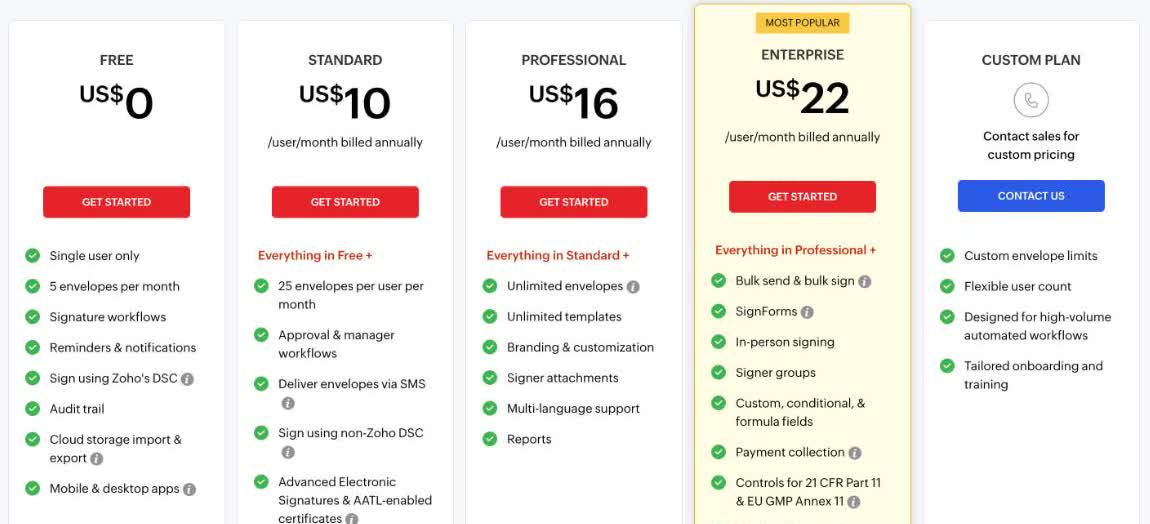
Zoho Sign Pricing
Zoho Sign prices per user. Yearly billing saves 20%, and every paid plan has a 14-day free trial without a credit card.
| Zoho Sign plan | Annual billing | Monthly billing | Envelopes | What it adds |
|---|---|---|---|---|
| Free | $0 | $0 | 5 per month, single user | Signature workflows, reminders, audit trail |
| Standard | $10/user/mo | $12/user/mo | 25 per user per month | Approval workflows, recipient authentication, witness signing; SMS, AES and timestamping in credits |
| Professional | $16/user/mo | $20/user/mo | Unlimited; credits for automations and integrations | Unlimited templates, branding, signer attachments, reports |
| Enterprise | $22/user/mo | $28/user/mo | Unlimited | Bulk send, SignForms, in-person signing, QES, APIs and webhooks (most in credits); 50 complimentary credits per user per month |
DocuSign Pricing
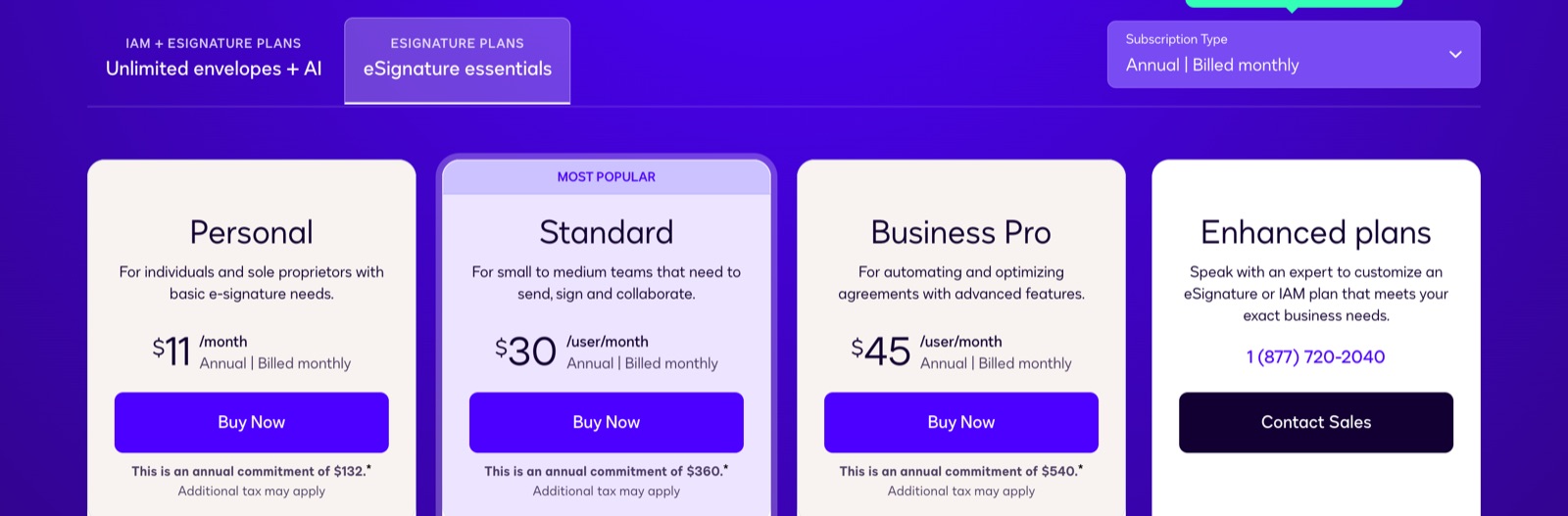
DocuSign's US page opens on annual billing paid monthly. Paying the year upfront is the cheapest option, and month-to-month costs the most.
| DocuSign plan | Annual, upfront | Annual, billed monthly | Monthly | Envelopes |
|---|---|---|---|---|
| Personal (1 user) | $10/mo | $11/mo | $15/mo | 5 per month |
| Standard | $25/user/mo | $30/user/mo | $45/user/mo | 100 per user per year |
| Business Pro | $40/user/mo | $45/user/mo | $65/user/mo | 100 per user per year |
| Enhanced | Contact sales | Contact sales | Contact sales | Custom |
How Much Does Zoho Sign Cost Compared With DocuSign?
Zoho Sign's published Standard, Professional and Enterprise list prices are below DocuSign Standard and Business Pro, although the plans do not map feature for feature and both vendors have quote-based options. From Professional up, Zoho Sign has no envelope cap. The plan price is not the whole bill, though: SMS delivery, bulk send, forms, the API, third-party integrations and qualified signatures draw on credits, and the complimentary credits that come with Enterprise expire at the end of each billing month and cannot be used for the API, SMS codes or third-party integrations. DocuSign's self-serve plans bill extras the same way, per use, and add envelope overage on top.
How Zoho Sign and DocuSign Pricing Compare With Sign.Plus
Sign.Plus prices per user with unlimited sending and keeps everyday verification inside the plan.
| Platform | Team plan, annual billing | Sending model | Verification included |
|---|---|---|---|
| DocuSign | Standard: $25 per user per month | 100 envelopes per user per year | Email; SMS and ID checks billed per use |
| Sign.Plus | Professional: $19.99 per user per month | Unlimited signature requests | Passcode verification; in-person signing |
Sign.Plus Professional costs $19.99 per user per month on annual billing and includes unlimited signature requests, 10 templates, automatic reminders, passcode verification, in-person signing and a monthly allowance of signature requests by SMS or WhatsApp. Business adds bulk send, custom branding and Zapier at $29.99, and Enterprise adds storage choice and SSO at $49.99, plus HIPAA support with Advanced Security Controls enabled and a signed BAA, all at published prices.
2. Usage Limits and Credits
How Zoho Sign Meters Usage
The Free plan allows 5 envelopes a month and Standard 25 per user per month; Professional and Enterprise remove the envelope cap. Credits cover the rest. Zoho's credits page lists 0.5 credit per SMS, and 5 credits per recipient for bulk send, per SignForms response, per REST API or SDK request, and per automation through Zoho or third-party apps. Bought credits are sold in blocks of 500 and do not expire.
How DocuSign Counts Envelopes
DocuSign's eSignature terms say an envelope is used when it is sent, whether or not anyone signs it, and voiding it does not give it back. Bulk sends and API sends count against the same allowance, and envelopes above it are billed per envelope.
How Their Usage Costs Compare With Sign.Plus
Sign.Plus Professional and higher eSignature plans include unlimited signature requests, and API access is sold as separate plans with a published monthly allowance.
| Signing requests per year | DocuSign Standard (1 user, upfront) | Sign.Plus Professional (1 user) |
|---|---|---|
| 100 | $300, about $3.00 per request | $239.99, about $2.40 per request |
| 200 | $300 plus 100 overage envelopes, or a second seat | $239.99, about $1.20 per request |
| 1,000 | $300 plus 900 overage envelopes, or more seats | $239.99, about $0.24 per request |
Each Sign.Plus seat also includes signature requests by SMS or WhatsApp: 10 a month on Professional, 30 on Business and 150 on Enterprise. See how signing by SMS or WhatsApp works.
3. QES and eIDAS: Zoho Sign vs DocuSign
Which Signature Level Do You Need?
Not every electronic signature carries the same legal weight. In the European Union, the eIDAS regulation defines three levels:
- SES (simple electronic signature): a typed name, drawn signature or click to sign. Fine for most everyday agreements, such as sales contracts, NDAs and offer letters.
- AES (advanced electronic signature): uniquely linked to the signer, capable of identifying them, created with data the signer alone controls, and linked to the document so any later change is detectable.
- QES (qualified electronic signature): an advanced signature based on a qualified certificate and created with a qualified signature creation device, issued by a qualified trust service provider after the signer's identity is verified. Under eIDAS it has the same legal effect as a handwritten signature in every EU country.
Switzerland has its own law, ZertES, with its own qualified level. In the United States, the ESIGN Act and UETA make electronic signatures legally valid for most transactions, without separate levels.
How Zoho Sign Handles QES
Zoho Sign connects to many trust service providers, such as Swisscom, itsme, InfoCert, D-Trust and national eIDs, and charges QES in credits at a rate that depends on the provider; some providers add a yearly fee per user. Its plan comparison lists QES on Enterprise, while its help center lists the providers on all paid plans, so check with Zoho for your plan. The Free plan has no QES.
How DocuSign Handles QES
On DocuSign's US price list, AES and QES appear only on Enhanced, sold through sales. Its European price lists offer QES as a paid add-on on Personal, Standard and Business Pro.
How Zoho Sign and DocuSign QES Compare With Sign.Plus
If a client in Europe asks for a qualified signature tomorrow, how fast can you say yes?
| Platform | Where QES is available | Price |
|---|---|---|
| Zoho Sign | Enterprise on the plan comparison; help center lists paid plans | Credits; rate depends on the provider |
| DocuSign | US: Enhanced (contact sales); Europe: paid add-on | US: quote from sales; Europe: check the regional price list |
| Sign.Plus | Every plan, including Free; eIDAS and ZertES through Swisscom Trust Services | $5 per recipient, identity verification included; purchased credits do not expire |
With Sign.Plus, you can say yes on any plan, including Free, with one published price per recipient. A team can send everyday contracts with a simple signature and switch to a qualified one for the agreement that needs it. Read more about eIDAS signatures and ZertES signatures.
4. Where Your Documents Live
Signed contracts often hold salaries, health details and ID numbers, so legal and IT teams ask two questions: in which country are the documents stored, and which company, under which country's law, holds them?
Zoho Sign Data Centers
Zoho Sign runs ten data centers: the US, the EU, India, Australia, Japan, Canada, Saudi Arabia, the UK, Singapore and the UAE. The data center is chosen from your location when you sign up, and Zoho moves an account to another one on request, with some limitations. Our test account, created from Switzerland, was placed in the EU data center; Zoho has no Swiss data center.
DocuSign Data Residency
DocuSign offers five regions: the US, Canada, Europe, Australia and Japan. On its US eSignature price list, data residency appears on Enhanced, and the region is set when the account is created.
How Their Storage Options Compare With Sign.Plus
| Platform | Company based in | Storage choice | Can documents move later? |
|---|---|---|---|
| Zoho Sign | India | Ten regions, set from your location at sign-up | On request, with limitations |
| Sign.Plus | Geneva, Switzerland | Switzerland by default; 43 locations on Enterprise | Yes |
| DocuSign | San Francisco, United States | Five regions (Enhanced) | No, set at account creation |
Want your documents in Switzerland? Sign.Plus is built by Alohi, a Swiss company headquartered in Geneva. Documents are stored in Switzerland by default, under the Swiss Federal Data Protection Act (FADP), and the EU recognizes Switzerland as offering an adequate level of data protection. On Enterprise, US teams can keep documents in nine US locations, and European teams can pick locations such as Frankfurt, Paris, Madrid, Milan, Warsaw, Geneva and Zurich, out of 43 worldwide. See Alohi's data residency options and our guide to what data residency means for e-signatures.
5. HIPAA and Security Certifications
HIPAA is the US law that protects patient health information; a provider that handles it signs a BAA (Business Associate Agreement). ISO/IEC 27001 is an international certification for information security management, and a SOC 2 Type 2 report is an auditor's review of how security controls worked over time.
Zoho Sign Compliance
Zoho lists SOC 2 Type II, a SOC 2 + HIPAA report and ISO/IEC 27001, 27017, 27018 and 27701 for its services. Zoho Sign is on Zoho's list of HIPAA services, and a BAA is available on request; the plan you need is not published. Enterprise adds controls for 21 CFR Part 11 and EU GMP Annex 11.
DocuSign Compliance
DocuSign lists SOC 2 Type 2 reports and ISO 27001 certification. A BAA is available, and on its US eSignature price list HIPAA support is listed on Enhanced, sold through sales.
How Their Compliance Compares With Sign.Plus
| Platform | ISO 27001 | SOC 2 Type 2 | HIPAA and BAA |
|---|---|---|---|
| Zoho Sign | Yes | Yes | BAA on request; plan not published |
| Sign.Plus | Certified to ISO/IEC 27001:2022 by EY CertifyPoint | Report from EY | Enterprise with Advanced Security Controls and a signed BAA, at a published price |
| DocuSign | Yes | Yes | BAA available; listed on Enhanced (contact sales) |
Zoho does not publish which plan you need for a BAA, and DocuSign lists BAA support on Enhanced, priced by sales. Sign.Plus offers HIPAA on Enterprise at a published $49.99 per user per month on annual billing, with Advanced Security Controls enabled and a signed BAA. It holds ISO/IEC 27001:2022 certification and a SOC 2 Type 2 report, is listed on the CSA STAR Registry and upholds the standards set by the GDPR.
6. Signing Experience: What We Saw Hands-On
To see the everyday workflow and not just the feature list, we sent a one-page test agreement through each service in November 2026.
Sending With Zoho Sign
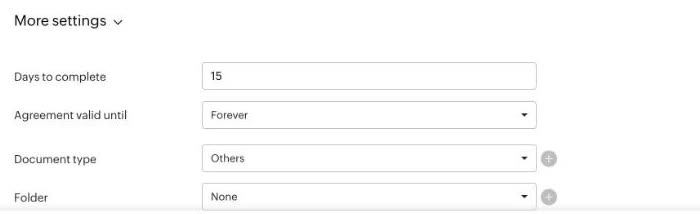
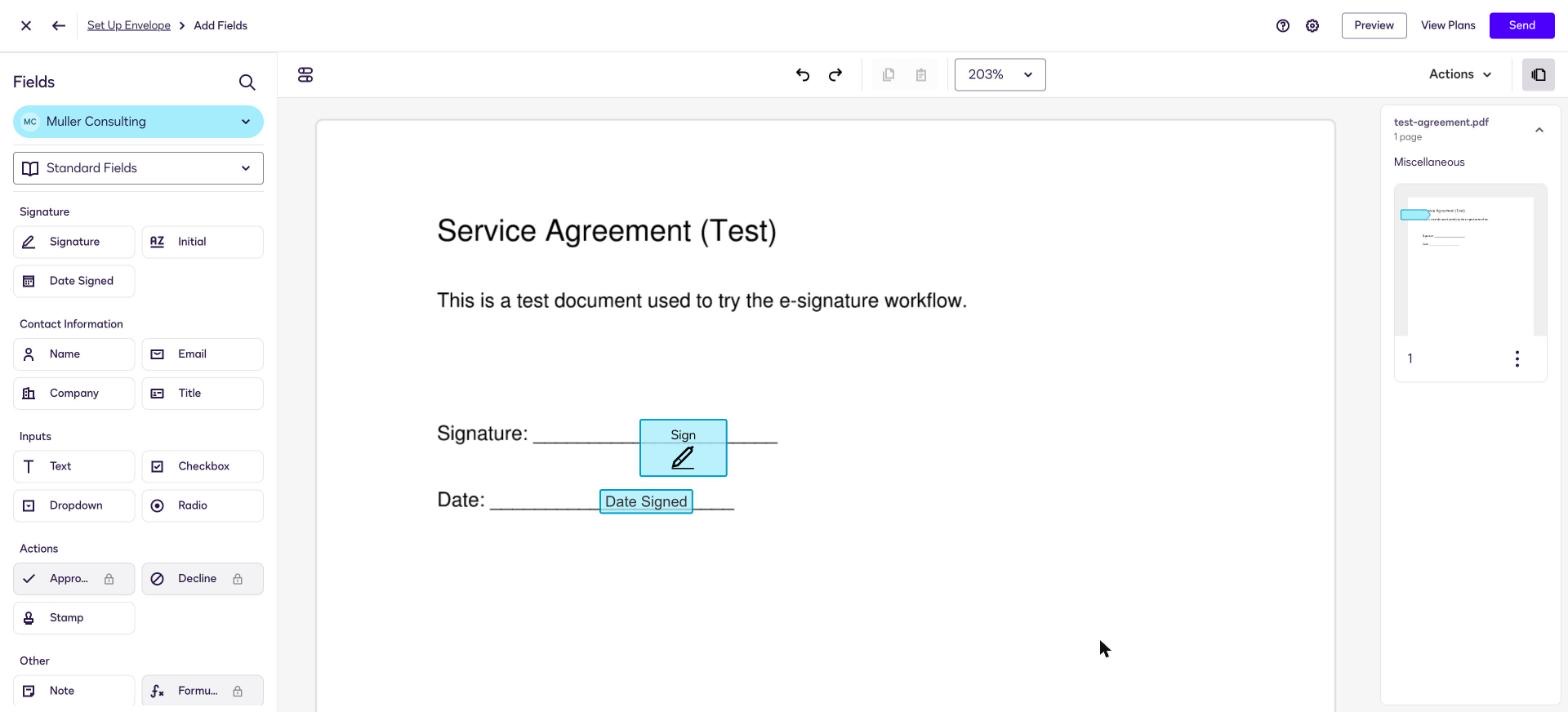
Zoho Sign takes documents from the desktop, cloud storage or templates, then asks for recipients, their role and an optional check: email code, SMS code or an offline code. Under More settings, two similar-sounding options sit side by side: Days to complete, set to 15, and Agreement valid until, set to Forever. The signer got an email with a Start Signing button and confirmed a one-time code before seeing the document, which showed a Zoho Sign document ID across the top, a default you can turn off.
Sending With DocuSign
In DocuSign we placed the signature and date fields by hand. DocuSign offers AutoPlace, which places fields from anchor text you add to the document yourself, but nothing placed fields for us automatically. The envelope was named "Complete with Docusign: test-agreement.pdf" by default, and the request was set to expire four months after sending without the send flow asking.
How the Signing Experience Compares With Sign.Plus
What if field suggestions appeared as soon as you uploaded? Sign.Plus Auto-Place suggests fields right after upload, ready for you to review and assign, on fillable PDFs and on many flat documents such as scans and received faxes, where there is no form data to read.
Within one request, you can also set a different check for each recipient: a passcode, an SMS code or an ID Check with a government ID, so a colleague signs with a simple link while an outside party confirms their identity. Every signed document comes with a separate Certificate of Completion alongside the audit trail.
7. Zoho Sign API vs DocuSign API
Zoho Sign API
Zoho Sign sells a separate API plan billed per envelope, with no commitment. On Enterprise, sending through the API or SDKs consumes 5 credits per signature request, Zoho's pricing page labels APIs and webhooks as credit-consuming, and web and mobile SDKs may need extra licensing.
DocuSign API
DocuSign publishes developer plans priced per account: Starter at $50 per month on annual billing (from 40 envelopes a month), Intermediate at $300 and Advanced at $480 (from 100 envelopes a month), plus a free developer account for testing. QES through the API is listed on the Enhanced developer plan, sold through sales.
How Their APIs Compare With Sign.Plus
| Zoho Sign | DocuSign Developer | Sign.Plus API | |
|---|---|---|---|
| Billing model | API plan per envelope; credits on Enterprise | Monthly plans with an envelope allowance | Monthly plans with a published allowance: Grow 200, Scale 600 requests a month |
| AES and QES through the API | Credits per provider | Listed on Enhanced (contact sales) | Supported on every API plan; QES credits cost extra |
Every Sign.Plus API plan supports SES, AES and QES, so your app can send a qualified signature without a separate contract. See Sign.Plus API plans and the API documentation.
8. Single Sign-On (SSO)
| Platform | Where SSO is available | Price |
|---|---|---|
| Zoho Sign | Not listed on the Zoho Sign pricing page | Not published |
| DocuSign | Enhanced (US eSignature) and some IAM plans | Enhanced priced by sales |
| Sign.Plus | Enterprise | $49.99 per user per month, annual billing |
Need SSO at a published price? Sign.Plus includes it on Enterprise, on the same plan as storage choice and HIPAA support with Advanced Security Controls and a signed BAA.
9. Contract Terms and Canceling
Zoho Sign Terms
Zoho Sign sells monthly and yearly billing and describes its plans as pay-as-you-go: you can upgrade, downgrade or cancel at any time. Bought credits do not expire, while complimentary Enterprise credits lapse at the end of each billing month.
DocuSign Terms
DocuSign annual plans can be canceled within 30 days without penalty, an option that can be used once per customer. After that, the remaining balance of the year is owed. Envelopes are used on sending, and overage is billed per envelope.
Either way, find your renewal date before you test an alternative, so you do not pay for a year you will not use.
Check Recent Zoho Sign and DocuSign Reviews
Pricing pages and terms show what a provider promises; users show how it feels a year in. Before renewing or committing, search for:
- "Zoho Sign credits" and "Zoho Sign support"
- "DocuSign envelope limit" and "DocuSign auto renewal"
- "is Zoho Sign legit" and "DocuSign support"
- The same searches for any alternative you shortlist
Sort by most recent, and look for patterns rather than single complaints.
Other Zoho Sign and DocuSign Alternatives
| Platform | Team plan (annual) | Sending limit | Best for |
|---|---|---|---|
| Sign.Plus | $19.99 | Unlimited | QES on every plan; verification and in-person signing from Professional; storage choice on Enterprise |
| Dropbox Sign | $25 per user, two-user minimum | Unlimited on paid web plans | Small teams already working in Dropbox |
| PandaDoc | $19 per seat (Starter) | Unlimited in the app; automation uses usage credits | Sales teams writing proposals and quotes |
Final Verdict: Zoho Sign vs DocuSign
Zoho Sign suits teams already on Zoho that want signing inside the same suite. Lower plans cap envelopes, and bulk send, forms, SMS, the API, integrations and qualified signatures run on credits, several of them on Enterprise only.
DocuSign suits teams that value its brand and integration catalog. On its self-serve plans every envelope counts against 100 per user per year, add-ons are billed per use, and on its US price list QES, storage choice and HIPAA support require a sales quote.
Sign.Plus suits teams that want unlimited sending and the compliance features at a published price. Professional costs $19.99 per user per month with unlimited signature requests, passcode verification and in-person signing, QES is on every plan at $5 per recipient with credits that do not expire, and Enterprise adds storage choice and SSO at a published price, plus HIPAA support with Advanced Security Controls and a signed BAA, from a Swiss provider. Start a Sign.Plus free trial and send your next contract with it.
FAQs
What is Zoho Sign?

Is Zoho Sign better than DocuSign?
Is Zoho Sign free?
How much does Zoho Sign cost?
Is Zoho Sign legit and legally binding?
Is Zoho Sign HIPAA compliant?
Who is DocuSign's biggest competitor?

Featured Articles






Confédération Suisse
Confederazione Svizzera
Confederaziun Svizra
Swiss Confederation
Innosuisse - Swiss Innovation Agency



